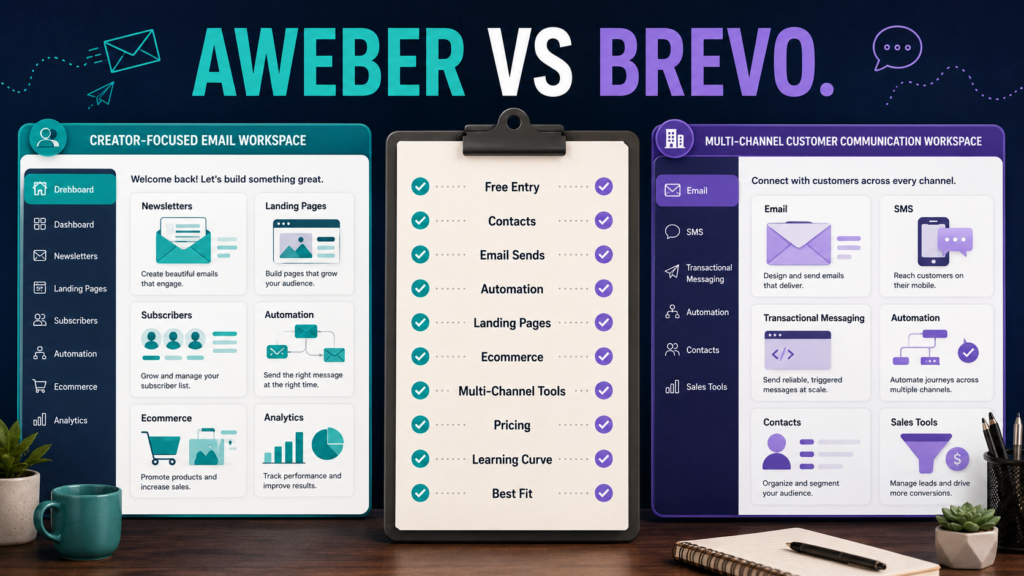
AWeber and Brevo can both help a small business build an email list, send campaigns, and automate communication, but they approach pricing and customer communication differently.
AWeber is generally the more straightforward choice for someone primarily building a traditional email-marketing and creator workflow, while Brevo deserves closer attention when email is part of a broader multi-channel communication system that may also involve transactional messages, SMS, sales tools, or a large contact database.
Neither platform is automatically better.
The right decision depends on how you expect your list, sending volume, automation needs, and customer communication strategy to develop.
Review Methodology: This comparison is based on official product information and publicly available documentation reviewed on September 1, 2026. No firsthand product testing or personal experience is claimed. Pricing, plan limits, promotions, and features can change, so verify the current checkout and pricing pages before purchasing.
The Main Difference
The most useful starting point is not asking which platform has the longest feature list.
Ask:
How does my business expect to use email?
AWeber has a long-standing email-marketing focus with subscriber management, campaigns, automation, landing pages, ecommerce features, and creator-oriented tools.
Brevo positions itself more broadly around customer relationships and multi-channel communication, including email, SMS, transactional messaging, automation, sales-related capabilities, and other communication tools.
That difference influences everything from pricing to which platform feels simpler.
AWeber: What Kind of Business Does It Fit?
AWeber can make sense for a creator, blogger, affiliate marketer, coach, small business, or digital-product seller who wants email marketing to remain at the center of the system.
Its current official AWeber pricing page emphasizes tools including email campaigns, landing pages, subscriber segmentation, automations, reporting, and ecommerce capabilities.
For someone who wants to:
- Collect subscribers.
- Send broadcasts.
- Create automated email sequences.
- Build landing pages.
- Segment an audience.
- Sell some products or services.
- Track email performance.
AWeber offers a fairly recognizable email-marketing workflow.
If you want a deeper look at the platform by itself before comparing alternatives, see my AWeber review for beginners.
Brevo: What Kind of Business Does It Fit?
Brevo may appeal more strongly when you want email marketing to operate inside a wider communications environment.
Brevo’s current official pricing documentation describes capabilities spanning email, SMS, transactional communication, automation, contacts, and related customer-management functions.
This can be useful for businesses that expect to manage several types of customer communication rather than primarily newsletters and autoresponders.
The broader scope does not automatically make Brevo superior.
A beginner who needs only a signup form, welcome sequence, newsletter, and occasional promotion may value simplicity more than additional communication channels.
How AWeber Pricing Works
AWeber’s official documentation currently describes several plan levels, including Free, Lite, Plus, and Unlimited, while its public pricing page prominently promotes a free trial and paid Lite and Plus options.
Because official public pages can display promotions or slightly different entry offers, confirm the exact option presented when you sign up.
AWeber’s documentation currently lists Lite starting around:
- $15 per month on monthly billing at the 500-subscriber level.
- Roughly $12.50 per month when using the corresponding annual billing option.
Plus begins around:
- $30 per month on monthly billing at the 500-subscriber level.
- Roughly $20 per month when billed annually.
Costs rise as subscriber levels increase.
The practical point is that AWeber’s pricing is closely connected to subscriber capacity and sending allowances.
How Brevo Pricing Works
Brevo’s current pricing documentation takes a different approach.
It lists:
Free: $0 per month.
The current Free plan includes up to 300 email sends per day and storage for a much larger number of contacts than many subscriber-based free email plans, although other limits apply.
Starter: currently begins at $9 per month.
Standard: currently begins at $18 per month.
Higher Professional and Enterprise options are designed for more advanced needs.
Brevo’s pricing tiers vary according to monthly email volume and contact allowances.
That distinction matters.
A business with a large contact database but relatively modest sending volume may evaluate Brevo very differently from a creator who emails every subscriber frequently.
Free or Low-Cost Entry: Which Is Better?
There is no universal winner.
AWeber can be attractive if your goal is learning a conventional creator email workflow.
Brevo’s free structure can be appealing when contact storage matters and the daily sending limit fits your needs.
Do not choose based only on the word “free.”
Check:
- Subscriber or contact limit.
- Monthly or daily send limit.
- Automation restrictions.
- Branding.
- Landing-page access.
- Reporting.
- Support.
- Number of users.
- Features you will need after the first few months.
The cheapest first month is not necessarily the cheapest long-term system.
Automation
Both platforms provide automation, but you should evaluate the kind of automation you intend to build.
A beginner may require only:
Signup → Welcome Email → Helpful Follow-Up → Offer
That does not require an enormous automation engine.
AWeber’s higher-level offering emphasizes unlimited automations and more advanced segmentation capabilities.
Brevo’s current Standard plan documentation includes marketing automation for unlimited contacts, along with features such as A/B testing and additional analytics.
Instead of asking which tool has “more automation,” sketch your actual workflow first.
Then confirm that the plan you intend to purchase supports it.
Landing Pages and Forms
For a beginner building an email list, landing pages and signup forms can remove the need for another piece of software.
AWeber makes landing pages a prominent part of its creator-oriented offering.
Brevo also provides landing-page capabilities, although availability and quantity depend on plan level.
If your entire lead-generation system is:
- Visitor reaches landing page.
- Visitor joins list.
- Welcome sequence begins.
then this feature deserves more weight than ten advanced tools you may never use.
Subscriber-Based vs Sending-Based Thinking
This may be one of the most important decision criteria.
With traditional subscriber-oriented email pricing, list size has a strong influence on cost.
With Brevo, sending volume plays a significant role.
Imagine two businesses with 10,000 stored contacts.
Business A emails its audience frequently.
Business B sends only occasional campaigns.
Their economics can be very different.
Before purchasing, estimate:
Contacts × emails per month = expected email volume
Then compare that realistic usage with each plan’s current rules.
Ecommerce and Selling
AWeber includes ecommerce-related functionality that may be useful for creators selling products or services while connecting purchases with email activity.
Brevo is not simply an email newsletter platform either; it connects marketing communication with broader customer and transactional workflows.
If your checkout is already handled by another dedicated platform, do not automatically choose an email service because it includes additional commerce tools.
Avoid paying for overlapping systems unless those features simplify your workflow.
Multi-Channel Communication
Brevo has the clearer advantage when multi-channel communication is a central requirement.
Its platform extends beyond ordinary email campaigns into communication channels and customer-management functions such as SMS and transactional messaging.
But ask whether you actually need those capabilities.
A small creator business may be better served by doing three things well:
- Building the list.
- Sending useful emails.
- Running a simple automation.
More channels also create more systems to manage.
Ease of Use for a Beginner
Ease of use is partly subjective.
However, complexity usually increases when your business tries to use more functions.
For someone whose main objective is conventional email marketing, AWeber’s focused workflow may be easier to conceptualize.
For someone who already knows that email, transactional messages, additional communication channels, and contact management need to live together, Brevo’s broader system may reduce tool fragmentation.
The easier platform is the one that matches the business you are actually building.
Internal Alternatives Worth Comparing
If Brevo interests you but you want to see how it compares with another marketing-oriented platform, my GetResponse vs Brevo comparison examines that decision from a different angle.
And if your decision is between two traditional beginner email options, the GetResponse vs AWeber comparison may help clarify the tradeoffs.
Who Should Consider AWeber?
AWeber may fit you better when:
- Email is the center of your audience system.
- You want straightforward list building.
- Landing pages matter.
- You want creator-friendly automation.
- You prefer subscriber-oriented email marketing.
- You do not need a broad multi-channel customer platform.
Affiliate Disclosure: This article contains affiliate links. If you purchase through one of these links, I may earn a commission at no additional cost to you. Affiliate compensation does not determine the conclusions or recommendations presented in this article.
If that description matches your business, you can review AWeber through this approved partner link and compare the current offer with the requirements you listed before subscribing.
Who Should Consider Brevo?
Brevo may fit better when:
- You want email plus additional communication channels.
- Transactional messaging matters.
- You expect to store many contacts.
- Sending volume is an important pricing consideration.
- You want broader customer-management functionality.
- You expect marketing and sales communication to become more integrated.
Who May Need Neither Yet?
You may not need either paid system yet if you:
- Have no lead magnet.
- Have no signup page.
- Have no welcome email.
- Have no plan for sending ongoing content.
- Are comparing advanced automation before collecting your first subscribers.
In that situation, define the email strategy first.
Software should support the workflow, not replace the need to create one.
Conclusion
AWeber and Brevo can both support a small online business, but they solve the email-marketing problem from different directions.
AWeber is especially worth considering when you want a recognizable creator-centered system for subscriber management, email campaigns, landing pages, automation, and related selling tools.
Brevo becomes particularly interesting when email is only one part of a broader customer-communication system and when its contact-and-sending pricing structure fits your expected usage.
Before choosing, write down five numbers or requirements:
- Current contacts.
- Expected contacts in one year.
- Emails sent per subscriber each month.
- Automations you actually need.
- Additional communication channels you realistically expect to use.
Then compare the current plans against those requirements.
The better email platform is not the one with the longest feature list. It is the one that gives you the workflow you need without making your business harder to manage.