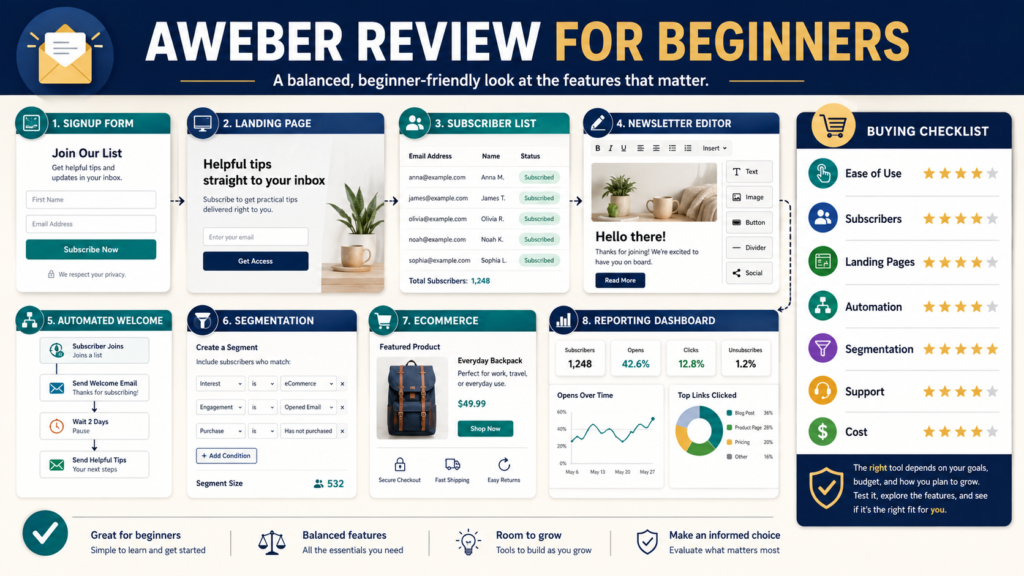
AWeber may be a practical first email-marketing platform for a beginner who needs subscriber management, newsletters, signup forms, landing pages, and automated email workflows within one service.
Its current website emphasizes email marketing, landing-page creation, automation, ecommerce, and web-push features for small businesses.
The most important buying question is whether AWeber’s current plan structure supports the exact features and subscriber capacity you need at an acceptable cost. A beginner with a small list may need only a form, landing page, welcome workflow, and newsletter. Advanced segmentation, larger subscriber limits, and additional services may require a paid plan.
Review Methodology: This review is based on current AWeber website information, pricing material, official help documentation, and publicly available product details reviewed on August 5, 2026. No firsthand platform testing, deliverability testing, customer-support experience, or personal campaign results are claimed.
Key Takeaways
- AWeber combines subscriber management, email campaigns, landing pages, forms, and automation.
- A free or trial option may allow a beginner to evaluate the basic workflow.
- Some segmentation and advanced functions are unavailable on the free plan.
- Pricing may increase with subscriber count and selected services.
- The platform may be useful for a straightforward lead-magnet and welcome-email system.
- A beginner should verify current plan limits before building a permanent workflow.
- No email service can guarantee opens, clicks, inbox placement, or sales.
What Is AWeber?
AWeber is an email-marketing platform designed to help businesses:
- Collect subscribers.
- Organize contacts.
- Send newsletters.
- Build automated workflows.
- Create landing pages.
- Publish signup forms.
- Apply tags.
- Segment audiences on qualifying plans.
- Connect with other services.
- Accept certain payments through integrated landing-page tools.
- Review subscriber and campaign activity.
A small online business might use AWeber to offer a free checklist, send a welcome series, publish a weekly newsletter, and communicate with customers.
Who May Benefit From AWeber?
AWeber may suit:
- Bloggers.
- Affiliate marketers.
- Ebook creators.
- Coaches.
- Course creators.
- Local businesses.
- Retirees starting a small online business.
- Beginners who want a recognizable email platform.
- Businesses that need forms and landing pages.
- Users who prefer guided templates and help documentation.
It may be especially relevant to someone who wants one uncomplicated email-list system before attempting advanced marketing automation.
Who May Not Need It?
AWeber may not be necessary for:
- Someone with no permission-based subscriber strategy.
- A person who only needs a basic website contact form.
- A business already committed to another email platform.
- A company requiring advanced enterprise CRM functions.
- A creator who needs highly complex multichannel automation.
- A beginner who has not created a lead magnet or signup offer.
- A business whose required integrations are not supported.
The availability of a free plan does not mean you should build a list before defining why people should subscribe.
Subscriber Management
A subscriber record may include:
- Email address.
- Name.
- Signup source.
- Tags.
- Status.
- Message activity.
- Workflow position.
- Purchase or interest information.
- Custom fields.
AWeber’s help documentation explains that users can view and search subscribers from the account dashboard.
A beginner should learn:
- How subscribers enter a list.
- How duplicates are handled.
- How tags are applied.
- How unsubscribes are recorded.
- How contacts can be exported.
- How imports are reviewed.
- How subscriber activity is displayed.
Signup Forms
AWeber provides form-publishing options that may include placing a form on a website or using the form as a hosted landing page.
A useful form should:
- Explain the offer.
- Request only necessary information.
- Use accurate consent language.
- Connect to the correct list.
- Apply the appropriate tag.
- Deliver the promised resource.
- Display correctly on a phone.
- Provide a working confirmation process.
Before publishing, submit the form yourself and inspect the complete subscriber journey.
Landing Pages
AWeber currently promotes a landing-page builder as part of its marketing platform. Its official landing-page information references hosting, templates, email automation, payment integrations, and a trial period, although pricing and plan availability should be verified before purchase.
A beginner landing page might be used for:
- A lead magnet.
- An event signup.
- An ebook offer.
- A webinar registration.
- A newsletter.
- A consultation request.
- A simple product.
Review whether the platform allows:
- Custom domains.
- Tracking.
- Mobile editing.
- Form connections.
- Payment elements.
- Thank-you pages.
- Design customization.
- Analytics.
Email Campaigns
An email campaign should allow the user to:
- Choose the audience.
- Write the subject line.
- Create the message.
- Insert links.
- Preview the email.
- Send a test.
- Schedule or send.
- Review results.
Evaluate the editing experience.
A large template library may help a beginner start, but every template must be adjusted for readability, branding, and mobile display.
Automated Workflows
AWeber refers to automated email sequences as Workflows in its current documentation. Official help material explains that workflows can begin when a subscriber receives a specific tag and that templates can be used for purposes such as blog, YouTube, or podcast automation.
A beginner workflow might be:
- Subscriber joins through an ebook form.
- A tag is applied.
- The welcome workflow begins.
- The ebook delivery message is sent.
- A second lesson arrives later.
- A third message recommends the next action.
Do not begin with complicated branches. Build and test one linear sequence first.
Tags and Segmentation
Tags can identify:
- Signup source.
- Product interest.
- Customer status.
- Content preference.
- Workflow activity.
- Link clicks.
Segments can combine subscriber criteria for more targeted messages.
AWeber’s current help documentation states that saving and sending to custom segments is not available on the free plan.
This limitation matters when a beginner expects to create several audience groups while remaining on a free account.
Link-Based Automation
A link click may be used to apply a tag or begin another workflow when the plan and setup support it. AWeber documents workflows that can start after a subscriber clicks a link in a broadcast.
This can support a simple interest system:
- Subscriber clicks “ebook creation.”
- Apply an ebook-interest tag.
- Begin an ebook-related workflow.
- Avoid sending unrelated course promotions.
Use behavior responsibly. Do not treat one click as proof that the subscriber wants frequent promotions.
Ecommerce Features
AWeber’s help documentation currently describes a landing-page ecommerce element connected with Stripe. The feature may apply tags and help trigger a workflow after a payment.
A creator considering this feature should verify:
- Supported countries.
- Currency options.
- Stripe requirements.
- Fees.
- Taxes.
- Refund handling.
- Product delivery.
- Tag automation.
- Receipt and customer communication.
- Current plan requirements.
A simple payment element may not replace a specialized checkout when advanced order features are required.
Integrations
AWeber maintains integrations with various website, form, landing-page, ecommerce, and marketing services.
Before choosing the platform, confirm compatibility with:
- WordPress.
- Checkout software.
- Digital-product delivery.
- Course platforms.
- Payment processors.
- Webinar tools.
- Lead-generation software.
- Analytics.
- Automation connectors.
- Customer-management systems.
Do not assume an integration supports every trigger or data field you need.
Free and Trial Access
AWeber has promoted free access for smaller lists and trial access to paid features in its current public material. One current AWeber page states that a free account can support up to 500 subscribers and that a trial is available for Plus features. Verify this information on the exact signup and pricing pages because offers can change.
Use free or trial access to test:
- Form creation.
- Landing pages.
- Email editing.
- Workflow setup.
- Subscriber imports.
- Reporting.
- Help documentation.
- Integrations.
Do not build a critical process around a temporary trial feature without confirming its paid-plan cost.
Pricing Considerations
AWeber’s public pricing information may display different options according to subscriber level, billing cycle, expert services, and current promotions. One current pricing page displays a Plus-related annual rate alongside an optional setup service, but users should enter their own list size and review the complete checkout terms.
Ask:
- What is the monthly or annual charge?
- How many subscribers are included?
- What happens when the limit is exceeded?
- Are unsubscribed contacts counted?
- Which automation features are included?
- Is segmentation included?
- How many users are allowed?
- Are landing pages unlimited?
- Is branding removable?
- What support is included?
- Are setup services optional?
- What is the cancellation process?
Pricing should be evaluated at the expected list size twelve months from now, not only today. AWeber’s own small-business guidance notes that many email platforms charge according to subscriber count.
Ease of Use
Ease of use is best judged through a complete test.
Try to:
- Create a list.
- Build a form.
- Publish a landing page.
- Add a test subscriber.
- Deliver a lead magnet.
- Build a three-message workflow.
- Send a newsletter.
- Apply a tag.
- Create a segment.
- Find a subscriber.
- Review a click.
- Export contacts.
A platform may appear easy during email creation while becoming more complicated during tagging or workflow setup.
Help and Support
AWeber provides a public knowledge base containing instructions for forms, workflows, subscribers, landing pages, integrations, and messages.
Before purchasing, verify:
- Live-chat availability.
- Telephone support.
- Email support.
- Support hours.
- Migration help.
- Setup services.
- Training resources.
- Plan-specific support.
- Response expectations.
Support quality can vary by issue and timing. This review does not claim personal support experience.
Meaningful Advantages
Beginner-oriented email tools
Forms, newsletters, landing pages, and workflows can support a straightforward list-building system.
Hosted landing pages
A beginner may publish an offer without creating a separate website page.
Tag-triggered workflows
Tags can connect subscriber actions with automated messages.
Public help documentation
The knowledge base may help users complete common tasks.
Ecommerce options
Simple payment and tag workflows may be useful for certain products.
Integration availability
Connections can help AWeber operate with other business tools.
Meaningful Limitations
Free-plan restrictions
Segmentation and other capabilities may require a paid plan.
Subscriber-based pricing
Cost can increase as the list grows.
Possible feature overlap
Landing pages, ecommerce, and automation may duplicate tools already owned.
Learning requirements
Tags, lists, workflows, and segments still require setup and testing.
Integration limits
A listed integration may not support every desired action.
No performance guarantee
AWeber cannot guarantee subscriber growth, inbox placement, opens, clicks, or sales.
A Realistic Beginner Scenario
Consider a retired educator who wants to offer a free ebook-planning worksheet.
The initial system requires:
- One signup landing page.
- One form.
- One subscriber list.
- A delivery email.
- A three-message welcome workflow.
- One monthly newsletter.
- A tag identifying worksheet subscribers.
AWeber may support this system without requiring the creator to build advanced automation.
Before upgrading, the creator should determine whether custom segments, additional subscribers, advanced reporting, or other paid features are genuinely needed.
Beginner Buying Checklist
- Do I have a specific reason for building the list?
- Have I created the lead magnet?
- How many subscribers do I have?
- How many might I have in twelve months?
- Do I need one workflow or several?
- Do I need custom segments?
- Do I need landing pages?
- Do I need ecommerce?
- Which integrations are required?
- Is the free plan sufficient for testing?
- What will the paid plan cost at my expected list size?
- Can I export contacts?
- Which support channels are included?
- Have I completed a full test?
Affiliate Recommendation
Affiliate Disclosure: This article contains affiliate links. If you purchase through one of these links, I may earn a commission at no additional cost to you. Affiliate compensation does not determine the conclusions or recommendations presented in this article.
You can review AWeber’s current Free and Plus email-marketing options when you want to compare its forms, landing pages, workflows, subscriber limits, and pricing.
Confirm the current terms on the official checkout page before selecting a plan.
Is AWeber Worth Considering?
AWeber appears worth considering when a beginner needs:
- Subscriber management.
- Signup forms.
- Landing pages.
- Newsletters.
- Automated welcome workflows.
- Tags.
- Basic ecommerce connections.
- A public help library.
It may offer less value when:
- Advanced CRM functions are essential.
- The free-plan restrictions prevent the required workflow.
- The list will grow beyond the affordable range quickly.
- The business already owns overlapping tools.
- A required integration is unavailable.
- Another platform better matches the user’s preferred workflow.
Review the current plan details again when your list or automation needs change: explore AWeber’s current email-marketing offer.
Final Verdict
AWeber appears to be a practical email-marketing option for beginners who want to create a simple, permission-based list-building system. Its combination of forms, landing pages, newsletters, and automated workflows can support a lead magnet and regular subscriber communication.
The primary caution is that features differ by plan. A beginner should verify segmentation, subscriber limits, pricing, branding, automation, integrations, and support before building a permanent system.
Conclusion
AWeber may be a good first email-marketing platform when your immediate goal is to collect subscribers, deliver a resource, send a welcome sequence, and publish newsletters without assembling several separate tools.
Its value depends on using a plan that matches the actual workflow and list size. Begin with a simple test, document every required feature, and avoid paying for advanced capabilities until they solve a real problem.
Create your first subscriber workflow on paper and compare each step with AWeber’s current plan limits before opening a paid account.