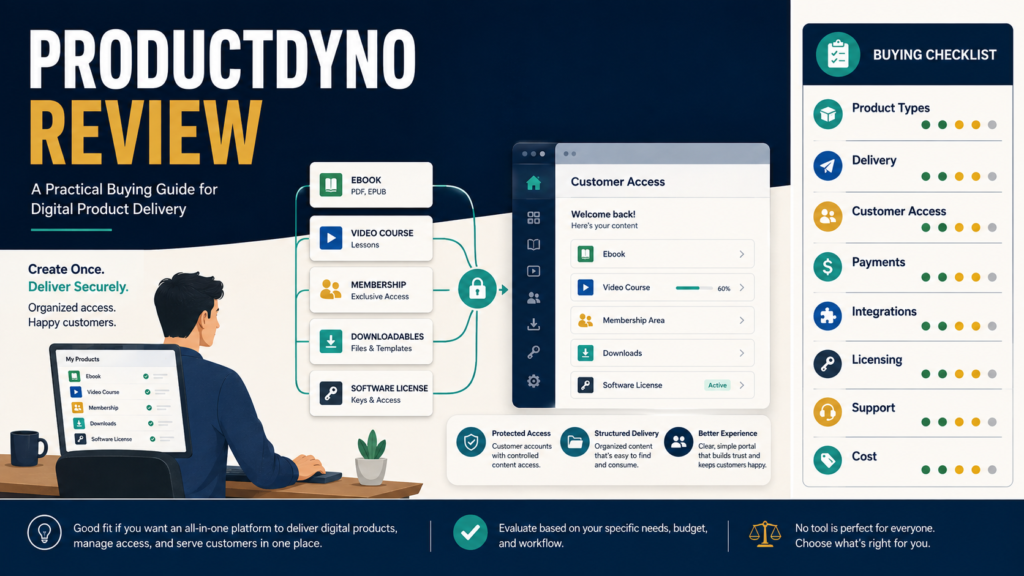
ProductDyno may be a practical option for creators who need one system to organize and deliver multiple forms of digital content, including downloadable files, online courses, memberships, videos, and licensed software.
The platform appears most relevant to a creator who has already decided what will be sold and needs a protected customer-access and delivery process.
It may be unnecessary for someone who has not created a product, sells only through a marketplace that handles delivery, or needs a highly specialized learning-management system.
Review Methodology: This review is based on official ProductDyno pages, published feature descriptions, and publicly available product information reviewed on August 4, 2026. No firsthand testing, support experience, security testing, customer results, or personal sales results are claimed.
Key Takeaways
- ProductDyno is positioned as a platform for selling, licensing, protecting, and delivering several types of digital products.
- Official information highlights digital downloads, courses, memberships, video content, and software licensing.
- It may reduce the need for separate delivery systems.
- The value depends on the exact product type, checkout process, integrations, limits, and current offer.
- Beginners should verify pricing and plan terms directly because promotional offers may vary.
- A platform cannot compensate for a weak product, confusing instructions, or poor customer support.
- The customer-access experience should be tested before a product is launched.
What Is ProductDyno?
ProductDyno is a digital-product management and delivery platform.
Its official website currently presents uses including:
- Digital downloads.
- Online courses.
- Membership sites.
- Video courses.
- Streamable files.
- Software and plugin licensing.
- Protected content delivery.
- Customer-access areas.
- Landing pages and sales-related features.
- Integrations.
- Checkout and payment-related functionality.
The company describes its central purpose as helping creators sell and securely deliver different forms of digital content.
What Problem Is ProductDyno Designed to Solve?
After a customer buys a digital product, several things must happen:
- The payment must be recognized.
- The correct customer must receive access.
- The correct product must be delivered.
- Protected content should not be exposed publicly.
- Login or access instructions must be understandable.
- The creator may need to update or revoke access.
- The system may need to communicate with other marketing tools.
- The customer may need support.
A delivery platform brings these tasks together.
Without an organized system, creators may rely on:
- Manual emails.
- Public download links.
- Unprotected cloud-storage folders.
- Separate course platforms.
- Separate membership plugins.
- Spreadsheet-based access tracking.
- Repeated customer-support messages.
ProductDyno is intended to centralize more of this process.
Who May Benefit From ProductDyno?
The platform may suit:
- Ebook sellers.
- Workbook and template creators.
- Online-course creators.
- Membership owners.
- Coaches delivering protected resources.
- Software developers who need license control.
- PLR sellers.
- Creators with several product types.
- Businesses using external checkout platforms.
- Affiliate marketers developing their own digital products.
A creator planning to build several related products may appreciate managing delivery through one account.
Who May Not Need It?
ProductDyno may not be necessary for:
- A beginner without a finished product.
- An author selling only through a marketplace that manages delivery.
- Someone giving away one public PDF.
- A creator satisfied with a current course platform.
- A business needing highly specialized enterprise training features.
- A user whose preferred checkout or email tools do not integrate adequately.
- Someone who does not want to maintain a separate customer-access system.
Buying delivery software before creating a product can lead to paying for a system that remains unused.
Digital Download Delivery
ProductDyno’s official information states that it can deliver downloadable or streamable products such as PDFs, audio files, videos, plugins, and other digital files.
A beginner selling an ebook might need to:
- Upload the ebook file.
- Create the product record.
- Connect the checkout.
- Create the customer-access page.
- Customize the delivery email.
- Complete a test purchase.
- Confirm that the correct file appears.
- Test access from a mobile device.
- Create a support process.
The platform’s value depends on whether these steps are manageable for the creator.
Online Courses
Official ProductDyno pages promote online and video-course creation and delivery.
A course creator should verify:
- Lesson organization.
- Module structure.
- Video hosting options.
- File attachments.
- Student progress tracking.
- Quizzes.
- Certificates.
- Drip scheduling.
- Access expiration.
- Mobile usability.
- Student communication.
- Instructor management.
- Completion reporting.
Do not assume that every feature associated with a specialized learning-management system is included.
A straightforward video course may require fewer capabilities than a formal certification program.
Membership Sites
ProductDyno also presents membership-site functionality as one of its central product types.
Membership requirements may include:
- Recurring access.
- Multiple membership levels.
- Content released over time.
- Member login.
- Cancellation handling.
- Failed-payment handling.
- Protected downloads.
- Community features.
- Account management.
- Renewal communication.
Verify how the platform handles recurring billing and access changes with the checkout system you plan to use.
Software and Plugin Licensing
ProductDyno’s highlighted features include built-in licensing for software, desktop applications, SaaS products, and WordPress plugins. Its official feature page describes options for controlling the number of licenses and handling activation.
This capability may be useful to software sellers.
A nontechnical ebook creator probably does not need it.
Software developers should investigate:
- Authentication methods.
- Activation procedures.
- License limits.
- Deactivation.
- Refund handling.
- Updates.
- API documentation.
- Failure behavior.
- Security responsibilities.
- Developer support.
A marketing statement about licensing should not replace a technical evaluation.
Customer Access and Delivery Experience
The buyer should not have to search through several messages to find a product.
A good delivery experience should make it clear:
- What was purchased.
- Where to log in.
- How to reset a password.
- Where the product is located.
- Which files are available.
- When access expires.
- Where to request help.
- Whether future updates are included.
ProductDyno marketing materials emphasize simple delivery pages, customer emails, and organized training or membership areas.
The creator should test the experience from the customer’s perspective rather than relying only on the administrator preview.
Checkout and Payment Considerations
A delivery system and a checkout system may perform different jobs.
The checkout may handle:
- Order forms.
- Payment processing.
- Taxes.
- Coupons.
- Payment plans.
- Refunds.
- Invoices.
- Affiliate tracking.
ProductDyno may then receive the purchase information and provide access.
Before selecting it, identify:
- Which checkout will be used.
- Whether a direct integration exists.
- Which purchase data is transferred.
- How refunds affect access.
- How subscriptions affect membership status.
- How failed payments are handled.
- Whether test transactions are supported.
- Whether the checkout requires another subscription.
Do not assume that “integration available” means every required action is automated.
Email-Marketing Integrations
A product purchase may need to trigger:
- Customer onboarding.
- A buyer tag.
- Removal from a prospect promotion.
- A course reminder.
- An update notice.
- A renewal message.
- A related-product sequence.
Check whether ProductDyno connects with your preferred email provider directly or through another service.
Verify:
- Which lists or tags can be applied.
- Whether duplicate contacts are created.
- How unsubscribed buyers are handled.
- Whether customer-service messages are separated from marketing messages.
- Which plan includes the integration.
Security and Protection
No platform can guarantee that digital content will never be copied or shared.
Protection features may discourage casual unauthorized access, but creators should maintain realistic expectations.
Review:
- Public-file exposure.
- Login requirements.
- Download-link behavior.
- Access revocation.
- Password-reset procedures.
- Software licensing.
- Backup responsibilities.
- Administrator security.
- Data export.
- Privacy and legal requirements.
Use strong passwords and multifactor authentication when available.
Do not advertise a product as impossible to copy unless that claim can be proven.
Page and Email Customization
A customer-access system should match the business sufficiently to avoid confusion.
Review options for:
- Logos.
- Colors.
- Product names.
- Support links.
- Login messages.
- Welcome emails.
- Access instructions.
- Terms.
- Refund information.
- Upsells.
- Related products.
A beginner does not need a highly customized portal on the first day, but the basic experience should look consistent and trustworthy.
Product Organization
A creator with several products needs a naming system.
For example:
- AI Starter Guide.
- AI Starter Guide Workbook.
- AI Starter Video Course.
- AI Starter Resource Library.
- AI Starter Membership.
Use consistent:
- Product names.
- Version numbers.
- File names.
- Cover images.
- Access levels.
- Support references.
- Update dates.
Poor internal organization can cause the wrong file or access level to be assigned even when the platform functions correctly.
Pricing and Offer Considerations
ProductDyno’s public pages display different offers and promotional arrangements, including plan-specific and lifetime promotions. Because pricing can vary by page, campaign, upgrade, and timing, buyers should verify the exact checkout terms connected to the offer they are considering.
Before purchasing, record:
- Initial price.
- Recurring or one-time status.
- Renewal amount.
- Product limits.
- Customer limits.
- Storage limits.
- Bandwidth limits.
- Course or membership limits.
- Integration limits.
- Upgrade requirements.
- Refund terms.
- Support level.
- Included updates.
- Agency or commercial rights.
- Any required add-ons.
Take screenshots or save the official terms associated with the purchase.
Ease of Use
Ease of use should be evaluated through a complete workflow, not the appearance of the dashboard.
Test whether you can:
- Create a product.
- Upload content.
- Build the access area.
- Connect the payment process.
- Customize the email.
- Complete a test purchase.
- Log in as a customer.
- Reset a password.
- Issue a refund.
- Revoke access.
- Update a file.
- Locate support.
A platform may be easy for one product type and more complex for another.
Support and Training
Before purchasing, determine:
- Which support channels exist.
- Expected operating hours.
- Whether setup help is included.
- Whether documentation is current.
- Whether training videos match the latest interface.
- Whether developer support is available.
- Whether migration assistance exists.
- Whether support differs by plan.
Public testimonials can provide context, but they do not guarantee that another user will receive the same experience. ProductDyno publishes customer-success statements, but this review does not independently verify those experiences.
Meaningful Advantages
Multiple product types
The platform is positioned to support downloads, courses, memberships, videos, and software licensing.
Centralized delivery
A creator may manage several products within one delivery environment.
Protected customer access
Products can be placed behind customer login and access controls.
Potential reduction in manual work
Automated delivery can reduce repeated file-sending tasks.
Room for a growing product catalog
A creator may add different product formats without immediately adopting a separate delivery platform for each one.
Meaningful Limitations
Setup is still required
The creator must upload content, configure products, connect payments, write customer messages, and test access.
Promotional offers may be confusing
Different pages may display different plans, upgrades, or limited promotions.
Feature overlap
Checkout, course, membership, page, and email tools may duplicate software already owned.
Integration details matter
A listed integration may not support every workflow.
Customer support remains the seller’s responsibility
Automation does not remove the need to answer access questions.
No sales guarantee
Delivery software does not create demand or guarantee revenue.
Not every course need is identical
A specialized learning-management platform may be better for advanced academic or corporate requirements.
A Realistic Beginner Scenario
Consider a creator selling:
- A PDF ebook.
- A workbook.
- A five-module video course.
- A bonus resource library.
The creator uses a separate checkout and needs one location where customers can access everything.
ProductDyno may fit because it is designed for several digital formats and protected delivery.
The creator should complete these tests before launching:
- Purchase through the checkout.
- Confirm the order is transmitted.
- Receive the access email.
- Create the customer password.
- Open the ebook.
- Download the workbook.
- Watch the course videos.
- Access the bonus area.
- Test the process on a phone.
- Request a password reset.
- Process a test refund.
- Confirm access changes correctly.
If any step fails, the system is not ready for paying customers.
ProductDyno Buying Checklist
Product requirements
- Which product types will be sold?
- Is streaming required?
- Are courses or memberships needed?
- Is software licensing required?
- Will content be released gradually?
Customer experience
- Is login simple?
- Can passwords be reset?
- Is mobile access acceptable?
- Are instructions customizable?
- Can customers locate support?
Business workflow
- Which checkout will be used?
- Which email service will be used?
- Are required integrations available?
- How do refunds change access?
- Can customer data be exported?
Cost and limits
- Is the payment one-time or recurring?
- What are the product and customer limits?
- Are upgrades required?
- Are there storage or bandwidth limits?
- What is the refund policy?
Support
- Which support channels are included?
- Is documentation current?
- Is migration help available?
- Is technical support included for licensing?
Affiliate Recommendation
Affiliate Disclosure: This article contains affiliate links. If you purchase through one of these links, I may earn a commission at no additional cost to you. Affiliate compensation does not determine the conclusions or recommendations presented in this article.
You can see how ProductDyno currently presents its digital-product delivery options when you need a system for downloads, courses, memberships, or protected customer access.
Verify the exact current offer, plan limits, checkout terms, integrations, support, and refund conditions before purchasing.
Is ProductDyno Worth Considering?
ProductDyno appears worth considering for a creator who:
- Has a finished or clearly planned digital product.
- Needs protected customer delivery.
- Expects to sell several product formats.
- Wants courses, memberships, downloads, or licensing in one ecosystem.
- Has confirmed that the checkout and email tools are compatible.
- Is willing to complete and test the setup.
It may not be the best option for a creator who:
- Has no product ready.
- Uses a marketplace that already handles delivery.
- Requires a highly specialized learning-management system.
- Needs an integration the platform does not support.
- Is buying only because a promotion appears urgent.
- Does not want to operate a customer-access portal.
Final Verdict
ProductDyno appears to offer a broad digital-product delivery system for creators who need more than a public download link. Its support for different product types may be valuable to someone building an ebook, course, membership, resource library, or software product.
The most important caution is to evaluate the entire business workflow rather than the feature list alone. Delivery must connect correctly with payment, email, customer support, refunds, and the buyer’s access experience.
Review the current ProductDyno offer again when you have identified the exact product, checkout, and customer-access process you need: examine the current ProductDyno offer.
Conclusion
ProductDyno may be a practical way to deliver digital products when a creator needs one platform for downloads, courses, memberships, protected content, or software licensing.
It should be selected only after comparing its current limits, integrations, support, and pricing with a documented workflow. The platform can automate access and delivery, but it cannot replace a useful product, clear customer instructions, responsible support, or complete prelaunch testing.
List every step that must occur between a customer’s payment and successful product access, and verify that ProductDyno can support each step before purchasing.