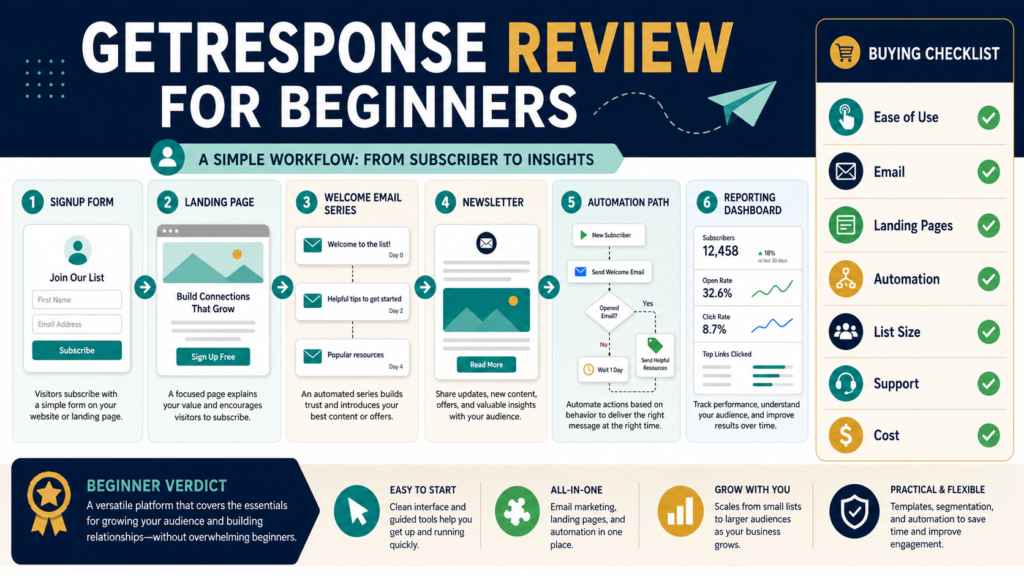
GetResponse may be a practical option for a beginner who wants to manage email campaigns, signup forms, landing pages, welcome messages, and basic automation within one platform. Its broad feature selection can reduce the need to connect several separate tools.
The same breadth can also create unnecessary complexity when someone only needs a basic subscriber list and occasional newsletter.
The most important decision is not whether GetResponse has a large number of features. It is whether the plan you are considering includes the specific capabilities required for your current list size, welcome sequence, landing pages, automation, and future product plans at an acceptable cost.
Review Methodology: This review is based on official GetResponse product information, feature descriptions, pricing information, and publicly available documentation reviewed on August 4, 2026. No firsthand product testing or personal performance results are claimed.
Key Takeaways
- GetResponse combines email marketing with landing pages, forms, automation, and additional marketing tools.
- The entry-level features may be sufficient for a simple beginner list-building system.
- More advanced automation, segmentation, ecommerce, webinars, and course features may require higher plans.
- Pricing depends on the selected plan, billing arrangement, and list size.
- A beginner should choose a plan based on an immediate workflow, not a long list of possible future features.
- The platform may be excessive for someone who only sends a few basic newsletters.
- Current plan details should be verified before purchasing.
What Is GetResponse?
GetResponse is an online marketing platform built around email communication and subscriber management.
Its current official feature pages describe capabilities including:
- Email campaigns.
- Autoresponders.
- Signup forms and popups.
- Landing pages.
- Welcome email series.
- Marketing automation.
- Audience segmentation.
- Ecommerce-related tools.
- Sales funnels.
- Website features.
- Webinars on qualifying plans.
- Course and knowledge-monetization features on qualifying plans.
The precise combination depends on the selected plan.
A beginner might use GetResponse to create a simple workflow:
- A visitor arrives at a landing page.
- The visitor completes a signup form.
- The subscriber receives a welcome message.
- The subscriber enters a short email sequence.
- The business sends newsletters or relevant offers.
- The owner reviews basic reporting.
Who May Benefit From GetResponse?
GetResponse may suit:
- Beginners building their first permission-based email list.
- Bloggers who need forms and landing pages.
- Ebook creators promoting a lead magnet.
- Course creators who want email and educational features in one ecosystem.
- Affiliate marketers who need subscriber communication.
- Small businesses that plan to use automation.
- Creators who expect their email system to become more sophisticated.
- Users who prefer one provider for several marketing functions.
It may be particularly appealing to someone who wants to avoid buying one landing-page tool, another email tool, and a separate basic automation system.
Who May Not Need It?
GetResponse may not be necessary for:
- Someone with no clear plan for using email.
- A person who only needs a basic contact form.
- A creator who sends a few personal messages manually.
- A business already committed to another email platform.
- A beginner who would be distracted by advanced features.
- A user whose preferred checkout, course, or CRM tools do not integrate adequately.
- Someone seeking a specialized enterprise platform.
- A creator whose list is too small to justify a paid plan.
The availability of many features does not make all of them necessary.
Email Campaign Creation
Email campaigns are the central feature.
A typical beginner needs to:
- Select or create a message layout.
- Add a recognizable sender name.
- Write a clear subject line.
- Create the message.
- Add links.
- Choose the subscriber group.
- Preview the email.
- Send a test.
- Schedule or send the campaign.
- Review reporting.
GetResponse currently promotes unlimited newsletters, an AI email generator, autoresponders, templates, and testing features within its broader email-marketing offering, subject to plan terms.
The presence of an AI writing feature does not remove the need to check facts, links, tone, and promises. Automated writing can assist with a draft, but the sender remains responsible for the message.
Signup Forms and Popups
Forms are used to collect subscriber information.
A beginner should evaluate whether the platform makes it reasonably simple to:
- Add a form to WordPress.
- Create an embedded form.
- Build a popup.
- Connect the form to the correct list.
- Add consent language.
- Confirm the signup process.
- Deliver the promised lead magnet.
- Tag or identify the subscriber source.
- Test the mobile display.
GetResponse lists signup forms and popups among its current list-building tools.
Do not collect more personal information than the campaign requires. A first name and email address may be sufficient for many beginner systems.
Landing Pages
A landing page gives a lead magnet or offer a focused destination.
GetResponse’s current feature information describes a landing-page builder and the ability to connect pages with forms, email campaigns, automation, and other marketing functions.
A beginner landing page should include:
- One clear headline.
- A short explanation.
- The main benefits.
- An image of the resource.
- A signup form.
- Privacy information.
- Accurate expectations.
The value of the landing-page feature depends on how easily you can create a usable page without extensive design work.
Welcome Emails and Autoresponders
A welcome email can deliver a resource and explain what the subscriber should expect.
A basic series might include:
- Immediate resource delivery.
- A helpful follow-up lesson.
- A relevant next step or recommendation.
GetResponse provides welcome email and automation templates in its current marketing materials.
A beginner should confirm:
- How many automated messages are allowed.
- Whether the selected plan supports the required workflow.
- Whether delays and conditions are easy to configure.
- How subscribers enter and exit the sequence.
- Whether a test contact can be used safely.
- What happens when someone unsubscribes.
Marketing Automation
Automation can send messages or take actions based on conditions and subscriber behavior.
GetResponse describes automation events, conditions, filters, tags, scoring, segmentation, and behavioral triggers within its marketing-automation offering.
A useful beginner automation might be:
- When a person joins the ebook list, send the ebook.
- Wait one day.
- Send a lesson connected to the ebook.
- Wait two days.
- Send a relevant article.
- Tag the subscriber when a link is clicked.
Advanced automation can become complicated. Begin with one working workflow and document what each step is supposed to accomplish.
Segmentation
Segmentation divides subscribers into meaningful groups.
Possible segments include:
- Lead-magnet source.
- Product interest.
- Customer status.
- Engagement level.
- Course enrollment.
- Link activity.
- Newsletter preferences.
A beginner may not need elaborate behavioral scoring. However, basic tags can prevent every subscriber from receiving every promotion.
Reporting
Email reporting can help answer:
- Was the message delivered?
- Did subscribers open it?
- Which links received clicks?
- Did people unsubscribe?
- Did a campaign produce visits or sales?
- Which signup source produces engaged subscribers?
Treat open-rate information as directional rather than perfect because privacy protections and automated image loading can affect tracking.
More important questions include:
- Are subscribers clicking useful resources?
- Are people replying?
- Are complaints increasing?
- Does the email support the intended business goal?
Ecommerce and Funnel Features
Some GetResponse plans include features related to:
- Sales funnels.
- Promo codes.
- Revenue reporting.
- Ecommerce automation.
- Abandoned-cart recovery.
- Product recommendations.
- Integrations.
These features may benefit a growing ecommerce operation, but a beginner selling one ebook through an external checkout may not need all of them.
Confirm whether your checkout and delivery tools integrate with the selected GetResponse plan.
Webinar and Course Features
The current Creator plan is promoted with webinars, course-creation tools, student capacity, quizzes, certificates, premium newsletters, and related knowledge-monetization features. Plan limits and availability should be checked on the current pricing page.
This could be useful for a creator who wants to combine:
- Email marketing.
- Course delivery.
- Webinars.
- Subscriber management.
- Paid newsletter options.
It may also create overlap if the creator already uses a dedicated course or product-delivery platform.
Current Plan Considerations
GetResponse’s current official pricing information presents Starter, Marketer, Creator, and higher-level business options, with feature access differing by plan. Prices may vary by region, billing cycle, promotions, currency, and list size.
At the time of this review, the official information indicates:
Starter
Designed around list growth and core email marketing, with newsletters, landing pages, forms, a welcome series, and limited automation.
Marketer
Adds more advanced automation, segmentation, ecommerce, funnel, scheduling, and related marketing features.
Creator
Adds course, webinar, website, student, certificate, and monetization capabilities to the broader marketing system.
Do not rely on an old review for the exact price. Check the current pricing page and enter your expected list size.
Free Access and Trial Considerations
GetResponse currently promotes a free starting option and a period of access to premium features, with limitations applying after the premium period. Its free-plan page references basic email marketing, landing pages, forms, and a limited contact allowance.
A free account or trial can help you evaluate:
- The interface.
- Email creation.
- Form setup.
- Landing-page creation.
- Subscriber import requirements.
- Automation.
- Support materials.
- Mobile responsiveness.
Do not build a critical system around a trial feature without checking whether it remains available on the plan you intend to keep.
Ease of Use
The platform’s practical ease of use depends on the workflow.
A beginner should test:
- How many screens are required to create a list.
- Whether terminology is understandable.
- Whether templates are easy to edit.
- How test emails are sent.
- Whether the form connects to the correct list.
- How automations are activated.
- Where reports are located.
- How help documentation is accessed.
An all-in-one platform can reduce integration work while increasing the number of menus and choices.
Support and Learning Resources
GetResponse’s current plan information promotes support access, while its resource pages include onboarding and educational material. The level and method of support may differ among plans.
Before purchasing, verify:
- Live chat availability.
- Email support.
- Telephone support, if required.
- Response expectations.
- Migration assistance.
- Training resources.
- Support hours.
- Whether advanced assistance requires a higher plan.
Integrations
A useful email platform should connect with the rest of the business.
Check compatibility with:
- WordPress.
- Checkout software.
- Product-delivery software.
- Course platforms.
- Contact-management tools.
- Ecommerce stores.
- Payment processors.
- Webinar tools.
- Analytics systems.
- Automation connectors.
An integration shown on a directory page may not include every action you need. Review the exact trigger, action, and data fields.
Meaningful Advantages
Potential advantages include:
Several functions in one platform
Email, forms, landing pages, automation, and additional marketing tools can be managed within one account.
A starting path for beginners
A basic lead-magnet and welcome-email workflow may be built without a complex external technology stack.
Room to expand
More advanced plans support broader automation, ecommerce, course, and webinar needs.
Templates and guided workflows
Templates may reduce setup time when they are customized carefully.
Subscriber organization
Tags, segments, and automation can help send more relevant messages.
Meaningful Limitations
Plan-dependent features
A feature discussed in a review may not be included in the plan a beginner chooses.
Cost can rise
Expenses may increase as the list grows or more advanced capabilities are required.
Possible feature overload
A new user may spend time learning tools that are unrelated to the first campaign.
Overlap with existing software
Course, webinar, landing-page, and website tools may duplicate services already owned.
Migration work
Changing platforms later can require exporting contacts, recreating forms, rebuilding automations, and updating integrations.
No performance guarantee
Using an email platform does not guarantee delivery, opens, clicks, subscribers, or sales.
A Beginner Buying Checklist
Before selecting GetResponse, answer:
- How many contacts do I currently have?
- How many do I reasonably expect within twelve months?
- Do I need one welcome series or advanced automation?
- Do I need landing pages?
- Do I need ecommerce features?
- Do I plan to run webinars?
- Do I need a course creator?
- Which tools must integrate?
- What is my monthly budget?
- Which features are included in the exact plan?
- What happens if I exceed a limit?
- Can I export my contacts and data?
- What support is available?
- Have I tested the important workflow?
A Realistic Beginner Scenario
Consider a retired ebook creator who wants to offer a free planning checklist and promote a paid guide.
The initial system requires:
- One landing page.
- One form.
- One subscriber list.
- A three-email welcome series.
- A monthly newsletter.
- Basic reporting.
The beginner probably does not need advanced ecommerce segmentation, webinars, courses, or elaborate automation immediately.
The best decision would be to identify the lowest plan that supports the actual workflow, test it, and upgrade only after a specific missing feature becomes important.
Affiliate Recommendation
Affiliate Disclosure: This article contains affiliate links. If you purchase through one of these links, I may earn a commission at no additional cost to you. Affiliate compensation does not determine the conclusions or recommendations presented in this article.
You can explore GetResponse’s current email-marketing features and plans to compare the official offer with your list size and required workflow.
Before purchasing, confirm the current price, contact limit, automation allowance, landing-page features, support level, and billing terms.
Is GetResponse Worth Considering?
GetResponse appears worth considering when a beginner wants:
- Email campaigns.
- Signup forms.
- Landing pages.
- Welcome emails.
- Basic or advanced automation.
- A platform that can expand into other marketing functions.
It may provide less value when:
- Only a basic newsletter is required.
- The user already owns overlapping tools.
- The budget does not justify the desired plan.
- The interface feels more complex than necessary.
- A specialized email platform better matches the workflow.
Final Verdict
GetResponse appears to be a capable email-marketing platform with enough range to support both a simple beginner system and more advanced marketing operations. Its combination of email, forms, landing pages, automation, and optional creator features may help users reduce the number of separate services they manage.
The primary caution is that plan selection matters. Beginners should not assume every feature is included at the entry level or purchase advanced capabilities merely because they may be useful someday.
Review the current GetResponse offer again when your list size, automation requirements, or product strategy changes: see GetResponse’s current options.
Conclusion
GetResponse may be a practical first email-marketing platform for a beginner who wants to build a lead-magnet page, collect subscribers, send a welcome series, and expand into additional automation later.
Its value depends on choosing the correct plan and using the features that support a real workflow. The platform cannot replace a relevant lead magnet, responsible permission practices, useful messages, or consistent subscriber communication.
Write down your first email-list workflow and compare every required step with the current GetResponse plan details before opening a paid account.