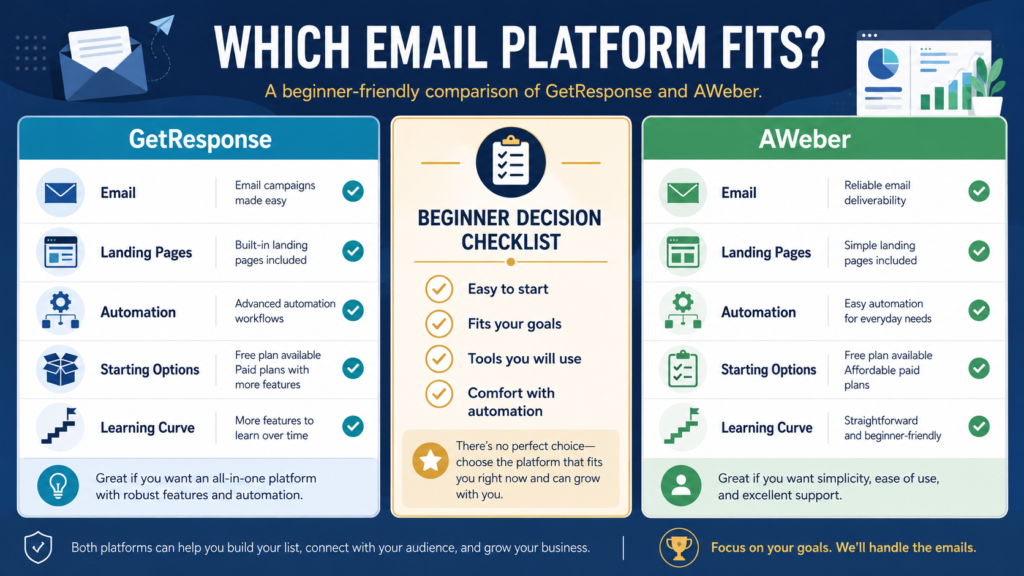
GetResponse and AWeber can both help a beginner collect subscribers, send emails, create landing pages, and automate parts of an email-marketing system.
The better choice depends on the type of business you want to operate.
AWeber may be the easier starting point for someone who wants a basic email list, landing pages, and simple automation with a free entry option for a small list.
GetResponse may be the stronger fit for someone who expects to build a broader system involving landing pages, marketing automation, funnels, segmentation, and additional campaign tools.
Neither platform is automatically best for every beginner.
Review Methodology: This comparison is based on official product information, available documentation, current pricing pages, and publicly available details reviewed on July 28, 2026. No firsthand product testing or personal experience is claimed.
Affiliate Disclosure: This article contains affiliate links. If you purchase through one of these links, I may earn a commission at no additional cost to you. Affiliate compensation does not determine the conclusions or recommendations presented in this article.
Quick Comparison
Choose AWeber When:
- You want a free starting option for a small subscriber list.
- You prefer a focused email-marketing system.
- You need landing pages, signup forms, and basic automation.
- You want to learn the fundamentals before building complex campaigns.
- You do not currently need an advanced funnel system.
Choose GetResponse When:
- You want email marketing and landing pages in one platform.
- You expect to use more detailed automation.
- You want broader lead-generation and funnel capabilities.
- You anticipate using segmentation and behavior-based workflows.
- You are comfortable learning a larger set of marketing features.
What GetResponse Provides
GetResponse is an email-marketing and automation platform designed to support subscriber communication, landing pages, forms, autoresponders, campaigns, and more advanced marketing workflows.
Its official landing-page information currently describes a no-code drag-and-drop editor, AI-assisted page creation, customizable templates, and mobile-friendly publishing. Its marketing-automation documentation describes workflows based on events, conditions, filters, and user behavior.
This makes GetResponse relevant to businesses that want to connect several parts of a marketing process.
A beginner might use it for:
- Creating a landing page
- Collecting subscribers
- Delivering a lead magnet
- Sending a welcome sequence
- Broadcasting newsletters
- Creating behavior-based follow-up messages
- Developing more advanced campaigns later
You can explore GetResponse’s current email-marketing offer.
What AWeber Provides
AWeber focuses on email marketing for creators and small businesses.
Its official website currently highlights landing pages, website signup forms, email creation assistance, automation, and ecommerce-related capabilities. AWeber also states that its free plan supports up to 500 subscribers and includes access to automation and landing pages, although plan limits and terms should always be verified before signup.
A beginner might use AWeber for:
- Creating a basic landing page
- Adding a signup form to a website
- Collecting subscribers
- Delivering a free resource
- Sending automated welcome messages
- Publishing newsletters
- Selling or promoting simple offers
You can review the current AWeber Free and Plus options.
Starting Cost and Trial Options
Pricing can change based on subscriber count, billing period, promotions, and selected features.
At the time of this review, GetResponse’s official pricing page listed its Starter plan at $19 per month when billed monthly or $15.58 per month when billed annually. The main website also promoted a 14-day trial without requiring a credit card.
AWeber’s official documentation listed paid subscriptions beginning at $15 per month or $12.50 per month when billed annually. Its official small-business guide stated that the free plan supported up to 500 subscribers.
These prices and limits should be treated as a dated snapshot rather than permanent information.
Starting-Option Advantage: AWeber
AWeber may be more attractive to a beginner who wants to build a very small list without immediately paying for a subscription.
However, a free plan should not be the only decision factor.
Review:
- Subscriber limits
- Email limits
- Branding
- Automation limits
- Landing-page limits
- Customer support
- Ecommerce fees
- Upgrade costs
Trial Advantage: GetResponse
GetResponse’s trial may give a beginner temporary access to a broader range of tools before selecting a paid plan.
The limitation is that a trial has an ending date. You should know whether you are prepared to continue with a paid plan before building an important system around it.
Email Creation
Both platforms support email newsletters and automated messages.
The important beginner questions are:
- Is the editor understandable?
- Can you create a plain, readable email?
- Are templates optional?
- Can you preview the message?
- Can you send a test?
- Can you schedule delivery?
- Can you see whether links work?
- Can you manage unsubscribe requests?
A beginner should not choose a platform based solely on the number of templates.
The email must still contain a useful subject line, clear message, readable formatting, and relevant action.
Landing Pages and Signup Forms
Both platforms provide tools for collecting subscribers.
GetResponse may appeal to users who want landing pages connected to a broader marketing system.
AWeber may appeal to users who want a straightforward landing page or website form connected directly to an email list.
For a first lead-magnet funnel, either platform may be sufficient.
The essential workflow is:
- Visitor reaches the signup page.
- Visitor understands the offer.
- Visitor enters an email address.
- The system records permission.
- The promised resource is delivered.
- Welcome emails begin.
- The subscriber can unsubscribe when desired.
The complexity of the page matters less than whether this process works reliably.
Automation
Automation sends or changes messages based on rules.
A simple automation might say:
When a person joins the AI Starter Kit list, send the delivery email immediately and send a helpful follow-up two days later.
A more advanced workflow might respond to:
- A link click
- A purchase
- An abandoned cart
- A tag
- A completed email sequence
- A customer action
- A segment change
GetResponse Automation
GetResponse is likely to be more attractive when detailed workflows are an important part of the business.
Its official materials describe automation based on events, conditions, filters, customer behavior, and contact information. Access to specific automation features depends on the selected plan.
AWeber Automation
AWeber offers automation suitable for common email sequences and subscriber follow-up.
Its appeal may be simplicity rather than the number of possible workflow combinations.
A beginner creating one lead magnet and one welcome sequence may not need an advanced visual automation system.
Ease of Use
Ease of use is partly personal.
A platform may feel simple to one user and confusing to another.
Evaluate the actual tasks you need to complete:
- Create a list
- Build a signup page
- Upload or link a lead magnet
- Write a welcome email
- Add follow-up messages
- Send a test
- Publish the page
- Confirm the subscriber experience
Do not spend hours exploring features you do not plan to use.
Potential AWeber Learning Advantage
AWeber may feel more focused to users who primarily want email communication.
A free starting option can also provide time to learn without immediately paying for a small list.
Potential GetResponse Learning Advantage
GetResponse may allow a user to keep more marketing tasks inside one platform.
The tradeoff is that a larger feature set may require more initial learning.
Which Platform Fits a Retiree or Beginner Business Owner?
Consider a retiree who wants to:
- Offer one free checklist
- Build an email list
- Send a weekly newsletter
- Promote an ebook later
- Avoid complicated automation
AWeber may provide enough capability for this system, especially while the list remains small.
Now consider a business owner who wants to:
- Create several landing pages
- Build multiple lead-magnet funnels
- Segment subscribers
- Use behavior-based automation
- Connect email with a broader campaign
GetResponse may offer a more suitable growth path.
The right decision depends on the business you plan to manage, not the platform with the longest feature list.
Important Limitations
GetResponse Limitations
- The broader feature set may require more learning.
- Advanced capabilities may require higher-level plans.
- Pricing may increase as the list or feature needs grow.
- A beginner may pay for tools that are not immediately necessary.
AWeber Limitations
- A simple starting structure may become limiting for a business that needs complex funnels.
- Free-plan limits may require an eventual upgrade.
- Advanced marketers may prefer more detailed automation control.
- Ecommerce or specialized campaign needs should be reviewed carefully.
A Five-Question Decision Checklist
1. Do You Need a Free Starting Plan?
Choose AWeber for investigation if avoiding an immediate subscription is important.
2. Do You Need Advanced Automation?
Investigate GetResponse when behavior-based workflows and broader marketing automation are priorities.
3. Do You Want a Focused Email Tool?
AWeber may be easier to evaluate.
4. Do You Want a Broader Marketing Platform?
GetResponse may provide a better fit.
5. Which Platform Can You Operate Consistently?
The best feature set provides little value when the system feels too complicated to maintain.
Recommended Beginner Testing Process
- Write down the exact funnel you need.
- Review the current plan limits.
- Create a test landing page.
- Create a test signup form.
- Write one welcome email.
- Subscribe using a separate email address.
- Confirm that the email arrives.
- Test every link.
- Review the mobile display.
- Compare the amount of effort required.
Complete the same basic task in each platform before deciding.
Final Verdict
AWeber is a reasonable choice for beginners who want a straightforward email-list system and value a free entry option for a small audience.
GetResponse is a reasonable choice for users who want email marketing connected to broader landing-page, automation, lead-generation, and funnel capabilities.
Choose AWeber when simplicity and a lower-risk starting path matter most. Choose GetResponse when you expect to build more detailed marketing workflows and are prepared to learn the additional features.
Conclusion
GetResponse and AWeber can both support a beginner email list, but they serve slightly different priorities.
AWeber may fit a simpler list-building system. GetResponse may fit a broader marketing and automation system.
Write down the exact landing page, email sequence, and automation you need before comparing the current plans.