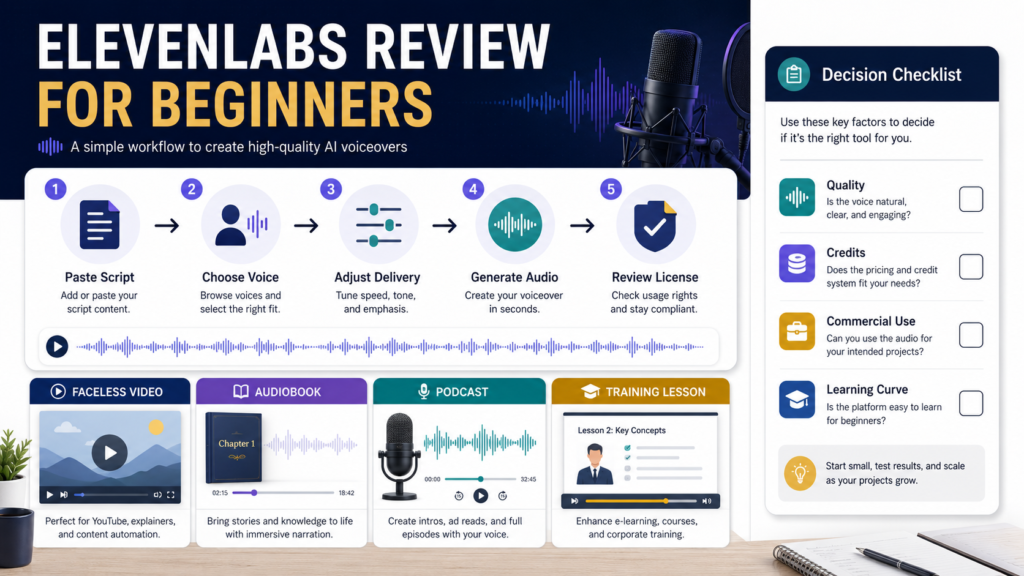
ElevenLabs is a practical option for creators who need AI-generated narration for faceless videos, audiobooks, podcasts, training materials, or other spoken content.
Its main strength is the ability to turn written text into natural-sounding speech while offering choices involving voices, models, pacing, and delivery.
It may not be necessary for someone who is comfortable recording a personal voice, needs only occasional basic narration, or does not want to manage a credit-based subscription.
The most important beginner considerations are:
- Audio quality
- Script preparation
- Voice selection
- Credit usage
- Commercial licensing
- Voice-cloning rules
- The amount of content you plan to produce
Review Methodology: This review is based on official ElevenLabs documentation, help-center information, pricing details, and publicly available product information reviewed on July 28, 2026. No firsthand testing or personal product experience is claimed.
Affiliate Disclosure: This article contains affiliate links. If you purchase through one of these links, I may earn a commission at no additional cost to you. Affiliate compensation does not determine the conclusions or recommendations presented in this article.
Quick Verdict
ElevenLabs is best suited for:
- Faceless-video creators
- Ebook authors developing audio editions
- Course creators producing narration
- Marketers creating voiceovers
- Podcasters experimenting with generated speech
- Publishers producing multilingual or alternative audio formats
- Users who need consistent narration without recording every script manually
It may not be the best fit for:
- People who prefer their natural speaking voice
- Creators who need only a few short recordings
- Users who do not want to monitor credits
- Anyone seeking unrestricted commercial use on a free plan
- People who intend to clone voices without proper rights or permission
- Beginners who expect perfect audio without script editing
What Is ElevenLabs?
ElevenLabs is an AI audio platform offering text-to-speech, speech-to-text, voice tools, dubbing, sound effects, and other generative-audio capabilities. Its no-code creative application allows creators to generate voiceovers and other audio directly in a browser.
For a basic text-to-speech project, the workflow is straightforward:
- Paste or type the script.
- Select a voice.
- Select a model.
- Adjust optional settings.
- Generate the audio.
- Listen and revise.
- Download the acceptable version.
ElevenLabs’ documentation states that voice selection has the greatest influence on the result, followed by model selection and voice settings.
You can review the current ElevenLabs voice-generation options.
Text-to-Speech Features
Text-to-speech converts written content into spoken audio.
Possible uses include:
- YouTube narration
- Facebook or LinkedIn video voiceovers
- Ebook audio
- Course lessons
- Product demonstrations
- Website explainers
- Podcast segments
- Accessibility versions of written content
The process is simple enough for a beginner to understand, but good results require more than pasting an unedited article into the system.
Written content and spoken content use different rhythms.
A narration script should contain:
- Shorter sentences
- Natural transitions
- Clear punctuation
- Pronunciation guidance when necessary
- Fewer long lists
- Fewer complicated parenthetical explanations
- Instructions that make sense without a visual page
Current Plans and Credits
ElevenLabs uses a credit-based pricing system.
At the time of this review, the official pricing page listed:
- Free: $0 with 10,000 credits
- Starter: $6 per month with 30,000 credits
- Creator: $22 per month with 121,000 credits, with a first-month promotion shown
- Pro: $99 per month with 600,000 credits
- Higher Scale, Business, and Enterprise options
The pricing page explains that credit use varies by product and model. Text-to-speech is commonly measured in relation to characters, while other tools may consume credits differently.
Prices, promotions, credits, and plan features can change. Verify the current details before subscribing.
Free Plan
The free plan provides an opportunity to explore the interface and create noncommercial test content.
However, ElevenLabs states that its free plan does not include a commercial license. Content created under the free plan cannot be used commercially and may require attribution when published for permitted noncommercial purposes.
This distinction is important for:
- Monetized YouTube channels
- Paid courses
- Affiliate-marketing videos
- Business advertisements
- Audiobooks sold to customers
- Client projects
- Commercial podcasts
Paid Plans
ElevenLabs states that paid plans include commercial usage rights for generated content, provided the user owns the necessary rights to the input and complies with applicable terms and policies.
A paid plan may therefore be necessary when the audio supports a business or revenue-generating project.
Do not assume that every experimental or beta feature carries identical commercial rights. Review the current terms for the specific product you plan to use.
How Credit Use Affects Beginners
Credit-based software requires planning.
A script may consume additional credits when you:
- Generate several voice options
- Change the wording repeatedly
- Adjust settings and generate again
- Produce long-form narration
- Create several versions for different platforms
- Use additional audio tools
- Regenerate sections after editing
A beginner should not automatically select the largest plan.
First estimate:
- How many scripts you create each month
- The approximate length of each script
- How many voice tests you expect
- Whether you create short or long-form audio
- Whether commercial rights are required
- Whether you will use tools beyond text-to-speech
Start with the plan that supports a realistic workflow rather than the plan with the most credits.
Voice Selection
Voice selection affects whether the narration fits the subject.
A calm educational course may require a different voice from:
- A promotional video
- An audiobook
- A business tutorial
- A dramatic story
- A short social-media video
- A meditation recording
Evaluate:
- Pace
- Tone
- Clarity
- Age impression
- Accent
- Energy
- Emotional range
- Suitability for the audience
Do not choose a voice simply because it sounds impressive in a short demonstration.
Test it with the type of script you actually plan to produce.
Voice Design and Voice Library
ElevenLabs offers different ways to select or create voices.
The Voice Library contains voices shared for use through the platform, while Voice Design allows a user to describe characteristics such as accent, pacing, tone, and speaking style to create a synthetic voice.
These options provide flexibility, but they can also increase decision time.
A beginner may benefit from selecting one or two suitable voices and using them consistently rather than choosing a new voice for every project.
Voice Cloning Rules
Voice cloning requires careful attention to consent, ownership, and platform rules.
ElevenLabs states that Professional Voice Cloning can only be used to create a professional clone of your own voice. A person who wants to share a professional clone must create and verify it through the person’s own account.
For Instant Voice Cloning, ElevenLabs states that users must have permission to clone the voice.
Do not:
- Clone a celebrity voice
- Clone another creator without authorization
- Imitate someone deceptively
- Use a voice to misrepresent identity
- Assume public audio provides permission
- Ignore applicable laws or platform policies
Beginners who do not need a cloned voice can avoid this issue by using an available synthetic or licensed library voice.
Studio for Longer Content
Short scripts can be generated through the basic text-to-speech interface.
For longer content, ElevenLabs provides Studio, which supports larger projects such as articles, documents, books, and long-form narration. Its documentation describes importing documents or web content and organizing narration inside a project.
Possible Studio projects include:
- Audiobooks
- Multi-chapter guides
- Long training lessons
- Article narration
- Podcast-style content
- Educational materials
Long-form audio still requires careful review.
Check:
- Chapter breaks
- Voice consistency
- Pronunciation
- Pauses
- Missing words
- Repeated audio
- Volume
- Exported file organization
A Beginner Voiceover Workflow
Step 1: Prepare the Script
Write for listening.
Remove headings that sound unnatural and replace them with spoken transitions.
Step 2: Divide the Script
Break long content into manageable sections.
This makes it easier to correct one paragraph without regenerating the entire project.
Step 3: Choose One Voice
Test the voice with a representative section of the script.
Do not begin with the complete article.
Step 4: Select the Model
Review the current model descriptions and select the one suited to your language, quality, speed, and project type.
Step 5: Adjust Settings Carefully
Change one setting at a time.
If you change the voice, model, stability, speed, and script simultaneously, you may not know what improved or harmed the result.
Step 6: Generate a Short Sample
Listen with headphones and speakers.
Check whether the voice sounds clear in both situations.
Step 7: Correct the Script
Use punctuation, sentence breaks, and wording changes to improve delivery.
Do not expect settings alone to correct an awkward script.
Step 8: Generate the Complete Audio
Produce the project in sections and save files with descriptive names.
Step 9: Complete a Final Review
Listen from beginning to end before publishing.
Practical Use Case: Faceless Educational Video
Imagine a creator producing a short video about three ways beginners can improve AI prompts.
The script is 90 seconds long.
The creator:
- Removes long written explanations.
- Uses short sentences.
- Selects a calm instructional voice.
- Generates the first 20 seconds.
- Corrects the pronunciation of a product name.
- Adjusts pauses between the three steps.
- Generates the complete narration.
- Adds the audio to the video editor.
- Checks that the visual timing matches the speech.
- Reviews the commercial rights before publication.
The AI voice saves the creator from recording the narration manually, but it does not remove editing work.
Advantages
Strong Text-to-Speech Focus
ElevenLabs is designed specifically around AI audio and voice applications.
Multiple Voice Options
Users can investigate library voices, synthetic voice design, and permitted cloning options.
Short and Long-Form Workflows
The platform supports individual text-to-speech generations and longer projects through Studio.
Commercial Options
Paid plans provide commercial-use rights under the company’s current terms, subject to ownership and policy requirements.
Useful Creator Applications
The platform can support faceless video, audio products, training, narration, and other content formats.
Limitations
Credits Require Monitoring
Repeated testing and long scripts can consume credits.
Free Audio Is Not for Commercial Use
A creator planning to monetize or use audio in a business may need a paid plan.
Results Still Require Editing
Mispronunciations, pacing problems, emotional mismatches, and unnatural pauses may occur.
Voice Decisions Can Become Time-Consuming
A large number of voice and setting choices may overwhelm beginners.
Voice Cloning Has Restrictions
Users must understand permission, verification, ownership, and platform rules.
AI Narration May Not Fit Every Brand
Some audiences may prefer the creator’s natural voice and personal delivery.
Who Should Consider ElevenLabs?
ElevenLabs may be a good fit for a creator who:
- Produces narration regularly
- Wants a faceless-video workflow
- Needs consistent audio
- Is developing an audiobook
- Creates educational lessons
- Understands credit limits
- Is willing to review licensing
- Does not want to record every script personally
Who May Not Need It?
You may not need ElevenLabs when:
- You enjoy recording your own voice.
- You create only one short video occasionally.
- Your existing video tool includes acceptable narration.
- You do not need a consistent voice.
- You are not prepared to review generated audio.
- The cost would be greater than the value of the time saved.
A Simple Plan-Selection Checklist
Ask:
- Is the audio for personal or commercial use?
- How many minutes of narration will I create monthly?
- How many test generations will I need?
- Do I need long-form Studio projects?
- Do I need voice cloning?
- Which plan includes the required rights and features?
- Can I manage the cost if usage grows?
- Is AI narration better for this audience than my natural voice?
Review the official pricing and licensing pages after answering these questions.
Final Verdict
ElevenLabs is a capable AI voice platform for creators who need regular text-to-speech narration and are prepared to manage scripts, voices, credits, and licensing.
Its value is strongest when voiceover creation is a repeated business task.
A beginner who only needs occasional narration may be able to start with a smaller plan or use an existing tool. A creator producing commercial faceless videos, courses, audiobooks, or regular audio content may find a paid ElevenLabs plan more practical.
Conclusion
ElevenLabs can help turn written scripts into polished narration for several types of creator projects.
The platform is not a one-click replacement for audio production. Good results still depend on script preparation, voice selection, listening, revision, credit management, and correct commercial licensing.
Prepare one short sample script and compare the generated narration with your project’s actual quality and licensing requirements before selecting a paid plan.