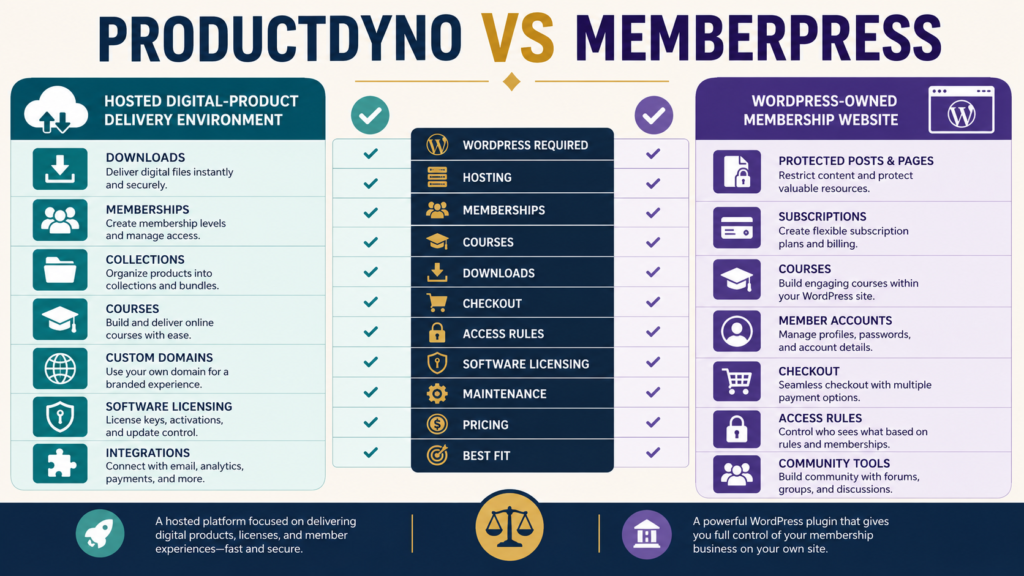
ProductDyno and MemberPress can both help protect content, manage customer access, and build recurring or membership-style offers.
But they begin from very different foundations.
ProductDyno is a hosted platform designed around digital-product creation, delivery, memberships, collections, courses, integrations, and software licensing. MemberPress is a WordPress membership platform that lets you build protected memberships, subscriptions, courses, and access rules directly on a WordPress website you control.
That distinction should come before the feature comparison.
If you do not want your membership system to depend on maintaining WordPress, ProductDyno may be the more natural fit.
If owning and controlling the WordPress website itself is an important part of your strategy, MemberPress deserves serious consideration.
Review Methodology: This comparison is based on official ProductDyno and MemberPress product information and publicly available documentation reviewed on September 1, 2026. No firsthand testing or personal product-use claim is made. Both companies may change pricing, promotions, features, transaction fees, and plan terms, so verify current checkout information before purchasing.
ProductDyno and MemberPress Solve Different Infrastructure Problems
It is tempting to compare these products line by line.
A better first question is:
Where do you want the membership business to live?
With ProductDyno, the product-delivery and member-management environment is provided as a hosted platform.
With MemberPress, WordPress is the foundation.
That means a MemberPress business also depends on:
- WordPress.
- Web hosting.
- Website maintenance.
- Themes.
- Plugins.
- Backups.
- Security.
- Updates.
- Compatibility.
That is not necessarily a disadvantage.
For some business owners, control over WordPress is exactly the reason to choose it.
For others, it is additional infrastructure they would prefer not to manage.
What ProductDyno Provides
ProductDyno’s current official feature information describes a platform that can support digital products, courses, memberships, pages, integrations, and related delivery functions.
Its current plan information also highlights capabilities such as:
- Unlimited digital products on listed plans.
- Memberships.
- Product collections.
- Member and customer management.
- Custom domains.
- Software and SaaS licensing.
- Integrations.
- Reporting.
- Content protection.
- Course/LMS capabilities on appropriate offerings.
This makes ProductDyno broader than a simple file-download service.
If you want more background before comparing it with MemberPress, my ProductDyno review for beginners explains the basic delivery-platform decision.
What MemberPress Provides
MemberPress is built around WordPress.
Its current official MemberPress plan information describes unlimited members, memberships, subscriptions, access rules, course capabilities, content protection, member-management functions, and payment-related tools across its current plan structure.
That makes it especially relevant for a business that already considers WordPress the permanent home of its content.
Instead of sending customers into a separate hosted delivery environment, you can build protected experiences directly into the website.
Website Ownership and Control
This is one of MemberPress’s strongest strategic arguments.
Your WordPress installation, hosting account, database, theme, content, and other site infrastructure remain under your control.
That can make MemberPress attractive if you want:
- A membership woven into an existing website.
- Protected blog posts or pages.
- Custom WordPress design.
- WordPress plugins.
- SEO content and paid content on the same platform.
- Greater technical control over the site.
The tradeoff is responsibility.
Control and maintenance usually arrive together.
You need to keep the WordPress environment healthy.
Hosted Convenience
ProductDyno shifts more of the product-delivery infrastructure into a specialized hosted environment.
That can be appealing when your priority is:
Sell → Grant Access → Deliver Content → Manage Member
without building the entire membership architecture yourself in WordPress.
This can reduce the number of technical components you directly maintain.
However, it also means your product infrastructure depends more heavily on ProductDyno’s platform design and available integrations.
Neither architecture is universally superior.
The question is which responsibility you prefer to own.
Digital Downloads
ProductDyno is explicitly designed for digital-product delivery.
It can protect and distribute downloadable files as part of products, memberships, or collections.
That makes it a natural option for:
- Ebooks.
- PDFs.
- Templates.
- Audio.
- Video.
- Training materials.
- Product bundles.
- Download libraries.
MemberPress can also protect content and files through WordPress access rules and membership structures, but its primary identity is a WordPress membership platform rather than a specialized standalone digital-delivery service.
If downloadable products are the center of the business, examine the exact delivery workflow in both products rather than assuming “membership access” and “digital delivery” are identical.
Memberships and Subscriptions
Both products can support membership-oriented businesses.
ProductDyno provides member-management functions and can organize products and collections behind controlled access.
MemberPress is particularly deep in WordPress membership logic.
Its current feature set includes:
- Unlimited memberships on current plans.
- Unlimited members.
- Subscription management.
- Content-access rules.
- Upgrade and downgrade paths.
- Registration.
- Payment management.
- Protected WordPress content.
If the primary business model is a recurring WordPress membership, MemberPress’s architecture has a natural advantage.
If memberships are one of several digital-product formats you sell, ProductDyno’s broader product-delivery orientation may be attractive.
Online Courses
The difference has narrowed because both platforms now include course-oriented capabilities.
ProductDyno offers online-course tools and has LMS functionality associated with relevant offerings.
MemberPress’s current plans include its course system, with unlimited courses and lessons identified on its pricing page.
For course creators, compare:
- Lesson builder.
- Student experience.
- Drip functionality.
- Quizzes or learning tools.
- Member management.
- Course design.
- Progress features.
- Checkout.
- Email integration.
- Reporting.
Do not choose a course platform merely because the word “course” appears in the feature list.
Your teaching workflow matters.
You can also review how a specialized delivery platform differs from a course-first platform in my ProductDyno vs Thinkific comparison.
Software Licensing
This is a meaningful ProductDyno differentiator.
ProductDyno promotes a software/SaaS licensing module as part of its platform capabilities.
That can matter if your business may sell:
- Software.
- Plugins.
- Applications.
- Licensed digital tools.
MemberPress is designed primarily around WordPress memberships, subscriptions, protected content, and courses.
If software licensing is a central requirement, do not assume a standard membership-access system provides an equivalent licensing infrastructure.
This category deserves separate evaluation.
Checkout and Payment Architecture
MemberPress can manage membership payments from the WordPress environment and supports payment integrations according to plan.
ProductDyno also provides checkout-related functionality and integrations with payment and selling systems.
The important question is whether you want one platform to perform every job.
Many digital-product businesses already have a preferred checkout tool.
If so, evaluate:
- Can the checkout connect reliably to the delivery platform?
- Is access granted automatically?
- Are refunds handled correctly?
- What happens when a subscription fails?
- Can access be revoked?
- Does upgrading or downgrading work properly?
- Are customer records synchronized?
The smoothness of the complete purchase-and-access workflow matters more than one attractive checkout feature.
Current Pricing Requires Careful Comparison
Pricing is one area where you should verify the exact current offer immediately before purchasing.
ProductDyno currently displays more than one public offer structure across its official pages.
One current ProductDyno pricing page lists annually billed plan options including Starter, Growth Plus+, and Teach Pro+, with advertised promotional monthly equivalents.
A separate ProductDyno promotional pricing page currently presents a different unlimited offer and trial structure.
Because these offers can change or coexist as promotions, use the actual checkout tied to the offer you intend to purchase rather than relying on an older review.
MemberPress’s current public pricing page lists promotional first-year pricing for:
Launch: $199.50 for the first year at the displayed promotion, with a stated regular renewal price of $399 per year. The current Launch plan also identifies a 4.9% MemberPress transaction fee in addition to normal payment-processor charges.
Growth: $349.50 promotional first-year pricing, with a displayed regular renewal price of $699 per year and no MemberPress transaction fee.
Scale: $499.50 promotional first-year pricing, with a displayed regular renewal price of $999 per year and no MemberPress transaction fee.
Promotional pricing can change, so compare both:
First-year cost
and:
Expected renewal cost.
Do Not Forget WordPress Hosting Costs
MemberPress pricing is not the entire cost of a MemberPress website.
You may also need:
- Hosting.
- Domain.
- Backup solution.
- Security tools.
- Premium theme or builder.
- Additional plugins.
- Technical support.
You may already be paying for many of these things.
If so, MemberPress could fit efficiently into your existing setup.
If you are starting from nothing, include those costs in the comparison.
Maintenance Requirements
ProductDyno is likely to require less direct WordPress-style infrastructure maintenance because the core delivery environment is hosted.
MemberPress gives you more control but introduces the normal responsibilities of running a WordPress site.
For a technically comfortable website owner, this may not be a major issue.
For someone seeking a low-maintenance business, it deserves significant weight.
A platform can be financially affordable and still be expensive in the amount of attention it requires.
Product Collections and Bundles
ProductDyno places noticeable emphasis on product collections.
This can be helpful when customers buy multiple related resources and you want them organized inside a shared delivery environment.
You might create:
Beginner Business Collection
containing:
- Ebook.
- Checklist.
- Mini-course.
- Templates.
- Bonus resources.
MemberPress can create different memberships and protected areas, but the organizational model is different because the foundation is WordPress membership access.
Think about how you want customers to experience multiple purchases over time.
When ProductDyno May Fit Better
ProductDyno deserves closer consideration when:
- You sell multiple kinds of digital products.
- Secure delivery is a central requirement.
- You want hosted product infrastructure.
- You sell downloads, courses, memberships, or bundles.
- Software licensing matters.
- You want less dependence on WordPress.
- You prefer product collections.
- You already use another checkout and need a delivery layer.
Affiliate Disclosure: This article contains affiliate links. If you purchase through one of these links, I may earn a commission at no additional cost to you. Affiliate compensation does not determine the conclusions or recommendations presented in this article.
If those requirements match your business, you can review ProductDyno through this approved partner link and compare the current offer with the workflow you actually need.
When MemberPress May Fit Better
MemberPress deserves closer consideration when:
- WordPress is already your permanent business platform.
- You want memberships directly inside WordPress.
- Protected pages and posts are central to the offer.
- You want tight control over website design.
- Online courses are important.
- You are comfortable maintaining WordPress.
- You want the membership experience integrated with the rest of your site.
- Software licensing is not a central requirement.
An Alternative Hosted Comparison
If you like ProductDyno’s hosted approach but MemberPress feels too dependent on WordPress, compare ProductDyno with another hosted digital-commerce option.
My ProductDyno vs SendOwl comparison examines two systems that approach selling and delivery from a different direction.
Use a Five-Question Buying Test
Before purchasing either platform, answer these five questions.
1. Do I want WordPress to be the membership platform?
If yes, MemberPress moves up the list.
2. Do I need specialized digital-product delivery beyond memberships?
If yes, investigate ProductDyno carefully.
3. Will I sell software requiring licensing?
If yes, ProductDyno has an important capability to examine.
4. How much technical maintenance do I want?
Include time, not just money.
5. What will the complete three-year cost look like?
Consider:
- Subscription.
- Renewal.
- Hosting.
- Payment fees.
- Add-ons.
- Related software.
- Maintenance.
A discounted first year can hide a very different long-term cost.
Conclusion
ProductDyno and MemberPress overlap, but they are not simply interchangeable membership platforms.
ProductDyno is built as hosted digital-product infrastructure that can support downloads, memberships, collections, courses, integrations, and software licensing.
MemberPress transforms WordPress into a membership, subscription, protected-content, and course environment.
Choose ProductDyno when specialized digital-product delivery and lower dependence on WordPress matter more.
Choose MemberPress when WordPress ownership, protected website content, membership control, and an integrated WordPress experience matter more.
Before buying either one, map your complete workflow:
Customer Finds Offer → Checkout → Payment → Account Creation → Product Access → Course or Download → Support → Renewal or Upgrade
Then identify which platform handles that workflow with the fewest unnecessary moving parts.
That is a much better buying decision than selecting the product with the longest feature list.