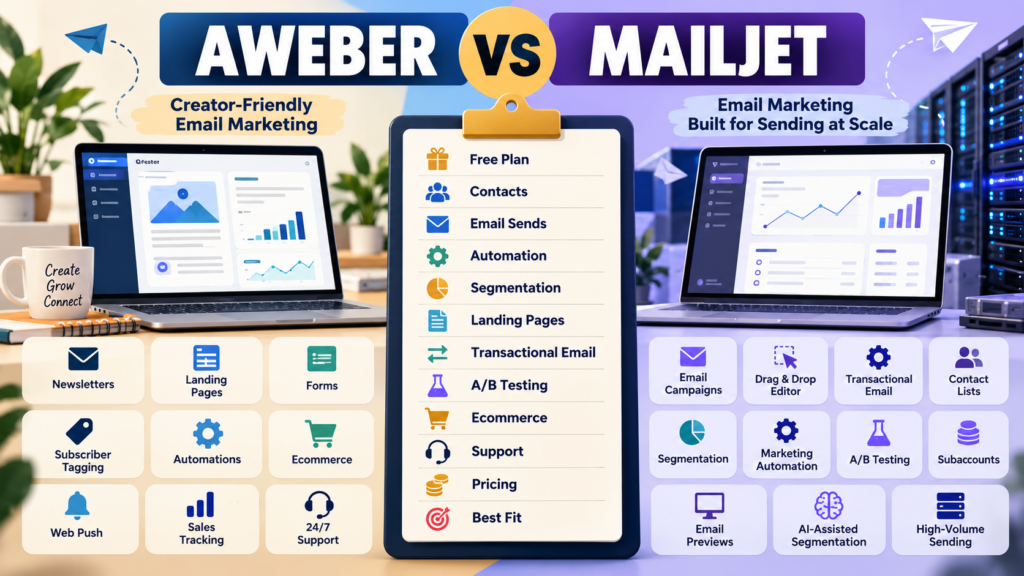
AWeber and Mailjet both send email.
That simple description hides an important difference.
AWeber is strongly positioned as a creator and small-business email-marketing platform.
It includes:
- Newsletters.
- Landing pages.
- Automations.
- Subscriber tagging.
- Ecommerce.
- Web push.
- Support.
Mailjet combines email marketing with transactional-email infrastructure.
Its current plans span:
- Campaign creation.
- Transactional sending.
- Segmentation.
- Automation.
- A/B testing.
- Subaccounts.
- Higher-volume email delivery.
The main question is:
Do you primarily need a creator-focused marketing system—or a platform that also gives transactional and higher-volume sending more emphasis?
Review Methodology: This comparison is based on official AWeber and Mailjet information reviewed on October 5, 2026. No firsthand product testing or personal experience is claimed. Pricing, send limits, contact allowances, promotions, and feature packaging may change. Mailjet changed several self-service prices on September 9, 2026, so verify current checkout information before buying.
AWeber Free
AWeber currently documents a Free plan that includes:
- Up to 500 subscribers.
- 3,000 emails per month.
- One list profile.
- One workflow automation.
For a beginner testing basic email marketing:
That is enough to learn the platform without an immediate paid subscription.
AWeber Lite
AWeber Lite currently begins at:
$15/month
or:
$150/year
for up to 500 subscribers.
The same tier allows:
5,000 monthly sends.
At 1,000 subscribers:
AWeber currently documents:
$25/month
or:
$250/year
with:
10,000 monthly sends.
AWeber Plus
At the lower subscriber tiers, AWeber Plus increases:
- Send capacity.
- Automation.
- Lists.
- Segmentation.
- Landing-page flexibility.
AWeber’s current support documentation ties Plus to a higher monthly-send multiplier than Lite.
This is the more realistic AWeber plan when you want several active workflows rather than one simple email sequence.
Mailjet Free
Mailjet currently offers a Free plan with:
- Up to 1,000 contacts.
- 6,000 emails per month.
- 200-email daily sending limit.
- Drag-and-drop email editor.
- Subscription forms.
- Basic statistics.
That gives Mailjet a larger contact allowance than AWeber Free.
But:
A daily sending limit changes how the plan can be used.
Example
Suppose you have:
1,000 contacts
and want to send one newsletter to everyone in a single morning.
A daily limit of:
200
does not fit that workflow.
A free plan can look generous by monthly volume and still be impractical for full-list campaigns.
Always inspect:
Monthly limit + Daily limit
together.
Mailjet Starter
Mailjet’s current Starter plan costs:
$9/month
or:
$8.10/month equivalent with annual billing.
Mailjet says annual billing continues to receive a 10% discount.
The current Starter plan includes:
- 8,000 emails per month.
- Up to 2,000 contacts.
- Brand Kit.
- Online support.
- One subaccount.
That is an inexpensive entry point for businesses whose sending fits the allowance.
Mailjet Essential
Mailjet’s current Essential 15k tier is:
$19/month
or:
$17.10/month equivalent annually.
The current Essential 50k tier is:
$40/month
or:
$36/month equivalent annually.
Essential adds areas such as:
- Unlimited contacts.
- Segmentation.
- Ticket support.
- Custom branding.
- Email address validation.
- Email previews.
Mailjet Premium
Mailjet currently lists:
Premium 15k
$29/month
or:
$26.10/month equivalent annually
Premium 50k
$59/month
or:
$53.10/month equivalent annually.
Premium adds features including:
- Marketing automation.
- Dynamic content.
- A/B testing.
- Advanced statistics.
- Landing pages.
- Multi-user functionality.
- Priority support.
Mailjet Pricing Changed Recently
This matters for a 2026 comparison.
Mailjet officially increased several self-service subscription prices effective:
September 9, 2026.
Older reviews may therefore display outdated pricing.
Always check publication date.
The Pricing Models Are Different
AWeber is largely:
Subscriber Tier + Send Multiplier
Mailjet is more strongly:
Monthly Email Volume + Feature Tier
That creates very different economics.
Example: 2,000 Contacts Sending Twice Monthly
Approximate monthly sends:
4,000
Mailjet Starter’s:
8,000 emails
could potentially fit.
AWeber would require the appropriate subscriber tier.
Example: 2,000 Contacts Sending Eight Times Monthly
Approximate sends:
16,000
Mailjet Starter would no longer be enough.
You would need a higher Mailjet sending tier.
AWeber’s send multiplier becomes relevant.
The winner changes depending on frequency.
Transactional Email Is a Major Mailjet Difference
Mailjet is built for both:
- Marketing campaigns.
- Transactional messages.
Transactional examples include:
- Password reset.
- Purchase confirmation.
- Account notification.
- Application-generated email.
For a software or ecommerce business:
That can be an important reason to choose Mailjet.
AWeber’s primary identity is email marketing rather than transactional-email infrastructure.
Segmentation
Mailjet currently includes segmentation beginning with its Essential plan.
Its updated segmentation system can use:
- Contact activity.
- Contact-list subscription.
- Contact properties.
- AND/OR logic.
Mailjet also now provides an AI-assisted natural-language segmentation option on eligible plans.
That is especially useful when advanced targeting matters.
AWeber Segmentation
AWeber also supports segmentation, subscriber tagging, and automation.
AWeber’s structure may feel more natural for a creator workflow such as:
Subscriber → Tag → Email Sequence → Product Offer
The platforms can reach similar outcomes through different interfaces.
Marketing Automation
Mailjet’s current Premium plan includes marketing automation.
AWeber offers automation even at lower plan levels, although plan limits vary.
This creates an important buying question:
How early in the pricing structure do I need meaningful automation?
If automation is central from day one:
Price the tier that actually supports your workflow.
A/B Testing
Mailjet’s current A/B testing is a Premium feature and can test up to:
10 versions
of a campaign under the current system.
You can test elements such as:
- Subject.
- Sender.
- Images.
- Buttons.
- Content.
A winner can then be sent to the remaining audience.
For marketers who test aggressively:
That is a strong feature.
Landing Pages
Mailjet currently places landing pages among its Premium-level functionality.
AWeber includes landing-page capability much earlier in its product structure.
If your business depends on:
Content → Landing Page → Lead Magnet → Email List
AWeber may give you a simpler starting path.
Ecommerce
AWeber includes native creator-oriented selling tools such as:
- Product/service sales.
- Subscription/payment plans.
- Purchase tagging.
- Sales tracking.
That can be useful for smaller creator businesses that want email and simple selling in one environment.
Mailjet is more heavily focused on email-delivery infrastructure.
Collaboration
Mailjet becomes especially interesting for teams.
Premium includes features around:
- Multiple users.
- Permissions.
- Template collaboration.
- Locked sections.
Those may matter for organizations where several people build campaigns.
A one-person business may place less value on them.
Email Previews
Mailjet includes email-preview allowances in higher current tiers, with Essential and Premium receiving different monthly allowances.
That can help when teams care about testing rendering across many clients and devices.
AWeber Support
AWeber has long emphasized direct customer support.
For beginners who want help building:
- Forms.
- Campaigns.
- Automations.
that can be meaningful.
Do not value support only by the number of channels.
Ask:
Will I actually use it?
AWeber May Fit Better If…
Consider AWeber when:
- You are a creator or small online business.
- Landing pages matter.
- Straightforward automation matters.
- Tagging matters.
- Simple ecommerce matters.
- You want an email-first system.
- Direct support matters.
My AWeber Review for Beginners provides more background.
Affiliate Disclosure: This article contains affiliate links. If you purchase through one of these links, I may earn a commission at no additional cost to you. Affiliate compensation does not determine the conclusions or recommendations presented in this article.
If AWeber matches your requirements, you can review the current AWeber offer through this approved partner link.
Mailjet May Fit Better If…
Consider Mailjet when:
- Transactional email matters.
- You send based on email volume rather than list size.
- Team collaboration matters.
- Advanced segmentation matters.
- A/B testing matters.
- Email previews matter.
- Application or ecommerce messaging is important.
Compare With AWeber vs ActiveCampaign
Your verified AWeber vs ActiveCampaign comparison is useful when deeper automation is your main priority.
Mailjet’s strongest distinction is different:
Marketing Email + Transactional Email + Volume-Based Sending
Compare With AWeber vs Campaign Monitor
Your verified AWeber vs Campaign Monitor comparison provides another traditional email-platform comparison focused more heavily on:
- Email design.
- Journeys.
- Testing.
- Campaign optimization.
Calculate Your Send Volume First
Write:
Contacts: _____
Marketing Campaigns per Month: _____
Transactional Emails per Month: _____
Then calculate:
Marketing Sends + Transactional Sends = Expected Monthly Volume
Mailjet’s pricing model makes this particularly important.
A Simple Buying Scorecard
Score each from 1–5:
Free Entry
Contact Allowance
Monthly Email Volume
Automation
Landing Pages
Segmentation
Transactional Email
A/B Testing
Ecommerce
Team Collaboration
Support
Annual Cost
Double-weight your three most important categories.
Conclusion
AWeber and Mailjet can both serve a small online business, but they are optimized for different workflows.
AWeber emphasizes:
Subscribers → Landing Pages → Email → Automation → Creator Selling → Support
Mailjet emphasizes:
Contacts → Campaigns → Transactional Email → Segmentation → Testing → High-Volume Sending
AWeber may fit better when the business is primarily a creator-led email-marketing operation.
Mailjet may fit better when email itself is part of a larger technical or transactional messaging system.
Your Next Action
Write down:
Contacts: _____
Marketing Emails per Month: _____
Transactional Emails per Month: _____
Need Landing Pages?: Yes / No
Need Advanced Segmentation?: Yes / No
Need A/B Testing?: Yes / No
Need Transactional Email?: Yes / No
Then determine the actual paid tier required on both platforms.
Do not compare only their lowest prices.
Finally, test one real workflow:
Signup → Welcome → Follow-Up → Offer
If transactional messages are important, also test or review:
Purchase → Confirmation Email
Choose the platform that fits both the kind of email you send and the volume you expect to send.