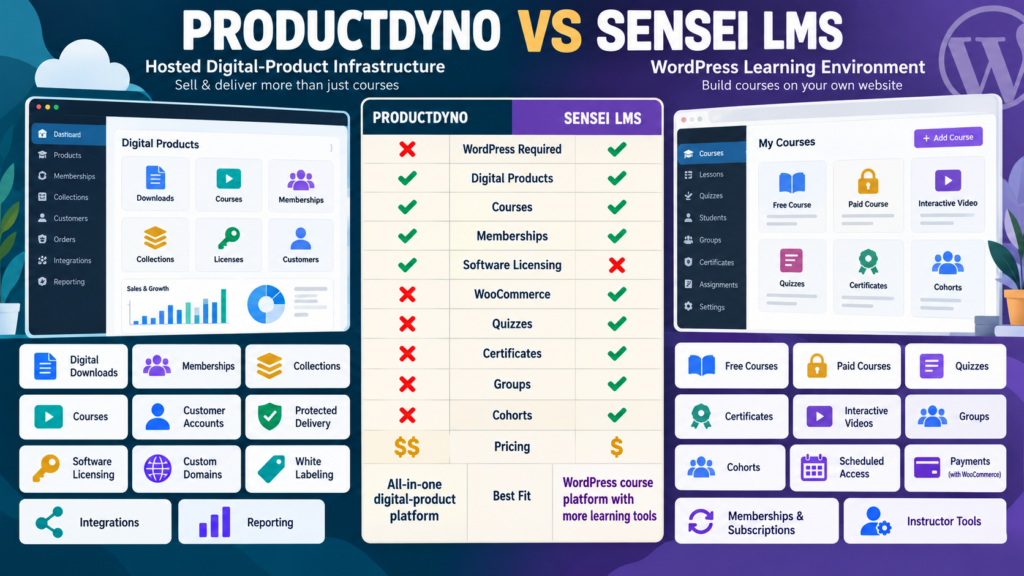
ProductDyno and Sensei LMS can both help deliver online training.
But the similarity ends quickly.
ProductDyno is a hosted digital-product platform.
It is designed around:
- Digital downloads.
- Memberships.
- Collections.
- Courses.
- Customer accounts.
- Software licensing.
Sensei LMS is a WordPress learning-management system.
Its free and paid versions focus much more strongly on:
- Courses.
- Quizzes.
- Certificates.
- Interactive learning.
- Groups.
- Cohorts.
- WooCommerce-powered course selling.
The central decision is:
Do you need a broad hosted digital-product system—or do you want WordPress itself to become the learning environment?
Review Methodology: This comparison is based on official ProductDyno and Sensei LMS information reviewed on October 5, 2026. No firsthand product testing or personal experience is claimed. ProductDyno currently maintains more than one official pricing offer, while Sensei uses a free core plus paid options and may require additional WooCommerce extensions for certain membership or subscription workflows. Verify current checkout terms before purchasing.
ProductDyno Current Principal Pricing
ProductDyno’s current principal pricing page lists:
Starter
$49/month billed annually
Growth Plus+
$69/month billed annually
Teach Pro+
$99/month billed annually.
ProductDyno Core Features
The current principal offer includes:
- Unlimited digital products.
- Unlimited memberships.
- Unlimited collections.
- Unlimited members/customers.
- Software/SaaS licensing.
- Unlimited custom domains.
- White-label branding removal.
- SSL.
- Integrations.
- Reporting.
- 0% ProductDyno transaction fee.
Teach Pro+ adds its LMS-oriented feature layer.
ProductDyno Still Has Another Official Offer
ProductDyno also maintains an official offer advertising:
14-day trial followed by $199/month.
Because ProductDyno has more than one live offer:
Verify the checkout attached to the promotion you intend to use.
Sensei LMS Free
Sensei currently offers:
Sensei Free — $0
as an open-source WordPress plugin.
The Free version includes:
- Unlimited free courses.
- Certificate builder.
- Basic quizzes.
- Distraction-free Learning Mode.
- Compatibility with WordPress themes.
That creates a very different starting point from ProductDyno.
Sensei Interactive Blocks
Sensei also currently offers Interactive Blocks at:
$5/month
billed:
$60 yearly.
Interactive Blocks can add:
- Interactive videos.
- Flashcards.
- Image hotspots.
- Accordions.
- Task lists.
- Quiz questions.
Sensei says the blocks can be used even without Sensei LMS.
Sensei Pro
Sensei Pro currently costs:
$15/month
billed:
$179/year.
Pro includes:
- Everything in Sensei Free.
- Course selling.
- Advanced quizzes.
- Interactive lessons and videos.
- Groups and cohorts.
For a WordPress course creator:
That is a comparatively affordable entry point.
WordPress Is the Biggest Difference
Sensei runs inside:
WordPress.
That means your course business depends on:
- Hosting.
- WordPress.
- Sensei.
- Theme.
- Backups.
- Security.
- Plugin compatibility.
ProductDyno hosts its protected product-delivery environment separately.
Sensei Free Is Course-First
Sensei’s free product is specifically designed for learning.
You can create:
- Courses.
- Lessons.
- Quizzes.
- Certificates.
without paying for Sensei Pro.
But:
You cannot assume the Free version gives you every commerce capability.
Selling Courses Requires More
Sensei’s current documentation says that selling courses through its WooCommerce workflow requires:
- Sensei LMS.
- Sensei Pro.
- WooCommerce.
- Payment gateway.
That means the real paid-course stack is larger than:
“Sensei Pro = $179.”
You also need to account for:
- Hosting.
- WooCommerce environment.
- Payment processing.
WooCommerce Is Central to Sensei Commerce
Sensei has deep integration with WooCommerce.
Current Sensei documentation supports:
- Selling courses as WooCommerce products.
- Course bundles.
- Membership-based access.
- Subscription-based access.
If your business already uses WooCommerce:
This can be an advantage.
Recurring Subscriptions
Sensei Pro can work with recurring course access through WooCommerce.
Current documentation gives two primary approaches:
- WooPayments where supported.
- WooCommerce Subscriptions, currently listed by Sensei as a separate $199 extension for broader gateway flexibility.
Therefore:
If recurring course billing matters, include those extra requirements in the cost comparison.
Memberships
Sensei can also integrate with:
WooCommerce Memberships
to sell courses through membership plans.
This can support:
- Protected course access.
- Membership-based enrollment.
- Bundled learning programs.
Again:
The WordPress stack becomes more powerful.
It also becomes more complex.
ProductDyno Memberships Are Native to Its Core Platform
ProductDyno’s principal current pricing includes:
Unlimited memberships
and:
Unlimited collections
across the listed plans.
You do not need to assemble WooCommerce Memberships merely to create a ProductDyno membership environment.
That can simplify certain digital-product businesses.
Courses
Both support courses.
But courses occupy different positions.
Sensei
Courses are the core purpose of the system.
ProductDyno
Courses are one category inside a broader digital-product platform.
If your business is:
Education first
Sensei deserves strong consideration.
If your business is:
Several different digital product types
ProductDyno may fit better.
Quizzes
Sensei Free includes basic quiz capability.
Sensei Pro expands into advanced quizzes under the current feature structure.
If assessment matters:
Sensei has a strong course-first advantage.
Certificates
Sensei Free currently includes a certificate builder.
That is notable.
A creator can build:
Course → Quiz → Completion → Certificate
without immediately requiring the highest paid tier.
Groups and Cohorts
Sensei Pro includes:
- Groups.
- Cohorts.
- Access periods.
- Group enrollment.
- Scheduled access.
This supports:
- Cohort-based courses.
- Corporate training.
- Scheduled learning programs.
- Group-specific content.
If students need to move through training together:
Sensei becomes much more compelling.
Interactive Learning
Sensei’s current Pro and Interactive Blocks feature set includes:
- Interactive videos.
- Flashcards.
- Image hotspots.
- Accordions.
- Tasks.
Those are educational features.
ProductDyno’s primary strengths lie more in:
Delivery + Access + Licensing
than instructional interaction.
Tutor AI
Sensei’s current feature listing also includes AI-powered learning functionality in its newer course environment.
As with any AI feature:
Do not choose the platform solely because AI appears in the feature table.
Ask whether the feature improves the teaching experience you actually plan to offer.
Software Licensing
This remains one of ProductDyno’s strongest differences.
Its current principal plans include:
Software/SaaS Licensing Module.
If you sell:
- Plugin.
- SaaS.
- Desktop application.
- License-controlled software.
ProductDyno fits that business model far more directly.
Sensei LMS is an educational platform.
Digital Downloads
Suppose your catalog includes:
- Ebook.
- Prompt pack.
- Templates.
- Membership.
- Course.
- Software.
ProductDyno is designed around that mixed catalog.
Sensei may still host training around those products.
But it is fundamentally:
Course infrastructure.
Custom Domains and Branding
ProductDyno’s current principal plans include:
- Unlimited custom domains.
- White-label branding removal.
Sensei runs inside your own WordPress site.
That means brand control comes through:
- Your domain.
- Your theme.
- WordPress design.
Both can produce branded experiences.
The architecture is different.
Maintenance
ProductDyno
Hosted service handles more of the delivery infrastructure.
Sensei
You manage:
- Hosting.
- WordPress.
- Updates.
- Security.
- WooCommerce.
- Plugins.
That flexibility has an operational cost.
If low maintenance is important:
Weight this heavily.
Sensei May Fit Better If…
Consider Sensei LMS when:
- Courses are central.
- You already use WordPress.
- You want a free starting option.
- Quizzes matter.
- Certificates matter.
- Groups or cohorts matter.
- WooCommerce is already part of your stack.
- You want deep ownership of the learning environment.
ProductDyno May Fit Better If…
Consider ProductDyno when:
- You sell mixed digital products.
- Hosted delivery matters.
- Memberships matter.
- Collections matter.
- Software licensing matters.
- You prefer product delivery outside WordPress.
- You want fewer WordPress course-commerce dependencies.
My ProductDyno Review for Beginners provides additional context.
Affiliate Disclosure: This article contains affiliate links. If you purchase through one of these links, I may earn a commission at no additional cost to you. Affiliate compensation does not determine the conclusions or recommendations presented in this article.
If ProductDyno matches your digital-product infrastructure needs, you can review the current ProductDyno offer through this approved partner link.
Compare With ProductDyno vs Tutor LMS
Your verified ProductDyno vs Tutor LMS comparison provides another WordPress LMS alternative.
Tutor LMS and Sensei both center on courses.
But their:
- Pricing.
- Learning features.
- Commerce architecture.
- Add-on ecosystems.
differ.
Compare With ProductDyno vs LifterLMS
Your verified ProductDyno vs LifterLMS comparison gives another perspective on a more advanced WordPress LMS ecosystem.
Use those comparisons if you first decide:
WordPress LMS is the architecture I want.
The Product-Mix Test
List your products.
Scenario A
- Ebook.
- Templates.
- Course.
- Membership.
- Software application.
ProductDyno may fit naturally.
Scenario B
- Free course.
- Paid course.
- Cohort training.
- Quiz.
- Certificate program.
Sensei may fit naturally.
The Commerce Test
Ask:
Do I want WooCommerce to power course sales?
If yes:
Sensei’s deep WooCommerce integration is an advantage.
If no:
ProductDyno’s independent hosted delivery architecture may be simpler.
The Maintenance Test
Ask:
Do I want to manage WordPress as the student-delivery environment?
If yes:
Sensei gives you substantial ownership.
If no:
A hosted system may better match your operating preference.
The Cost Test
Calculate the complete stack.
Sensei LMS
Potential costs:
- Sensei Pro.
- Hosting.
- Payment processing.
- WooCommerce extensions if needed.
- Backup/security.
- Other WordPress tools.
ProductDyno
Potential costs:
- ProductDyno plan.
- Public website.
- Email.
- Checkout/payment setup.
Do not compare:
$179
against:
$588 annual equivalent
without considering what each platform replaces.
A Simple Buying Scorecard
Score from 1–5:
Digital Downloads
Courses
Memberships
Quizzes
Certificates
Interactive Learning
Groups/Cohorts
WooCommerce Integration
Software Licensing
Hosted Delivery
WordPress Ownership
Maintenance
Year-One Cost
Long-Term Cost
Double-weight your three most important categories.
Conclusion
ProductDyno and Sensei LMS overlap around course delivery, but they are designed for different businesses.
ProductDyno emphasizes:
Digital Products → Hosted Delivery → Memberships → Collections → Courses → Software Licensing
Sensei emphasizes:
WordPress → Courses → Quizzes → Certificates → Interactive Learning → Groups/Cohorts → WooCommerce
ProductDyno may fit better when you operate a mixed digital-product business and want hosted delivery.
Sensei LMS may fit better when education itself is the core product and you want WordPress to control the course environment.
Your Next Action
Write down your next five paid offers.
Mark each:
Download | Course | Membership | Cohort | Certification | Software
Then answer:
Need software licensing? Yes / No
Need advanced quizzes? Yes / No
Need certificates? Yes / No
Need cohorts? Yes / No
Already use WooCommerce? Yes / No
Want students inside WordPress? Yes / No
Want to minimize WordPress maintenance? Yes / No
Next calculate the complete cost of each architecture.
For Sensei, include any WooCommerce or subscription extensions your real business would need.
For ProductDyno, include the actual ProductDyno plan and external tools your workflow requires.
Finally, map one customer journey:
Sales Page → Payment → Account → Course/Product Access → Completion → Continued Access
Choose the platform that fits both the products you intend to sell and the level of technical maintenance you are willing to manage.