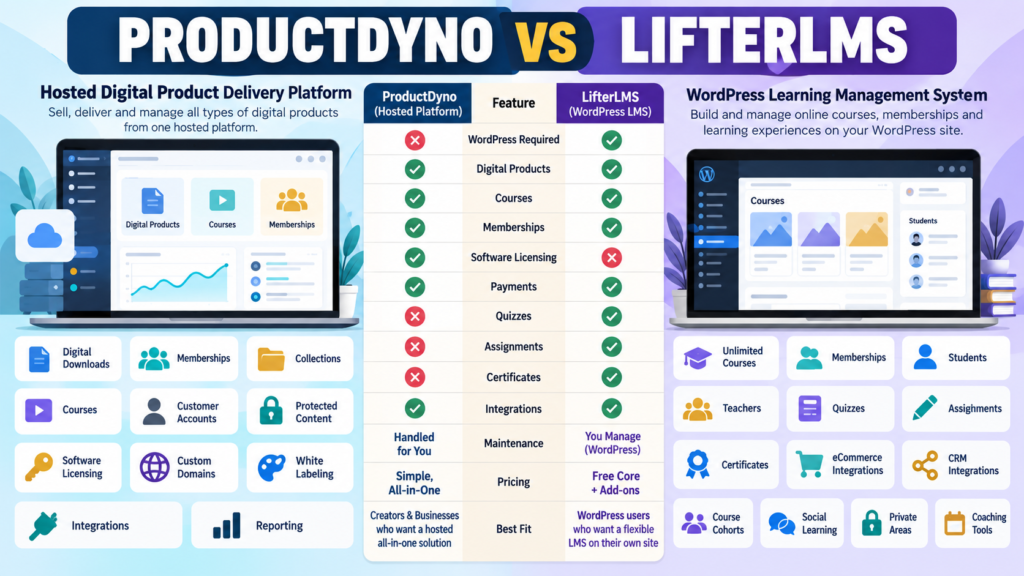
ProductDyno and LifterLMS can both be part of a course business.
But they are not built around the same architecture.
ProductDyno is a hosted digital-product platform for:
- Downloads.
- Memberships.
- Collections.
- Courses.
- Customer access.
- Software licensing.
LifterLMS is a WordPress learning-management system designed to turn a WordPress site into a course, membership, and education platform.
Its current core plugin supports unlimited:
- Courses.
- Memberships.
- Students.
- Teachers.
The central decision is:
Do you want courses inside a hosted product-delivery system—or inside WordPress?
Review Methodology: This comparison is based on official ProductDyno and LifterLMS information reviewed on September 22, 2026. No firsthand product testing or personal experience is claimed. ProductDyno currently maintains multiple official offers, while LifterLMS’s published bundle prices include promotional discounts and renew at full price. Verify current checkout details before purchasing.
ProductDyno Current Pricing
ProductDyno’s current principal pricing page lists:
Starter
$49/month billed annually
Growth Plus+
$69/month billed annually
Teach Pro+
$99/month billed annually.
ProductDyno Core Features
Its current principal offer includes:
- Unlimited digital products.
- Unlimited memberships.
- Unlimited collections.
- Unlimited members/customers.
- Software/SaaS licensing.
- Unlimited custom domains.
- White-label branding removal.
- SSL.
- Integrations.
- Reporting.
- 0% ProductDyno transaction fee.
Teach Pro+ adds ProductDyno’s learning-management capability.
ProductDyno Has Another Official Offer
ProductDyno also maintains a separate current offer advertising:
14-day test drive followed by $199/month.
Because multiple official offers exist:
Verify the exact checkout attached to the promotion you are considering.
LifterLMS Core Is Free
LifterLMS currently offers its Core Plugin free.
The core feature comparison includes:
- Unlimited courses.
- Unlimited memberships.
- Unlimited students.
- Unlimited teachers.
That makes it possible to start building a learning site without immediately purchasing a bundle.
But advanced business functions may require paid add-ons or bundles.
LifterLMS Earth Bundle
The current official pricing page displays Earth at a promotional:
$199/year
with a regular price shown as:
$398/year.
Earth is licensed for one active site and includes ecommerce add-ons for:
- Stripe.
- PayPal.
- WooCommerce.
This is the entry bundle for a business that wants to take payments through the WordPress LMS.
LifterLMS Universe Bundle
Universe currently displays:
$299/year
with a regular listed price of:
$598/year.
It supports five active sites and adds areas such as:
- Email/CRM integrations.
- Form integrations.
- Sky Pilot theme.
- Expanded support.
LifterLMS Infinity Bundle
Infinity currently displays:
$799/year
with a regular listed price of:
$1,598/year.
It includes:
- Unlimited active sites.
- Everything in Universe.
- Fifteen advanced add-ons.
The advanced add-on list includes capabilities such as:
- Advanced quizzes.
- Assignments.
- Advanced video.
- Continuing education.
- Course cohorts.
- Groups.
- Notes.
- Private areas.
- Social learning.
Renewal Pricing Matters
LifterLMS explicitly states that the current displayed promotional prices renew at the full price.
Therefore, compare:
Year 1
and:
Year 2
rather than looking only at the initial promotional amount.
WordPress Is the Biggest Architectural Difference
LifterLMS runs inside your WordPress website.
That means the learning environment depends on:
- Hosting.
- WordPress.
- Theme.
- LifterLMS.
- Add-ons.
- Backups.
- Security.
- Plugin compatibility.
ProductDyno hosts its product-delivery environment separately.
WordPress Control Can Be an Advantage
LifterLMS can appeal to someone who wants:
- Full WordPress ownership.
- Custom themes.
- Flexible page builders.
- Course content integrated into the main site.
- Access to a large WordPress ecosystem.
If you enjoy managing WordPress:
That control can be valuable.
WordPress Responsibility Can Also Be a Cost
More control also means:
- Updates.
- Security.
- Hosting.
- Compatibility.
- Performance.
- Backup management.
A lower plugin price does not automatically mean lower operating burden.
ProductDyno Separates the Marketing Site From Delivery
With ProductDyno:
Your WordPress site can remain primarily:
Public Website + Content + Sales
while ProductDyno handles:
Protected Customer Access + Products + Memberships + Courses
This separation may reduce membership-plugin complexity inside WordPress.
Digital Products Beyond Courses
ProductDyno is designed around many product types.
Examples:
- Ebook.
- Template.
- Resource library.
- Membership.
- Course.
- Licensed software.
LifterLMS is much more strongly centered on:
Learning and membership experiences.
If courses are only one part of the business:
ProductDyno may be the more natural mixed-product environment.
Courses
Both platforms support courses.
But the depth is different.
ProductDyno
Courses are part of a broader product-delivery platform.
LifterLMS
Courses are the central purpose of the platform.
That means LifterLMS offers more educationally specialized add-ons for advanced use cases.
Quizzes
LifterLMS provides core quiz functionality and advanced quiz capabilities through its more advanced add-on ecosystem.
If assessment is important:
This deserves significant weight.
If you only deliver:
Video + PDF + Lesson
you may not need the deeper assessment system.
Assignments
Assignments are among the advanced LifterLMS add-ons listed in the Infinity bundle.
This can be important for:
- Certification.
- Coaching.
- Education.
- Skill development.
ProductDyno’s primary differentiation is not advanced assignment management.
Cohorts
LifterLMS also lists Course Cohorts among its advanced add-ons.
That matters if students move through a program:
- Together.
- On a schedule.
- In groups.
A simple evergreen course may not require it.
Social Learning and Groups
LifterLMS’s advanced ecosystem includes:
- Groups.
- Social learning.
- Private areas.
Those features can make WordPress a more complete education environment.
Payments
LifterLMS’s Earth bundle includes payment integrations for:
- Stripe.
- PayPal.
- WooCommerce.
That lets purchases and enrollment happen directly through the WordPress system.
ProductDyno integrates with external payment and checkout workflows as part of its hosted-delivery architecture.
Email and CRM
Universe includes LifterLMS email-marketing and CRM add-ons under the current bundle structure.
This lets learning activity connect with external marketing tools.
Software Licensing
This is one of ProductDyno’s clearest advantages.
ProductDyno’s current principal plans include a:
Software/SaaS Licensing Module.
If you sell:
- WordPress plugins.
- SaaS.
- License-controlled software.
ProductDyno provides infrastructure LifterLMS is not primarily designed to replace.
Memberships
Both systems support memberships.
LifterLMS core currently includes unlimited memberships.
ProductDyno’s principal plans also include unlimited memberships.
The difference is the environment.
LifterLMS
WordPress learning membership.
ProductDyno
Hosted digital-product membership.
ProductDyno May Fit Better If…
Consider ProductDyno when:
- You sell mixed digital products.
- Secure hosted delivery matters.
- Software licensing matters.
- Courses are only part of the catalog.
- You prefer fewer membership-related WordPress dependencies.
- Custom product-delivery domains matter.
My ProductDyno review for beginners provides additional context.
Affiliate Disclosure: This article contains affiliate links. If you purchase through one of these links, I may earn a commission at no additional cost to you. Affiliate compensation does not determine the conclusions or recommendations presented in this article.
If ProductDyno matches your digital-product infrastructure needs, you can review the current ProductDyno offer through this approved partner link.
LifterLMS May Fit Better If…
Consider LifterLMS when:
- WordPress ownership matters.
- Courses are the heart of the business.
- Unlimited courses/students matter.
- Quizzes matter.
- Assignments matter.
- Cohorts matter.
- Social learning matters.
- You are comfortable maintaining WordPress.
Compare With ProductDyno vs LearnDash
Your verified ProductDyno vs LearnDash comparison provides another WordPress LMS comparison.
The differences among WordPress LMS platforms often involve:
- Learning features.
- Membership model.
- Add-ons.
- Pricing.
- Maintenance.
Compare With ProductDyno vs MemberMouse
Your newly verified ProductDyno vs MemberMouse comparison provides a different WordPress perspective focused more heavily on:
- Membership billing.
- Protected content.
- Subscriptions.
- Member management.
LifterLMS is more course-centered.
The Product-Mix Test
List your planned offers.
Example A
- Ebook.
- Template pack.
- Membership.
- Course.
- Software tool.
ProductDyno may fit naturally.
Example B
- Beginner course.
- Advanced course.
- Certification.
- Cohort program.
- Student assignments.
LifterLMS may fit naturally.
The Maintenance Test
Ask:
Who will maintain WordPress?
With LifterLMS, ongoing WordPress management is part of the platform choice.
With ProductDyno, protected product delivery is more separated from your WordPress marketing site.
If low maintenance is an important goal:
Give this factor extra weight.
The Cost Test
Calculate the complete environment.
LifterLMS
Include:
- Bundle.
- Hosting.
- Theme if paid.
- Security/backups.
- Other plugins.
- Email platform.
ProductDyno
Include:
- ProductDyno.
- Website.
- Email.
- Checkout/payment systems.
Compare the actual stack.
A Simple Buying Scorecard
Score from 1–5:
Digital Products
Courses
Memberships
Quizzes
Assignments
Certificates
Cohorts
Social Learning
Software Licensing
WordPress Control
Maintenance
Year-One Cost
Renewal Cost
Ease of Management
Double-weight your three most important requirements.
Conclusion
ProductDyno and LifterLMS can both support courses and memberships, but they are designed around different operating models.
ProductDyno emphasizes:
Digital Products → Hosted Delivery → Memberships → Collections → Courses → Software Licensing
LifterLMS emphasizes:
WordPress → Courses → Students → Memberships → Assessments → Advanced Learning Add-Ons
ProductDyno may fit better when you operate a mixed digital-product business.
LifterLMS may fit better when the education experience itself is the core product and you want WordPress to own that experience.
Your Next Action
Write down your next five offers.
Mark each:
Download | Course | Membership | Certification | Cohort | Software
Then answer:
Need quizzes? Yes / No
Need assignments? Yes / No
Need cohorts? Yes / No
Need social learning? Yes / No
Need software licensing? Yes / No
Want WordPress to control the learning environment? Yes / No
Next, calculate:
LifterLMS Year 1 Cost
and:
LifterLMS Full Renewal Cost
alongside the ProductDyno plan and other tools each setup requires.
Finally, map one customer journey:
Sales Page → Payment → Account → Course/Product → Progress → Support
Choose the platform that supports the actual experience you plan to deliver with the maintenance burden you are willing to manage.