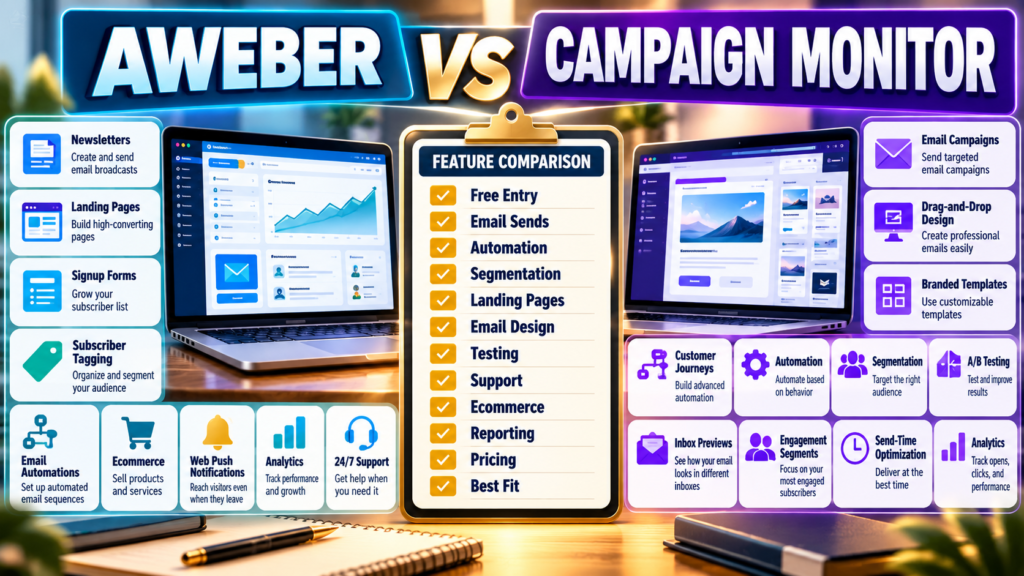
AWeber and Campaign Monitor are both established email-marketing platforms.
Each can help a business:
- Build subscriber lists.
- Send newsletters.
- Automate follow-up.
- Segment contacts.
- Measure campaign performance.
But they emphasize different parts of the email-marketing workflow.
AWeber focuses heavily on creators and small businesses that want email, landing pages, automation, ecommerce, web push, and strong support inside one accessible platform.
Campaign Monitor focuses strongly on email design, branded campaigns, automation journeys, segmentation, testing, and campaign optimization.
The important question is not:
Which company has existed longer?
It is:
Which workflow better matches how you plan to market?
Review Methodology: This comparison is based on official AWeber and Campaign Monitor documentation reviewed on September 25, 2026. No firsthand product testing or personal experience is claimed. Pricing, discounts, plan availability, send limits, and features may change. Verify the current checkout for your exact subscriber count before purchasing.
AWeber’s Current Plan Structure
AWeber’s official support documentation currently describes four plans:
- Free.
- Lite.
- Plus.
- Unlimited.
Its public pricing page currently emphasizes a 14-day trial alongside paid Lite and Plus pricing, while AWeber’s support documentation continues to document the Free plan.
That difference is worth noting:
Verify the actual signup option available when you create the account.
AWeber Free
AWeber’s current support documentation states that Free supports:
- Up to 500 subscribers.
- 3,000 monthly emails.
- One list profile.
- One workflow automation.
If available through your signup path, that can support a very small beginner list.
AWeber Lite Pricing
AWeber currently lists Lite beginning at:
$15/month
or:
$150/year
at the 500-subscriber level.
That level allows:
5,000 monthly email sends.
At 1,000 subscribers:
$25/month
or:
$250/year
with:
10,000 sends.
AWeber Plus Pricing
AWeber Plus currently begins at:
$30/month
or:
$240/year
at 500 subscribers.
That level supports:
6,000 monthly sends.
At 1,000 subscribers:
$45/month
or:
$450/year
with:
12,000 monthly sends.
AWeber Lite Feature Limits
AWeber’s public pricing page currently lists Lite with limits including:
- One email list.
- Three landing pages.
- Three email automations.
- Three users.
- One custom segment.
- 10× subscriber maximum in monthly sends.
That keeps the plan relatively simple.
AWeber Plus
Plus currently expands to:
- Unlimited email lists.
- Unlimited landing pages.
- Unlimited email automations.
- Unlimited custom segments.
- Unlimited users.
- Advanced reporting.
- Priority 24/7 support.
- 12× subscriber maximum in monthly sends.
That is the more appropriate AWeber tier when a business needs multiple automations or lists.
Campaign Monitor’s Current Tiers
Campaign Monitor’s official documentation currently describes:
Lite
Core email marketing with limited sending.
Essentials
Unlimited traditional and automated campaigns with more advanced automation and testing.
Premier
Adds advanced optimization and higher-level support capabilities.
Campaign Monitor Lite
Campaign Monitor currently says Lite includes:
- 2,500 emails for traditional sends.
- Email customer support.
- Drag-and-drop email building.
- Branded emails.
- Analytics.
- Basic marketing automation.
That 2,500-send limit deserves attention.
If you have:
500 subscribers
and send:
5 full-list campaigns,
you can reach 2,500 sends quickly.
Campaign Monitor Essentials
Essentials currently includes:
- Unlimited emails across traditional and automated campaigns.
- Priority email support.
- Advanced marketing automation.
- Inbox previews.
- Time-zone scheduling.
- Spam-filter testing.
- Countdown timers.
For a frequent sender, Essentials may be a more realistic comparison than Lite.
Campaign Monitor Premier
Premier currently adds features such as:
- Premier phone and email support.
- Engagement segments.
- Send-time optimization.
- Advanced link tracking.
- Email-builder locking.
Those tools can matter for larger teams and more controlled brand environments.
Campaign Monitor’s Design Focus
Campaign Monitor emphasizes professional email creation and branded templates.
Its current platform also includes AI-assisted segmentation tools such as Segment Mapper on Essentials, Premier, and Enterprise plans. Campaign Monitor describes Segment Mapper as a plain-language system for creating audience segments from existing subscriber data.
For marketers who care deeply about design and audience targeting:
That may be valuable.
AWeber’s Creator Focus
AWeber includes areas beyond email campaigns.
Its current pricing page lists capabilities such as:
- Landing pages.
- Subscriber tagging.
- Ecommerce.
- Subscriptions and payment plans.
- Web push notifications.
- Sales tracking.
This can make AWeber attractive when the business wants a more creator-oriented toolkit.
Ecommerce
AWeber currently provides native ecommerce tools for:
- Products and services.
- Subscriptions.
- Payment plans.
- Purchase tagging.
- Sales tracking.
Campaign Monitor is much more heavily focused on email campaign management and customer journeys than acting as a direct ecommerce selling platform.
If you already use:
- ThriveCart.
- Shopify.
- WooCommerce.
that distinction may matter less.
Automation
Both platforms automate email.
But compare the kind of automation you need.
AWeber
Useful for:
- Welcome series.
- Tag-triggered sequences.
- Creator funnels.
Campaign Monitor
Essentials and above provide more advanced journey and testing tools.
Do not compare only:
“Both have automation.”
Build the actual journey.
Example Automation
Lead Magnet Signup
↓
Welcome Email
↓
Wait 2 Days
↓
Send Education Email
↓
Segment Based on Click
↓
Offer
If this is all you need:
Either platform may handle it.
If your workflow becomes much more complex:
Compare the exact journey tools.
Email Sending Limits Matter
AWeber uses send allowances tied to the subscriber tier.
Lite:
10× subscriber limit
Plus:
12× subscriber limit.
Campaign Monitor Lite currently has a much more restrictive traditional-send allowance, while Essentials and Premier include unlimited campaigns.
Therefore:
Do not compare only monthly subscription price.
Calculate:
Subscribers × Campaigns per Month
Example
1,000 subscribers.
8 newsletters monthly.
Approximate sends:
8,000
AWeber Lite at 1,000 subscribers supports:
10,000 sends.
Campaign Monitor Lite would not fit an 8,000-send traditional-campaign requirement under its current 2,500-email allowance.
You would need to evaluate a higher Campaign Monitor tier.
Support
AWeber currently emphasizes 24/7 support on its paid plans, with priority service on Plus.
Campaign Monitor Lite currently provides email support.
Essentials provides priority email support.
Premier adds phone support.
If you value direct help:
Compare the actual support included in the tier you will buy.
Landing Pages
AWeber Lite currently includes three landing pages.
Plus includes unlimited landing pages.
Campaign Monitor focuses more heavily on the core campaign and journey workflow.
If landing pages are central to your lead-generation system:
Give this category additional weight.
Segmentation
AWeber Plus currently includes unlimited custom segments.
Campaign Monitor emphasizes segmentation heavily, including AI-assisted Segment Mapper on higher current tiers.
If sophisticated audience targeting matters:
Campaign Monitor deserves close consideration.
AWeber May Fit Better If…
Consider AWeber when:
- You want creator-friendly email marketing.
- Landing pages matter.
- Ecommerce tools matter.
- Web push matters.
- You value strong support.
- Your automation needs are straightforward.
- You want a documented free entry option if available through current signup.
My AWeber Review for Beginners provides additional background.
Affiliate Disclosure: This article contains affiliate links. If you purchase through one of these links, I may earn a commission at no additional cost to you. Affiliate compensation does not determine the conclusions or recommendations presented in this article.
If AWeber matches your requirements, you can review the current AWeber offer through this approved partner link.
Campaign Monitor May Fit Better If…
Consider Campaign Monitor when:
- Email design is especially important.
- Advanced journeys matter.
- Segmentation matters.
- Inbox previews matter.
- Send-time optimization matters.
- Multiple team members need stronger brand control.
- You are willing to choose the tier that supports your actual send volume.
Compare With AWeber vs ActiveCampaign
Your newly verified AWeber vs ActiveCampaign comparison provides a useful comparison if your main requirement is deeper automation.
ActiveCampaign emphasizes a more advanced automation architecture than either AWeber’s simplest workflows or Campaign Monitor’s entry-level plan.
Compare With AWeber vs Constant Contact
Your verified AWeber vs Constant Contact comparison provides another traditional email-marketing alternative if you want to compare simpler small-business email platforms before moving into more advanced journey tools.
A Simple Buying Scorecard
Score each from 1–5:
Entry Cost
Email Send Allowance
Automation
Segmentation
Landing Pages
Email Design
Testing
Ecommerce
Reporting
Support
Ease of Use
Annual Cost
Double-weight your three most important categories.
Conclusion
AWeber and Campaign Monitor both provide established email-marketing platforms, but their strongest use cases differ.
AWeber emphasizes:
Email → Landing Pages → Automations → Creator Ecommerce → Web Push → Support
Campaign Monitor emphasizes:
Email Design → Segmentation → Journeys → Testing → Optimization → Brand Control
The right choice depends heavily on:
- How often you send.
- How complex your automation is.
- Whether you need landing pages or ecommerce.
- How important design and segmentation are.
- What support level you want.
Your Next Action
Write down:
Subscribers: _____
Campaigns Per Month: _____
Expected Monthly Sends: _____
Need Landing Pages?: Yes / No
Need Ecommerce?: Yes / No
Need Advanced Segmentation?: Yes / No
Need Phone Support?: Yes / No
Then identify the actual plan you would need on each platform.
Do not compare:
AWeber Lite
with:
Campaign Monitor Lite
unless both support your real send volume.
Finally, build the same test workflow in each available trial environment:
Signup → Welcome Email → Segment → Follow-Up Campaign
Choose the platform that supports your real sending volume and marketing workflow with the least unnecessary complexity.