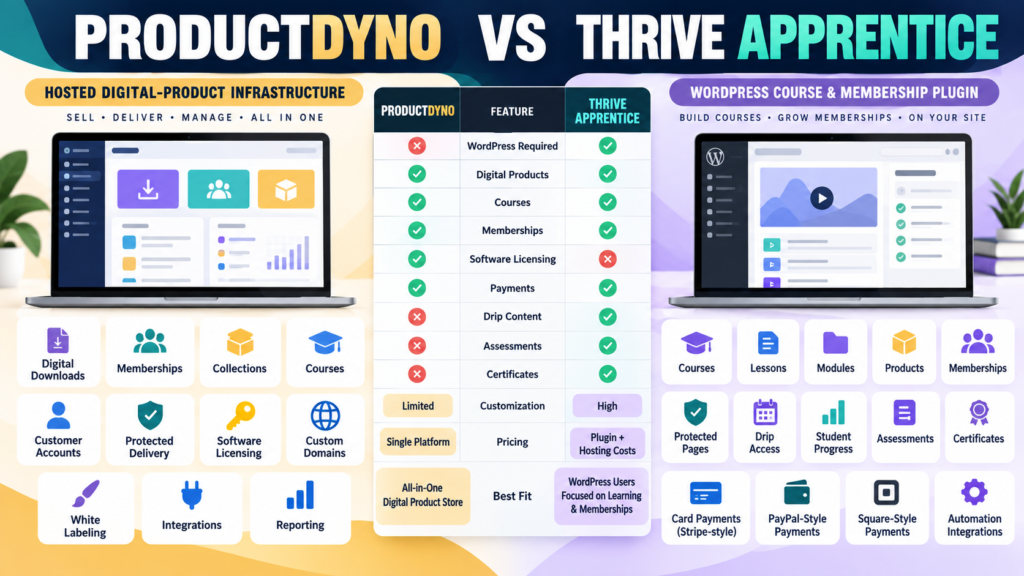
ProductDyno and Thrive Apprentice can both help sell and deliver digital learning products.
But they begin from different architectures.
ProductDyno is a hosted digital-product delivery platform.
Its current principal plans focus on:
- Digital products.
- Memberships.
- Collections.
- Courses.
- Customer access.
- Software licensing.
Thrive Apprentice is a WordPress course and membership plugin.
It lets WordPress become the environment where you create, protect, sell, and manage courses and other protected content. Thrive Themes currently describes the standalone product as appropriate for existing WordPress websites that want course and membership functionality.
That creates the main question:
Do you want your protected product environment hosted separately—or built directly inside WordPress?
Review Methodology: This comparison is based on official ProductDyno and Thrive Themes information reviewed on September 23, 2026. No firsthand product testing or personal experience is claimed. Both companies currently display promotional pricing, and ProductDyno maintains more than one official offer. Verify the checkout attached to the specific promotion you are considering.
ProductDyno Current Principal Pricing
ProductDyno’s current principal pricing page lists:
Starter
$49/month billed annually
Growth Plus+
$69/month billed annually
Teach Pro+
$99/month billed annually.
ProductDyno Core Features
The principal offer currently includes:
- Unlimited digital products.
- Unlimited memberships.
- Unlimited collections.
- Unlimited members/customers.
- Software/SaaS licensing.
- Unlimited custom domains.
- White-label branding removal.
- SSL.
- Integrations.
- Reporting.
- 0% ProductDyno transaction fee.
Teach Pro+ adds the LMS-oriented capability.
ProductDyno Has Another Official Offer
ProductDyno also currently maintains a separate official offer promoting a:
14-day test drive followed by $199/month.
Because multiple official offers exist:
Always verify the checkout attached to the particular ProductDyno promotion you are considering.
Thrive Apprentice Current Standalone Pricing
Thrive Themes currently lists Thrive Apprentice standalone at a promotional:
$149/year
with the normal renewal price shown as:
$299/year.
The standalone license covers:
1 site
and includes a 30-day money-back guarantee under the current offer.
That is significantly less expensive than a full multi-tool WordPress suite if Apprentice is the only Thrive product you need.
Renewal Pricing Matters
Thrive’s pricing page specifically states that renewals occur at the full price.
Therefore:
Do not compare only:
ProductDyno recurring annual-equivalent cost
with:
Thrive Apprentice first-year promotional price.
Calculate both:
Year 1
and:
Renewal Years.
Thrive Apprentice Requires WordPress
This is the most important structural difference.
Thrive Apprentice runs inside WordPress.
Your environment therefore includes:
- Hosting.
- WordPress.
- Thrive Apprentice.
- Theme.
- Security.
- Backups.
- Plugin updates.
ProductDyno hosts its protected delivery system separately.
ProductDyno Separates Delivery From Your Website
With ProductDyno:
Your WordPress site can remain the public-facing marketing site.
ProductDyno can manage:
- Product access.
- Membership environment.
- Collections.
- Course delivery.
- Software licensing.
That separation may reduce the number of customer-access functions running inside WordPress.
Thrive Apprentice Uses a Product Framework
Thrive Apprentice’s current Products system allows you to package:
- One or more courses.
- WordPress pages.
- WordPress posts.
- Other protected content.
into a single sellable or access-controlled product.
A course can also belong to multiple products.
That makes it possible to create:
- Standalone course.
- Bundle.
- Membership level.
- All-access package.
Thrive Apprentice Can Protect More Than Courses
Thrive specifically documents that products can contain:
- Courses.
- Other WordPress content.
- Both together.
This makes Apprentice more than a simple lesson builder.
It can function as a protected-content and membership environment.
Built-In Membership Capabilities
Thrive’s current documentation says Apprentice has built-in membership and payment functionality, and external membership plugins are mainly needed when a business already uses one or requires additional multi-tier access control beyond the native capabilities.
That reduces the need to automatically purchase a separate membership plugin.
Native Payment Options
Thrive Apprentice’s 2026 updates expanded its native payment capabilities.
Its July 2026 release added native PayPal payments alongside Stripe and Square, including support for PayPal subscriptions and free trials.
That makes Thrive Apprentice more self-contained than older comparisons may suggest.
Access Requirements
Thrive Apprentice Products allow access rules based on:
- Payment integrations.
- Custom payment links.
- Manual access.
- Other supported access conditions.
The platform also supports access-expiry controls for time-limited products.
This can support:
- Subscription program.
- Limited-time training.
- Permanent course access.
Membership Integrations Are Still Available
If you already use:
- MemberPress.
- MemberMouse.
- WishList Member.
Thrive Apprentice currently documents integrations with those membership platforms.
That flexibility can be useful for an existing WordPress membership business.
Student and Member Management
Thrive Apprentice’s current Members section provides information such as:
- Member identity.
- Enrollment.
- Last activity.
- Courses.
- Course progress.
- Access rights.
That creates a much more education-centered administrative environment than a simple download-delivery platform.
Courses and Progress
Course creation is a central purpose of Thrive Apprentice.
The platform supports:
- Lessons.
- Modules.
- Course structures.
- Progress tracking.
- Completion behavior.
- Course access controls.
ProductDyno’s Teach Pro+ also supports learning delivery, but courses sit inside ProductDyno’s broader digital-product system.
Assessments and Certificates
Thrive Apprentice’s current documentation includes dedicated areas for:
- Assessments.
- Course completion.
- Certificates.
If structured learning is central to the product:
Those features deserve extra weight.
If you mainly sell:
PDF + Templates + Downloads
they may provide little value.
Drip Content
Thrive Apprentice supports drip and content scheduling as part of its current learning-management environment.
This can support:
- Weekly lessons.
- Membership sequences.
- Scheduled learning paths.
Again:
That is especially useful when the product is a structured learning experience.
Automated Welcome Emails
Thrive Apprentice added automatic course welcome emails in 2026.
Thrive says the email can fire when a learner receives course access, including purchases, manual enrollment, or bundle access, and can include course and login information.
That can reduce basic:
“Where do I start?”
support questions.
Software Licensing
This remains a major ProductDyno distinction.
ProductDyno’s current principal plans include a:
Software/SaaS Licensing Module.
If your catalog includes:
- WordPress plugin.
- Desktop software.
- SaaS.
- License-controlled application.
ProductDyno may fit more naturally.
Thrive Apprentice is fundamentally a WordPress learning and membership product.
Digital Downloads
If your business sells:
- Ebook.
- PDF.
- Template.
- Swipe file.
- Software.
- Course.
ProductDyno is designed to manage a mixed catalog.
Thrive Apprentice can protect non-course WordPress content, but its overall identity remains much more centered on:
Courses + Memberships + Protected WordPress Content
than general-purpose software and download delivery.
Custom Domains and White Labeling
ProductDyno’s current principal offer includes:
- Unlimited custom domains.
- White-label branding removal.
Thrive Apprentice runs within your own WordPress website, so your branding is naturally controlled through your website environment.
These are two different paths to brand control.
Maintenance
This difference should not be overlooked.
ProductDyno
Vendor manages the hosted product-delivery platform.
Thrive Apprentice
You manage:
- WordPress hosting.
- WordPress updates.
- Plugin updates.
- Site backups.
- Security.
- Compatibility.
If low maintenance is important:
Give this category extra weight.
Thrive Apprentice May Fit Better If…
Consider Thrive Apprentice when:
- WordPress is already central to the business.
- Courses are important.
- Memberships are important.
- You want protected WordPress pages and posts.
- Drip content matters.
- Student progress matters.
- Assessments or certificates matter.
- You want extensive visual control over the learning environment.
- You are comfortable maintaining WordPress.
ProductDyno May Fit Better If…
Consider ProductDyno when:
- You sell several types of digital products.
- Hosted product delivery is preferred.
- Software licensing matters.
- Collections matter.
- You want product access separated from WordPress.
- You want fewer membership-specific WordPress dependencies.
My ProductDyno Review for Beginners provides additional background.
Affiliate Disclosure: This article contains affiliate links. If you purchase through one of these links, I may earn a commission at no additional cost to you. Affiliate compensation does not determine the conclusions or recommendations presented in this article.
If ProductDyno matches your digital-product infrastructure requirements, you can review the current ProductDyno offer through this approved partner link.
Compare With LearnDash
Your verified ProductDyno vs LearnDash comparison provides another WordPress LMS alternative.
This can help you understand whether your real choice is:
Hosted Product System
versus:
WordPress LMS
rather than only ProductDyno versus one particular plugin.
Compare With MemberMouse
Your verified ProductDyno vs MemberMouse comparison focuses more heavily on:
- Membership billing.
- Protected WordPress content.
- Subscriptions.
- Member management.
Thrive Apprentice is more strongly course and learning focused.
The Product-Mix Test
Write your planned offers.
Scenario A
- Ebook.
- Templates.
- Membership.
- Mini-course.
- Software tool.
ProductDyno may fit the mixed catalog more naturally.
Scenario B
- Beginner course.
- Advanced course.
- Dripped membership.
- Assessment.
- Certification.
Thrive Apprentice may fit more naturally.
The WordPress Test
Ask:
Do I want customers logging into my own WordPress site for protected content?
If yes:
Thrive Apprentice deserves serious consideration.
If no:
A separate hosted delivery environment may be simpler.
The Maintenance Test
Ask:
Who will maintain the learning site?
If the answer is:
I want the least WordPress maintenance possible
ProductDyno gains weight.
If the answer is:
I want maximum WordPress control and am willing to maintain it
Thrive Apprentice gains weight.
The Cost Test
Compare the complete environment.
Thrive Apprentice
Include:
- $149 promotional first year.
- $299 renewal under the current published pricing.
- WordPress hosting.
- Backup/security.
- Other plugins.
- Email marketing.
ProductDyno
Include:
- Appropriate ProductDyno plan.
- Public website.
- Email platform.
- Checkout/payment tools in your actual workflow.
The cheapest plugin is not automatically the cheapest business system.
A Simple Buying Scorecard
Score each from 1–5:
Digital Downloads
Courses
Memberships
Protected Content
Drip Content
Assessments
Certificates
Software Licensing
WordPress Control
Hosted Delivery
Maintenance
Year-One Cost
Renewal Cost
Ease of Management
Double-weight your three most important categories.
Conclusion
ProductDyno and Thrive Apprentice can both support courses and memberships, but they solve the problem from different directions.
ProductDyno emphasizes:
Digital Products → Hosted Delivery → Memberships → Collections → Courses → Software Licensing
Thrive Apprentice emphasizes:
WordPress → Courses → Products → Memberships → Protected Content → Student Progress → Learning Tools
ProductDyno may fit better when the business has a mixed digital-product catalog and wants hosted delivery.
Thrive Apprentice may fit better when the learning experience itself is central and WordPress should control that experience.
Your Next Action
Write down your next five paid offers.
Mark each:
Download | Course | Membership | Protected Content | Software
Then answer:
Need software licensing? Yes / No
Need assessments? Yes / No
Need certificates? Yes / No
Need drip lessons? Yes / No
Want customers inside WordPress? Yes / No
Want to minimize WordPress maintenance? Yes / No
Next calculate:
Thrive Apprentice Year 1 Cost: _____
Thrive Apprentice Renewal Cost: _____
ProductDyno Annual Cost: _____
plus the other tools each setup genuinely requires.
Finally, map one real customer journey:
Sales Page → Payment → Account → Product/Course Access → Progress → Support
Choose the platform that makes that real journey easiest for you to maintain—not simply the platform with the most features.