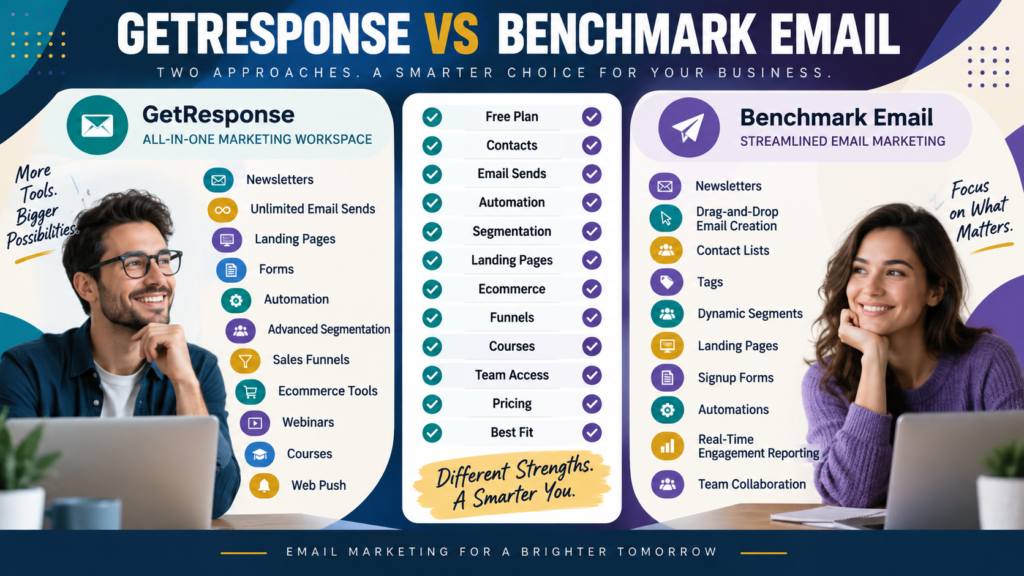
GetResponse and Benchmark Email both help small businesses:
- Collect subscribers.
- Create email campaigns.
- Segment contacts.
- Automate follow-up.
- Build landing pages.
But they package those capabilities differently.
GetResponse is the broader marketing platform.
Its current plans extend into:
- Sales funnels.
- Ecommerce.
- Webinars.
- Courses.
- Web push.
Benchmark Email maintains a simpler core plan structure built primarily around email marketing, contacts, landing pages, segmentation, and automation.
The most useful decision is therefore:
Do you want a broader marketing ecosystem—or a simpler email-focused platform?
Review Methodology: This comparison is based on official GetResponse and Benchmark Email information reviewed on September 12, 2026. No firsthand product testing or personal experience is claimed. Pricing, promotions, contact limits, sending allowances, and features may change. Verify current checkout information before purchasing.
GetResponse’s Current Pricing
GetResponse currently lists:
Starter
$19/month at the entry 1,000-contact level.
Annual billing currently reduces the equivalent monthly cost to:
$15.58/month
Marketer
$59/month
or:
$48.38/month equivalent annually
Creator
$69/month
or:
$56.58/month equivalent annually
GetResponse currently offers an 18% discount for annual billing.
Review GetResponse’s current pricing.
GetResponse Sending Allowance
GetResponse’s current standard paid plans advertise:
Unlimited monthly email sends.
That distinction becomes important for businesses sending frequently.
Cost is driven primarily by:
- Contact tier.
- Feature plan.
rather than a fixed monthly campaign-send allowance.
Benchmark Email’s Current Free Plan
Benchmark Email currently provides a Free plan supporting:
Up to 500 contacts
and allows up to:
Five times the contact limit in monthly sends, which Benchmark states is a maximum of 2,500 emails per month on Free.
That creates a useful permanent entry point for a very small list.
Benchmark Email Pro
Benchmark Email’s current pricing page displays Pro starting at:
$19/month
or approximately:
$16/month on the currently displayed annual billing option
at the entry 1,000-contact level.
Paid plans currently allow approximately:
10 times the selected contact limit in monthly sends.
For 1,000 contacts, that implies a sending allowance based on the 10x rule rather than GetResponse’s unlimited standard sends.
The Sending Models Are Different
This is one of the most important distinctions.
GetResponse
Contact-based pricing + unlimited standard paid-plan sends
Benchmark Email
Contact-based pricing + sending allowance tied to contact tier
A business sending:
4 emails per subscriber each month
may not care much.
A business sending:
15–20 emails per subscriber
should calculate volume carefully.
Example
Suppose you have:
1,000 contacts
and send:
12 campaigns each month.
Approximate send volume:
12,000 emails
GetResponse’s standard paid plans are designed around unlimited sends.
Benchmark’s currently documented 10x paid-plan sending rule would make the exact required tier important.
Do the calculation before buying.
Email Creation
Both platforms provide drag-and-drop email creation.
Benchmark emphasizes streamlined email campaign creation and currently includes AI-assisted content-improvement tools in its email-marketing feature set.
GetResponse also includes visual email creation and AI content tools on its current plans.
For straightforward newsletters, both can perform the core task.
Segmentation
Benchmark currently supports:
- Tags.
- Contact segments.
- Dynamic lists.
Its current feature page emphasizes automatically updated segments and targeting contacts according to relevant criteria.
GetResponse Starter includes basic segmentation, while Marketer expands into advanced audience segmentation.
A beginner using one lead magnet may not need sophisticated segmentation yet.
Landing Pages
Benchmark Email currently includes a drag-and-drop landing-page builder designed to:
- Use templates.
- Embed signup forms.
- Add contacts to lists.
- Connect landing pages with campaigns and automations.
GetResponse includes a landing-page builder on Starter and higher.
Both can therefore support a basic funnel:
Content → Landing Page → Subscriber → Email
Automation
Both platforms provide automation.
GetResponse Starter currently includes:
One custom automation workflow
while Marketer and Creator include unlimited automation workflows.
Benchmark Email also offers automation tools as part of its email-marketing platform.
The practical comparison should focus on the actual workflow you need.
Example:
Signup → Welcome Email → Follow-Up → Offer
Build that workflow during the trial.
Real-Time Engagement
Benchmark’s current feature set includes a contact activity feed designed to show email engagement such as opens and clicks in real time.
That can make simple campaign monitoring easier for businesses that want a direct email-centric workflow.
GetResponse Ecommerce
GetResponse Marketer adds:
- Abandoned cart recovery.
- Sales funnels.
- Promo codes.
- Revenue reporting.
- Product recommendations.
That gives GetResponse a clear broader-commerce advantage when ecommerce automation matters.
Funnels
GetResponse Marketer currently includes sales funnels.
If your business wants:
Lead Capture → Email → Offer → Sale
within one connected platform, that may reduce other software needs.
Benchmark is more strongly centered on email and landing-page marketing.
Courses and Webinars
GetResponse Creator currently includes:
- Webinars.
- Course creator.
- Up to 500 students at its currently displayed entry configuration.
- Premium newsletter subscriptions.
Benchmark Email is not primarily a course or webinar platform.
This difference matters only if you actually need those capabilities.
Benchmark Email May Be Simpler
A broad feature set can create value.
It can also create complexity.
A business wanting primarily:
Subscribers → Newsletter → Segmentation → Basic Automation → Landing Page
may appreciate Benchmark Email’s narrower focus.
GetResponse May Consolidate More Tools
If you also need:
- Sales funnels.
- Ecommerce recovery.
- Webinars.
- Courses.
GetResponse may replace software you would otherwise purchase separately.
Do not compare the platforms as email tools only if your business intends to use those extra functions.
Free Entry
Benchmark Email currently has a permanent Free plan for up to 500 contacts and its documented free sending allowance.
GetResponse currently provides a 14-day trial with access to premium features, after which paid-plan or available account options apply under its current offer.
This can make Benchmark more attractive for a very small list that needs ongoing no-cost basic email.
GetResponse May Fit Better If…
Consider GetResponse when:
- You send frequently.
- Unlimited email sends matter.
- Advanced automation matters.
- Ecommerce marketing matters.
- Funnels matter.
- You want webinars.
- You want courses.
- You want broader tool consolidation.
My GetResponse review for beginners provides more background.
Affiliate Disclosure: This article contains affiliate links. If you purchase through one of these links, I may earn a commission at no additional cost to you. Affiliate compensation does not determine the conclusions or recommendations presented in this article.
If GetResponse matches your requirements, you can review the current GetResponse offer through this approved partner link.
Benchmark Email May Fit Better If…
Consider Benchmark Email when:
- You want a permanent small-list free plan.
- Email campaigns are the primary requirement.
- You want straightforward segmentation.
- Landing pages matter.
- You do not need courses or webinars.
- You send within the plan’s monthly allowance.
- You prefer a narrower email-oriented system.
Compare GetResponse With Other Email Platforms
If you’re still deciding, related comparisons on this site include GetResponse vs ActiveCampaign and GetResponse vs Brevo.
Those alternatives emphasize different combinations of automation, transactional email, and multichannel marketing.
Calculate Send Volume First
Before comparing prices, write:
Contacts: _____
Emails per contact each month: _____
Then calculate:
Contacts × Emails per Contact = Expected Monthly Sends
Example:
2,500 contacts × 8 emails = 20,000 monthly sends
Now compare the plan that actually supports that usage.
A Simple Buying Scorecard
Score each platform from 1–5 for:
Free Entry
Monthly Send Allowance
Automation
Segmentation
Landing Pages
Ecommerce
Funnels
Courses/Webinars
Ease of Use
Total Cost
Double-weight your top three requirements.
Conclusion
GetResponse and Benchmark Email can both serve a small online business, but their strengths are different.
GetResponse offers a broader marketing environment:
Email → Automation → Landing Pages → Funnels → Ecommerce → Webinars → Courses
Benchmark Email offers a more focused email environment:
Email → Contacts → Segmentation → Landing Pages → Automation → Reporting
GetResponse may fit better when you want more of the marketing stack consolidated into one platform.
Benchmark Email may fit better when you want simpler email marketing and its current sending limits match your usage.
Your Next Action
Write down:
Current Contacts: _____
Expected Contacts in 12 Months: _____
Emails Per Month: _____
Need Ecommerce Automation?: Yes / No
Need Funnels?: Yes / No
Need Courses/Webinars?: Yes / No
Calculate your expected monthly email volume.
Then compare:
GetResponse plan required
with:
Benchmark Email plan required
at both your current and projected list size.
If your decision is still close, build the same workflow in both available trial/free environments:
Signup Form → Landing Page → Welcome Email → Follow-Up Campaign
Choose the system you can maintain most easily at the volume you actually expect to send.