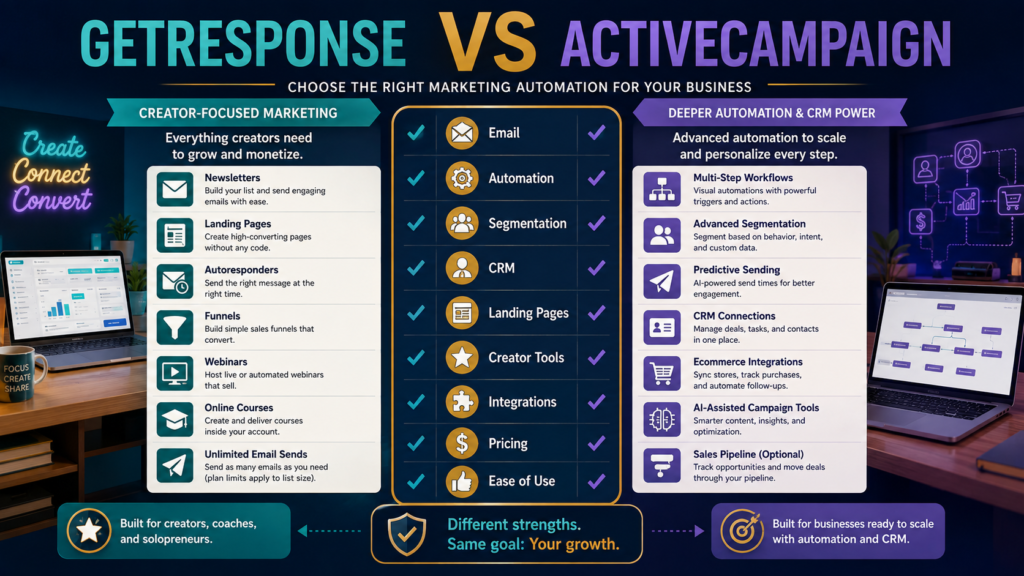
GetResponse and ActiveCampaign both go far beyond basic newsletter sending.
Each can handle:
- Email campaigns.
- Automations.
- Subscriber segmentation.
- Forms.
- Integrations.
- Landing-page-related workflows.
The difference becomes clearer when you look at what each platform emphasizes.
GetResponse currently combines email marketing with landing pages, funnels, ecommerce automation, webinars, course creation, premium newsletters, and other creator-oriented capabilities depending on plan.
ActiveCampaign emphasizes deeper marketing automation, segmentation, integrations, predictive and conditional capabilities, and optional CRM, transactional email, SMS, and other add-ons.
For a small online business, the better platform is not simply the one with the longer feature list.
It depends on whether your center of gravity is:
creator marketing and monetization
or
advanced automation and customer orchestration.
Review Methodology: This comparison is based on official product information, current documentation, and publicly available details reviewed on August 18, 2026. No firsthand product testing or personal experience is claimed.
Key Takeaways
- Both platforms support email marketing and automation.
- GetResponse Starter currently includes unlimited monthly email sends, a welcome series, one custom automation workflow, landing pages, forms, and popups.
- GetResponse Marketer adds unlimited workflows, advanced segmentation, abandoned-cart recovery, funnels, and additional ecommerce features.
- GetResponse Creator adds webinars, a website builder, course creation, up to 500 students, and premium newsletters.
- ActiveCampaign Starter currently limits automations to five actions per workflow, while higher plans expand automation and segmentation capabilities.
- ActiveCampaign supports more than 1,000 integrations according to its current pricing page and provides optional enhanced CRM, SMS, transactional email, and custom-reporting packages.
- ActiveCampaign offers a 14-day free trial.
- GetResponse also currently offers a 14-day free trial.
Affiliate Disclosure: This article contains affiliate links. If you purchase through one of these links, I may earn a commission at no additional cost to you. Affiliate compensation does not determine the conclusions or recommendations presented in this article.
What Is GetResponse?
GetResponse is an email-marketing and marketing-automation platform that has expanded toward creator and ecommerce workflows.
Its current core plans are:
- Starter.
- Marketer.
- Creator.
- Enterprise.
You can explore GetResponse’s current marketing and automation features through Michael’s approved affiliate link.
What Is ActiveCampaign?
ActiveCampaign is positioned around marketing automation and customer engagement.
Its current base email plan structure includes:
- Starter.
- Plus.
- Professional.
- Enterprise.
It also offers separate or optional capabilities for:
- Enhanced CRM.
- SMS.
- Transactional email.
- Custom reporting.
- WhatsApp-related plans and functionality.
That modular structure is important.
You may not need every part.
The Core Difference
A useful simplification:
GetResponse
Email + funnels + creator monetization + marketing automation
ActiveCampaign
Email + deeper automation + segmentation + extensible customer workflows
That is not an absolute boundary.
Both overlap substantially.
But it explains why different businesses may prefer them.
Email Sending
GetResponse’s current core paid plans list unlimited monthly email sends.
ActiveCampaign’s current pricing model uses email-send limits tied to contact levels and plans; its public feature table shows multipliers such as 10x, 12x, or 15x the contact limit depending on tier.
That can matter if you send very frequently.
Do the math using your actual list and schedule.
Automation
This is where ActiveCampaign receives much of its attention.
Its current plan documentation says:
Starter
- Marketing automation.
- Five actions per automation.
- Limited segmentation.
Plus
- More advanced automation.
- Landing pages.
- Broader segmentation.
- Additional optimization features.
Professional
- Advanced automation triggers/actions.
- Advanced segmentation.
- Automation A/B testing.
- Conditional content.
- Predictive sending.
- Attribution and conversion tracking.
GetResponse Starter currently includes one custom automation workflow, while Marketer and Creator include unlimited workflows.
Which Automation Is Actually Better?
That depends on the workflow.
Example:
Simple Creator Workflow
Lead magnet → welcome series → product recommendation.
GetResponse can handle that without requiring a highly complex system.
Advanced Behavioral Workflow
Subscriber visits page → tag changes → score increases → branch by behavior → conditional content → ecommerce action → sales-team follow-up.
ActiveCampaign may deserve stronger consideration.
Do not buy advanced automation until you know what you want to automate.
Segmentation
ActiveCampaign’s higher tiers place considerable emphasis on segmentation and personalization, including advanced segmentation, conditional content, and AI-assisted segmentation tools.
GetResponse Marketer and Creator currently include advanced audience segmentation.
If your list has:
- 500 subscribers.
- One lead magnet.
- One product.
you may not need an extremely elaborate segmentation model.
CRM
ActiveCampaign’s current structure is worth checking carefully because some enhanced CRM capabilities are now sold as add-on packages rather than simply assuming that every plan includes every sales feature.
Its current documentation describes Pipelines Enhanced CRM and Sales Engagement Enhanced CRM add-ons for qualifying base plans.
This means buyers should verify:
Does the plan I am considering include the sales functionality I actually need, or is it an add-on?
Do not rely on an old comparison article.
Creator Features
This is one of GetResponse’s clearer distinctions.
Its Creator plan currently includes:
- Webinars.
- Website builder.
- Course creator.
- Up to 500 students.
- Premium newsletter subscriptions.
That can be attractive if you sell knowledge products.
ActiveCampaign focuses more heavily on marketing orchestration rather than trying to become your course platform.
Landing Pages
Both platforms offer landing-page functionality at relevant levels.
GetResponse includes its landing-page builder across the listed Starter, Marketer, and Creator tiers.
ActiveCampaign’s Plus and higher plan feature sets include landing pages; its current pricing structure should be checked for your specific configuration.
Ecommerce
Both can integrate with ecommerce.
GetResponse Marketer includes:
- Abandoned-cart recovery.
- Sales funnels.
- Promo codes.
- Revenue reporting.
ActiveCampaign’s current features include ecommerce integrations such as Shopify, WooCommerce, and Square, with broader integrations available on higher configurations.
Integrations
ActiveCampaign currently advertises 1,000+ integrations, including tools across ecommerce, CRM, productivity, advertising, and automation.
This can matter to a business with a more complex software environment.
If your stack has six tools, you may not need 1,000 integrations.
You need the six that matter.
AI Capabilities
ActiveCampaign’s current pricing materials emphasize its Active Intelligence capabilities, including AI-powered campaign and automation tools, suggested segments, content generation, and additional features depending on plan.
GetResponse currently includes AI-powered content generation across its core paid plans and broader AI functionality in its ecosystem.
Again, AI should not decide the platform by itself.
Ask what recurring job it improves.
Pricing
GetResponse pricing varies by:
- Plan.
- Contact count.
- Billing period.
- Locale/currency.
Its current official pricing page shows an 18% annual-billing discount option and a 14-day free trial.
ActiveCampaign says email-marketing packages start at $15/month, with pricing scaling by contact volume and feature needs, and it currently offers a 14-day free trial.
Because both platforms scale with usage and configuration, compare your actual scenario.
Compare at Your Real List Size
Run:
1,000 Contacts
What does the required plan cost?
5,000 Contacts
What changes?
10,000 Contacts
What changes?
Then include:
- Add-ons.
- Additional users.
- SMS.
- CRM.
- Transactional email.
- Annual discounts.
The “starts at” price is not the entire ownership cost.
GetResponse May Reduce Separate Creator Tools
If you genuinely use:
- Webinars.
- Course creation.
- Landing pages.
- Premium newsletters.
GetResponse Creator may replace separate subscriptions.
If you already use dedicated systems for all of those jobs, the overlap may provide little benefit.
ActiveCampaign May Reduce Automation Workarounds
If your existing platform cannot handle:
- Behavioral branching.
- Advanced segmentation.
- Predictive sending.
- Connected automations.
ActiveCampaign’s more sophisticated automation environment may reduce manual work.
That is valuable only if you use it.
Existing GetResponse Reviews
MichaelELeeReviews has a dedicated GetResponse review for beginners in its verified library.
There is also a GetResponse vs. AWeber comparison for beginners.
Those provide context if your decision is between a simpler email environment and GetResponse.
Use the Free Trials as Experiments
Do not spend the trial clicking menus.
Build one workflow.
Test
- Create a list.
- Build a signup form.
- Create a landing page.
- Add three welcome emails.
- Build one automation.
- Create two segments.
- Track one test subscriber.
- Edit the workflow.
- Review reports.
- Record the time required.
The site’s software free-trial evaluation guide provides a repeatable method for this kind of test.
Who Should Consider GetResponse?
GetResponse may fit better if:
- You want email plus funnels.
- You sell courses or knowledge products.
- Webinars matter.
- Unlimited email sending is attractive.
- You prefer more creator tools in one platform.
- Your automation needs are meaningful but not highly complex.
Who Should Consider ActiveCampaign?
ActiveCampaign may fit better if:
- Advanced automation is central.
- Segmentation is sophisticated.
- You need extensive integrations.
- Predictive/conditional functionality matters.
- Sales-pipeline functionality may be needed through add-ons.
- You want a modular automation platform that can expand.
Final Verdict
Choose GetResponse when your business centers on content, email, funnels, webinars, newsletters, and digital knowledge products and you value consolidating several creator-marketing jobs.
Choose ActiveCampaign when automation depth, behavioral segmentation, integrations, and customer-journey orchestration are more important than having course or webinar creation inside the email platform.
A small creator should not pay for automation complexity merely to say the business has sophisticated automation.
Choose the platform whose workflow you can actually maintain.
Conclusion
GetResponse and ActiveCampaign are both capable marketing platforms.
The decision becomes easier when you draw the customer journey you intend to build.
If the journey looks like:
Lead magnet → welcome emails → useful content → product offer
GetResponse may provide more than enough.
If it looks like:
Multiple behaviors → scores → branches → dynamic segments → cross-channel actions → CRM follow-up
ActiveCampaign deserves closer evaluation.
Build the workflow first.
Then choose the software.