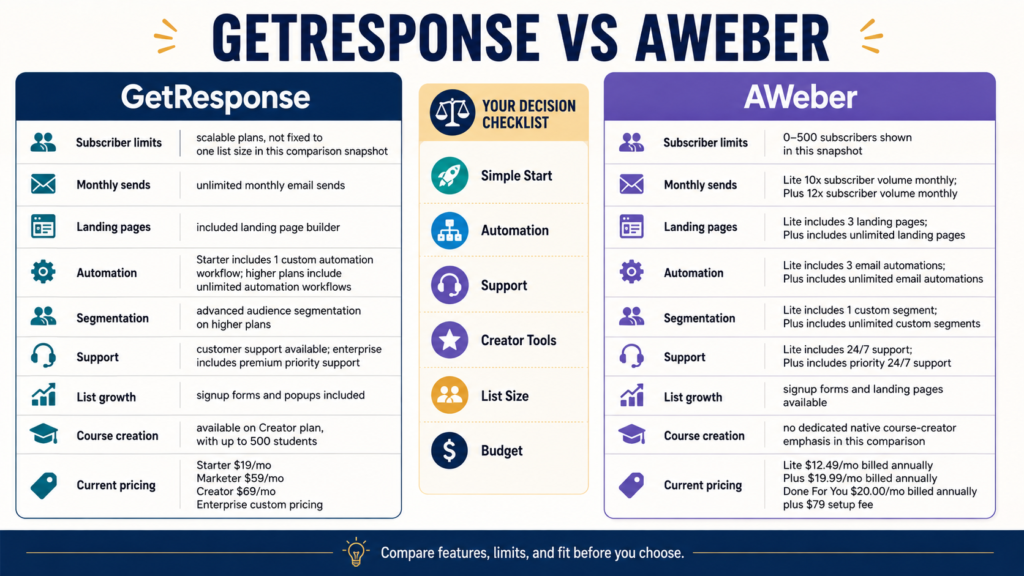
GetResponse and AWeber can both handle the basic email-marketing jobs a beginner is likely to need: collecting subscribers, sending newsletters, creating landing pages, and setting up automated email follow-up.
The better choice depends on what you expect the business to need next.
AWeber may appeal more to a beginner who values a straightforward email-first platform, smaller-list plan options, and strong access to customer support. GetResponse may appeal more to a creator who expects to expand into more sophisticated automation, sales funnels, webinars, premium newsletters, or course creation within the same ecosystem.
Current plan pricing and feature limits differ significantly, so the exact answer changes according to your list size and workflow.
Review Methodology: This comparison is based on current official GetResponse and AWeber pricing pages, help documentation, and publicly available platform information reviewed on August 9, 2026. No firsthand deliverability testing, customer-support experience, campaign results, or personal platform testing is claimed.
Affiliate Disclosure: This article contains affiliate links. If you purchase through one of these links, I may earn a commission at no additional cost to you. Affiliate compensation does not determine the conclusions or recommendations presented in this article.
Key Takeaways
- Both platforms support beginner email-list building.
- GetResponse’s current Starter plan begins at 1,000 contacts and includes unlimited monthly email sends, landing pages, a welcome series, and one custom automation workflow.
- AWeber currently offers Free, Lite, and Plus pathways, with Lite starting at $15 monthly for up to 500 subscribers and 5,000 sends, while Plus adds broader unlimited-feature allowances.
- GetResponse becomes substantially broader on Marketer and Creator plans.
- AWeber emphasizes email marketing, landing pages, automation, and support.
- The lowest advertised price is not enough information to make the decision.
GetResponse at a Glance
GetResponse’s current standard plans are:
- Starter.
- Marketer.
- Creator.
- Enterprise.
For 1,000 contacts, its current public pricing page displays:
- Starter: $19 monthly, or $15.58 per month when billed annually.
- Marketer: $59 monthly, or $48.38 per month annually.
- Creator: $69 monthly, or $56.58 per month annually.
Prices can change, and taxes may apply.
Starter Currently Includes
GetResponse lists:
- Unlimited monthly email sends.
- AI-powered content generators.
- Welcome email series.
- One custom automation workflow.
- Landing-page builder.
- Signup forms and popups.
That is enough for many beginner list-building systems.
AWeber at a Glance
AWeber’s current pricing structure includes Free, Lite, Plus, and higher-capacity options.
Its official pricing documentation currently shows Lite at:
- $15 monthly for 500 subscribers and up to 5,000 sends.
- $25 monthly for 1,000 subscribers and up to 10,000 sends.
AWeber Plus is:
- $30 monthly for 500 subscribers and up to 6,000 sends.
- $45 monthly for 1,000 subscribers and up to 12,000 sends.
Annual billing reduces the effective monthly cost.
Compare the Smallest Beginner Setup
Imagine you need:
- One lead magnet.
- One landing page.
- One welcome sequence.
- Weekly newsletter.
- 300 subscribers.
AWeber’s smaller-list options may be attractive because its paid tiers begin below GetResponse’s 1,000-contact standard pricing point.
However, compare features carefully.
A lower subscriber tier is useful only if the plan includes the automation, landing-page, branding, and segmentation features you need.
Compare Email Sending
GetResponse’s current Starter, Marketer, and Creator plans list unlimited monthly email sends.
AWeber uses subscriber-based sending allowances.
Its current official documentation says Lite allows monthly sends equal to ten times the subscriber limit, while Plus allows twelve times the subscriber limit.
For example:
1,000-subscriber AWeber Lite:
Up to 10,000 monthly sends.
1,000-subscriber AWeber Plus:
Up to 12,000 monthly sends.
This matters if you email frequently.
Compare Landing Pages
Both platforms offer landing pages.
GetResponse Starter currently includes a landing-page builder.
AWeber Lite has plan limits around landing pages, while Plus currently provides unlimited landing pages. AWeber’s current plan information identifies Plus as the broader tier for unlimited landing pages and automation.
A beginner with one lead magnet may not care.
A creator building many campaigns might.
Compare Automation
GetResponse Starter currently includes one custom automation workflow.
Marketer and Creator include unlimited automation workflows.
AWeber Lite provides more limited automation functionality.
Plus provides unlimited email automations.
Ask:
- How many sequences will I build?
- Do I need branching?
- Do I need advanced segmentation?
- Do I need ecommerce behavior?
- Do I need only a welcome series?
Do not pay for unlimited automation if you have one sequence.
Compare Advanced Segmentation
GetResponse currently places advanced audience segmentation on Marketer and Creator rather than Starter.
AWeber’s Plus plan includes unlimited custom segments, while Lite and Free have limitations.
For a small list, sophisticated segmentation may be unnecessary.
You may initially need only:
- Lead-magnet tag.
- Buyer tag.
- Product-interest tag.
Compare Sales Funnel Features
GetResponse Marketer currently includes sales funnels, abandoned-cart recovery, promo codes, and revenue reporting.
That may appeal to ecommerce or funnel-focused businesses.
AWeber remains more strongly centered on email, landing pages, automations, subscriber management, and sales tracking rather than positioning itself as the same type of all-in-one funnel ecosystem.
If sales funnels are central to your future strategy, GetResponse deserves a closer look.
Compare Course and Creator Features
This is one of the clearest differences.
GetResponse Creator currently includes:
- Webinars.
- Website builder.
- Course creator.
- Up to 500 students.
- Premium newsletter subscriptions.
AWeber does not currently position its Plus plan around native course creation in the same way.
If your future system includes:
- Email.
- Paid newsletter.
- Webinar.
- Course.
GetResponse Creator may reduce the number of separate platforms.
If you already use ProductDyno for courses, you may not need those extras.
Compare Free and Trial Access
GetResponse currently offers a 14-day trial period with access to premium functionality, subject to specific trial limits.
AWeber currently advertises a 14-day paid-feature trial and also maintains Free-plan eligibility for smaller accounts subject to limits such as fewer than 500 subscribers and restricted landing pages and automations.
Testing both is reasonable.
Use the same workflow.
Compare Customer Support
AWeber’s current website emphasizes 24/7 support and includes phone, chat, and email support information.
GetResponse’s current pricing FAQ describes support availability through live chat at defined hours, a 24/7 chatbot, and 24/7 email support in several languages for its Free/trial environment, with broader support structures depending on plan.
Support arrangements can change.
Verify the channel included with your plan.
Test the Exact Same Workflow
Create this in both systems:
Step 1
Create a list.
Step 2
Build one landing page.
Step 3
Create a signup form.
Step 4
Add a test subscriber.
Step 5
Deliver a lead magnet.
Step 6
Build three welcome emails.
Step 7
Create one tag or segment.
Step 8
Send a newsletter.
Step 9
Review reports.
Step 10
Export the contacts.
Which system feels easier to you?
That is more important than which vendor claims to be easiest.
A Simple Retiree-Business Scenario
Imagine a retired teacher who needs:
- One free checklist.
- 400 subscribers.
- Three welcome emails.
- Two newsletters per month.
- One ebook promotion.
AWeber Lite or even qualifying Free functionality could be sufficient initially, depending on the exact feature limits.
Now imagine the same creator plans:
- Several automation workflows.
- Sales funnels.
- Webinars.
- Course creation.
- Premium newsletter.
GetResponse Marketer or Creator becomes more relevant because those features are built into its current higher plans.
Neither scenario makes one platform universally better.
Compare 1,000-Subscriber Pricing Carefully
At 1,000 subscribers:
GetResponse Starter currently lists $19 monthly or $15.58 per month when billed annually.
AWeber Lite currently lists $25 monthly for 1,000 subscribers, or $250 annually.
AWeber Plus lists $45 monthly or $450 annually at 1,000 subscribers.
But this is not an apples-to-apples feature comparison.
GetResponse Starter has one custom workflow.
AWeber Plus includes more unlimited functionality.
GetResponse Marketer includes substantially more automation and funnel features.
Compare the plan you would actually need.
When GetResponse May Be the Better Fit
Consider GetResponse when you expect to need:
- Unlimited sends.
- Broader automation.
- Sales funnels.
- Advanced segmentation.
- Ecommerce tools.
- Webinars.
- Course creator.
- Premium newsletters.
You can review GetResponse’s current plans and features before selecting a tier.
Do not automatically choose Creator merely because it contains more features.
When AWeber May Be the Better Fit
Consider AWeber when you value:
- Email-focused workflow.
- Smaller-list starting options.
- Landing pages.
- Automations.
- Strong support emphasis.
- Straightforward subscriber-based tiers.
You can review AWeber’s current email-marketing options.
Verify the exact Lite, Plus, and Free limits at the time of signup.
Important Limitations of This Comparison
This comparison does not measure:
- Deliverability.
- Inbox placement.
- Editor preference.
- Actual support quality.
- Automation reliability.
- Email-open rates.
- Conversion rates.
Those would require controlled firsthand testing.
Vendor pricing and feature pages tell us what is offered, not how every user will experience it.
Buying Checklist
Before choosing:
- How many subscribers do I have?
- How many emails will I send?
- How many automation workflows?
- Do I need advanced segmentation?
- Do I need unlimited landing pages?
- Do I need sales funnels?
- Do I need ecommerce recovery?
- Do I need courses?
- Do I need webinars?
- Which support channels matter?
- What will my list size be in one year?
- What will that plan cost?
- Can I export contacts?
- Have I tested the editor?
Final Verdict
For a beginner building only an email list, lead magnet, and welcome sequence, both GetResponse and AWeber are realistic options.
AWeber may be especially attractive for someone who wants an email-centered platform, smaller initial list tiers, and strong support access.
GetResponse may be stronger for someone whose long-term plan includes more sophisticated automation, funnels, webinars, courses, or paid newsletters.
The best choice is the lowest-complexity plan that supports what you are actually going to build.
Conclusion
GetResponse vs. AWeber is not a question with one universal winner.
GetResponse currently offers a broader path into automation, funnels, webinars, and course monetization, while AWeber provides a focused email-marketing environment with smaller-list pricing options and broad Plus-plan functionality.
Write down the five email functions you need during the next twelve months, then test those exact functions in both platforms before committing to the long-term plan.