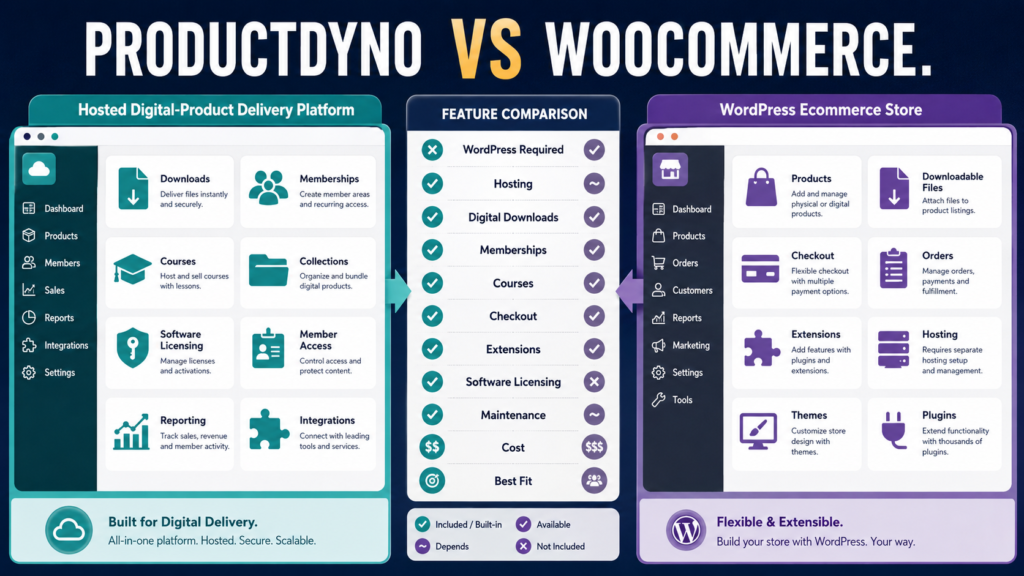
ProductDyno and WooCommerce can both be used in a digital-product business.
They are not the same type of platform.
ProductDyno is a hosted digital-product creation, protection, delivery, membership, collection, course, and licensing environment. WooCommerce is a free, open-source ecommerce platform built for WordPress that can sell physical, virtual, and downloadable products and can be expanded through extensions.
That difference affects almost every part of the buying decision.
Choose between them by deciding whether you want:
A specialized hosted digital-product system
or:
A WordPress ecommerce system you control and extend yourself.
Review Methodology: This comparison is based on official ProductDyno and WooCommerce information reviewed on September 2, 2026. No firsthand product testing or personal product-use claim is made. Pricing, promotions, extension costs, and features may change, so verify the current offer before purchasing.
ProductDyno’s Core Approach
ProductDyno is designed specifically around digital-product businesses.
Its current feature information highlights capabilities such as:
- Digital products.
- Memberships.
- Collections.
- Member management.
- Access management.
- Courses and LMS functionality.
- Integrations.
- Reporting.
- Custom domains.
- Built-in licensing.
- Checkout tools.
- Content protection.
ProductDyno’s current pricing page lists Starter, Growth Plus+, and Teach Pro+ annual plans, with the displayed promotional equivalents currently starting at $49 per month billed annually for Starter. The page states that the listed plans include unlimited digital products, memberships, collections, members/customers, software/SaaS licensing, custom domains, integrations, and zero ProductDyno transaction fees.
You can check the latest details on ProductDyno’s official pricing page.
WooCommerce’s Core Approach
WooCommerce begins from WordPress.
The core WooCommerce platform is currently free and open source.
WooCommerce’s official pricing guidance states that the core platform has no monthly subscription and no WooCommerce platform revenue share, while the business is responsible for costs such as hosting, payment processing, and any premium extensions it chooses to add.
Review the current structure on WooCommerce’s official pricing page.
That sounds inexpensive—and it can be.
But “free core software” and “free complete ecommerce business” are not the same thing.
WordPress Is the Biggest Architectural Difference
WooCommerce requires WordPress.
That means you are responsible for a technology stack that may include:
- Web hosting.
- WordPress.
- WooCommerce.
- Theme.
- Plugins.
- Backups.
- Security.
- Updates.
- Payment gateway.
- Email integration.
- Membership extension.
- Course plugin.
- Additional digital-delivery tools.
If you already run a WordPress website comfortably, that may be an advantage.
You keep more control.
If you want the product-delivery environment to be largely separated from your WordPress maintenance, ProductDyno may be more attractive.
Selling Digital Downloads
WooCommerce’s core plugin supports virtual and downloadable products.
Its documentation allows store owners to attach downloadable files, set download limits, set expiration periods, and configure how digital files are delivered.
That means you do not necessarily need a premium extension merely to sell a basic PDF or downloadable ZIP file.
For a simple product such as:
Customer Pays → Download Becomes Available
WooCommerce may already cover the core transaction.
ProductDyno goes further toward an integrated protected-product environment.
That can matter when you want:
- Member accounts.
- Product libraries.
- Collections.
- Courses.
- More controlled access.
- Software licensing.
Checkout Flexibility
WooCommerce is fundamentally an ecommerce platform.
That gives it tremendous flexibility.
You can sell:
- Physical products.
- Digital products.
- Services.
- Subscriptions with appropriate extensions.
- Variable products.
- Mixed physical and digital orders.
ProductDyno is more specialized around digital goods and customer access.
A store selling:
T-shirts + books + digital downloads + consulting
may find WooCommerce’s broad commerce architecture more natural.
A business selling:
Ebooks + courses + memberships + software + templates
may find ProductDyno’s specialization more convenient.
Hosting Responsibility
WooCommerce gives you control over hosting.
WooCommerce’s own pricing guidance currently estimates typical hosting in a broad range depending on store needs and performance, while emphasizing that the merchant chooses the provider.
Control is useful because you can:
- Upgrade hosting.
- Change providers.
- Tune performance.
- Manage backups.
- Control server configuration.
It also means you are responsible when something breaks.
ProductDyno places the product-delivery infrastructure inside its hosted platform.
That reduces some server-management responsibility.
Extensions Can Change WooCommerce’s Real Cost
WooCommerce core is free.
Many advanced functions are not necessarily included in core.
WooCommerce’s pricing page currently describes extensions as optional à-la-carte additions, with paid extensions often carrying annual fees.
Depending on the business, you might add tools for:
- Memberships.
- Subscriptions.
- Advanced checkout.
- Marketing automation.
- Bookings.
- Licensing.
- Specialized reporting.
- Product bundles.
This can create a highly customized system.
It can also create plugin cost and maintenance.
Do not compare:
ProductDyno annual subscription
with:
WooCommerce = $0
unless the free WooCommerce core genuinely performs every job your business requires.
Memberships
ProductDyno includes membership-building functionality within its current plan structure.
WooCommerce can support memberships through additional extensions.
For example, WooCommerce’s official Memberships extension can restrict posts, pages, custom content types, and products to members, and recurring memberships can be combined with WooCommerce Subscriptions.
That gives WooCommerce substantial flexibility.
But it also shows the difference in architecture:
ProductDyno: memberships are a native part of the product-delivery environment.
WooCommerce: memberships can be added to the WordPress ecommerce system.
Online Courses
If your digital products include courses, compare the complete learner experience.
ProductDyno’s higher-level course/LMS functionality includes features promoted around learning management, progress, quizzes, communication, and related course tools.
WooCommerce itself is not primarily a learning-management system.
A WordPress course business normally combines WooCommerce with an LMS or course extension.
That can be powerful.
It also means more components.
Ask:
“Do I want one specialized environment or a modular WordPress stack?”
Software Licensing
ProductDyno’s built-in licensing capability is one of the clearer differences.
Its current plan information includes a Software/SaaS Licensing Module across the listed plans.
This can be important if you sell:
- WordPress plugins.
- Desktop software.
- SaaS access.
- Licensed digital tools.
WooCommerce can be extended to support software licensing through extensions or integrations, but basic WooCommerce core should not be treated as equivalent to a specialized licensing platform.
If licensing is essential, compare the actual implementation before choosing.
Product Collections
ProductDyno can organize products into collections.
That can make sense when a customer buys several products over time and you want them available through a unified product-access environment.
For example:
Creator Toolkit Collection
- Ebook.
- Worksheets.
- Templates.
- Mini-course.
- Bonus videos.
WooCommerce can sell bundles and grouped offers through its ecommerce ecosystem, but the customer-access experience depends on the specific WordPress configuration and extensions.
Maintenance
This is where your personal business preferences matter.
ProductDyno Maintenance
You manage:
- Product setup.
- Content.
- Integrations.
- Customer access.
- Platform configuration.
The vendor manages the core hosted application.
WooCommerce Maintenance
You may also manage:
- WordPress updates.
- Plugin updates.
- Theme compatibility.
- Hosting.
- Security.
- Backups.
- Performance.
- Extension conflicts.
A technically comfortable WordPress owner may accept that responsibility gladly.
A solo creator trying to minimize maintenance may prefer a hosted environment.
Long-Term Ownership and Flexibility
WooCommerce has an important strategic strength:
Control.
Because it is open-source WordPress software, you can:
- Change hosting.
- Change themes.
- Add extensions.
- Customize code.
- Hire developers.
- Build unusual workflows.
ProductDyno offers less infrastructure-level control because you are using a hosted platform.
But the tradeoff is simplicity.
Flexibility is valuable only when you need it.
ProductDyno May Fit Better When…
ProductDyno deserves closer consideration if:
- You primarily sell digital products.
- You want hosted delivery.
- You want memberships built into the same environment.
- You want product collections.
- You sell courses.
- Software licensing matters.
- You want fewer WordPress dependencies.
- You want less plugin maintenance.
If you need more background, my ProductDyno review for beginners explains the platform’s basic role.
Affiliate Disclosure: This article contains affiliate links. If you purchase through one of these links, I may earn a commission at no additional cost to you. Affiliate compensation does not determine the conclusions or recommendations presented in this article.
If those requirements match your business, you can review ProductDyno through this approved partner link.
WooCommerce May Fit Better When…
WooCommerce deserves closer consideration if:
- You already use WordPress.
- You want maximum control.
- You sell physical and digital products.
- You want a flexible ecommerce store.
- You are comfortable maintaining plugins.
- You need unusual customizations.
- You prefer adding functionality as needed.
- You want to choose your own hosting.
Compare ProductDyno With Other Hosted Alternatives
If the main reason you are considering WooCommerce is digital-product checkout and delivery rather than WordPress itself, compare other hosted platforms too.
For example, my ProductDyno vs SendOwl comparison examines two more specialized digital-commerce approaches.
If online courses are more important than a general ecommerce store, the ProductDyno vs Kajabi comparison explores a different all-in-one alternative.
Compare Total Cost, Not Sticker Price
Create a three-year estimate.
For ProductDyno include:
- Subscription.
- Relevant add-ons.
- Checkout/payment processing.
- Connected email software.
For WooCommerce include:
- Hosting.
- Domain.
- Premium theme if used.
- Membership extensions.
- Subscription extensions.
- LMS.
- Backup/security services.
- Developer help.
- Payment processing.
- Email integration.
Some businesses may find WooCommerce less expensive.
Others may discover that several premium extensions plus hosting and maintenance make the hosted alternative more attractive.
Use the Maintenance Test
Ask yourself:
If an important plugin stops working after a WordPress update, do I want to troubleshoot that problem?
If the answer is:
“Yes. I want the flexibility and control.”
WooCommerce may fit your style.
If the answer is:
“No. I want to focus on products and customers.”
A specialized hosted platform becomes more appealing.
Conclusion
ProductDyno and WooCommerce can both support a digital-product business, but they solve the problem from different directions.
ProductDyno provides a hosted environment designed around digital products, memberships, collections, courses, customer access, and software licensing.
WooCommerce provides a flexible open-source ecommerce foundation inside WordPress, with digital downloads available in core and a large extension ecosystem for additional capabilities.
Choose ProductDyno when specialization and lower infrastructure maintenance matter more.
Choose WooCommerce when WordPress ownership, customization, broad ecommerce flexibility, and control matter more.
Before deciding, write down the complete workflow you need:
Product Creation → Sales Page → Checkout → Payment → Delivery → Account Access → Membership or Course → Updates → Support
Then identify how many separate tools each approach requires to complete that workflow.
The simpler answer for your business may become much clearer.