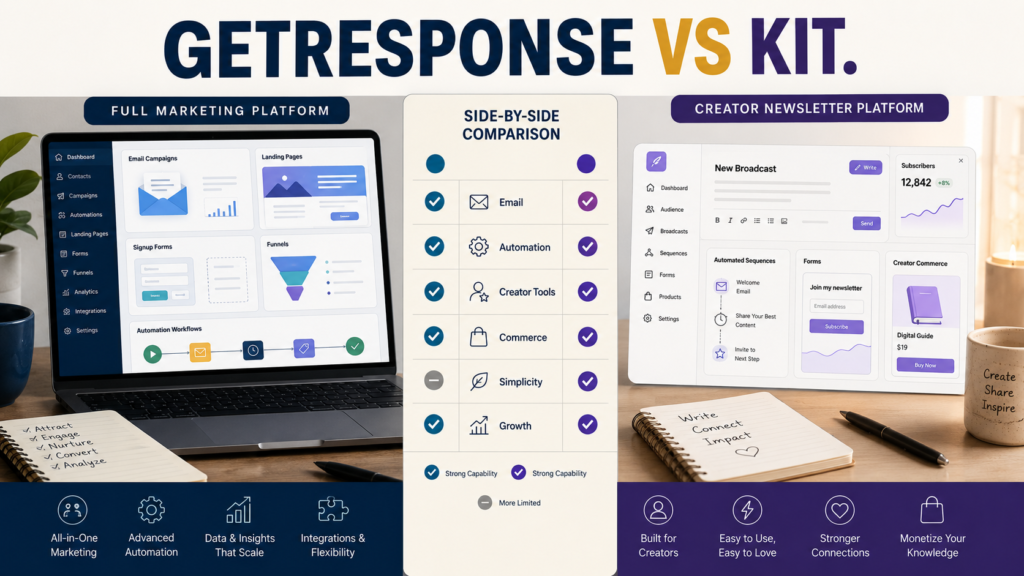
GetResponse and Kit can both manage email subscribers, send campaigns, create automated sequences, and support a creator building an audience.
They are not identical products.
The practical difference is in where each platform puts its emphasis.
GetResponse offers a broader marketing environment that includes email marketing, landing pages, automation, and additional marketing and monetization capabilities.
Kit, formerly ConvertKit, positions itself specifically around creators and combines email, newsletters, creator-focused automation, recommendations, and digital-product commerce.
Neither is automatically the better platform.
The better choice depends on whether you want a broader marketing toolkit or a creator-centered email system that keeps newsletters, audience management, and creator commerce closely connected.
Review Methodology: This comparison is based on official product information, available documentation, and publicly available details reviewed on August 14, 2026. No firsthand product testing or personal experience is claimed.
Key Takeaways
- GetResponse is the stronger candidate when you want broader marketing functionality around email.
- Kit is designed specifically for creators, newsletter publishers, authors, coaches, course creators, and similar audiences.
- Both provide automation, but their workflows and surrounding ecosystems differ.
- Kit includes native creator-commerce features for selling digital products and subscriptions.
- GetResponse provides landing pages, forms, email, and wider marketing-automation capabilities in one environment.
- Pricing depends on subscriber count, plan, billing period, and features, so compare the current official plans before buying.
- The simplest choice is the platform that eliminates unnecessary tools from your own workflow.
Affiliate Disclosure: This article contains affiliate links. If you purchase through one of these links, I may earn a commission at no additional cost to you. Affiliate compensation does not determine the conclusions or recommendations presented in this article.
What Is GetResponse?
GetResponse is an email-marketing and automation platform that currently combines email campaigns with forms, landing pages, automation, integrations, and additional marketing capabilities. Its current official pricing information also shows different plan levels intended for businesses with varying automation and monetization needs. GetResponse’s current pricing page should be checked before purchase because prices and plan limits can change.
For someone who wants email to sit inside a broader marketing system, that can be attractive.
You can explore GetResponse’s current email-marketing and automation offer if those broader capabilities match the system you are building.
GetResponse may be worth investigating when you expect to use several of these functions:
- Email broadcasts.
- Autoresponders.
- Marketing automation.
- Landing pages.
- Signup forms.
- Subscriber segmentation.
- Integrations.
- Creator or monetization features depending on plan.
What Is Kit?
Kit is the current name of the platform formerly known as ConvertKit.
Its official website describes it as a creator-first email marketing and newsletter platform, with use cases including authors, bloggers, coaches, course creators, newsletter creators, podcasters, musicians, and YouTubers. Kit’s official platform overview highlights email marketing, automation, paid newsletters, and digital-product selling.
Kit provides capabilities including:
- Broadcast emails.
- Automated email sequences.
- Visual automation on applicable plans.
- Forms and landing pages.
- Subscriber organization.
- Creator recommendations.
- Paid newsletters.
- Digital-product sales.
- Recurring subscriptions.
The emphasis is clearly creator-oriented.
GetResponse vs Kit for Basic Email Marketing
Both platforms can perform the central job:
Collect subscribers and send them email.
That means the decision should not begin with:
Which platform sends email?
Both do.
Ask instead:
Which surrounding workflow do I need?
A beginner may only require:
- Signup form.
- Subscriber list.
- Welcome sequence.
- Regular newsletter.
- Occasional promotion.
Either platform may be capable of supporting that basic process.
Paying for a large collection of capabilities you never use does not automatically improve your marketing.
Automation
Automation can sound more complicated than it needs to be.
For a small creator business, useful automations might include:
Trigger: Subscriber joins through a lead-magnet form.
Action: Send welcome sequence.
Then: Tag or organize the subscriber appropriately.
Later: Send relevant educational or promotional communication.
Kit’s current documentation describes its Email Sequences as self-contained sets of automated emails that subscribers receive in order. Kit’s sequence documentation was updated in July 2026.
GetResponse similarly provides automation capabilities, with the number and sophistication of workflows depending on the selected plan.
For a beginner, the question is not which platform can create the most impressive workflow diagram.
Ask:
Can I build the small number of automations my business actually needs without making maintenance difficult?
Creator Commerce Is an Important Difference
Kit allows creators to sell certain digital products and recurring subscriptions within its ecosystem.
Its official documentation currently supports one-time products such as digital downloads and courses as well as recurring subscription products such as paid newsletters. Kit’s product-creation documentation explains the current options.
Kit also publishes separate commerce transaction pricing. The current documentation states that USD sales through Kit Commerce carry transaction charges rather than a separate monthly Commerce fee, although fees can vary by currency and should be verified at the time of purchase.
That may appeal to a creator who wants fewer separate systems.
However, a business already using another checkout and product-delivery platform may not need native creator commerce from its email provider.
GetResponse Has a Broader Marketing Emphasis
GetResponse’s current platform positioning extends beyond creator newsletters.
Its available functionality includes marketing automation, landing pages, forms, email, integrations, and broader conversion-oriented tools.
That can make GetResponse appealing when a business wants the email platform to participate in several stages of the marketing process.
The tradeoff is simple:
More capability can also mean more capability to learn.
Do not choose a larger platform because you might possibly use every advanced feature someday.
Choose based on the next system you actually plan to build.
Which Is Simpler?
There is no universal answer.
Kit’s creator-first design may feel natural if your workflow revolves around:
- Publishing.
- Newsletters.
- Subscriber relationships.
- Creator recommendations.
- Simple digital products.
- Paid newsletters.
GetResponse may feel more logical if your workflow revolves around:
- Lead capture.
- Landing pages.
- Email sequences.
- Marketing campaigns.
- Segmentation.
- Broader automation.
- Multiple marketing functions.
Simplicity is not determined only by how few menu items a platform contains.
A system is simple when it matches your work.
Pricing Requires Careful Comparison
Email-platform pricing can change based on:
- Number of subscribers.
- Monthly versus annual billing.
- Plan level.
- Automation needs.
- Creator-commerce requirements.
- Advanced segmentation.
- Team features.
- Promotional pricing.
Kit’s current official pricing page shows both free and paid options, with features such as automated sequences and more advanced automation varying by plan. Kit’s current pricing page is the appropriate place to verify current limits.
GetResponse also offers several plan levels, and its pricing varies with list size and billing choices.
Do not choose from an old comparison article showing last year’s price.
Check the checkout you would actually use.
Who Should Consider GetResponse?
GetResponse may be the better fit when:
- Email is part of a broader marketing system.
- You want landing pages and forms connected closely with email.
- You expect to use marketing automation.
- You want to consolidate several marketing functions.
- You prefer a platform aimed at businesses as well as creators.
- The current plan provides the features you need at an acceptable cost.
MichaelELeeReviews already has a detailed GetResponse review for beginners if you want to examine that platform separately before comparing alternatives.
Who Should Consider Kit?
Kit may be the better fit when:
- Your business identity is strongly creator-centered.
- Newsletters are a major part of your strategy.
- You want creator-focused audience tools.
- You are interested in paid newsletters.
- You want native simple digital-product sales.
- You value a system built specifically around creator workflows.
- You do not need a broader collection of marketing features.
Its creator specialization is a genuine distinction.
Whether that distinction matters depends on your business.
What About GetResponse vs AWeber?
A buyer researching multiple email tools may also want to compare another beginner-oriented option.
MichaelELeeReviews has a separate GetResponse vs AWeber comparison for beginners that focuses on those two platforms.
Do not compare five platforms simultaneously unless you genuinely need five choices.
Too many comparisons can become a substitute for making a decision.
A Practical Buying Checklist
Before choosing GetResponse or Kit, answer these questions.
1. How large is your current list?
Use your real subscriber count, not the audience size you hope to have three years from now.
2. Do you need only email or broader marketing tools?
List the functions you genuinely plan to use during the next six months.
3. Do you need digital-product selling inside the email platform?
If you already have checkout and delivery tools, native commerce may be unnecessary.
4. How much automation do you need?
Draw your required workflow on paper.
If it has four steps, do not choose software based entirely on its ability to create a 40-step automation.
5. Do you publish a newsletter as the core business?
Kit deserves particularly close attention when newsletters and creator relationships are central.
6. Do you want more marketing functions in one platform?
GetResponse deserves closer consideration if your plan includes landing pages, forms, broader automation, and multiple campaign types.
7. What will the complete system cost?
Include supporting tools you might eliminate or still need.
A less expensive email subscription can become the more expensive total system if you need several additional services.
Do Not Switch Platforms Without a Reason
If your current platform works, changing platforms has costs.
You may need to:
- Move subscribers.
- Recreate forms.
- Rebuild sequences.
- Reconfigure integrations.
- Update website forms.
- Test tags or segments.
- Recheck authentication.
- Learn a new interface.
A different platform should solve a real problem before it earns the disruption.
Final Verdict
Choose GetResponse when you want email marketing to sit inside a broader marketing and automation system and you expect to use those additional capabilities.
Choose Kit when your business is primarily creator-centered and you want email, newsletters, creator automation, recommendations, and digital-product commerce closely connected.
For a beginner, neither platform should be chosen simply because it has the longest feature list.
Choose the one that supports the smallest complete system your business actually needs.
Conclusion
GetResponse and Kit are both credible email-marketing choices, but they approach the creator market from different directions.
GetResponse provides a broader marketing environment.
Kit puts the creator, newsletter, and audience relationship at the center of its platform.
Before buying, write down your required subscriber process from signup through follow-up and promotion. Then compare only the features necessary to operate that process.
That one-page workflow will usually tell you more than a list containing 100 software features.