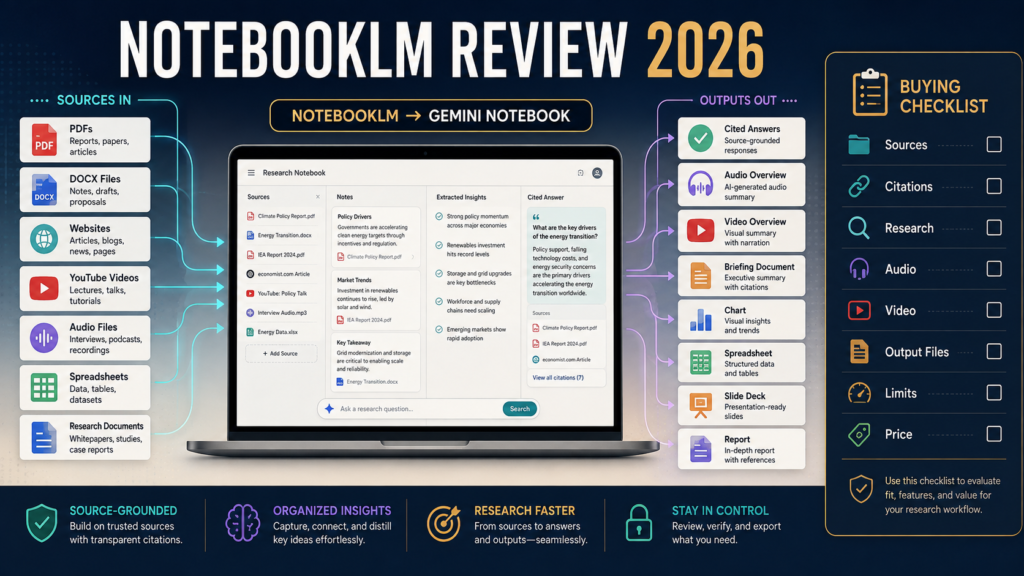
If you have been using or researching NotebookLM, the first thing to know is that the product has a new name.
Google officially renamed NotebookLM to Gemini Notebook on July 16, 2026. Google says it remains the same standalone research product, with existing notebooks continuing into the renamed service, while integration with the broader Gemini ecosystem is expanding.
The second important change is that Gemini Notebook is becoming much more than a tool that summarizes PDFs.
Google has expanded it with:
- Source-grounded question answering.
- Inline source citations.
- Web-source discovery.
- Deep Research.
- Audio Overviews.
- Video Overviews.
- Mobile access.
- More file types.
- Advanced reasoning.
- Code-assisted analysis on eligible plans.
- New document, spreadsheet, chart, image, and presentation output capabilities.
For a writer, researcher, educator, digital-product creator, or business owner who regularly works from source material, Gemini Notebook is now one of the more interesting AI research environments available.
Its biggest strength remains the same:
The workflow begins with sources you select rather than asking the AI to generate everything from an open-ended prompt.
Its biggest limitation also remains important:
Source-grounded does not mean error-proof. You still need to check important conclusions against the original material.
Review Methodology: This review is based on current official Gemini Notebook/NotebookLM product pages, Google product announcements, Google One plan information, and current Google documentation reviewed on August 12, 2026. No firsthand benchmark test, accuracy comparison, customer-support test, or private-data audit is claimed.
Key Takeaways
- NotebookLM was renamed Gemini Notebook on July 16, 2026.
- It remains a standalone research product rather than disappearing into the regular Gemini chat experience.
- Gemini Notebook remains centered around understanding and working from selected sources.
- Google has expanded source discovery, Deep Research, source formats, Audio Overviews, Video Overviews, and artifact creation.
- Some of the newest advanced capabilities depend on Google AI plan level and rollout status.
- Current U.S. Google One pricing lists Google AI Plus at $9.99 per month and Google AI Pro at $19.99 per month, with higher Gemini Notebook access included.
- Gemini Notebook can still generate inaccurate interpretations, so citations should be opened and checked. Google itself explicitly reminds users that AI-generated NotebookLM responses can contain inaccuracies.
Why the Name Changed
Google announced in July 2026 that NotebookLM was becoming Gemini Notebook.
The company described the renamed service as the same standalone product focused on research while increasingly connecting with:
- Gemini.
- Google Search.
- Other parts of the Google ecosystem.
This is more than cosmetic branding because the product has also been receiving substantial technical upgrades.
Do Existing Notebooks Disappear?
No.
Google says the rename does not remove existing notebooks and that the standalone notebook experience continues.
Therefore, an older tutorial referring to NotebookLM may still describe the general product even though the current name has changed.
The interface and features may still have changed since that tutorial was recorded.
What Is Gemini Notebook?
Gemini Notebook is an AI research environment centered around collections of source material.
You create a notebook around a subject or project.
Then you add relevant information.
Historically supported sources have included:
- PDFs.
- Google Docs.
- Google Slides.
- Websites.
- Public YouTube URLs.
- Audio files.
Google later expanded support to additional formats including DOCX, Google Sheets, images, and Drive-based materials.
You can then ask questions across the collection.
The Source-Grounded Difference
A general AI conversation might begin:
“Tell me everything about this subject.”
A Gemini Notebook workflow can begin:
“These are the twenty sources I want to use. Compare what they say about this question.”
That is a different research method.
It can be particularly helpful when working with:
- Your own documents.
- Course materials.
- Product documentation.
- Research papers.
- Meeting notes.
- Ebook manuscripts.
- Transcripts.
- Competitor documentation you are permitted to analyze.
- Public research sources.
The quality still depends heavily on the sources you select.
Citations Are One of the Most Useful Features
NotebookLM has long provided inline citations linking AI responses back to relevant source passages.
Google specifically built this capability to make it easier to inspect and verify where an answer came from.
That is valuable.
But do not make this mistake:
Citation present = claim automatically correct.
Open the citation.
Check whether:
- Source supports the statement.
- Context is correct.
- Date is current.
- AI did not overstate the source.
Source Quality Still Controls Output Quality
Suppose you upload:
- Old software review.
- Vendor sales page from 2023.
- Random forum post.
The notebook may give you a well-organized answer based on outdated or weak evidence.
The AI can be grounded in the wrong sources.
Your source-selection responsibility remains.
Web Source Discovery
Google added source discovery that can search the web for information connected with your topic and recommend relevant sources.
This removes some of the manual work involved in starting a notebook.
However:
Review the recommended sources before accepting them.
Ask:
- Is this official?
- Is it current?
- Is it independent?
- Does it actually answer my question?
Do not turn automated discovery into automated trust.
Deep Research
In late 2025, Google added Deep Research capabilities that can conduct more extensive research and produce reports along with recommended sources that can be added into a notebook.
This creates a useful two-stage model:
Stage 1
Discover and research.
Stage 2
Build a controlled source repository and analyze it.
That can be useful for complicated topics.
A Better Business Research Workflow
Suppose you are comparing two software platforms.
Step 1
Add both official pricing pages.
Step 2
Add official feature documentation.
Step 3
Add licensing or terms pages.
Step 4
Add current independent sources.
Step 5
Ask:
“Identify factual differences supported by the supplied sources. Separate current verified facts from vendor marketing claims.”
Step 6
Open citations.
Step 7
Write your own review.
The notebook helps organize evidence.
It should not make the final buying recommendation automatically.
Audio Overviews
Audio Overviews became one of NotebookLM’s most recognizable features.
Google describes them as AI-generated conversations based on your sources, designed to summarize material and connect ideas.
Potential uses:
- Review long research while walking.
- Listen to ebook material.
- Understand a report.
- Revisit notes.
- Prepare for a presentation.
Google has also emphasized that Audio Overviews reflect the supplied sources and should not be treated as comprehensive or completely objective.
Mobile Audio
Google released dedicated mobile apps for NotebookLM in 2025.
Current mobile capabilities include listening to downloaded Audio Overviews offline, sharing sources into the notebook from other apps, and interacting with notebook material.
For someone who prefers listening away from the computer, this can be useful.
Video Overviews
NotebookLM expanded into Video Overviews in 2025, turning source material into narrated visual presentations.
Google subsequently expanded language support and visual styles.
This makes the product more useful for visual learning.
It does not automatically turn it into a professional marketing-video platform.
The purpose is primarily understanding and presenting source material.
Cinematic Video Overviews
Google introduced a more advanced Cinematic Video Overview capability in March 2026 using several Google AI models.
At launch, Google limited this feature to eligible Google AI Ultra subscribers and specified English availability.
That distinction matters.
Do not assume every Gemini Notebook user receives every video capability.
Major June 2026 Upgrade
Google announced a significant NotebookLM research upgrade in June 2026.
The company said the upgraded system can use:
- More advanced reasoning.
- A secure cloud computer.
- Code execution.
- More than 100 software skills.
- Expanded artifact formats.
- Web research and source discovery.
Google initially rolled those capabilities to AI Ultra and certain Workspace business customers, with expansion to other users planned.
The July rename announcement separately said secure cloud-computer capabilities were rolling toward Pro users on the web.
Therefore:
Check your own account.
Do not assume a feature described in an announcement has reached every plan.
New Output Formats
Google’s June 2026 announcement described output creation including:
- PNG and SVG charts.
- PDF.
- DOCX.
- Markdown.
- Text.
- PNG/JPG/GIF images.
- CSV.
- JSON.
- XLSX spreadsheets.
- PPTX presentations.
That is a significant expansion from the earlier notebook-as-research-assistant concept.
For a business user, one research notebook may now produce:
- Research report.
- Spreadsheet.
- Presentation.
- Worksheet.
- Chart.
Availability still depends on the rollout and plan.
This Makes Gemini Notebook More Useful for Digital Products
Imagine you have:
- Ebook manuscript.
- Customer survey.
- Product research.
- Competitor notes.
- Source articles.
A research notebook could help you:
- Identify repeated topics.
- Compare sources.
- Create a structured research summary.
- Generate a worksheet draft.
- Build a presentation.
- Create a data table.
- Develop questions for a course.
You still need human editing.
What Gemini Notebook Is Not
It is not automatically:
- A full website builder.
- Complete email platform.
- Dedicated course host.
- Ecommerce checkout.
- Finished publishing system.
It can produce and analyze assets.
You still need other tools for distribution, commerce, or delivery.
Current Personal Pricing
Gemini Notebook has free access, while Google AI subscriptions increase access and provide additional Google AI benefits.
On the current U.S. Google One pricing page reviewed August 12, 2026:
Google AI Plus
$9.99 per month.
Includes 2 TB of storage and “more access” to Gemini Notebook.
Google AI Pro
$19.99 per month.
Includes 5 TB of storage and “expanded access” to Gemini Notebook, along with broader Gemini functionality.
Google also offers higher Ultra tiers.
Prices and plan benefits can change.
Do You Need Pro?
Not automatically.
Begin with the free version.
Ask:
- Do I hit usage limits?
- Do I need the newer advanced research functions?
- Do I need broader Gemini tools anyway?
- Will the additional storage help?
- Do I need heavier source analysis?
Upgrade because a real limitation appears.
The Name Change Can Create Search Confusion
You may encounter:
- NotebookLM.
- Gemini Notebook.
- NotebookLM Plus.
- Google AI Pro references.
Older reviews may refer to plans or features that have since changed.
When researching the product in late 2026, check publication dates carefully.
A Practical Content-Research Example
Suppose a blogger wants to create:
ProductDyno vs. ThriveCart Academy
The notebook could contain:
- ProductDyno homepage.
- ProductDyno pricing.
- ThriveCart Academy announcement.
- ThriveCart pricing.
- ThriveCart help documentation.
- ProductDyno integration pages.
Then ask:
“Create a feature comparison based only on these sources. Flag any pricing conflicts rather than choosing one value automatically.”
That is a strong use of the product.
It turns conflicting documentation into a research question rather than an excuse to guess.
A Practical Ebook Example
Upload:
- Twenty blog posts.
- Existing ebook outline.
- Customer questions.
- Research PDFs.
Ask:
“Group these sources by reader problem. Identify repeated explanations and missing topics. Do not write the ebook yet.”
Now Gemini Notebook becomes a planning tool rather than an automatic book generator.
A Practical Course Example
Add:
- Finished ebook.
- Worksheets.
- Teaching notes.
- FAQs.
Ask:
“Identify which concepts require demonstration, practice, assessment, or supporting resources.”
That can help convert written knowledge into instructional structure.
Again:
The creator makes the final curriculum decision.
Major Advantages
Source-Centered Workflow
You decide what material grounds the project.
Citations
Responses link back to source passages.
Multiple Source Types
Documents, websites, video, audio, images, and additional formats can be brought together.
Audio and Video
Useful for learning and reviewing source material.
Deep Research
Helps discover and organize additional evidence.
Growing Artifact Creation
Newer eligible versions can create documents, spreadsheets, presentations, charts, and other outputs.
Meaningful Limitations
It Can Still Be Wrong
Google itself warns that NotebookLM-generated responses can contain inaccuracies.
Source Quality Matters
Poor evidence produces poor research.
New Features Have Uneven Availability
Many 2026 functions depend on plan and rollout status.
It Does Not Replace Publishing Platforms
You still need systems for website publishing, ecommerce, email, and course delivery.
The Product Is Changing Quickly
Tutorials age fast.
Who Should Consider Gemini Notebook?
It appears particularly useful for:
- Researchers.
- Authors.
- Teachers.
- Students.
- Content creators.
- Software reviewers.
- Course creators.
- Business owners with large document libraries.
- Anyone who repeatedly compares multiple sources.
Who May Not Need It?
You may not need it when:
- You rarely work with source documents.
- Your AI tasks are mostly short brainstorming.
- You already have a research workflow you prefer.
- You do not need source citations.
- You would not use Audio, Video, or notebook organization.
A general AI assistant may be enough for casual work.
Is It Better Than General AI Chat?
That is the wrong comparison for many users.
A general AI assistant is often better for:
- Open brainstorming.
- General writing.
- Flexible conversation.
- Broad one-off tasks.
Gemini Notebook is particularly strong when the task is:
“Here is my evidence. Help me understand it.”
The tools can complement each other.
A Buying Checklist
Before paying for a Google AI plan mainly for Gemini Notebook, ask:
- Do I already use the free version?
- Am I reaching its limits?
- Do I need advanced research?
- Do I need more Google AI access generally?
- Do I need expanded storage?
- Has the secure cloud-computer feature reached my plan?
- Which output formats are currently enabled?
- Do I need Cinematic Video?
- Would Pro remove a real business limitation?
Official Access
You can review the current Gemini Notebook service to see which features are active in your own account.
Because the product is being updated rapidly, your live account is more reliable than an old tutorial for determining current access.
Final Verdict
NotebookLM was already a useful AI research tool because it allowed people to build notebooks around selected sources and ask questions with citations.
Gemini Notebook is becoming substantially more capable.
The July 2026 rename reflects a broader integration with Google’s AI ecosystem, while the major 2026 updates are expanding the product into code-assisted research, advanced source discovery, multimedia overviews, and downloadable business artifacts.
For creators who regularly work from:
- Research.
- Product documentation.
- Ebooks.
- Transcripts.
- PDFs.
- Websites.
- Course materials.
it appears increasingly valuable.
Conclusion
NotebookLM—now Gemini Notebook—is one of the more distinctive AI research tools because its strongest workflow begins with sources rather than an empty prompt box.
Its citations, source organization, Audio Overviews, Video Overviews, Deep Research, and newer artifact-creation capabilities make it useful for understanding and transforming large bodies of information.
The product should still be treated as an AI assistant, not an infallible research authority.
Start with the free version, create one notebook from a real project containing several trustworthy sources, and determine whether the research workflow solves a problem before paying for higher limits.