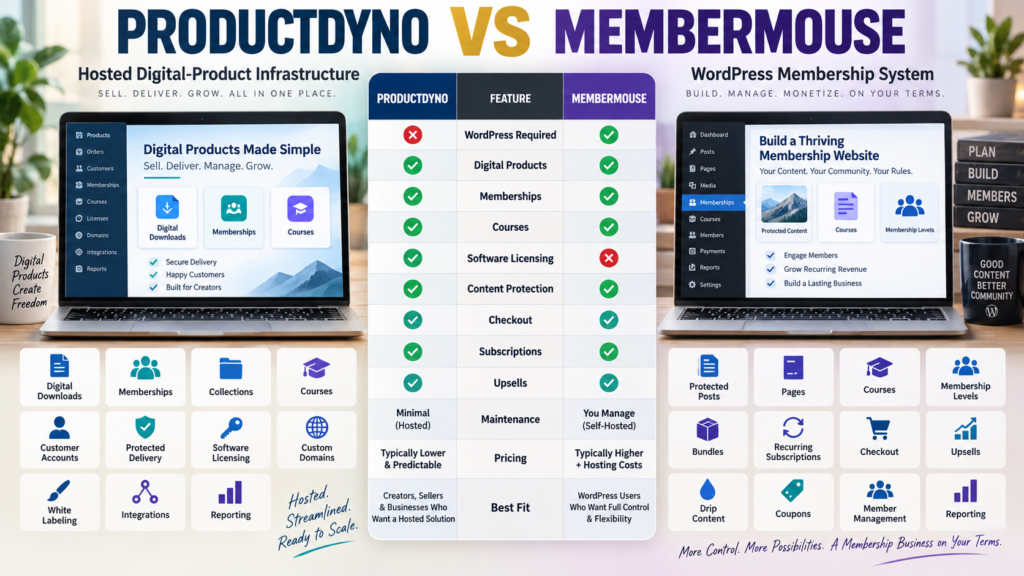
ProductDyno and MemberMouse can both support:
- Memberships.
- Courses.
- Digital products.
- Customer access.
That makes them look similar.
But their architecture is fundamentally different.
ProductDyno is a hosted digital-product platform.
MemberMouse is a WordPress membership plugin that turns your WordPress website into the membership and commerce environment.
That means the most important decision is:
Do you want membership infrastructure hosted separately—or do you want WordPress itself to own the member experience?
Review Methodology: This comparison is based on official ProductDyno and MemberMouse information reviewed on September 20, 2026. No firsthand product testing or personal experience is claimed. Promotional pricing, renewal pricing, features, and payment integrations may change. ProductDyno also maintains more than one official offer, so verify the checkout attached to the specific promotion before purchasing.
ProductDyno Current Pricing
ProductDyno’s current principal pricing page displays:
Starter
$49/month billed annually
Growth Plus+
$69/month billed annually
Teach Pro+
$99/month billed annually
under its current promotional offer.
ProductDyno Core Capabilities
The current principal plans advertise:
- Unlimited digital products.
- Unlimited memberships.
- Unlimited collections.
- Unlimited members/customers.
- Software/SaaS licensing.
- Unlimited custom domains.
- White-label branding removal.
- SSL.
- Integrations.
- Reporting.
- 0% ProductDyno transaction fee.
Teach Pro+ also includes its LMS add-on.
MemberMouse Current Introductory Pricing
MemberMouse’s current official plans page displays introductory annual pricing of:
Basic
$149.50/year
regularly shown as $299/year.
Plus
$249.50/year
regularly shown as $499/year.
Pro
$349.50/year
regularly shown as $699/year.
MemberMouse notes that the displayed introductory discount applies initially and annual renewals are at the full listed price.
That renewal detail should be included in any long-term cost comparison.
MemberMouse Requires WordPress
This is the largest architectural difference.
MemberMouse is designed to operate inside:
Your WordPress site.
That means the total operating environment includes:
- WordPress hosting.
- WordPress itself.
- MemberMouse.
- Theme.
- Plugin updates.
- Backups.
- Security.
ProductDyno hosts its product-delivery platform separately.
MemberMouse Basic
The current Basic plan includes capabilities such as:
- Stripe payments.
- Courses for MemberMouse.
- Email integrations.
- Zapier integration.
- One-click purchases and upsells.
- Bulk content protection.
- Drip scheduling.
- Coupons.
- Gifting.
- Gated content.
- Developer tools.
- Standard analytics.
This is already a substantial membership feature set.
MemberMouse Plus
Plus adds capabilities including:
- PayPal.
- Braintree.
- Social signup/login.
- Quizzes.
- Course certificates.
If you want course assessment and certificates:
Plus becomes more relevant.
MemberMouse Pro
Pro adds features including:
- Authorize.Net.
- ClickBank.
- Billing-date management.
- Full analytics/reporting.
- Advanced affiliate settings.
- Employee access controls.
The higher plan therefore expands more than just member count.
Courses
MemberMouse currently includes Courses for MemberMouse on all current plans.
Its official documentation says:
- Basic, Plus, Pro, and Elite can access courses.
- Quizzes and certificates require Plus or higher among the current plans.
Courses can be protected using membership levels or bundles.
ProductDyno Courses
ProductDyno’s Teach Pro+ plan adds its LMS-oriented feature set on top of its broader digital-product infrastructure.
If courses are only one part of your product catalog:
ProductDyno’s mixed-product model may make sense.
If your entire business is deeply integrated into WordPress memberships:
MemberMouse may feel more natural.
Membership Levels and Bundles
MemberMouse uses two important concepts:
Membership Levels
Useful for tiered access.
Bundles
Useful for additional à-la-carte access such as:
- Individual courses.
- Digital products.
- Add-ons.
A member can hold multiple bundles, making them useful for customers who purchase several independent products.
That provides flexibility inside WordPress.
ProductDyno Collections
ProductDyno uses collections and memberships to organize access to multiple digital products.
Its current principal offer includes unlimited:
- Products.
- Memberships.
- Collections.
- Members/customers.
The outcome can be similar:
One customer accesses several digital assets.
The implementation differs.
Content Protection
Content protection is central to MemberMouse.
Its current features support protecting:
- Posts.
- Pages.
- Custom post types.
- Categories.
- Dripped content.
This is particularly useful when the premium content is your WordPress content.
ProductDyno’s content lives inside its hosted product-delivery environment.
Recurring Subscriptions
MemberMouse supports:
- One-time payments.
- Recurring subscriptions.
- Payment plans.
- Trials.
- Different billing intervals.
- Access tied to billing status.
This makes it a serious recurring-membership platform.
ProductDyno also supports membership-based product businesses and integrates with payment systems.
Checkout
MemberMouse operates checkout inside WordPress.
Its feature set includes:
- Checkout pages.
- Upsells.
- Downsells.
- Coupons.
- Gifting.
- Multiple payment options depending on plan.
That gives you significant control.
It also makes checkout dependent on your WordPress environment.
Payment Processor Availability
MemberMouse currently supports Stripe across Basic and higher.
PayPal and Braintree require Plus or higher, while Authorize.Net is listed for Pro and Elite.
That matters when comparing plan cost.
Do not assume every processor is available at the entry tier.
Software Licensing
This is one of ProductDyno’s strongest differences.
ProductDyno’s current principal plans include a:
Software/SaaS Licensing Module.
MemberMouse is primarily membership, content, course, and ecommerce infrastructure inside WordPress.
If your business sells licensed software:
ProductDyno deserves additional weight.
WordPress Ownership
MemberMouse can appeal to business owners who want:
- Member records in WordPress.
- Protected WordPress pages.
- WordPress customization.
- Plugin extensibility.
- Direct control over the site experience.
That ownership also creates responsibility.
You manage:
- Hosting.
- Security.
- Backups.
- Plugin compatibility.
- Updates.
Hosted Simplicity
ProductDyno removes much of that membership-platform maintenance from WordPress.
Your marketing website can remain WordPress.
But product delivery is handled elsewhere.
That separation can reduce:
- Membership plugin conflicts.
- Membership-site hosting complexity.
- WordPress access-rule configuration.
MemberMouse May Fit Better If…
Consider MemberMouse when:
- WordPress is the center of the business.
- Your premium content already lives in WordPress.
- Membership tiers matter.
- Bundles matter.
- Drip content matters.
- WordPress checkout matters.
- You are comfortable maintaining WordPress.
- You want flexible member billing and upsells.
ProductDyno May Fit Better If…
Consider ProductDyno when:
- You sell many kinds of digital products.
- You prefer hosted delivery.
- You want digital products separated from WordPress.
- Software licensing matters.
- Collections matter.
- You want custom product-delivery domains.
- You prefer fewer membership-specific WordPress dependencies.
Your verified ProductDyno vs Easy Digital Downloads comparison provides another useful WordPress-vs-hosted comparison.
Affiliate Disclosure: This article contains affiliate links. If you purchase through one of these links, I may earn a commission at no additional cost to you. Affiliate compensation does not determine the conclusions or recommendations presented in this article.
If ProductDyno matches your requirements, you can review the current ProductDyno offer through this approved partner link.
Compare With ProductDyno vs LearnDash
If course delivery is more important than membership billing, the verified ProductDyno vs LearnDash comparison provides another WordPress-based perspective.
MemberMouse is broader than a traditional LMS because it combines:
Membership + Billing + Content Protection + Courses
inside WordPress.
Total Cost Matters
Do not compare only:
ProductDyno subscription
against:
MemberMouse plugin price.
MemberMouse Stack May Include
- WordPress hosting.
- MemberMouse.
- Theme.
- Backup/security tools.
- Email platform.
- Other plugins.
ProductDyno Stack May Include
- ProductDyno.
- Marketing website.
- Email platform.
- Checkout/payment tools depending on workflow.
Calculate the complete system.
Include Renewal Pricing
MemberMouse’s current pricing page explicitly identifies the displayed lower prices as special introductory pricing and says annual renewals return to full price.
Therefore, estimate:
Year 1
and:
Year 2
instead of comparing only the introductory offer.
The Content-Location Test
Ask:
Where should protected content live?
If your answer is:
Inside WordPress
MemberMouse becomes more attractive.
If your answer is:
Inside a separate hosted customer-access environment
ProductDyno becomes more attractive.
The Software-Licensing Test
Ask:
Will I sell software requiring license management?
If yes:
ProductDyno gains a meaningful advantage.
If no:
Do not give that feature extra value.
A Simple Buying Scorecard
Score each platform from 1–5 for:
Digital Downloads
Memberships
Courses
Content Protection
Recurring Billing
Checkout
Upsells
Software Licensing
WordPress Ownership
Hosting Responsibility
Maintenance
Year-One Cost
Renewal Cost
Ease of Management
Double-weight your top three requirements.
Conclusion
ProductDyno and MemberMouse can both support memberships, courses, and digital products, but their architectures are fundamentally different.
ProductDyno centers on:
Hosted Digital Products → Customer Access → Memberships → Collections → Courses → Software Licensing
MemberMouse centers on:
WordPress → Memberships → Protected Content → Checkout → Subscriptions → Courses → Member Management
ProductDyno may fit better when you want the digital-product environment separated from WordPress.
MemberMouse may fit better when WordPress itself should become the membership and customer-content environment.
The decision is less about which platform has more features and more about:
Where you want the membership business to live.
Your Next Action
Write down where these parts of your business should live:
Public Website: _____
Protected Content: _____
Customer Account: _____
Courses: _____
Checkout: _____
Membership Billing: _____
Software Licensing: _____
Then answer:
Do I want WordPress to control protected customer access? Yes / No
Am I comfortable maintaining a WordPress membership stack? Yes / No
Will I sell licensed software? Yes / No
Do customers need multiple independent product purchases? Yes / No
Finally, calculate:
Year 1 Cost
and:
Year 2 Renewal Cost
for the complete stack under each option.
If WordPress ownership and membership flexibility dominate your requirements, investigate MemberMouse first.
If hosted product delivery and software licensing dominate, investigate ProductDyno first.
Then build one test customer journey:
Sales Page → Checkout → Payment → Account Creation → Protected Access → Renewal
Choose the system that makes that journey easiest for you to operate consistently.