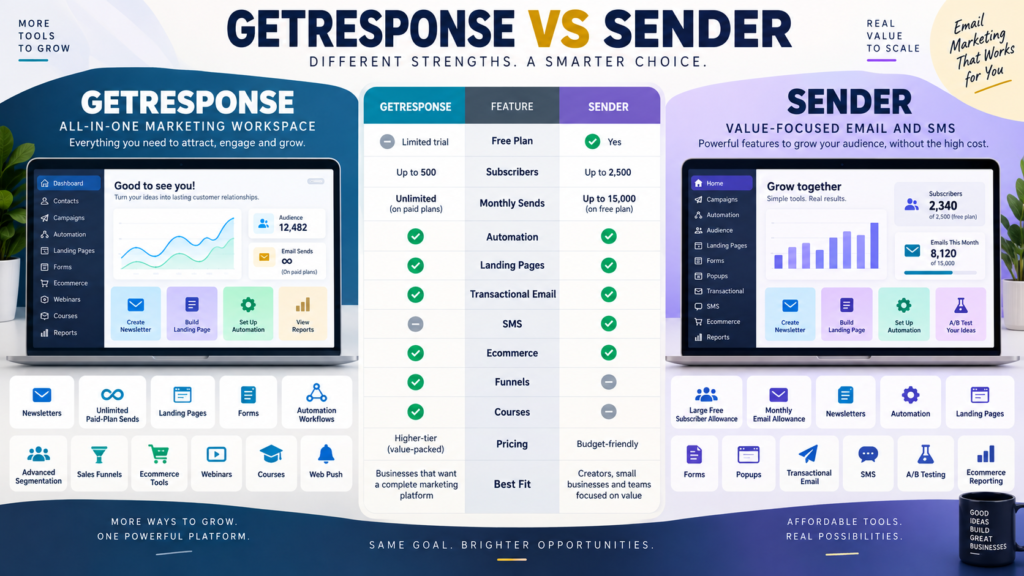
GetResponse and Sender both support serious email marketing.
But they approach the market differently.
GetResponse provides a broader marketing environment that extends into:
- Funnels.
- Ecommerce automation.
- Webinars.
- Courses.
- Web push.
Sender focuses heavily on affordable email and SMS marketing while offering a generous Free Forever plan, automation, landing pages, forms, transactional email, and ecommerce reporting.
The real decision is:
Do you need the broader marketing ecosystem—or the lower-cost email-and-messaging core?
Review Methodology: This comparison is based on official GetResponse and Sender product information reviewed on September 21, 2026. No firsthand product testing or personal experience is claimed. Pricing, first-year discounts, subscriber tiers, and send limits may change. Verify current checkout details before purchasing.
GetResponse Current Pricing
GetResponse currently lists:
Starter
$19/month
or:
$15.58/month equivalent with annual billing
Marketer
$59/month
or:
$48.38/month equivalent annually
Creator
$69/month
or:
$56.58/month equivalent annually
at its currently displayed entry configuration. Standard paid plans currently include unlimited monthly email sends.
GetResponse Starter
Starter currently includes:
- Unlimited monthly sends.
- Welcome email series.
- One custom automation workflow.
- Landing pages.
- Forms.
- Popups.
- AI-assisted content tools.
That creates a fairly complete starting email-and-lead-generation system.
Sender Free Forever
Sender currently advertises a Free Forever plan supporting:
Up to 2,500 subscribers
and:
15,000 emails per month.
It currently includes:
- Email newsletters.
- Email automation.
- Landing pages.
- Signup forms and popups.
- Transactional emails.
- One user seat.
Sender branding remains on Free accounts.
That is a substantial free allowance.
Sender Standard
Sender’s current pricing page displays a promotional entry configuration around:
$6.30/month effective under its displayed first-year annual discount
for the lowest subscriber tier shown on the public pricing page.
At 1,000 subscribers, Sender’s official billing documentation says Standard includes monthly email capacity equal to:
12 times the subscriber count.
Standard adds features such as:
- Three role-based seats.
- Removal of Sender branding.
- SMS messaging.
- Unlimited templates.
- Unlimited landing pages.
- A/B testing.
- Advanced ecommerce reporting.
Sender Professional
Sender’s Professional plan expands into:
- 24 times subscriber count in monthly email capacity.
- 10 role-based seats.
- Monthly SMS credit allowance.
- Advanced automation.
- Advanced reporting.
- Priority support.
- Dedicated IP availability at qualifying volume.
That makes Sender more sophisticated than a basic low-cost newsletter platform.
Compare the Sending Models
GetResponse
Standard paid plans:
Unlimited monthly sends.
Sender Standard
Monthly send limit:
12× subscriber count.
Sender Professional
Monthly send limit:
24× subscriber count.
That difference matters for businesses that send frequently.
Example: 1,000 Subscribers
Suppose you send:
8 emails per month
Approximate volume:
8,000 sends
Both systems can potentially fit.
Suppose you send:
30 emails per subscriber each month
Approximate volume:
30,000 sends
Sender Standard’s allowance could become limiting at that subscriber tier.
GetResponse’s unlimited paid-plan sending becomes more important.
Sender’s Free Plan Is a Major Advantage for Small Lists
A 2,500-subscriber free allowance is much larger than many traditional email-marketing free plans.
If your business:
- Has a small list.
- Sends fewer than 15,000 emails each month.
- Needs automation.
- Needs landing pages.
Sender Free deserves consideration.
Transactional Email
Sender’s Free Forever plan currently includes transactional email.
Transactional messages can include:
- Order confirmations.
- Account notifications.
- System-generated messages.
GetResponse currently reserves transactional email for its Enterprise offering rather than its standard Starter, Marketer, and Creator plans.
This is a meaningful difference.
SMS
Sender Standard includes access to SMS messaging, with SMS credits handled separately; Professional includes monthly SMS credit value under the current plan structure.
GetResponse currently lists SMS marketing under Enterprise.
If SMS is part of your small-business plan:
Sender may provide earlier access to that channel.
Landing Pages
Both platforms support landing pages.
GetResponse Starter
Landing-page builder included.
Sender Free
Landing pages included.
Sender Standard
Unlimited landing pages under its current plan structure.
That means either platform can support:
Traffic → Landing Page → Signup → Email
Automation
GetResponse:
- Starter: one workflow.
- Marketer/Creator: unlimited automation workflows.
Sender:
- Free: email automation.
- Standard: core automation.
- Professional: advanced automation.
Do not compare only the word:
Automation.
Build the exact workflow you need.
Ecommerce
GetResponse Marketer currently includes:
- Abandoned-cart recovery.
- Product recommendations.
- Promo codes.
- Revenue reporting.
- Sales funnels.
Sender Standard includes advanced ecommerce reporting, while Professional adds more advanced automation.
For a deeper ecommerce marketing stack:
GetResponse may offer more native funnel functionality.
Funnels
GetResponse Marketer includes sales funnels.
Sender provides email, landing pages, and automation, but is not positioned around a dedicated full sales-funnel system in quite the same way.
If your business depends on:
Lead → Nurture → Offer → Checkout
inside one marketing platform:
GetResponse deserves additional weight.
Courses and Webinars
GetResponse Creator includes:
- Webinars.
- Course creator.
- Student management at the applicable tier.
- Paid newsletter capability.
Sender does not position itself primarily as a course or webinar platform.
If those tools matter:
GetResponse provides more consolidation.
GetResponse May Fit Better If…
Consider GetResponse when:
- You send very frequently.
- Unlimited sending matters.
- Ecommerce automation matters.
- Sales funnels matter.
- Webinars matter.
- Course creation matters.
- You want more marketing functions consolidated.
Your verified GetResponse vs Klaviyo comparison provides another useful ecommerce-focused alternative.
Affiliate Disclosure: This article contains affiliate links. If you purchase through one of these links, I may earn a commission at no additional cost to you. Affiliate compensation does not determine the conclusions or recommendations presented in this article.
If GetResponse matches your requirements, you can review the current GetResponse offer through this approved partner link.
Sender May Fit Better If…
Consider Sender when:
- A large Free plan matters.
- You have under 2,500 subscribers.
- 15,000 free monthly sends are sufficient.
- Transactional email matters.
- SMS matters.
- You need straightforward automation.
- Lower entry cost is important.
- You do not need courses or webinars.
Compare With SendPulse
Your verified GetResponse vs SendPulse comparison provides another multichannel option.
SendPulse adds a broader CRM/chatbot ecosystem.
Sender focuses more directly on:
Email + SMS + Automation + Transactional Messaging
Calculate Your Actual Usage
Write:
Subscribers: _____
Emails per Subscriber per Month: _____
Calculate:
Subscribers × Emails = Monthly Send Volume
Then compare:
GetResponse Contact Tier
against:
Sender Subscriber Tier + Send Allowance
Do not compare only the lowest advertised price.
A Simple Buying Scorecard
Score 1–5:
Free Plan
Subscriber Capacity
Email Volume
Automation
Transactional Email
SMS
Landing Pages
Ecommerce
Funnels
Courses/Webinars
Ease of Use
Annual Cost
Double-weight your three most important areas.
Conclusion
GetResponse and Sender can both support a small online business, but they emphasize different priorities.
GetResponse is broader:
Email → Automation → Ecommerce → Funnels → Webinars → Courses
Sender is more focused and price-conscious:
Email → Automation → Landing Pages → Transactional Email → SMS
Sender’s current Free Forever plan is especially notable for a small list.
GetResponse becomes more compelling when the business needs more advanced marketing and creator infrastructure.
Your Next Action
Write down:
Subscribers Today: _____
Expected Subscribers in 12 Months: _____
Monthly Email Sends: _____
Need Transactional Email?: Yes / No
Need SMS?: Yes / No
Need Funnels?: Yes / No
Need Webinars/Courses?: Yes / No
If your list remains within Sender’s current free limits and your workflow is simple:
Test Sender first.
If your business needs frequent sending, advanced ecommerce automation, funnels, webinars, or course tools:
Test GetResponse first.
Then build the same workflow in your chosen test environment:
Signup → Welcome → Segment → Follow-Up → Offer
Choose the platform that fits the workflow you will actually maintain.