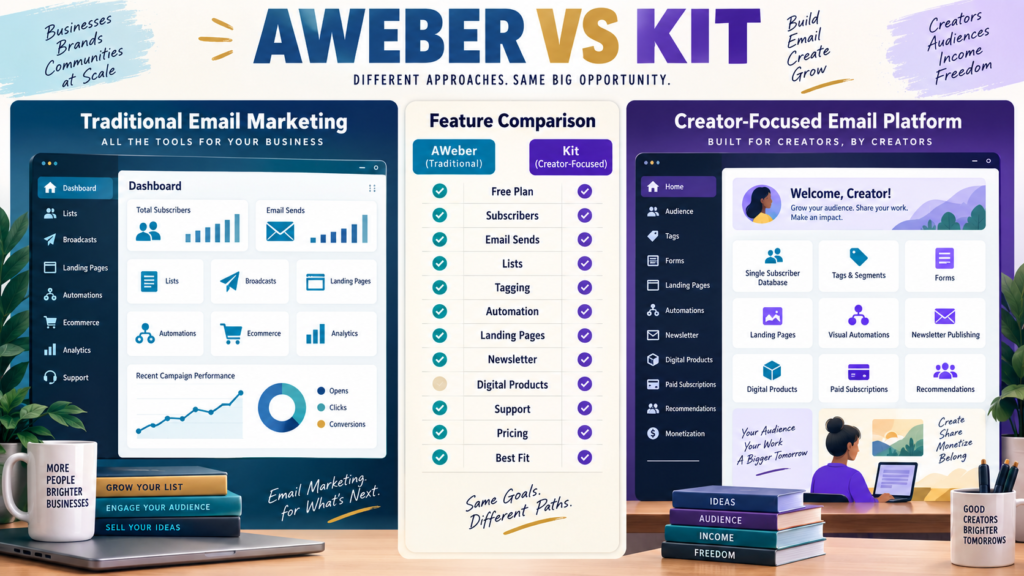
AWeber and Kit—formerly known as ConvertKit—can both handle the basic jobs a creator expects from an email-marketing platform.
Both can help you:
- Capture subscribers.
- Create forms.
- Build landing pages.
- Send broadcasts.
- Automate email.
- Tag subscribers.
- Promote products.
But the platforms organize the audience differently and increasingly emphasize different business models.
AWeber follows a more traditional email-marketing structure built around lists, campaigns, landing pages, automation, ecommerce, and broad small-business use.
Kit is designed specifically around creators, using a subscriber-centric database combined with tagging, visual automation, newsletters, recommendations, digital products, subscriptions, and creator monetization.
For a beginner, the real question is not:
“Which company has more features?”
It is:
Which structure matches the business I want to run?
Review Methodology: This comparison is based on official AWeber and Kit information reviewed on September 4, 2026. No firsthand product testing or personal-use claim is made. Prices, promotions, subscriber limits, transaction fees, and features can change. Verify the current checkout before purchasing.
AWeber’s Current Pricing Structure
AWeber’s official documentation currently lists four plans:
- Free.
- Lite.
- Plus.
- Unlimited.
The current Free plan supports up to 500 subscribers and 3,000 emails per month, with one list profile and one workflow automation.
AWeber Lite currently starts at $15 per month when paid monthly for 500 subscribers, or $150 annually, equivalent to $12.50 per month. Its sending allowance is currently ten times the subscriber plan limit per month.
Plus currently starts at $30 per month monthly or $240 annually, with higher sending allowances and broader feature access.
Check the latest details through AWeber’s official pricing documentation.
Kit’s Current Pricing Structure
Kit’s current public pricing page lists:
Free
$0 per month, currently supporting up to 10,000 subscribers.
The free plan includes capabilities such as unlimited landing pages and forms, unlimited email broadcasts, subscriber tagging and segmentation, and digital-product/subscription selling.
Creator
At the 1,000-subscriber level, Kit’s current public pricing page displays $33 per month equivalent when billed annually, with $390 billed yearly in the displayed configuration.
Creator adds features including unlimited Visual Automations, unlimited email sequences, A/B subject-line testing, apps and integrations, RSS campaigns, and 24/7 email and chat support.
Pro
The current annual-billing display shows an equivalent of $66 per month at the selected 1,000-subscriber level, adding deeper engagement analytics, deliverability reporting, engagement scoring, collaborative features, and other advanced tools.
Review current pricing directly on Kit’s official pricing page.
Because Kit’s annual-equivalent pricing and separately documented monthly starting prices are presented differently, compare the actual billing option you intend to purchase rather than assuming one displayed number applies to every checkout configuration.
The Free Plans Are Very Different
This is one of the clearest differences for beginners.
AWeber Free currently supports:
500 subscribers
and:
3,000 monthly sends.
Kit Free currently advertises:
Up to 10,000 subscribers
and unlimited broadcasts on its current pricing page.
On raw subscriber capacity, Kit’s free entry point is substantially larger.
But do not choose from the number alone.
Ask:
Which automation, support, branding, migration, and selling features will I need as the business grows?
Lists: The Platforms Think Differently
AWeber supports multiple lists depending on plan and account configuration.
Kit uses a subscriber-centric approach.
Kit’s own migration documentation explains that while AWeber users may work with multiple lists, Kit keeps subscribers in one overall account database and relies heavily on tags, segments, forms, sequences, and automations to organize them.
For example:
AWeber approach:
AI Starter List
Customer List
Newsletter List
Kit approach:
One subscriber database with tags such as:
AI Starter
Customer
Newsletter
Neither model is automatically superior.
The question is which one makes more sense to you.
Tagging and Segmentation
Both platforms support segmentation.
Kit’s creator model puts particularly strong emphasis on tags and subscriber behavior.
This can be useful when one person may:
- Join a lead magnet.
- Purchase a course.
- Subscribe to a newsletter.
- Buy another product.
Instead of thinking primarily in separate lists, you can maintain one subscriber record with different tags.
For creators who dislike managing duplicate subscribers across multiple lists, that model can be attractive.
Email Broadcasts
Both products support one-time broadcasts.
Typical uses include:
- Newsletter.
- Product announcement.
- New article.
- Affiliate promotion.
- Customer update.
The better platform is not necessarily the one with the prettier broadcast editor.
Also compare:
- Sending limits.
- Templates.
- Segmentation.
- Reporting.
- Deliverability tools.
- Ease of reuse.
A frequent sender should calculate expected monthly volume.
Automation
This is another important distinction.
AWeber uses campaign and workflow automation.
Kit uses email sequences, Visual Automations, rules, link triggers, and subscriber tagging.
Kit’s current Creator plan specifically includes unlimited Visual Automations and email sequences.
AWeber’s current Free plan includes one workflow automation, with paid tiers increasing capability and Plus providing much broader access.
Ask yourself:
Do I need:
Signup → Welcome Email → Weekly Broadcast
or:
Signup → Tag → Sequence → Purchase → New Tag → Different Sequence → Product Promotion
The second model places more value on flexible automation.
Landing Pages and Forms
Both platforms can create:
- Signup forms.
- Landing pages.
This can reduce the need for a separate landing-page builder when your needs are simple.
For a beginner funnel:
Article → Lead Magnet Landing Page → Email Signup → Welcome Sequence
either platform may provide the necessary foundation.
Compare the exact plan limits and customization you need.
Kit Is More Explicitly Creator-Focused
Kit positions itself specifically around creator businesses.
Its current pricing structure includes capabilities around:
- Newsletter publishing.
- Paid newsletters.
- Digital products.
- Recurring subscriptions.
- Recommendations.
- Sponsorship-related creator tools.
This can be attractive for:
- Bloggers.
- YouTubers.
- Podcasters.
- Authors.
- Coaches.
- Course creators.
AWeber serves many of the same users but maintains a more conventional email-marketing identity.
Selling Digital Products
Kit currently allows users to sell digital products directly from their accounts, including on the Free plan.
Its official documentation currently states that USD transactions are charged 3.5% + $0.30 per transaction for Kit Commerce, with payment setup connected through Stripe.
AWeber also supports ecommerce-related selling capabilities.
However, if digital products are a major business rather than an occasional offer, you may still choose a dedicated checkout and delivery platform.
Email software does not have to perform every business function.
Support
Support can matter greatly to beginners.
Kit’s current Creator plan advertises 24/7 email and chat support, with priority support at Pro.
AWeber’s paid offerings emphasize customer support as well, with higher plans providing broader access and priority service.
If support matters, compare:
- Email.
- Chat.
- Phone availability if offered on your selected plan.
- Knowledge base.
- Migration help.
Do not assume every support channel is included in every tier.
AWeber May Fit Better If…
AWeber deserves stronger consideration when:
- You prefer a traditional email-marketing structure.
- Multiple lists fit your organizational style.
- You want straightforward campaigns and autoresponders.
- You value AWeber’s established small-business email workflow.
- Email supports a broader business rather than becoming the business itself.
- You want to start with a conventional autoresponder model.
My AWeber review for beginners provides additional background.
Affiliate Disclosure: This article contains affiliate links. If you purchase through one of these links, I may earn a commission at no additional cost to you. Affiliate compensation does not determine the conclusions or recommendations presented in this article.
If AWeber matches your requirements, you can review the current AWeber offer through this approved partner link.
Kit May Fit Better If…
Kit deserves stronger consideration when:
- You identify primarily as a creator.
- You want a subscriber-centric database.
- Tags are central to organization.
- Visual automation matters.
- The generous current free subscriber allowance is useful.
- Newsletter publishing matters.
- Digital products or paid newsletters are part of your plan.
- You want creator-focused monetization features.
Compare Kit With GetResponse Too
Kit is not the only creator-oriented alternative.
GetResponse provides a broader marketing environment incorporating email, automation, funnels, webinars, and additional marketing functionality.
My GetResponse vs Kit comparison examines that different tradeoff.
Compare AWeber With Another Beginner Option
If simplicity and price are your main concerns, the AWeber vs MailerLite comparison provides another useful beginner-focused comparison.
The Duplicate Subscriber Question
If you use multiple lists, investigate how the selected platform counts subscribers for billing.
Do not assume that:
One email address on two lists
always equals:
One billable subscriber.
Platform billing rules vary.
Read current documentation for your exact account structure.
Kit’s single subscriber database can simplify this mental model for creators who prefer tags over separate lists.
Build Your Workflow Before Choosing
Write:
Lead Magnet → Subscriber → Welcome Sequence → Newsletter → Product Promotion → Customer
Then ask:
How would AWeber organize each step?
How would Kit?
The clearer workflow often becomes obvious.
A Practical Buying Scorecard
Score each platform 1–5 for:
- Beginner setup.
- Free-plan fit.
- Subscriber organization.
- Sending allowance.
- Forms.
- Landing pages.
- Automation.
- Newsletter publishing.
- Product selling.
- Support.
- Pricing at expected list size.
Do not score features you do not need.
Conclusion
AWeber and Kit can both run a serious creator email list, but their organizational philosophies differ.
AWeber provides a familiar traditional email-marketing environment with lists, campaigns, landing pages, automation, ecommerce tools, and broad small-business functionality.
Kit is built more explicitly around the modern creator model, with one subscriber-centric database, tags, visual automations, newsletters, digital products, subscriptions, and creator monetization.
Kit’s current free subscriber allowance makes it especially attractive for creators beginning with a limited budget.
AWeber may still be the better choice for someone who prefers the traditional autoresponder model and wants email marketing to remain a straightforward component of the business.
Do not choose from the free-plan headline alone.
Write down your expected:
Subscribers → Emails Per Month → Automations → Products → Newsletter Strategy → Support Needs
Then compare the plan you will actually need after the first year.
That is the comparison that matters.
Evening Blog Article
Website: MichaelELeeReviews.com
Blog Post Number: 6
Date: September 5, 2026
Publication Time: Evening
Primary Search Phrase: ClickDesigns vs Kittl
Supporting Search Phrases: Kittl vs ClickDesigns, ClickDesigns comparison, Kittl review for creators, best design tool for digital products, ClickDesigns pricing, Kittl pricing 2026
Primary WordPress Category: Product Comparisons and Buying Guides
Featured Image Prompt: Create a professional horizontal 16:9 WordPress featured image showing a balanced comparison between two creator design approaches without copied logos or branded interfaces. On the left, show a marketing and digital-product graphics workspace containing ebook covers, product boxes, mockups, bundles, funnel graphics, social posts, thumbnails, AI editing, and stock assets. On the right, show a modern design workspace containing typography, vector editing, templates, mockups, AI image tools, print-on-demand graphics, brand assets, and illustration resources. Place a central checklist labeled Digital Products, Mockups, Typography, Vector Design, AI Tools, Templates, Stock Assets, Print Design, Commercial Use, Pricing, and Best Fit. Use navy blue, teal, violet, warm gold, cream, white, and charcoal gray. Include the large readable headline “CLICKDESIGNS VS KITTL.” Avoid copied logos, copied editors, fake ratings, fake sales claims, unsupported winner badges, clutter, and tiny text.