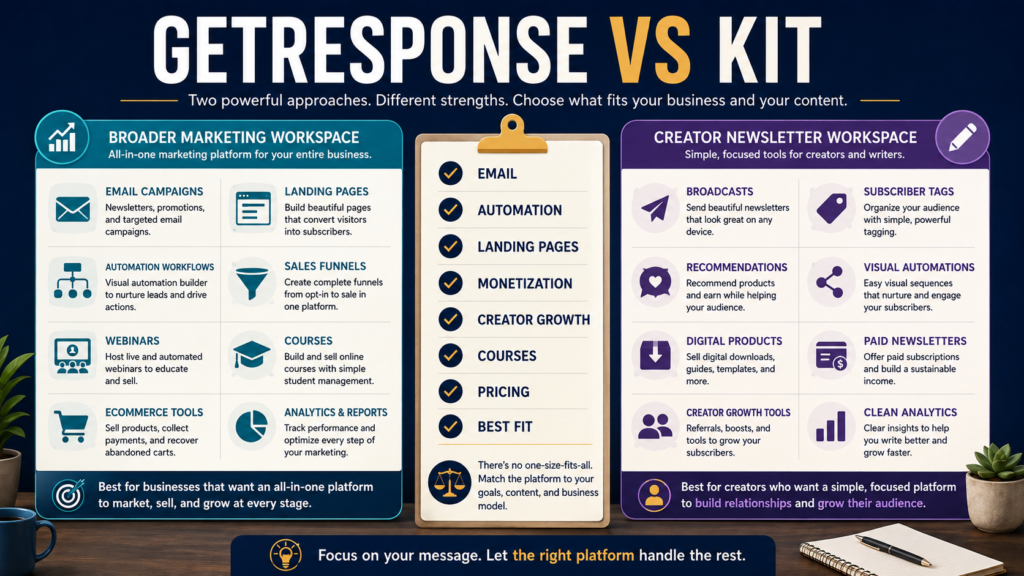
GetResponse and Kit can both help you build an email list, send broadcasts, automate follow-up, create forms and landing pages, segment subscribers, and sell digital content.
The more important question is not which platform has the longest feature list.
It is:
Which platform’s overall workflow better matches the business you are actually building?
As of August 24, 2026, GetResponse remains positioned as a broader email-marketing and automation platform with additional funnels, ecommerce, webinars, course tools, and creator monetization features. Kit remains strongly focused on creators, newsletters, audience growth, recommendations, email automation, and direct creator monetization.
Review Methodology: This comparison is based on official GetResponse and Kit pricing pages, help documentation, and publicly available product information reviewed on August 24, 2026. No firsthand product testing or personal experience is claimed.
Affiliate Disclosure: This article contains affiliate links. If you purchase through one of these links, I may earn a commission at no additional cost to you. Affiliate compensation does not determine the conclusions or recommendations presented in this article.
Quick Verdict
GetResponse may be the better fit when you want email marketing to operate inside a broader marketing system that may also include funnels, ecommerce automation, webinars, courses, landing pages, and advanced segmentation.
Kit may be the better fit when your business centers heavily on a newsletter, creator audience, recommendations, subscriber relationships, creator monetization, and a streamlined email-first workflow.
Neither is automatically better for everyone.
What Is GetResponse?
GetResponse is an established email-marketing platform that has expanded well beyond newsletters.
Its current plans include combinations of:
- Email marketing.
- Autoresponders.
- Forms and popups.
- Landing pages.
- Marketing automation.
- Advanced segmentation.
- Sales funnels.
- Ecommerce marketing.
- Web push notifications.
- Webinars.
- Website creation.
- Courses.
- Premium newsletters.
The exact features depend on the plan. GetResponse’s official pricing page currently lists Starter, Marketer, Creator, and Enterprise tiers.
Readers who want a broader introduction can also review my GetResponse review for beginners before comparing it with Kit.
What Is Kit?
Kit is the platform formerly known as ConvertKit and is designed primarily around creator businesses.
Its current environment includes:
- Email broadcasts.
- Subscriber tagging.
- Segmentation.
- Landing pages.
- Forms.
- Automated sequences.
- Visual automations.
- Creator recommendations.
- Newsletter publishing.
- Digital-product sales.
- Paid newsletters.
- Recurring subscriptions.
- Creator-focused growth tools.
Kit’s current Newsletter plan is free for up to 10,000 active unique subscribers and includes unlimited forms, landing pages and broadcasts, plus one basic visual automation and one sequence. Paid Creator and Pro plans expand automation and other capabilities.
That free-plan structure makes Kit particularly interesting to someone who wants to begin building a creator-focused list before committing to a paid email platform.
Pricing: The First Major Difference
Pricing changes, so always verify the current checkout before purchasing.
GetResponse
At the time of review, GetResponse’s pricing page lists Starter beginning at $19 per month for monthly billing at the entry list size, or $15.58 per month when paid annually.
Marketer begins at $59 monthly or $48.38 per month billed annually.
Creator begins at $69 monthly or $56.58 per month billed annually. Pricing scales with contact count.
You can review GetResponse for your current email-marketing needs.
Kit
Kit’s main pricing page currently lists:
- Newsletter: $0.
- Creator: $33 per month when billed yearly for 1,000 subscribers.
- Pro: $66 per month when billed yearly for 1,000 subscribers.
Kit also shows monthly pricing in its help documentation, so billing frequency matters when comparing advertised rates.
The strongest pricing distinction for a new creator is Kit’s free Newsletter plan, which currently allows up to 10,000 active unique subscribers subject to its plan conditions.
Email Sending
Both platforms are capable email-marketing systems.
GetResponse’s current paid plans advertise unlimited monthly email sends, with pricing primarily scaling by contacts and selected plan.
Kit’s Newsletter plan currently includes unlimited email broadcasts, and Kit’s paid plans expand sequences and automation.
For a beginner, sending volume is therefore not the only buying criterion.
Look at what you need to do around those emails.
Automation
This may be one of the most important differences.
GetResponse
The Starter tier currently includes one custom automation workflow, while Marketer and Creator include unlimited automation workflows and broader automation capabilities.
This is useful when email is part of a larger funnel or ecommerce process.
Kit
Kit’s free Newsletter plan includes one basic Visual Automation and one sequence.
The Creator plan expands to unlimited Visual Automations and sequences.
Kit’s automation experience remains closely connected to subscriber tags, sequences, forms, creator funnels, and audience behavior.
Which Approach Is Better?
Choose based on the workflow.
If your main sequence is:
Signup → welcome emails → newsletter → creator offer
Kit may feel very natural.
If your workflow looks more like:
Signup → segmentation → automation → sales funnel → ecommerce → course or webinar → follow-up
GetResponse may provide more of those supporting tools inside one environment.
Landing Pages and Forms
Both platforms include landing-page and form tools.
GetResponse’s Starter plan currently includes a landing-page builder, signup forms, and popups.
Kit offers unlimited landing pages and forms across its main current plans.
The question is therefore less “Can either platform make a form?”
Both can.
Ask whether you prefer:
- A broader marketing-suite workflow.
- A creator/newsletter-centered workflow.
Creator Monetization
This comparison became more interesting because both platforms now extend beyond traditional email.
Kit
Kit currently supports:
- Digital-product sales.
- Paid newsletters.
- Recurring subscriptions.
- Tip jars.
- Recommendations.
- Creator-network growth and monetization features.
This fits a creator who wants email, audience, and monetization closely connected.
GetResponse
GetResponse’s Creator plan currently includes course creation, premium newsletters, webinars, website tools, student features, and payment integrations alongside email and marketing automation.
This can be attractive to someone who wants to monetize knowledge products while keeping the marketing system in the same ecosystem.
Courses
GetResponse now gives course creators something substantial to compare.
Its Creator plan includes course-creation features, quizzes, certificates, student access, premium newsletters, and related monetization tools.
Kit can sell digital products and subscriptions, but its core identity remains much more email-and-creator focused.
If a built-in course environment is a major requirement, GetResponse deserves closer examination.
If your course is hosted somewhere else and you primarily need creator email marketing, Kit may provide a cleaner fit.
Audience Growth
Kit has a distinctive advantage for people who care heavily about newsletter-network growth.
Its Recommendations system connects creators with other newsletters and offers mechanisms for audience discovery and subscriber referrals.
GetResponse focuses more heavily on conventional lead generation:
- Forms.
- Landing pages.
- Funnels.
- Campaigns.
- Marketing automation.
Neither model is inherently superior.
They represent different acquisition strategies.
GetResponse May Be Better If You Want
- Email marketing plus broader marketing functions.
- Ecommerce automation.
- Sales funnels.
- Advanced segmentation.
- Webinars.
- Courses.
- Premium newsletters.
- Landing pages.
- Multiple marketing channels.
- A platform capable of supporting more than a newsletter business.
If those needs describe your business, explore GetResponse’s current platform and plans before selecting the exact tier.
Kit May Be Better If You Want
- A creator-first platform.
- A newsletter-centered workflow.
- A generous free starting tier.
- Creator recommendations.
- Simple subscriber tagging.
- Visual automations.
- Paid newsletters.
- Digital-product sales.
- Strong creator-network features.
- Fewer unrelated marketing features.
A creator building primarily through audience and email may value this focus.
You May Not Need the More Powerful Platform
A common software-buying mistake is choosing the platform that can do the most things.
That sounds logical until you realize you may be paying for and learning capabilities you never use.
Before switching platforms, write down:
What must my email platform do during the next 12 months?
For example:
- Capture subscribers.
- Deliver a lead magnet.
- Send a five-email welcome sequence.
- Send a weekly newsletter.
- Tag subscribers by interest.
- Promote one digital product.
If that is the entire requirement, do not make the decision based on webinar capacity or an advanced ecommerce feature you may never use.
My earlier GetResponse versus AWeber comparison for beginners reinforces the same principle: evaluate the platform against your actual workflow rather than the total feature inventory.
Questions to Ask Before Choosing
About Your Audience
- Are you building a newsletter?
- Are subscribers primarily readers, customers, students, or shoppers?
- Do creator recommendations matter?
About Automation
- How many automated sequences will you create?
- Do you need advanced behavioral automation?
- Does ecommerce behavior need to trigger emails?
About Selling
- Will you sell digital products directly?
- Paid newsletters?
- Courses?
- Subscriptions?
- Physical ecommerce products?
About Your Existing Stack
- Do you already have a course platform?
- Funnel builder?
- Checkout?
- Product-delivery platform?
Duplicating software usually creates more complexity than value.
Switching Costs Matter
If you already have an email list, consider:
- Subscriber migration.
- Tags.
- Segments.
- Forms.
- Landing pages.
- Automations.
- Sequences.
- Integrations.
- Sending-domain configuration.
- Authentication.
- Historical analytics.
Saving a few dollars per month may not justify rebuilding a system that already works.
Final Verdict
GetResponse and Kit are both credible email-marketing choices, but they are optimized around somewhat different centers of gravity.
Choose GetResponse when you want email marketing to operate as part of a broader marketing, automation, funnel, ecommerce, webinar, or course environment.
Choose Kit when your business is primarily creator-led and you want a newsletter, subscriber relationships, recommendations, creator growth, email automation, and digital monetization in a focused environment.
Kit’s current free Newsletter tier is especially compelling for a creator beginning an audience.
GetResponse becomes more compelling when the business needs extend beyond the newsletter itself.
Conclusion
The GetResponse vs Kit decision should begin with your business workflow, not a winner badge.
Write down the five to ten things your email platform must actually do.
Then compare the lowest plan on each platform that performs those tasks.
If one platform adds twenty capabilities you do not need, those extras should not decide the purchase.
The best email platform is the one that handles your real subscriber journey with the least unnecessary complexity.