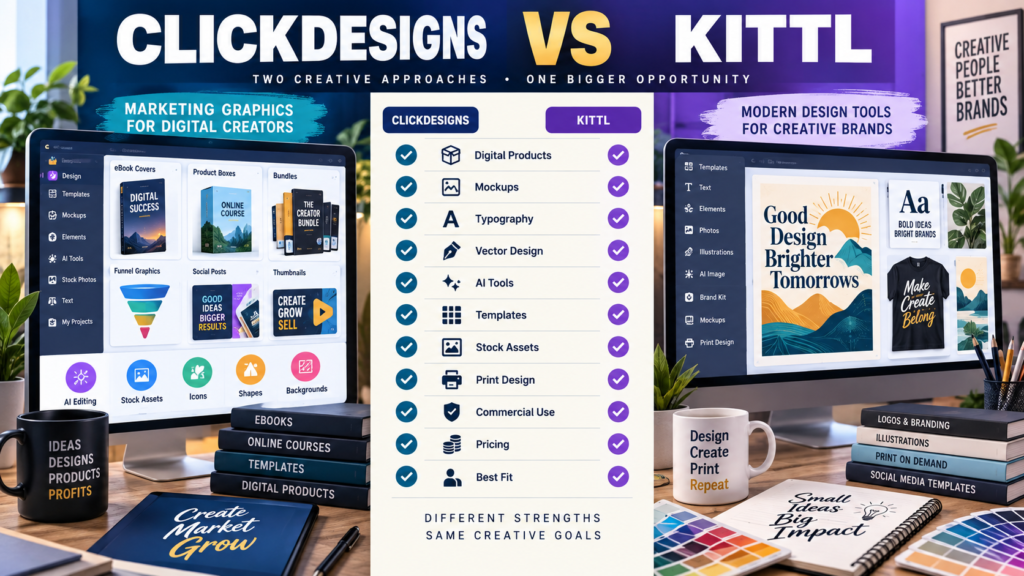
ClickDesigns and Kittl can both help a non-designer create professional-looking visual assets.
But their strongest use cases are different.
ClickDesigns is heavily oriented toward marketing graphics and digital-product presentation.
Its current platform emphasizes:
- Ebook covers.
- Boxshots.
- Product bundles.
- Mockups.
- Funnel graphics.
- Social graphics.
- Thumbnails.
- Page designs.
- AI-powered editing.
- Stock assets.
Kittl is positioned as a broader AI-first creative design platform, with strong emphasis on templates, typography, vector design, mockups, graphics, AI tools, print-oriented design, and large creative-asset libraries.
For a digital-product creator, the choice may come down to:
Do I mainly need graphics that help package and market products?
or:
Do I want a broader visual-design environment for creating original graphics and brand assets?
Review Methodology: This comparison is based on official ClickDesigns and Kittl information reviewed on September 4, 2026. No firsthand testing or personal-use claim is made. Pricing, promotional discounts, AI allowances, storage, templates, and features can change. Verify the current checkout before purchasing.
ClickDesigns’ Current Positioning
ClickDesigns focuses heavily on helping marketers create visual assets without hiring a designer.
Its official site currently highlights areas such as:
- Websites.
- Stores.
- Blog graphics.
- Offer and funnel graphics.
- Social media.
- Product mockups.
- Product bundles.
- Covers.
- AI image editing.
- Templates.
For someone selling:
- Ebook.
- Course.
- Checklist.
- Software.
- Membership.
- Template package.
that specialization can be very useful.
Kittl’s Current Positioning
Kittl describes itself as an AI-first design platform for creators.
Its current public offering emphasizes:
- Professional templates.
- Graphics.
- Fonts.
- AI tools.
- Vector design.
- Mockups.
- Large asset libraries.
- Print and merchandise-oriented creative work.
Kittl is particularly strong when the design itself is a larger part of the creative process.
Examples:
- Typography artwork.
- Posters.
- Apparel designs.
- Logos.
- Print-on-demand graphics.
- Detailed brand visuals.
- Illustrations.
Current ClickDesigns Pricing
ClickDesigns’ current pricing page displays three primary subscription levels under its present promotional pricing.
Standard
Currently displayed at approximately $20 per month when billed monthly.
The current page lists:
- 50 projects.
- Unlimited designs and downloads.
- PNG, JPEG and PDF output.
- Print-ready exports.
- Templates.
- AI tools with usage allowances.
- Flat and 2D covers and mockups.
- Product bundle tools.
- Stock assets.
- Cloud storage.
- Commercial use.
Pro
Currently displayed at approximately $30 per month monthly.
It expands project capacity, AI usage, 3D mockups, product bundles, social scheduling, asset libraries, storage, and export formats.
Expert
Currently displayed at approximately $49 per month monthly, with additional project, AI, hosting, storage, mockup, and automation capabilities.
ClickDesigns also displays lower equivalent prices for annual billing on the same page.
Because ClickDesigns has multiple promotional and offer pages with different pricing structures, verify the checkout attached to the offer you actually intend to purchase rather than relying on an older sales page.
Check the current subscription presentation on ClickDesigns’ official pricing page.
Current Kittl Pricing
Kittl currently lists:
Free
$0 per month
with:
- Five projects.
- Professional templates.
- A one-time AI token allowance.
- A large library of photos, graphics, and fonts.
Pro
Currently shown at $19 per month monthly or approximately $14 per month when billed annually, with the annual page currently displaying $168 billed annually.
Pro includes:
- Unlimited projects.
- Larger AI-token allowance.
- Premium templates and mockups.
- 10GB file storage.
- Additional creative capabilities.
Expert
Currently shown at $49 per month monthly or approximately $39 per month when billed annually, with higher AI allowances, larger asset access, and 100GB storage.
Check the latest offer on Kittl’s official website.
Which Platform Is Better for Ebook Covers?
ClickDesigns has a clear advantage in specialization.
Its template library explicitly includes:
- Book covers.
- Reports.
- Magazines.
- Product boxes.
- Device mockups.
- Product bundles.
A digital-product creator can move quickly from:
Plain PDF
to:
Ebook cover + 3D mockup + product bundle graphic + sales-page image
without designing each component from scratch.
Kittl can certainly create covers.
But the workflow is more general creative design rather than being built specifically around online-marketing product presentation.
Which Is Better for Product Mockups?
Again, ClickDesigns is designed directly around this job.
Current paid plans include varying levels of:
- 2D mockups.
- 3D mockups.
- Product bundles.
- Bundle creators.
- Cover and packaging visual tools.
This can save time when you need:
- Ebook displayed on a tablet.
- Course bundle.
- Software box.
- Product-stack image.
- Bonus collection.
For digital marketers, that specificity is meaningful.
Kittl Has Stronger Broader Design Flexibility
Kittl becomes more attractive when your design needs extend beyond marketing mockups.
For example:
- Custom typography.
- Vector artwork.
- Apparel design.
- Posters.
- Logos.
- Print products.
- Original illustrations.
Its Pro plan specifically targets creators who need vector files, advanced editing, and AI tools.
That broader creative environment can be valuable if you enjoy building original designs rather than mainly adapting marketing templates.
Templates
Both platforms provide template-driven creation.
But template purpose differs.
ClickDesigns
Templates lean toward:
- Marketing graphics.
- Offers.
- Product covers.
- Funnel elements.
- Mockups.
- Social media.
- Sales graphics.
Kittl
Templates span a broader creative universe, including:
- Graphics.
- Typography.
- Merchandise.
- Posters.
- Branding.
- Mockups.
- Print-oriented design.
Choose the library that resembles the assets you actually create.
AI Tools
Both platforms now incorporate AI.
ClickDesigns’ current pricing page advertises more than 35 AI tools across plans, with different monthly usage allowances.
Examples currently mentioned include:
- Background removal.
- Generative fill.
- Background replacement.
- Photo editing.
- Product photography.
- Object-related image editing.
Kittl uses AI tokens on its current plans, with larger allowances at Pro and Expert tiers.
Do not compare:
“35 AI tools”
with:
“2,000 AI tokens”
as though those are the same measurement.
One describes functions.
The other describes usage allowance.
Stock and Creative Assets
Both products include built-in assets.
ClickDesigns currently advertises stock photos, images, and elements with larger libraries on higher plans.
Kittl currently advertises large libraries of photos, graphics, fonts, templates, mockups, and curated assets.
If stock assets are important, compare:
- Asset types.
- Search quality.
- Licensing.
- Commercial-use rules.
- Relevance to your niche.
Quantity alone does not tell you whether the library is useful.
Commercial Use
ClickDesigns’ current pricing page includes commercial use in its listed subscription benefits.
Kittl also offers licensing associated with its plans, but users should review the current Kittl licensing terms for the specific assets and plan they intend to use commercially.
Do not assume every stock asset on any design platform carries identical rights.
Always check the current license before reselling a design or using platform assets inside a product for redistribution.
ClickDesigns May Fit Better If…
ClickDesigns deserves stronger consideration when:
- You sell ebooks.
- You create lead magnets.
- You need product mockups frequently.
- Sales-page graphics matter.
- Product bundles matter.
- You create funnels.
- You want ready-made marketing visual structures.
- You are not a professional designer.
- Speed matters more than deep creative control.
My ClickDesigns review for beginners provides more background on the platform itself.
Affiliate Disclosure: This article contains affiliate links. If you purchase through one of these links, I may earn a commission at no additional cost to you. Affiliate compensation does not determine the conclusions or recommendations presented in this article.
If ClickDesigns fits the type of digital-product graphics you create, you can review ClickDesigns through this approved partner link.
Kittl May Fit Better If…
Kittl deserves stronger consideration when:
- You want broader graphic-design control.
- Typography is important.
- Vector design matters.
- You create print-on-demand graphics.
- You design apparel.
- You want original graphic creation.
- You need a strong general design environment.
- You want a useful free entry plan.
ClickDesigns vs Adobe Express Provides Another Comparison
If you like ClickDesigns’ specialization but want to compare it with another general creative suite, see ClickDesigns vs Adobe Express.
That comparison focuses on a different general-design ecosystem.
ClickDesigns vs Visme Is Also Useful
For users more interested in presentations, infographics, and broader visual communication, ClickDesigns vs Visme provides another perspective.
The “What Do I Create Every Week?” Test
List the last ten graphics you created.
If the list looks like:
- Ebook cover.
- Product box.
- Bonus stack.
- Sales-page graphic.
- Thumbnail.
- Lead magnet cover.
- Course mockup.
ClickDesigns’ specialization may save more time.
If the list looks like:
- Typography poster.
- Logo.
- T-shirt design.
- Vector illustration.
- Brand graphic.
- Print artwork.
Kittl may be the more natural workspace.
Do Not Buy Both Immediately
There may be legitimate reasons to use both platforms.
But a beginner usually benefits more from mastering one.
Buying two overlapping creative suites creates:
- More subscriptions.
- More templates to search.
- More assets to organize.
- More software to learn.
Start with the tool that solves your most frequent design problem.
Add another only when you can name a specific missing capability.
Use a Simple Scorecard
Score each product for:
- Digital-product covers.
- Mockups.
- Product bundles.
- Funnel graphics.
- Social media.
- Typography.
- Vector design.
- Print design.
- AI tools.
- Stock assets.
- Ease of use.
- Commercial-use needs.
- Monthly cost.
Give extra weight to the categories you actually use.
Pricing Should Be Compared at the Needed Tier
Do not compare:
ClickDesigns Standard
with:
Kittl Expert
unless those are genuinely the plans you require.
First identify:
- Number of projects.
- Export formats.
- AI use.
- Storage.
- Mockup requirements.
- Vector requirements.
- Commercial-use requirements.
Then compare the appropriate tiers.
Conclusion
ClickDesigns and Kittl are both capable creator design platforms, but they solve different visual problems especially well.
ClickDesigns is strongly positioned for online marketers and digital-product creators who frequently need:
Covers → Mockups → Bundles → Funnel Graphics → Social Assets → Sales Visuals
Kittl provides a broader creative environment with strong capabilities around:
Typography → Vector Design → Templates → Print Graphics → AI Creation → Original Visual Design
If your primary goal is to make digital products look professionally packaged and marketable quickly, ClickDesigns may provide the better specialized workflow.
If your creative work extends deeply into original graphic design, typography, merchandise, and vector artwork, Kittl may provide the stronger general design environment.
Choose based on the graphics you repeatedly create—not the longest feature list.