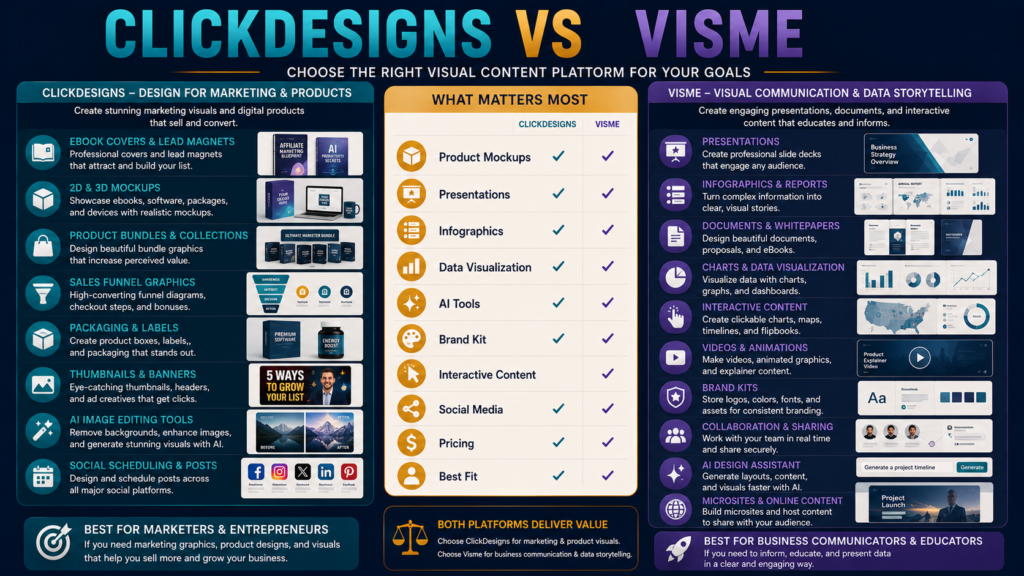
ClickDesigns and Visme are both visual-content creation platforms.
But they solve noticeably different creative problems.
ClickDesigns currently concentrates heavily on digital marketing and product graphics such as:
- Ebook covers.
- Boxshots.
- Product bundles.
- 2D and 3D mockups.
- Funnel graphics.
- Packaging.
- Thumbnails.
- Social assets.
- AI image-editing tools.
Visme is a broader visual-communication environment built around:
- Presentations.
- Infographics.
- Reports.
- Documents.
- Charts.
- Data visualization.
- Video.
- Interactive content.
- Brand management.
- Collaboration.
- AI-assisted design.
So the question is not:
Which has more design features?
It is:
What kind of content do you need to produce repeatedly?
Review Methodology: This review is based on official product information, available documentation, and publicly available details reviewed on August 22, 2026. No firsthand product testing or personal experience is claimed.
Key Takeaways
- ClickDesigns currently lists promotional monthly prices of $20 for Standard, $30 for Pro, and $49 for Expert, with the page displaying these as limited-time 50%-off prices.
- ClickDesigns Standard currently includes 50 projects, unlimited downloads, 100 monthly AI uses, 2D covers/mockups, product bundles, 1 million stock assets, 10GB storage, and commercial use.
- ClickDesigns Pro adds 3D mockups and bundles, social scheduling, 500 AI uses, 10 million stock assets, and 100GB storage.
- Visme Basic is currently free.
- Visme Starter is currently listed at $12.25/month per person when billed annually at $147/year.
- Visme Pro is currently $24.75/month per person under annual billing at $297/year.
- Visme Pro adds capabilities such as Brand Kit, analytics, broader integrations, privacy controls, and additional download formats.
- ClickDesigns is the more specialized option for digital-product packaging and mockups.
- Visme is the broader choice for presentations, infographics, reports, data visualization, and interactive visual communication.
Affiliate Disclosure: This article contains affiliate links. If you purchase through one of these links, I may earn a commission at no additional cost to you. Affiliate compensation does not determine the conclusions or recommendations presented in this article.
What Is ClickDesigns?
ClickDesigns is a visual-design platform built with digital marketers, publishers, creators, ecommerce businesses, and product sellers in mind.
Its template navigation currently includes:
- Webpages.
- Logos.
- Boxshots.
- Book covers.
- Sales-funnel graphics.
- Device mockups.
- Product bundles.
- Packaging.
- Thumbnails.
- Social media.
Explore ClickDesigns through Michael’s approved affiliate link
What Is Visme?
Visme describes itself as an AI-powered visual-content platform for creating and managing branded material.
Its current feature environment includes:
- Presentation maker.
- Infographic creator.
- Documents.
- Graphs.
- Reports.
- Whiteboards.
- Social graphics.
- Video.
- Data visualization.
- AI tools.
- Branding.
- Collaboration.
- Social scheduling.
Visme’s official feature overview
The Main Difference
Think of the products this way.
ClickDesigns
Make products and marketing assets look sellable.
Visme
Create and communicate visual information across many business formats.
There is overlap.
But the center of gravity differs.
Ebook and Digital-Product Covers
ClickDesigns has a clear advantage in specialization.
Its current system includes:
- 2D covers.
- 3D covers on higher plans.
- Book mockups.
- Software boxes.
- Reports.
- Digital devices.
- Product bundles.
If you regularly create:
- Ebook.
- Course.
- Workbook.
- Template pack.
- Software offer.
- PLR product.
these tools may save repetitive design time.
Product Bundles
ClickDesigns Pro and Expert currently provide 2D and 3D product-bundle creation, including custom product bundles.
This is a highly specific marketer feature.
Visme can create promotional images, but it is not primarily designed as a digital-product bundle mockup system.
Presentations
Visme is much stronger in presentation-oriented visual communication.
It supports:
- Templates.
- AI-generated presentation drafts.
- Animation.
- Interactive elements.
- Presenter features.
- Multiple publishing/download options.
If presentations are a major deliverable, Visme deserves the stronger look.
Infographics and Data Visualization
This is another Visme strength.
Current Visme features include:
- Infographics.
- Charts.
- Graphs.
- Tables.
- Data widgets.
- Reports.
- Interactive visual elements.
For:
- Research reports.
- Business presentations.
- Training.
- Analytics reports.
- Data-driven content.
Visme may fit better.
Interactive Content
Visme supports interactive elements such as:
- Hotspots.
- Clickable links.
- Popups.
- Animation.
- Embedded content.
That can turn a static presentation or report into a more interactive experience.
ClickDesigns is much more focused on the finished marketing graphic, mockup, or asset.
AI Tools: ClickDesigns
ClickDesigns currently lists more than 35 AI tools.
Examples include:
- Background removal.
- Generative Fill.
- Background replacement.
- AI product photography.
- AI photo editing.
- Virtual try-on.
- AI find-and-replace.
- Image expansion.
- Enhancement.
- Object removal.
Usage currently varies by plan:
Standard
100 uses/month.
Pro
500 uses/month.
Expert
1,000 uses/month.
AI Tools: Visme
Visme’s current AI environment includes:
- AI Designer.
- AI Presentation Maker.
- AI Document Generator.
- AI Brand tools.
- AI image generation.
- AI text.
- AI image editing.
The platforms therefore apply AI differently.
ClickDesigns emphasizes image/design production.
Visme increasingly uses AI to generate complete visual communications such as presentations and documents.
Brand Management
Visme Pro includes Brand Kit functionality. Its current product documentation describes storing:
- Logos.
- Brand colors.
- Fonts.
- Guidelines.
and applying them across content.
ClickDesigns also provides brand-oriented design functionality, but Visme’s approach is especially relevant for teams creating many kinds of branded communication.
Collaboration
Visme has stronger visible emphasis on:
- Team collaboration.
- Comments.
- Permissions.
- Asset management.
- Brand controls.
If several people create business materials, this can matter.
A solo digital-product seller may not need the same collaboration depth.
Social Media
Both platforms can participate in social-content workflows.
ClickDesigns Pro and Expert currently include:
- Social content planning.
- Posting.
- Scheduling for supported networks.
Visme also includes a social media scheduler and broader content-calendar functionality.
If social scheduling matters, test whether your actual networks are supported at your intended plan.
Export Options: ClickDesigns
Standard
Current headline plan information lists common image/document downloads.
Pro and Expert
Expand formats to include:
- PNG.
- JPEG.
- GIF.
- WebM.
- WebP.
- MP4.
- PDF.
ClickDesigns also lists print-ready CMYK/300-DPI output.
Export Options: Visme
Visme Starter currently includes downloads such as:
- JPG.
- PNG.
- PDF.
Pro adds formats such as:
- PPTX.
- HTML5.
- Video.
- GIF.
Those broader output formats are particularly useful for presentations and interactive communications.
ClickDesigns Pricing
Current promotional monthly pricing:
Standard
$20/month.
Pro
$30/month.
Expert
$49/month.
The page labels these as limited-time discounted rates, so buyers should verify current checkout pricing rather than assuming the promotion will remain available.
Visme Pricing
Current annual-billing presentation:
Basic
$0.
Starter
$12.25/month per person, billed $147/year.
Pro
$24.75/month per person, billed $297/year.
Visme currently describes the annual option as saving 50% compared with its monthly arrangement.
Again, verify checkout because pricing can change.
Free Access
ClickDesigns’ current pricing page offers a free trial/start option without requiring a credit card.
Visme Basic is a permanent free tier with limited assets/features and unlimited projects according to its current pricing page.
That makes both relatively easy to test before choosing.
Which Is Better for Digital Product Sellers?
ClickDesigns deserves the stronger look when most of your weekly work includes:
- Ebook covers.
- Product mockups.
- Bundle graphics.
- Software boxes.
- Sales-page images.
- Product packaging.
- Funnel graphics.
Its specialization is the advantage.
Which Is Better for Reports and Educational Content?
Visme may fit better when you regularly produce:
- Presentations.
- Reports.
- Infographics.
- Charts.
- Training documents.
- Interactive resources.
- Business proposals.
The tool is designed around communicating information visually.
Which Is Better for a Course Creator?
This depends on the asset.
ClickDesigns
Good fit for:
- Course cover.
- Box mockup.
- Bundle graphics.
- Sales-page graphics.
- Promotional thumbnails.
Visme
Good fit for:
- Lesson presentations.
- Infographics.
- Visual worksheets.
- Interactive learning resources.
- Reports.
A course creator could plausibly use either for different jobs.
Existing ClickDesigns Coverage
MichaelELeeReviews already has a detailed product review:
ClickDesigns Review: Is It Worth It for Ebook and Digital-Product Creators?
The site also recently compared ClickDesigns with a broader design competitor:
ClickDesigns vs. Adobe Express
Those provide more context if digital-product graphics are your main priority.
Run a Real Six-Asset Test
Create the same project in both platforms.
Asset 1
Ebook cover.
Asset 2
3D product mockup.
Asset 3
Social post.
Asset 4
Presentation.
Asset 5
Infographic.
Asset 6
YouTube thumbnail.
Record:
Setup time
Template quality
Editing ease
Product mockups
Data visualization
AI usefulness
Branding
Export
Overall cost
The difference should become obvious.
Who Should Consider ClickDesigns?
ClickDesigns may fit better if:
- Digital products are central.
- Mockups matter.
- Bundle graphics matter.
- Direct-response marketing graphics matter.
- You want specialized product templates.
- AI image editing matters.
- Social scheduling is useful.
- You do not need deep presentation/data tools.
Who Should Consider Visme?
Visme may fit better if:
- Presentations are common.
- Infographics matter.
- Reports matter.
- Data visualization matters.
- Interactive content matters.
- Team collaboration matters.
- Brand governance matters.
- You create many different forms of business communication.
Final Verdict
Choose ClickDesigns when your design workload revolves around packaging and promoting digital products.
Choose Visme when your workload revolves around communicating information visually through presentations, reports, infographics, documents, charts, and interactive branded content.
ClickDesigns is the stronger specialist.
Visme is the broader visual-communication system.
Conclusion
ClickDesigns and Visme overlap enough that either can create attractive marketing graphics.
But their strongest use cases are different.
If you spend most of your design time making:
ebook covers, mockups, bundles, product graphics, and sales assets
ClickDesigns deserves close consideration.
If you spend more time making:
presentations, infographics, reports, charts, branded documents, and interactive visual content
Visme may be the better fit.
Do not choose based on which homepage looks more impressive.
Create the six assets you actually need.
The platform that completes those jobs with the least unnecessary effort is the one that better fits your business.