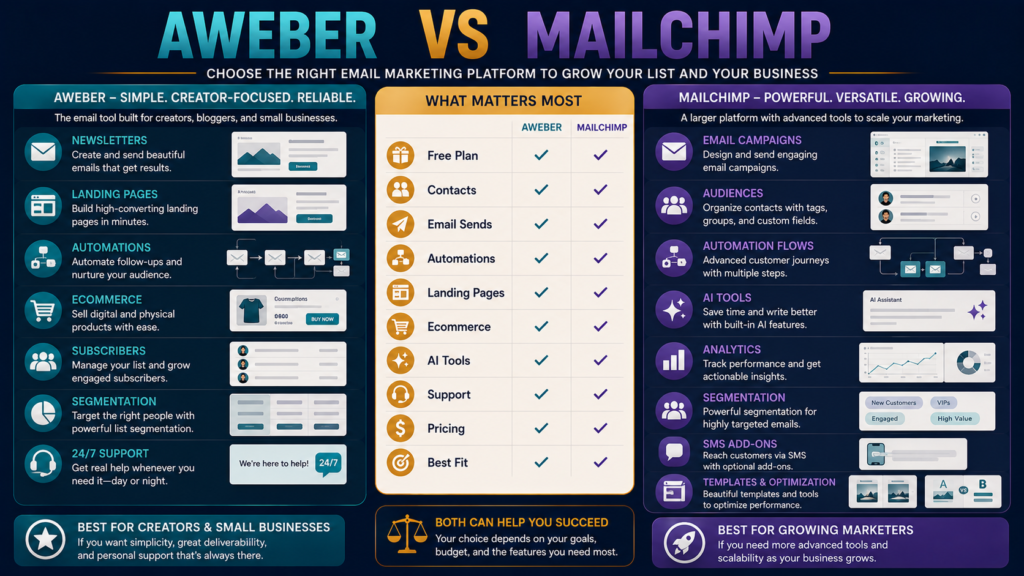
AWeber and Mailchimp are two long-established email-marketing platforms.
Both can handle:
- Subscriber lists.
- Broadcast emails.
- Automated follow-up.
- Signup forms.
- Landing pages.
- Segmentation.
But their current 2026 pricing and plan structures are quite different.
AWeber currently emphasizes creator-focused email, landing pages, automation, ecommerce, and straightforward subscriber-based tiers. Its official documentation continues to offer Free, Lite, Plus, and Unlimited plan structures.
Mailchimp offers Free, Essentials, Standard, and Premium marketing plans, with increasing emphasis on automation, AI, predictive capabilities, analytics, and larger-team functionality.
The better choice depends on:
- List size.
- Sending frequency.
- Automation needs.
- Number of audiences/lists.
- Need for advanced analytics and AI.
- How complicated you want the system to become.
Review Methodology: This review is based on official product information, available documentation, and publicly available details reviewed on August 22, 2026. No firsthand product testing or personal experience is claimed.
Key Takeaways
- AWeber Free currently supports up to 500 subscribers and 3,000 monthly emails according to AWeber’s current documentation.
- AWeber Lite currently starts at $15/month for up to 500 subscribers when paid monthly, or $150/year, and allows email sends equal to 10 times subscriber volume per month.
- AWeber Plus currently starts at $30/month for up to 500 subscribers or $240/year and raises sending to 12 times subscriber volume while removing many Lite limits.
- Mailchimp Free currently allows up to 250 contacts and 500 email sends per month.
- Mailchimp Essentials currently starts at $13/month at the displayed 500-contact tier and includes up to 5,000 monthly sends there.
- Mailchimp Standard currently starts at $20/month at the displayed 500-contact tier and includes up to 6,000 monthly sends there, along with additional automation and AI/optimization capabilities.
- Both companies scale pricing or usage limits as the audience grows, so the first-month price should not be the only comparison.
Affiliate Disclosure: This article contains affiliate links. If you purchase through one of these links, I may earn a commission at no additional cost to you. Affiliate compensation does not determine the conclusions or recommendations presented in this article.
What Is AWeber?
AWeber is an email-marketing platform built around:
- Newsletters.
- Subscriber management.
- Automations.
- Landing pages.
- Forms.
- Segmentation.
- Ecommerce.
Its current official pricing structure includes Free, Lite, Plus, and Unlimited.
Explore AWeber through Michael’s approved affiliate link
What Is Mailchimp?
Mailchimp is a broader marketing platform whose current email-marketing structure includes:
- Free.
- Essentials.
- Standard.
- Premium.
Its higher plans increasingly include:
- Automation flows.
- Generative AI.
- Predictive features.
- Custom reporting.
- Additional audiences.
- Additional users.
- SMS/MMS add-ons where available.
Free Plans
For a beginner, this is an obvious comparison.
AWeber Free
Current AWeber documentation lists:
- 500 subscribers.
- 3,000 emails/month.
- One list.
- One workflow automation.
Mailchimp Free
Current Mailchimp pricing lists:
- 250 contacts.
- 500 email sends/month.
- One audience.
- One user.
- Limited templates.
- No marketing automation flows in the current comparison table.
For a very small but active beginner newsletter, AWeber’s current free allowances are materially more generous on subscribers and sends.
AWeber Lite
At up to 500 subscribers, AWeber’s current table lists:
$15/month
or:
$150/year.
Lite includes:
- 10× subscriber volume in monthly sends.
- One list.
- Three landing pages.
- Three email automations.
- Three users.
- One custom segment.
- 24/7 support.
For 500 subscribers, 10× means up to roughly 5,000 sends under the published plan allowance.
Mailchimp Essentials
At the displayed 500-contact tier:
$13/month
with:
5,000 monthly email sends.
It also includes benefits such as:
- Professional templates.
- Email scheduling.
- Removal of Mailchimp branding.
- 24/7 email/chat support.
- Three seats.
- Three audiences.
Those audience limits may matter if you genuinely need several separate databases.
AWeber Plus
At 500 subscribers:
$30/month
or:
$240/year.
Plus includes:
- 12× subscriber volume in monthly sends.
- Unlimited list profiles.
- Unlimited landing pages.
- Unlimited email automations.
- Unlimited users.
- Unlimited saved segments.
- Priority 24/7 support.
- More advanced analytics.
This is a substantial jump from Lite in flexibility.
Mailchimp Standard
At the displayed 500-contact tier:
$20/month
and:
6,000 monthly sends.
Mailchimp currently positions Standard around:
- Automation.
- Personalization.
- AI writing/design.
- Predictive customer behavior.
- Reporting and analytics.
- Five seats.
- Five audiences.
This is one of the clearest differences.
Mailchimp Standard is positioned less as “more email” and more as “more sophisticated marketing.”
Subscriber vs. Contact Rules Matter
Do not compare prices until you understand how each company counts your audience.
Email platforms can count:
- Active subscribers.
- Unsubscribed contacts.
- Non-subscribed contacts.
- Multiple list entries.
differently.
Review the current billing rules before migration.
Email Send Limits
AWeber Lite
10× subscriber volume.
AWeber Plus
12× subscriber volume.
Mailchimp Essentials
10× contacts.
Mailchimp Standard
12× contacts.
Mailchimp Premium
15× contacts.
At equivalent list sizes, the sending multipliers can therefore look similar.
The surrounding features and contact-counting rules become important.
Automation
AWeber Lite currently allows three email automations.
Plus removes that restriction.
Mailchimp Essentials currently allows limited marketing automation flows, while Standard and Premium expand automation capabilities significantly.
If your workflow is:
Lead magnet → five welcome emails → newsletter
you may not need extremely sophisticated automation.
AI Tools
Mailchimp Standard and Premium currently include generative AI capabilities within the marketing-plan comparison.
AWeber has AI-related tools such as its subject-line assistant, but its current platform positioning remains more straightforwardly creator/email focused.
Do not choose the platform because “AI” appears on the feature table.
Ask whether you need the specific feature.
Landing Pages
AWeber Lite currently includes three landing pages.
AWeber Plus includes unlimited landing pages.
Mailchimp provides its own audience, forms, and campaign-building environment.
If landing pages are important, build a real lead-magnet page in both before deciding.
Ecommerce
AWeber currently includes ecommerce capabilities for selling products and services and lists transaction fees of:
- 1.0% on Lite.
- 0.6% on Plus.
according to its current feature table.
Mailchimp’s strength is more heavily centered on marketing/customer automation rather than acting as the only digital-product checkout system.
Large Lists
AWeber currently lists an Unlimited plan at:
$899/month
with unlimited subscriber capacity and sends up to 15× subscriber volume.
Mailchimp Premium currently begins around:
$350/month at the displayed 10,000-contact level and provides 150,000 sends at that tier, plus priority phone support and large-team capabilities.
Those tiers serve much larger businesses than a beginner with several hundred subscribers.
Which Is Simpler?
AWeber’s current plan positioning may feel easier to understand if your goal is:
- Build list.
- Send newsletters.
- Automate follow-up.
- Create landing pages.
- Sell simple products.
Mailchimp becomes increasingly attractive when you specifically value:
- Multi-audience organization.
- AI-assisted campaign tools.
- Predictive behavior.
- Advanced reporting.
- Broader marketing optimization.
Existing Comparison Context
MichaelELeeReviews already has a verified comparison of AWeber with another major email platform:
GetResponse vs. AWeber for Beginners
And the site’s newest email comparison covers Mailchimp from another angle:
GetResponse vs. Mailchimp in 2026
Those comparisons can help if GetResponse is also on your shortlist.
Test the Same Beginner Workflow
Do not spend the trial randomly exploring menus.
Build:
1. List/Audience
Create the subscriber database.
2. Lead Magnet Form
Connect a basic signup.
3. Landing Page
Build one page.
4. Welcome Automation
Create three messages.
5. Newsletter
Send a test.
6. Segment
Create one useful audience segment.
7. Reporting
Find clicks and subscriber activity.
Then record which platform required less effort.
Who Should Consider AWeber?
AWeber may fit better if:
- You want a straightforward beginner email system.
- The current Free plan capacity fits your early stage.
- You want more free monthly sends.
- Landing pages matter.
- Simple ecommerce may be useful.
- You value a creator-focused platform.
- You do not need a large set of predictive/optimization features.
Who Should Consider Mailchimp?
Mailchimp may fit better if:
- You already know the platform.
- You need multiple audiences on paid plans.
- Marketing automation depth matters.
- AI-assisted marketing tools matter.
- Predictive features matter.
- More advanced reporting becomes important.
- Your integrations already revolve around Mailchimp.
Final Verdict
Choose AWeber when your priority is a relatively straightforward email-marketing system for list building, newsletters, automations, landing pages, and simple creator selling.
Choose Mailchimp when you want email to sit inside a broader marketing environment with increasing automation, AI, personalization, predictive capabilities, and analytics as you upgrade.
For a true beginner, AWeber’s current Free allowance of up to 500 subscribers and 3,000 monthly sends makes it especially worth testing.
For a business anticipating more sophisticated campaign optimization, Mailchimp Standard deserves serious consideration.
Conclusion
AWeber vs. Mailchimp is not really about which company is more famous.
Compare the workflow you will actually maintain.
Calculate your expected:
Subscribers
Monthly sends
Automations
Landing pages
Audience segments
AI needs
Reporting needs
Then test that exact setup.
The best beginner email platform is the one you can understand well enough to keep using consistently after the excitement of setting it up has disappeared.