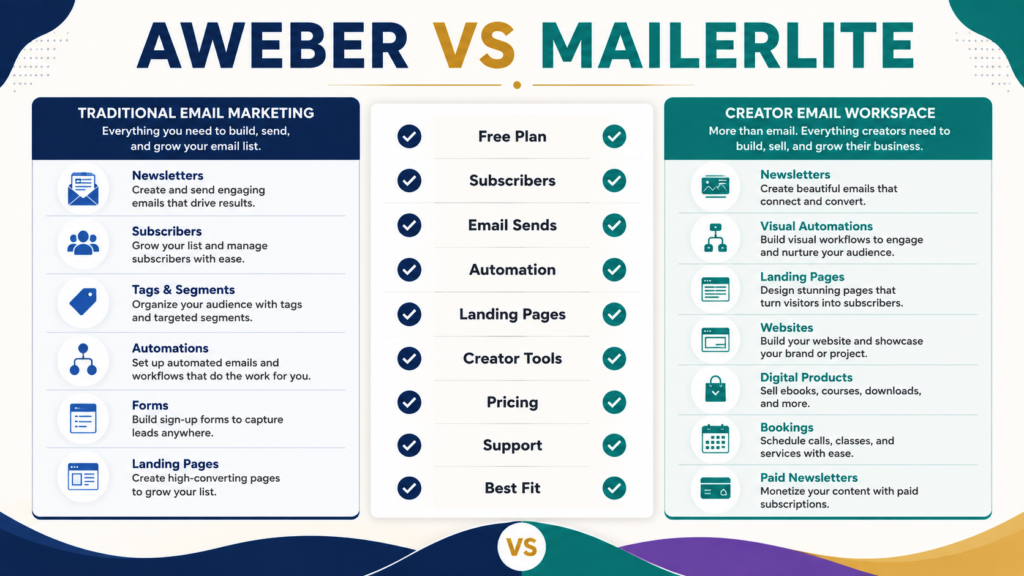
AWeber and MailerLite can both handle the basic jobs a beginner expects from an email-marketing platform: collecting subscribers, sending newsletters, building simple automations, and creating landing pages.
The better choice depends less on which platform has the longest feature list and more on the workflow you actually want to maintain.
As of September 1, 2026, AWeber’s official documentation lists Free, Lite, Plus, and Unlimited plans. Its Free plan supports up to 500 subscribers and 3,000 email sends per month. MailerLite’s current official pricing information lists a Free plan supporting up to 250 subscribers and 2,500 monthly emails, followed by paid plans with broader limits and features.
For a beginner building a straightforward email list, the decision usually comes down to four questions:
- How large is your list likely to become soon?
- How much automation do you actually need?
- Do you want website and digital-product tools inside the same platform?
- Which interface and support structure are easiest for you to maintain?
This comparison focuses on those practical differences rather than declaring one universal winner.
Review Methodology: This comparison is based on official AWeber and MailerLite product information, pricing pages, and publicly available documentation reviewed on September 1, 2026. No firsthand product testing or personal experience is claimed.
Affiliate Disclosure: This article contains affiliate links. If you purchase through one of these links, I may earn a commission at no additional cost to you. Affiliate compensation does not determine the conclusions or recommendations presented in this article.
Quick Answer
AWeber may fit you better if you want a traditional email-marketing platform with a beginner-accessible free tier, tagging, workflows, landing pages, and an established email-focused toolset.
MailerLite may fit you better if you want email marketing combined with broader built-in website, landing-page, digital-product, booking, and paid-newsletter capabilities.
Neither choice is automatically better for every beginner.
AWeber at a Glance
AWeber is primarily an email-marketing platform.
According to AWeber’s current pricing documentation, its Free plan allows up to 500 subscribers and 3,000 monthly email sends. The Lite plan starts at $15 per month for the 500-subscriber tier when billed monthly, with different limits as subscriber counts increase.
AWeber also provides landing pages, subscriber tags, segmentation, workflows, and automation features. Its documentation shows that landing-page forms can apply tags, and those tags can help organize subscribers or trigger workflows.
That creates a recognizable beginner workflow:
- Create a signup page.
- Collect subscribers.
- Apply tags when useful.
- Send newsletters.
- Build a simple welcome workflow.
- Add more segmentation when your needs justify it.
If you want a deeper look at the platform itself before comparing alternatives, see the AWeber Review for Beginners.
MailerLite at a Glance
MailerLite has expanded beyond basic newsletter sending.
Its current platform includes email campaigns, automations, landing pages, signup forms, websites, blogs, digital products, bookings, and paid newsletter subscriptions.
According to MailerLite’s current pricing information, the Free plan supports up to 250 subscribers and 2,500 monthly emails. Its current feature information also describes visual automations, a website and landing-page allowance, signup forms, A/B testing, and limited digital-product or booking features on the free level. Paid plans expand those limits.
For a beginner, MailerLite’s main appeal is that several functions can live inside one environment.
That can be useful if you want to create landing pages, send emails, build automations, publish a simple website, or sell a basic digital product without immediately connecting several unrelated tools.
Compare the Free Plans First
Free plans can be useful for learning, but they should not be treated as permanent guarantees.
AWeber Free currently provides a larger subscriber allowance at 500 subscribers, while MailerLite’s current Free plan lists up to 250 subscribers. AWeber currently allows 3,000 monthly email sends on Free; MailerLite lists 2,500.
On subscriber capacity alone, AWeber gives a beginner more room before reaching its current free subscriber limit.
MailerLite, however, exposes a broader range of creator-oriented tools within the platform, including website, landing-page, automation, digital-product, and booking functions.
So the better free plan depends on what you are trying to learn.
If your priority is:
Can I start building an email list and sending newsletters?
AWeber’s larger current subscriber allowance may be attractive.
If your priority is:
Can I experiment with email plus landing pages, a simple website, automations, and additional creator tools?
MailerLite may deserve closer consideration.
Do not choose only by the free-plan limit.
Also ask what happens when you need to upgrade.
Compare Paid Pricing Carefully
AWeber’s Lite plan currently starts at $15 per month for up to 500 subscribers when paid monthly, according to its official documentation.
MailerLite currently lists its Comfort plan starting at $12 per month and its Power plan starting at $25 per month, although final pricing depends on list size and selected billing conditions.
Those starting numbers are useful, but they do not tell the entire story.
Email-platform pricing can depend on subscriber count, sending limits, billing frequency, automation limits, number of users, landing-page limits, support level, and advanced features.
A cheaper starting price is not automatically the cheaper long-term system.
If one platform replaces another tool you otherwise would pay for, your overall cost could be lower even when the email plan costs more.
Likewise, a low monthly price is not valuable if the workflow is difficult enough that you stop using the platform.
Before paying, estimate where your list could realistically be six to twelve months from now and compare the plan you would probably need at that point.
Email Creation and Newsletters
Both platforms are designed to create and send email campaigns.
For beginners, the practical questions are more useful than a long feature chart:
Can I create an email without fighting the editor?
Can I reuse a template?
Can I send a simple newsletter?
Can I preview the email before sending?
Can I schedule messages?
Can I view opens and clicks?
Can I send a test to myself?
Most beginners do not need an elaborate newsletter design system.
If your newsletter is educational, a clear subject line, readable text, one or two useful links, and a natural next action may be enough.
The best editor is the one you can comfortably use every week.
Automation: Start With What You Actually Need
AWeber supports workflows, tags, and automation.
Its documentation describes subscriber actions and tags that can affect workflow progression and segmentation.
MailerLite provides visual automation tools and currently lists different automation allowances depending on plan level.
A beginner often needs much less automation than a software sales page suggests.
A simple starting sequence might be:
Email 1: Deliver the lead magnet.
Email 2: Explain the main problem.
Email 3: Teach one useful step.
Email 4: Share a related resource.
Email 5: Introduce an appropriate offer.
Both platforms can support basic follow-up systems.
The more important question is whether you understand the automation after you build it.
A complicated automation you are afraid to edit is not better than a five-email sequence you can maintain.
If you want another comparison point, the existing GetResponse vs AWeber comparison for beginners examines another email-platform approach.
Landing Pages and Lead Capture
AWeber has a drag-and-drop landing-page builder. Its official documentation explains that landing-page forms can apply tags to subscribers and those tags can be used for follow-up workflows or segmentation.
MailerLite also includes landing pages and signup forms, while extending its platform into websites, blogs, digital products, bookings, and paid newsletters.
If you already have a WordPress website and need only a simple lead-capture page, you may not care about an additional website builder.
If you want to reduce the number of tools in your stack, MailerLite’s broader creator features may matter more.
The feature only matters if it replaces work you would otherwise have to do somewhere else.
Subscriber Organization and Segmentation
AWeber uses tags and segments to organize subscribers.
This can help distinguish subscribers who joined through different forms, showed interest in different topics, or interacted with particular messages. AWeber’s documentation notes that saved tag-based segments can update dynamically as subscribers gain or lose matching tags.
Beginners should resist creating dozens of segments immediately.
Start with distinctions that affect what you actually send.
For example:
AI beginners
Digital-product subscribers
Affiliate-marketing subscribers
Customers
Non-customers
If two groups will receive exactly the same messages, there may be no reason to separate them yet.
Support and Learning Curve
Support matters more when you are new.
A platform can have excellent features and still be a poor fit if you cannot solve basic problems without spending hours searching for instructions.
MailerLite’s current plan information shows different support levels by tier, including email support on Comfort and live chat plus email support on Power.
AWeber maintains extensive documentation for landing pages, tags, workflows, and subscriber management.
Before choosing either platform, search its help center for three tasks you expect to perform:
Create a landing page.
Build a welcome automation.
Import or organize subscribers.
If the instructions make sense to you, that is useful information.
Do not evaluate software solely from the sales page.
Digital Products and Creator Features
This is one of the clearer differences between the two approaches.
MailerLite currently promotes built-in capabilities for selling digital products, handling bookings, publishing paid newsletters, and building websites.
AWeber also includes ecommerce-related and landing-page functions, but its product structure remains strongly centered on email marketing and subscriber communication.
If you already use separate checkout and digital-product delivery tools, you may not need your email platform to perform those jobs.
If you want one platform to handle more of the creator workflow, MailerLite deserves closer consideration.
The correct choice depends on your existing stack, not on which platform can display the longest feature list.
Which Is Better for a Beginner?
AWeber may fit better if you primarily want email marketing, value its current 500-subscriber Free allowance, want tagging and straightforward workflows, prefer to keep email separate from your website/product-delivery systems, or simply prefer its workflow.
MailerLite may fit better if you want email combined with website and landing-page tools, are interested in built-in digital-product or booking functions, prefer a broader creator platform, or find its pricing and interface more suitable for your expected list size.
There is no reason to choose based on hypothetical complexity you may never need.
Choose based on the next workflow you actually need to build.
A Simple Buying Test Before You Decide
Before paying for either platform, complete the same five tasks in each free account or trial when available.
- Create a list or audience.
- Build a signup form or landing page.
- Create a three-email welcome sequence.
- Send yourself a test newsletter.
- Find the report showing opens and clicks.
Then ask:
Which setup was easier to understand?
Which required less searching for help?
Which editor felt more comfortable?
Can I explain how my automation works?
Which paid plan would I need at my expected list size?
This produces a better decision than comparing fifty features you may never use.
You can also read the GetResponse Review for Beginners if you want to evaluate a third email-marketing approach.
Conclusion
AWeber and MailerLite are both capable email-marketing options for beginners, but they emphasize somewhat different workflows.
AWeber remains a reasonable choice for someone who wants an email-focused system with a current Free tier supporting up to 500 subscribers, tagging, workflows, landing pages, and established subscriber-management tools.
MailerLite is especially worth considering when you want email marketing combined with a broader collection of creator tools such as websites, landing pages, digital products, bookings, and paid newsletters.
The right choice is not the platform with the most features.
It is the platform that handles the small number of jobs you actually need without creating unnecessary complexity.
If AWeber’s approach fits those needs, you can review AWeber and its current options here. Before purchasing either service, verify the provider’s current pricing and plan limits because those details can change.
Your best next step is to write down the three email-marketing tasks you need during the next 90 days, then test those exact tasks before paying for either platform.