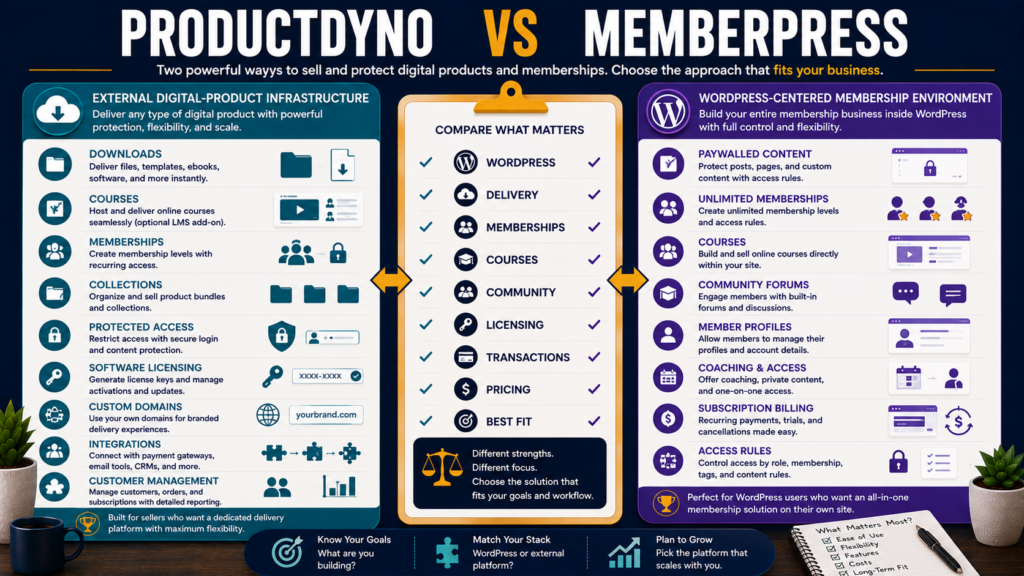
ProductDyno and MemberPress can both help protect digital content and control customer access.
Both can support memberships.
Both can support courses.
Both can participate in recurring-revenue businesses.
But they are built around fundamentally different architectures.
ProductDyno is a broader digital-product delivery and member-management platform with features such as collections, LMS functionality, access controls, licensing, integrations, and customer management.
MemberPress is a WordPress membership plugin and platform that turns an existing WordPress site into a membership, course, community, coaching, and paywalled-content environment.
That means the first question should be:
Do you want your membership business built inside WordPress—or do you want a specialized product-delivery platform that can operate alongside your existing website and marketing stack?
Review Methodology: This review is based on official product information, available documentation, and publicly available details reviewed on August 30, 2026. No firsthand product testing or personal experience is claimed.
Affiliate Disclosure: This article contains affiliate links. If you purchase through one of these links, I may earn a commission at no additional cost to you. Affiliate compensation does not determine the conclusions or recommendations presented in this article.
If ProductDyno’s delivery-and-licensing model fits your business, you can review ProductDyno through my affiliate link.
Quick Verdict
ProductDyno may be the better fit if you need digital-product delivery, memberships, collections, software licensing, customer access, and integrations without making WordPress the center of the product-delivery system.
MemberPress may be the better fit if you already use WordPress and want the website itself to become the membership, course, community, coaching, and protected-content platform.
Software licensing gives ProductDyno an important distinction.
WordPress ownership and integration give MemberPress an important distinction.
What Is ProductDyno?
ProductDyno’s current public platform lists capabilities including:
- Learning-management tools.
- Domain and access controls.
- Multilanguage support.
- Restricted IPs and emails.
- Collections.
- Business intelligence.
- Licensing.
- Team members.
- Integrations.
Its core identity is digital-product delivery and member management.
The existing ProductDyno review for beginners provides a more general introduction.
What Is MemberPress?
MemberPress runs on WordPress.
Its current feature set includes:
- Membership access rules.
- Paywalls.
- Online courses.
- Coaching.
- Community tools.
- Member profiles and directories.
- Recurring subscriptions.
- Member dashboards.
That can be attractive if your WordPress website is already the center of your business.
The Architectural Difference Matters
With MemberPress:
WordPress is the membership platform.
With ProductDyno:
ProductDyno is the product/member-delivery layer.
Neither approach is universally better.
They create different maintenance responsibilities.
WordPress Requirement
MemberPress requires a WordPress environment.
That means your overall membership system depends on:
- WordPress.
- Hosting.
- MemberPress.
- Theme.
- Plugin compatibility.
- Website security.
- Backups.
- Updates.
The advantage is ownership and control.
MemberPress itself emphasizes keeping membership, course, and community data on the WordPress installation rather than relying entirely on a hosted third-party community platform.
The disadvantage is that you are responsible for more of the website stack.
ProductDyno Does Not Require the Same WordPress-Centered Model
ProductDyno can work as a specialized delivery environment alongside other tools.
That may appeal to someone who already has:
- WordPress.
- External checkout.
- Email platform.
- Funnel software.
and does not want the WordPress installation itself responsible for all customer entitlements.
Memberships
MemberPress is specifically built around membership access.
Its current plans support unlimited members, memberships, and subscriptions.
Access Rules let site owners control protected content, while drip and expiration features can determine when members receive or lose access.
ProductDyno also focuses on memberships and protected product access but combines those capabilities with broader digital-product delivery and software licensing.
Courses
Both platforms now go beyond simple downloads.
MemberPress Launch
Includes basic course functionality and an AI Course Generator under the current plan structure.
MemberPress Growth
Adds fuller LMS features such as quizzes, assignments, certificates, and drip content.
MemberPress Scale
Adds additional higher-level tools including gradebook and broader integrations under the current plan configuration.
ProductDyno also offers LMS functionality as part of its broader content-delivery platform.
A serious course business should compare the student experience rather than simply checking whether both platforms say “courses.”
Community
MemberPress currently offers integrated community features.
Growth adds community functionality including forums, member directories, and profiles; Scale expands this further with direct messaging and related features.
This can reduce the need for a separate community platform.
ProductDyno is more focused on membership delivery and access rather than positioning community discussion as the center of the product.
Coaching
MemberPress Growth and higher plans include CoachKit-related coaching functionality under the current plan structure.
That may matter for:
- One-to-one coaching.
- Cohort programs.
- Accountability.
- Milestone-based programs.
A simple downloadable-product seller may never need it.
Software Licensing
This is one of ProductDyno’s clearest differentiators.
ProductDyno lists licensing as part of its platform.
That can matter for businesses selling:
- Plugins.
- Software.
- SaaS.
- Licensed applications.
MemberPress specializes in WordPress memberships and protected content rather than acting primarily as software-license infrastructure.
If licensing is essential, ProductDyno deserves substantially more weight.
MemberPress Pricing
MemberPress currently advertises three annual plans with introductory first-year pricing:
Launch
$199.50 for the first year under the current promotion.
Standard renewal price shown at checkout: $399/year.
Growth
$349.50 introductory first year.
Standard renewal price: $699/year.
Scale
$499.50 introductory first year.
Standard renewal price: $999/year.
Because promotional pricing can change, verify the live checkout before purchasing.
MemberPress Transaction Fees
The Launch plan currently charges a 4.9% MemberPress transaction fee per successful payment in addition to normal payment-processor fees.
Growth and Scale currently remove the MemberPress transaction fee.
This is important when comparing the cheaper Launch subscription with the higher plans.
A Simple MemberPress Fee Example
Suppose Launch processes:
$1,000 in membership payments.
At 4.9%, the MemberPress platform transaction fee would be:
$49
before normal payment-processor fees.
At $5,000:
$245
The higher Growth subscription can therefore become financially more attractive as sales rise.
Do the calculation with your actual expected revenue.
ProductDyno Pricing
ProductDyno’s current primary pricing page advertises a:
14-day test drive followed by $199 per month for the configuration promoted on that page.
ProductDyno has displayed different promotional structures on different official pricing pages during 2026, so verify:
- Exact live price.
- Billing frequency.
- Renewal terms.
- Included modules.
- Trial terms.
before purchasing.
This is especially important when comparing it against MemberPress’s annual plan pricing.
Fixed Platform Cost vs WordPress Stack Cost
MemberPress’s subscription is not the entire business cost.
You may also need:
- WordPress hosting.
- Domain.
- Backup system.
- Security.
- Premium theme or plugins.
- Email service.
- Payment processor.
Likewise, ProductDyno may sit inside a stack containing:
- Website.
- Email marketing.
- Checkout.
- Funnel software.
Compare total operating cost.
Content Ownership and Control
MemberPress’s WordPress-centered approach can be attractive to businesses that prioritize keeping the member experience on a site they control.
You control:
- Domain.
- WordPress installation.
- Hosting environment.
- Site structure.
But that control also creates responsibility for:
- Updates.
- Backups.
- Security.
- Plugin compatibility.
ProductDyno’s Specialized Approach
ProductDyno can remove some of that responsibility from WordPress by keeping product/member management inside a separate platform.
That can reduce the number of membership functions tied directly to WordPress.
But it introduces reliance on another external service.
Every architecture has tradeoffs.
Access Rules
MemberPress is particularly strong when you want to say:
Membership A can view Pages 1–10.
Membership B can access Category X.
Course students get these lessons.
Content unlocks after seven days.
Its access-rule and drip systems are deeply connected to WordPress content.
That is a major benefit when WordPress content itself is what you are selling.
Product Collections
ProductDyno places more emphasis on organizing multiple digital products, memberships, and collections within its delivery environment.
This can be useful when a customer purchases several related products and needs one controlled access area.
MemberPress May Be Better If You Want
- WordPress at the center of the business.
- Unlimited memberships.
- Unlimited members.
- Unlimited subscriptions.
- Paywalled WordPress content.
- Courses.
- Community.
- Coaching.
- Strong access rules.
- Direct control over the website environment.
ProductDyno May Be Better If You Want
- Dedicated digital-product delivery.
- Memberships.
- Collections.
- Product access separate from the WordPress plugin stack.
- Software licensing.
- LMS functionality.
- Domain/access controls.
- Integrations with an existing marketing stack.
Compare With Other Product Platforms
If structured education is the main priority, the verified ProductDyno vs LearnWorlds comparison examines a more learning-platform-focused alternative.
If commerce, subscription billing, and software licensing are central, the verified ProductDyno vs Lemon Squeezy comparison looks at a merchant-of-record model.
Which Is Easier?
The answer depends on what you already operate.
If you already know WordPress and have hosting:
MemberPress may feel natural.
If you do not want to maintain a membership plugin, theme compatibility, and WordPress access rules:
ProductDyno may feel simpler operationally.
Ease is relative to the existing stack.
Migration Risk
Changing either system later can involve:
- Members.
- Subscription records.
- Product entitlements.
- Course access.
- Protected content.
- Customer accounts.
- Payment integrations.
- URLs.
- Emails.
Choose carefully before building hundreds of protected pages.
Questions to Ask Before Choosing
- Must the membership live inside WordPress?
- Do I already have reliable hosting?
- Do I need software licensing?
- Do I need courses?
- Do I need quizzes and certificates?
- Do I need community forums?
- Do I need coaching tools?
- Do I need multiple product collections?
- What transaction fees apply?
- What is the renewal price?
- What other software remains necessary?
- Who will maintain the technical stack?
Final Verdict
ProductDyno and MemberPress overlap, but they are not the same type of system.
MemberPress is the stronger fit when WordPress itself should become the membership, course, community, coaching, and protected-content platform.
ProductDyno is the stronger fit when you want specialized digital-product delivery, memberships, collections, licensing, and customer access without making your WordPress installation responsible for the entire delivery system.
Software licensing strongly favors ProductDyno’s use case.
WordPress-native memberships and community strongly favor MemberPress’s use case.
Conclusion
Choose ProductDyno vs MemberPress by deciding where you want the membership business to live.
If the answer is:
“Inside my WordPress website.”
MemberPress deserves serious consideration.
If the answer is:
“Inside a specialized delivery platform that works alongside my website and marketing tools.”
ProductDyno may fit more naturally.
Then calculate the real cost—including transaction fees, renewal pricing, WordPress hosting, and any external tools you still need.
The best platform is not the one with the most features.
It is the one whose architecture matches how you want to operate the business.