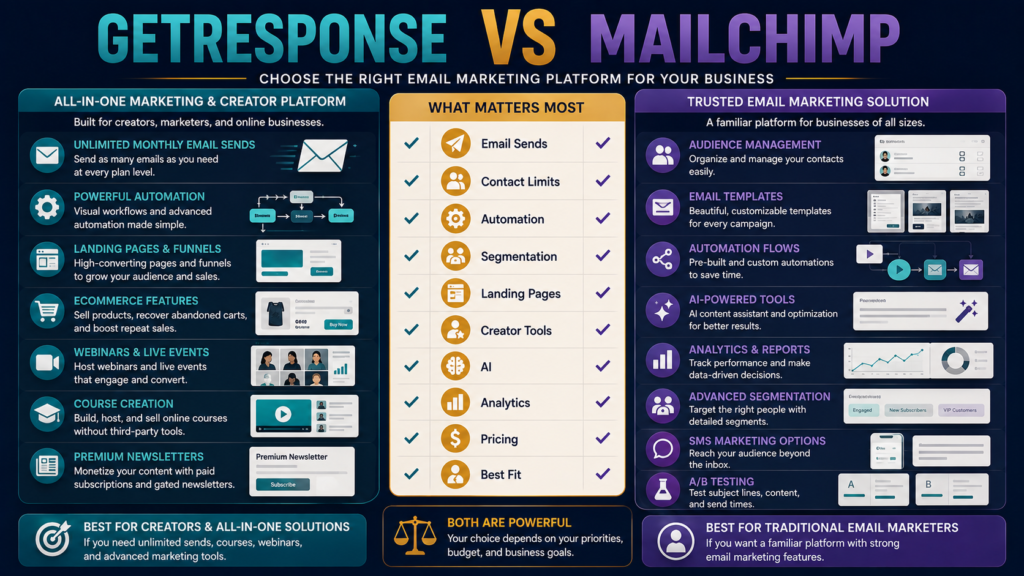
GetResponse and Mailchimp are two well-known names in email marketing.
Both can handle the basic job:
Collect subscribers → send email → automate follow-up → measure results.
But their current plan structures are meaningfully different.
GetResponse currently emphasizes unlimited monthly email sends on its paid Starter, Marketer, and Creator plans, while adding automation, funnels, ecommerce features, webinars, course creation, and premium newsletters as users move upward.
Mailchimp currently uses contact and email-send allowances across its Free, Essentials, Standard, and Premium marketing plans, with more advanced automation, AI, testing, reporting, and predictive capabilities available at higher levels.
The better choice depends on how frequently you send, how large your list becomes, and whether you want your email platform to perform additional creator-business jobs.
Review Methodology: This comparison is based on official GetResponse and Mailchimp pricing pages, current help documentation, and publicly available product information reviewed on August 21, 2026. No firsthand product testing or personal experience is claimed.
Key Takeaways
- GetResponse Starter currently starts at $19/month for the displayed 1,000-contact entry tier, or $15.58/month equivalent with annual billing.
- GetResponse paid standard plans currently include unlimited monthly email sends.
- Mailchimp Free currently supports up to 250 contacts and up to 500 email sends per month, subject to its plan rules.
- Mailchimp Essentials currently starts around $13/month at the displayed entry level, while Standard starts at $20/month; exact pricing changes with contacts and promotional terms.
- Mailchimp counts subscribed, unsubscribed, and non-subscribed contacts toward monthly paid-plan contact limits.
- GetResponse’s Creator plan adds webinars, course creation, premium newsletters, and up to 500 students at its displayed entry tier.
- Mailchimp Standard emphasizes automation, personalization, AI tools, behavioral prediction, and analytics.
Affiliate Disclosure: This article contains affiliate links. If you purchase through one of these links, I may earn a commission at no additional cost to you. Affiliate compensation does not determine the conclusions or recommendations presented in this article.
What Is GetResponse?
GetResponse is an email-marketing and marketing-automation platform.
Its current standard plans are:
- Starter.
- Marketer.
- Creator.
An Enterprise configuration is also available.
You can explore GetResponse through Michael’s approved affiliate link.
MichaelELeeReviews also has a verified GetResponse review for beginners for a deeper look at the platform by itself.
What Is Mailchimp?
Mailchimp is an email and marketing platform with current marketing tiers including:
- Free.
- Essentials.
- Standard.
- Premium.
Its paid plans combine email marketing with increasing levels of:
- Templates.
- Automation.
- Segmentation.
- Testing.
- Analytics.
- AI tools.
- Support.
- Predictive capabilities.
The Biggest Difference: Sending Limits
This may be the first number a frequent publisher should compare.
GetResponse
Paid standard plans currently advertise:
Unlimited monthly email sends.
Mailchimp
Current plans use email-send allowances tied to contact levels.
At the displayed 500-contact entry tier:
Essentials: 5,000 sends/month.
Standard: 6,000 sends/month.
Higher tiers and contact levels have their own allowances.
This does not automatically make one platform cheaper.
But it affects businesses that email frequently.
Example
Suppose you have 1,000 subscribers and send:
- 3 broadcasts per week.
- Automated welcome messages.
- Product follow-ups.
Your monthly sending volume may become significant.
With GetResponse, the paid standard plan currently emphasizes contact-based pricing with unlimited sends.
With Mailchimp, both contact level and send allowance matter.
Calculate using your real list.
Contact Counting Also Matters
GetResponse says its pricing scales with list size, and duplicate email addresses placed on multiple GetResponse lists can count multiple times.
Mailchimp says subscribed, non-subscribed, and unsubscribed contacts can all count toward the contact limit used for paid monthly pricing.
That means list hygiene matters on both platforms—but in different ways.
Free Plan Comparison
Mailchimp Free
Current public pricing shows:
- Up to 250 contacts.
- Up to 500 sends/month.
- Basic email-marketing tools.
GetResponse Trial/Free Access
GetResponse currently offers a 14-day premium-feature trial and maintains free-account access with limitations after the trial period.
If you are starting with almost no subscribers, either environment can be explored before making a larger commitment.
GetResponse Starter
Current entry pricing:
$19/month
or:
$15.58/month equivalent with annual billing at the entry contact tier shown.
Current features include:
- Unlimited sends.
- Welcome email series.
- One custom automation workflow.
- Landing pages.
- Signup forms.
- Popups.
- Basic AI content features.
This is a fairly complete list-building starting point.
Mailchimp Essentials
Mailchimp’s current displayed entry price is approximately:
$13/month at the entry contact level shown.
Essentials adds paid-plan capabilities such as:
- Professional templates.
- Scheduling.
- Email/chat support.
- Larger send allowances than Free.
The exact plan cost increases with contacts.
GetResponse Marketer
Current displayed entry price:
$59/month
or:
$48.38/month annually.
This adds:
- Unlimited automation workflows.
- Advanced segmentation.
- Abandoned-cart recovery.
- Sales funnels.
- Promo codes.
- Revenue reports.
- Web push.
This plan moves beyond basic email.
Mailchimp Standard
Current entry price shown:
$20/month, with current 12-month promotional presentations sometimes showing a lower equivalent during the offer period.
Standard emphasizes:
- Enhanced automation.
- AI writing/design tools.
- Predictive customer insights.
- Analytics.
- Personalization and optimization.
Automation Comparison
Both platforms support automation.
The more important question is:
How complicated is the system you actually need?
Simple Workflow
Lead magnet → welcome email → educational emails → product recommendation.
Either platform can support this kind of structure.
More Advanced Workflow
Behavior → segmentation → ecommerce activity → personalized automation → reporting.
Both platforms offer higher-level functionality, but you should build the actual workflow during the trial rather than compare marketing labels.
Creator Tools
This is a meaningful GetResponse distinction.
GetResponse Creator currently adds:
- Webinars.
- Website builder.
- Course creator.
- Up to 500 students.
- Premium newsletter subscriptions.
For someone selling knowledge products, those features may reduce the need for additional software.
Mailchimp is much more fundamentally centered on customer/audience marketing.
Mailchimp’s Familiar Marketing Ecosystem
Mailchimp’s Standard and Premium plans focus heavily on:
- Audience marketing.
- Automation.
- Predictive segmentation.
- Testing.
- Reporting.
- AI assistance.
For a business already built around ecommerce or customer campaigns, that may fit well.
Premium Pricing
Mailchimp Premium is significantly more expensive than beginner tiers.
Its current pricing page shows Premium starting around:
$350/month at the displayed 10,000-contact tier, with large send allowances and team/support features.
This is designed for a very different customer than someone with a 300-person beginner newsletter.
Do not compare Premium unless you need Premium features.
GetResponse Enterprise
GetResponse similarly offers an Enterprise plan with custom pricing and features such as:
- Dedicated infrastructure/support options.
- SMS.
- Mobile push.
- Transactional email.
- Additional enterprise capabilities.
Again, most small creators will begin lower.
Testing and Optimization
Mailchimp higher tiers place substantial emphasis on:
- A/B testing.
- Multivariate testing at Premium.
- Predictive tools.
- Advanced reporting.
GetResponse has its own analytics, scheduling, automation, ecommerce, and conversion tools.
If testing sophistication is a major requirement, compare the exact plan containing the feature—not the brand as a whole.
Landing Pages
GetResponse includes landing-page functionality in its standard paid plans.
Mailchimp also provides landing-page and form-related marketing functionality within its broader ecosystem.
For a lead-generation business, build this complete test:
Landing Page → Form → Subscriber → Welcome Email → Automation
Do not test email editing by itself.
Existing GetResponse Comparisons
The site already has a verified GetResponse vs. AWeber comparison.
That comparison is useful if your main question is about straightforward beginner email marketing.
Mailchimp creates a somewhat different decision because of its larger marketing ecosystem and usage-based pricing structure.
Which Is Better for Frequent Sending?
GetResponse deserves close attention because its current standard paid plans include unlimited monthly sends.
If your business publishes:
- Several newsletters per week.
- Automations.
- Product follow-ups.
- Educational sequences.
this can simplify forecasting.
Mailchimp can still handle substantial volume, but you need to understand the send allowance for your plan.
Which Is Better for a Very Small List?
Mailchimp Free may appeal if:
- You have fewer than 250 contacts.
- Your sending volume is very small.
- You want to begin without paying.
GetResponse’s trial allows you to test more premium functionality before choosing a plan.
Which Is Better for Course Creators?
GetResponse Creator deserves the stronger look when you want:
- Email.
- Webinars.
- Course creator.
- Paid newsletters.
inside the same environment.
A creator who already uses dedicated course software may not value those features as much.
Which Is Better for Ecommerce Marketing?
Both deserve testing.
Mailchimp has long emphasized customer/ecommerce marketing and current Standard tools focus on automation, segmentation, prediction, and analytics.
GetResponse Marketer currently includes abandoned-cart recovery, sales funnels, promo codes, and revenue reporting.
The answer depends on the ecommerce platform you use.
Run a 14-Day Workflow Test
Both currently offer ways to test paid features before fully committing.
Build:
- Lead magnet form.
- Landing page.
- Welcome email.
- Three-email automation.
- Newsletter.
- Two segments.
- Product email.
- Reporting review.
Score:
Setup
Editor
Automation
Segmentation
Reporting
Pricing
Send limits
Contact rules
Features you will actually use
The site’s software free-trial evaluation guide provides a useful framework.
Who Should Consider GetResponse?
GetResponse may fit better when:
- You send frequently.
- Unlimited sends matter.
- Automation matters.
- Funnels matter.
- Courses or webinars may matter.
- Premium newsletters matter.
- You prefer more creator-business functions in one platform.
Who Should Consider Mailchimp?
Mailchimp may fit better when:
- You want a familiar email-marketing ecosystem.
- You have a very small list that fits the Free tier.
- Advanced campaign optimization matters.
- Predictive segmentation matters.
- Your business already integrates around Mailchimp.
- You are comfortable managing contact and sending limits.
Final Verdict
Choose GetResponse when you want email marketing to serve as part of a broader creator, automation, funnel, webinar, or digital-product system—and especially when unlimited paid-plan email sends simplify your workflow.
Choose Mailchimp when you want a widely used marketing platform with a small free entry point and strong automation, personalization, AI, analytics, and optimization capabilities as you move into higher tiers.
The right answer depends heavily on your list size and sending frequency.
Conclusion
Do not choose GetResponse or Mailchimp because one has the more familiar name.
Create a realistic 12-month scenario.
Estimate:
Contacts
Emails per month
Automations
Landing pages
Course/webinar needs
Testing requirements
Total monthly cost
Then choose the platform that remains simple as your list grows.
The cheapest first month is not necessarily the lowest-cost long-term system.