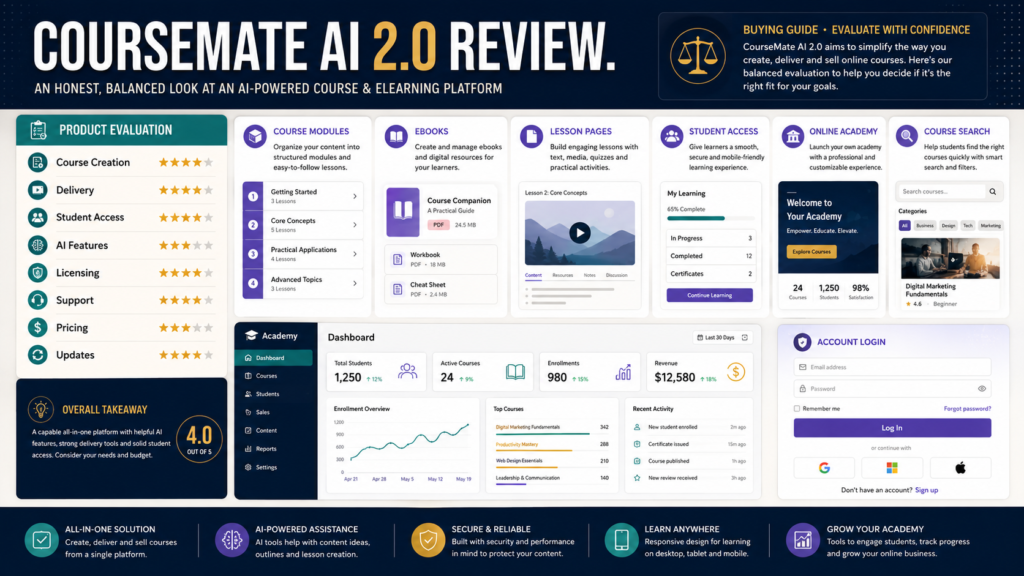
CourseMate AI 2.0 is currently presented on its official website as an AI-powered eLearning and digital course creation platform. The live site also exposes areas for courses, ebooks, account access, and learner registration, indicating that an operating web-based learning environment exists.
However, the publicly accessible official pages available during this review provide far less detailed information about current plan limits, AI-generation allowances, commercial rights, pricing, and specific creation features than a buyer would ideally want before making a purchasing decision.
That does not mean those features are unavailable.
It means they could not all be independently confirmed from the current public official pages reviewed on August 8, 2026.
For that reason, the most responsible conclusion is:
CourseMate AI 2.0 may be worth investigating if you want an AI-assisted course and eLearning platform, but buyers should verify the exact current offer, limits, licensing, and support terms directly before purchasing.
Review Methodology: This review is based primarily on the current official CourseMateAI 2.0 website and publicly accessible platform pages reviewed on August 8, 2026. No firsthand purchase, course-generation test, student-delivery test, customer-support interaction, or personal income result is claimed. Third-party promotional claims that could not be confirmed on official pages are not treated as established facts.
Key Takeaways
- The current official site identifies CourseMateAI 2.0 as an AI-powered eLearning and digital course creation platform.
- Public platform pages currently include course and ebook areas, login, registration, and learner-facing navigation.
- Current public official pages do not clearly display enough plan and pricing information for a complete feature-by-feature purchase decision.
- Buyers should verify AI creation limits, hosting, student limits, licensing, commercial rights, updates, and refund terms at checkout.
- A specialized platform should simplify course creation without replacing instructional judgment.
- The quality of a course still depends on curriculum, examples, accuracy, exercises, and human review.
What Is CourseMate AI 2.0?
The official CourseMateAI website describes the platform as:
“The Ultimate AI-Powered eLearning & Digital Course Creation Platform.”
The accessible site also presents learner-facing areas such as:
- All Courses.
- Ebooks.
- Children’s Books.
- Blog.
- Account registration.
- Login.
- Course-search and learning navigation.
This suggests CourseMateAI is intended to cover more than writing a course outline.
It appears designed around an eLearning environment in which educational materials can be organized and accessed.
Who May Benefit From It?
CourseMate AI may be relevant to:
- Course creators.
- Coaches.
- Trainers.
- Teachers.
- Ebook creators.
- Online-business owners.
- Digital-product sellers.
- Marketers developing educational products.
- Beginners who want a structured course-building environment.
A creator who already understands what should be taught but needs help organizing digital educational materials may find this category of software useful.
Who May Not Need It?
CourseMateAI may be unnecessary when:
- You already use another course platform.
- You only need an ebook.
- Your course contains very few lessons.
- You prefer manual course development.
- You need specialized corporate LMS features.
- You require integrations that cannot be confirmed.
- You do not yet know what course you want to create.
- Your current tools already handle content generation and delivery.
Do not buy course software before defining the course.
Define Your Course Requirements First
Before evaluating CourseMateAI, create your own requirements list.
Course Structure
Do you need:
- Modules?
- Lessons?
- Categories?
- Drip scheduling?
- Progress tracking?
Content
Do you need:
- Text lessons?
- Video?
- Audio?
- PDFs?
- Worksheets?
- Quizzes?
- Certificates?
Student Management
Do you need:
- Student registration?
- Paid access?
- Free access?
- Account recovery?
- Progress reporting?
Business Features
Do you need:
- Checkout?
- Coupons?
- Affiliate integration?
- Email integration?
- Membership access?
- Custom domains?
Only after answering those questions should you evaluate the software.
AI Course Creation Is Not the Same as Instructional Design
AI can generate:
- Outlines.
- Lesson drafts.
- Examples.
- Quiz questions.
- Worksheets.
- Titles.
But a useful course requires decisions such as:
- What should the student achieve?
- What prerequisite knowledge is necessary?
- Which lesson belongs first?
- Which explanation is too advanced?
- Where should the student practice?
- What should be assessed?
- What information needs verification?
Software can assist.
The creator remains responsible for teaching quality.
Start With the Student Outcome
Before entering a keyword into any AI course tool, complete:
“By the end of this course, the student should be able to…”
Example:
“By the end of this course, the student should be able to create a five-email welcome sequence and connect it to a simple lead-magnet funnel.”
That is stronger than:
“Create a course about email marketing.”
The outcome controls the curriculum.
Test Course Generation Carefully
If the current CourseMateAI offer includes automated curriculum or lesson generation, test it against:
- A subject you know well.
- A beginner audience.
- A specific outcome.
Then review:
- Sequence.
- Accuracy.
- Repetition.
- Missing steps.
- Examples.
- Learning objectives.
- Practical activities.
A convincing demo is not enough.
Use a real project.
Verify the Learning Environment
The official public platform includes sign-up and login functionality and displays a learner-facing course environment.
If you plan to host paying students there, test:
- Registration.
- Login.
- Password reset.
- Course access.
- Lesson navigation.
- Mobile experience.
- File downloads.
- Video playback.
- Course completion.
- Support instructions.
The student experience matters as much as the administrator experience.
Verify Current Pricing
The current public official pages reviewed for this article do not provide a sufficiently clear, easily verifiable current price and plan table.
That means a buyer should not rely on old reviews or launch-era pricing.
At the current checkout, verify:
- Front-end price.
- One-time versus recurring payment.
- Upsells.
- Required upgrades.
- Student limits.
- Course limits.
- AI limits.
- Hosting.
- Commercial rights.
- Agency rights.
Take a screenshot of the offer you purchase.
Be Careful With Old Promotional Reviews
CourseMateAI has existed through different promotional periods.
Older external review pages may describe:
- Previous prices.
- Old bonuses.
- Launch coupons.
- Different feature limits.
- Expired upgrades.
Those details may no longer apply.
The official live site currently identifies the platform as CourseMateAI 2.0, but current checkout terms should be treated as the source of truth for the exact offer.
Verify Commercial Rights
If you plan to create courses to sell:
Ask:
- Can I sell courses created with the tool?
- Can I use generated materials commercially?
- Are stock assets commercially licensed?
- Can I create client projects?
- Can students redistribute content?
- Are there restrictions on AI-generated materials?
- Does an agency license differ?
Do not assume “course creator” automatically includes agency rights.
Verify Content Ownership
Read the terms.
Questions include:
- Who owns generated course text?
- What rights apply to included templates?
- Can exported files be used elsewhere?
- Can you continue using exported content after cancelling?
- Are embedded assets subject to separate licenses?
These are more important than the number of templates.
Verify Export Options
A course platform can become difficult to leave if content cannot be exported.
Ask whether you can export:
- Text.
- PDFs.
- Video.
- Worksheets.
- Student lists.
- Course outlines.
- Progress information.
A creator should understand the exit path before building a large catalog.
Verify Integrations
Check whether CourseMateAI currently integrates with tools you already use.
Possible requirements:
- GetResponse.
- AWeber.
- ThriveCart.
- PayPal.
- Stripe.
- WordPress.
- ProductDyno.
- Zapier.
- Webhooks.
An integration must do more than appear on a logo page.
Check the exact actions supported.
Verify Support
The current site includes password-recovery functionality and account navigation, but that does not answer every support question.
Before purchase, identify:
- Helpdesk location.
- Email support.
- Response schedule.
- Documentation.
- Training videos.
- Setup assistance.
- Update policy.
If you are using the platform for paying students, support matters.
Refund Policy Requires Verification
One publicly accessible refund-policy page on the CourseMateAI domain currently contains placeholder-style text rather than a clear usable policy.
That is an important reason to verify refund terms at the actual checkout rather than relying on this public page.
Before paying:
- Read the checkout guarantee.
- Save the receipt.
- Save the refund terms.
- Identify the support address.
Do not assume a 30-day guarantee based on an old third-party review.
CourseMateAI vs. General AI
You could use a general AI assistant to:
- Plan a curriculum.
- Draft lessons.
- Create worksheets.
- Build quizzes.
The advantage of a specialized platform would need to come from workflow integration.
Ask:
Does CourseMateAI eliminate enough separate work to justify using another platform?
For example, value may come from combining:
- Course organization.
- Content creation.
- Student delivery.
- Learner access.
If you still need several additional systems, compare total complexity.
A Realistic Beginner Scenario
Suppose a retired educator wants to create:
How to Turn Teaching Experience Into a Beginner Ebook
The course contains:
- Six modules.
- Twelve lessons.
- Six worksheets.
- Three quizzes.
- Video explanations.
- Resource downloads.
Before buying CourseMateAI, the creator should build Module 1 as a test.
Evaluate:
- How quickly the module can be created.
- Whether AI-generated lessons are accurate.
- Whether worksheets are useful.
- Whether student navigation works.
- Whether content can be edited.
- Whether the result reflects the instructor’s teaching style.
Only then build the remaining modules.
A CourseMateAI Buying Checklist
Platform
- Current site active?
- Course creation available?
- Student access tested?
- Mobile experience acceptable?
AI
- Which AI tools are included?
- What are usage limits?
- Can generated content be edited?
- Are credits required?
Products
- Courses supported?
- Ebooks supported?
- Video supported?
- Downloads supported?
Business
- Can products be sold?
- Commercial rights clear?
- Checkout supported?
- Email integrations available?
Pricing
- Current front-end price?
- Monthly fee?
- Upsells?
- Required upgrades?
Support
- Helpdesk?
- Tutorials?
- Documentation?
- Refund policy?
Affiliate Recommendation
Affiliate Disclosure: This article contains affiliate links. If you purchase through one of these links, I may earn a commission at no additional cost to you. Affiliate compensation does not determine the conclusions or recommendations presented in this article.
You can review the current CourseMate AI offer if you want to compare the current course-creation features, pricing, licensing, and available upgrades directly.
Because the public official pages do not expose every detail needed for a complete buying decision, carefully review the actual checkout and member-feature information before purchasing.
Is CourseMate AI Worth Considering?
It may be worth investigating if:
- You regularly create courses.
- AI-assisted curriculum development is useful.
- You want an eLearning environment.
- You need ebook and course content in one ecosystem.
- Current pricing fits your budget.
- Commercial rights match your plans.
It may be less appropriate if:
- You already own a complete course platform.
- Current plan terms are unclear.
- A required integration is unavailable.
- You only create one small course.
- You prefer full control through existing tools.
Final Verdict
CourseMate AI 2.0 currently exists as a live AI-powered eLearning and digital course creation platform with publicly accessible course, ebook, login, and learner-facing areas.
The main limitation of this review is that the current public official website does not provide enough detailed plan, pricing, licensing, and feature documentation to verify many claims commonly repeated in third-party promotional reviews.
That makes buyer verification especially important.
Conclusion
CourseMate AI 2.0 may deserve consideration from course creators who want an AI-assisted eLearning environment, but it should be evaluated through a real course project rather than marketing claims.
Verify the current price, upgrades, AI limits, course limits, licensing, exports, integrations, student experience, support, and refund terms before purchasing.
If you are interested, begin by comparing the current offer against a written list of the exact features your first course requires.