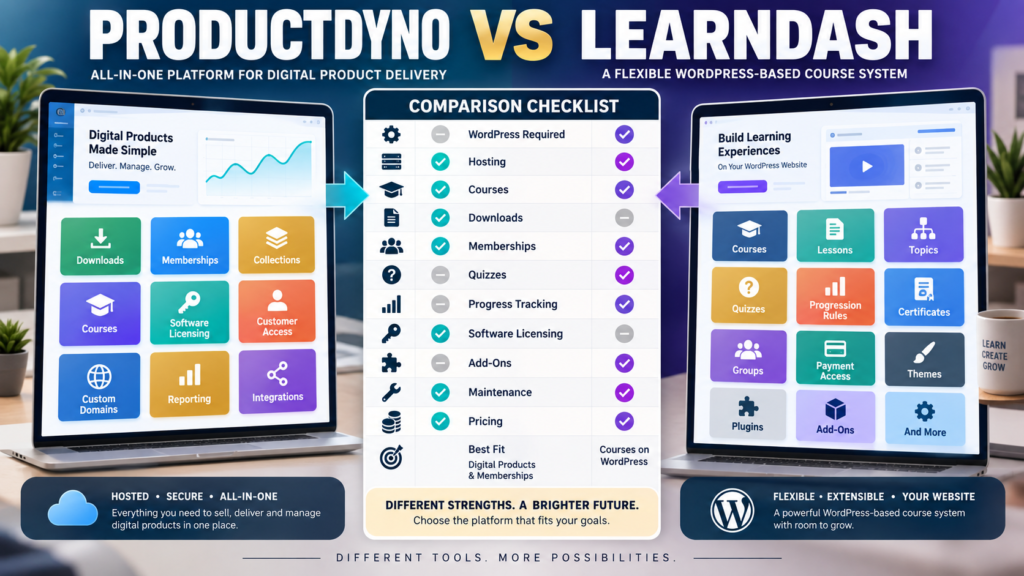
ProductDyno and LearnDash can both participate in an online-course business.
But they begin from different foundations.
ProductDyno is a broader digital-product platform built around selling, protecting, organizing, and delivering downloads, memberships, collections, courses, and licensed software.
LearnDash is a learning-management system centered on building structured courses, lessons, topics, quizzes, progression, enrollment, and related educational experiences inside WordPress.
That means the decision is not simply:
“Which course builder has more features?”
A better question is:
Is my business primarily a digital-product business that also sells courses—or primarily a learning business that needs a deeper WordPress LMS?
Review Methodology: This comparison is based on official ProductDyno and LearnDash documentation reviewed on September 6, 2026. No firsthand product testing or personal-use claim is made. ProductDyno currently displays multiple official promotional pricing structures. LearnDash’s live public pricing checkout was not reliably retrievable during this review, so this article does not quote a specific LearnDash subscription price. Verify both current checkouts before purchasing.
ProductDyno’s Core Approach
ProductDyno’s current platform positioning covers several types of digital products.
Its current site highlights:
- Online courses.
- Digital downloads.
- Membership sites.
- Product protection.
- Customer access.
- Sales and marketing capabilities.
Its current pricing-new page also lists:
- Unlimited digital products.
- Unlimited memberships.
- Unlimited collections.
- Unlimited members/customers.
- Software/SaaS licensing.
- Custom domains.
- White labeling.
- Integrations.
- Reporting.
This makes ProductDyno more than a course plugin.
LearnDash’s Core Approach
LearnDash is specifically designed around learning.
Current official documentation describes courses as the foundation of the LearnDash learning experience.
Its course system includes capabilities for:
- Courses.
- Lessons.
- Topics.
- Quizzes.
- Course progression.
- Enrollment and access rules.
- Certificates.
- Reusable course steps.
- Course organization.
The self-hosted LearnDash LMS runs inside WordPress.
That gives course creators significant control over the website environment.
The Biggest Difference: Product Platform vs LMS
Think of ProductDyno as:
Digital Products First
and LearnDash as:
Learning Experience First
ProductDyno makes sense when you sell:
- Ebook.
- Templates.
- Course.
- Membership.
- Software.
- Resource library.
all under one broader delivery environment.
LearnDash becomes particularly attractive when the central product is:
A structured course or academy
where lesson progression and the learning environment matter deeply.
WordPress Requirements
The self-hosted LearnDash LMS runs inside WordPress.
Current LearnDash documentation instructs users to manage courses through the WordPress dashboard under LearnDash LMS.
That means the self-hosted approach involves:
- WordPress hosting.
- WordPress updates.
- Themes.
- Plugins.
- Backups.
- Security.
- Compatibility.
LearnDash also offers LearnDash Cloud, which is a hosted WordPress site with LearnDash preinstalled and currently includes ProPanel, backups, security, caching, and SSL.
So LearnDash now provides both a traditional WordPress plugin path and a more hosted WordPress experience.
ProductDyno Does Not Require You to Build the Product Environment in WordPress
ProductDyno’s platform hosts the product-delivery environment separately.
You can connect custom domains and integrate it with other parts of the business.
That can appeal to a creator who has a WordPress marketing website but does not want the course and product-delivery infrastructure to depend on the same WordPress installation.
This may reduce some plugin-maintenance complexity.
Course Building in LearnDash
LearnDash has a strong course-specific structure.
Its current Course Builder allows administrators to:
- Add lessons.
- Add topics.
- Add quizzes.
- Reorder course steps.
- Edit learning structure.
- Reuse shared course steps.
This is valuable when the learning path itself is important.
For example:
Module 1 → Lesson 1 → Quiz → Module 2 → Certificate
LearnDash is built around that kind of educational progression.
LearnDash Access Modes
Current LearnDash documentation supports course-access approaches including:
- Free.
- Buy Now.
- Recurring.
- Closed.
That gives course creators several ways to control enrollment.
You can also connect LearnDash with additional ecommerce and membership tools when the business requires a more advanced selling structure.
Course Progression
LearnDash can control how students move through courses.
Current documentation describes:
- Linear progression.
- Flexible progression.
- Completion requirements.
- Shared course steps.
- Prerequisites and enrollment rules.
For serious educational products, those controls can matter more than general digital-product features.
ProductDyno’s Advantage: More Product Types
ProductDyno’s stronger distinction is breadth.
The same environment can manage:
- Downloadable products.
- Memberships.
- Product collections.
- Courses.
- Software licenses.
A creator who sells:
Ebook + Course + Prompt Pack + Membership + Software
may prefer one environment focused on all of those digital products.
LearnDash is much more course-centered.
Software Licensing Is a Major ProductDyno Difference
ProductDyno’s current pricing information lists a Software/SaaS Licensing Module across its principal promotional plans.
That is important if you sell:
- WordPress plugin.
- Software application.
- SaaS access.
- Licensed digital tool.
LearnDash is not primarily a software-licensing system.
If software is part of your catalog, ProductDyno has a meaningful advantage.
Memberships
ProductDyno includes membership capabilities directly in its digital-product platform.
LearnDash can participate in membership systems and has integrations/add-ons for membership tools.
Current LearnDash add-on documentation lists integrations involving membership products such as Restrict Content Pro and Paid Memberships Pro.
This highlights the architectural difference again.
ProductDyno:
Membership as part of the broader platform.
LearnDash:
Course LMS inside a WordPress ecosystem that can be extended.
Add-Ons and Extensibility
LearnDash’s WordPress architecture creates substantial extensibility.
Current LearnDash add-on documentation includes categories for:
- Ecommerce and payments.
- Memberships.
- Group management.
- Instructors.
- Grading and reports.
- Forms.
- Events.
- Student tools.
- Forums.
- Compatibility.
- Security.
This can create a sophisticated learning website.
It can also create more components to maintain.
WordPress Flexibility Is Both an Advantage and Responsibility
With LearnDash, you can potentially control:
- Theme.
- Page builder.
- Website design.
- Plugins.
- SEO.
- Custom code.
- Student pages.
- Checkout integrations.
That flexibility is valuable.
But it also means you may be responsible for:
- Plugin conflicts.
- Updates.
- Hosting.
- Backups.
- Security.
- Performance.
A creator comfortable with WordPress may consider that control an advantage.
Someone seeking lower maintenance may not.
LearnDash Cloud Changes the Maintenance Equation
LearnDash Cloud reduces some of those concerns by providing a hosted WordPress environment.
Official documentation says LearnDash Cloud currently includes:
- Preinstalled LearnDash.
- ProPanel.
- Daily backups.
- Security features.
- Caching.
- SSL.
That makes the LearnDash comparison more nuanced than simply:
“LearnDash requires you to host everything yourself.”
There are now different deployment options.
Course Materials
LearnDash supports supplemental course materials.
Current documentation says course materials may include:
- PDFs.
- Downloads.
- Images.
- Audio.
- External links.
This means LearnDash courses can certainly deliver supporting digital files.
But ProductDyno is designed around delivering digital files as standalone products as well as course resources.
ProductDyno Pricing
ProductDyno’s current pricing-new page displays a promotional annual-billing structure of:
Starter: $49/month billed annually
Growth Plus+: $69/month billed annually
Teach Pro+: $99/month billed annually
However, a separate official ProductDyno pricing page currently promotes a different unlimited offer: a 14-day trial followed by $199/month.
Because ProductDyno is displaying more than one official offer structure, verify the specific sales page and checkout you intend to use.
Do not assume one promotion applies to every buyer.
LearnDash Pricing Requires Checkout Verification
LearnDash’s official support material confirms distinct self-hosted LMS and Cloud models, but the live public pricing checkout was not reliably accessible through the documentation review used for this article.
Rather than insert a price that could be outdated or tied to the wrong offer, compare the current LearnDash checkout directly when making your buying decision.
Include:
- LMS license.
- Hosting if self-hosted.
- Premium add-ons.
- Payment extensions.
- Membership tools.
- Developer help if needed.
Total cost matters more than one license price.
ProductDyno May Fit Better If…
Consider ProductDyno when:
- You sell many types of digital products.
- Downloads matter as much as courses.
- Memberships matter.
- Collections matter.
- Software licensing matters.
- You want a hosted product-delivery environment.
- You prefer fewer WordPress dependencies.
- Product access and delivery are the main requirements.
My ProductDyno review for beginners provides additional background.
Affiliate Disclosure: This article contains affiliate links. If you purchase through one of these links, I may earn a commission at no additional cost to you. Affiliate compensation does not determine the conclusions or recommendations presented in this article.
If ProductDyno matches the digital-product infrastructure you need, you can review the current ProductDyno offer through this approved partner link.
LearnDash May Fit Better If…
Consider LearnDash when:
- Courses are the main product.
- Detailed lesson structure matters.
- Quizzes matter.
- Course progression matters.
- Certificates matter.
- Student learning experience matters.
- You want deep WordPress control.
- You want a large WordPress integration ecosystem.
- You are comfortable managing WordPress or prefer LearnDash Cloud.
Compare ProductDyno With Thinkific
If you like LearnDash’s course focus but do not want the same WordPress architecture, a hosted course platform may be worth comparing.
See ProductDyno vs Thinkific for that type of comparison.
Compare ProductDyno With LearnWorlds
If sophisticated learning experiences matter, ProductDyno vs LearnWorlds provides another course-centered alternative.
Use the Course-vs-Catalog Test
Write down everything you expect to sell during the next two years.
Example A:
- Course 1.
- Course 2.
- Course 3.
- Certification program.
LearnDash may fit naturally.
Example B:
- Ebook.
- Templates.
- Course.
- Membership.
- Software.
- Resource library.
ProductDyno’s broader product architecture may be more useful.
Use the Maintenance Test
Ask:
Do I want to control a WordPress learning website?
If yes:
LearnDash’s flexibility may be valuable.
If no:
ProductDyno’s hosted product environment may reduce complexity.
LearnDash Cloud may also deserve investigation as a middle ground.
Use the Learning-Depth Test
Ask:
How sophisticated does the student experience need to be?
If you need:
- Detailed lessons.
- Topics.
- Quizzes.
- Progression.
- Prerequisites.
- Certificates.
- Educational add-ons.
LearnDash deserves strong consideration.
If the course is one product among many and the learning features are relatively straightforward, ProductDyno may be sufficient while simplifying the broader catalog.
A Simple Buying Scorecard
Score each platform for:
- Digital downloads.
- Course creation.
- Lessons and topics.
- Quizzes.
- Progress tracking.
- Certificates.
- Memberships.
- Product collections.
- Software licensing.
- WordPress control.
- Hosting responsibility.
- Add-ons.
- Maintenance.
- Total cost.
Give extra weight to the requirements you actually need.
Conclusion
ProductDyno and LearnDash can both support an online-course business, but they are optimized around different priorities.
ProductDyno begins with the broader digital-product business.
It is especially relevant when you sell a mixture of:
Downloads → Memberships → Courses → Collections → Software
LearnDash begins with the learning-management system.
It is especially relevant when your business depends on:
Courses → Lessons → Topics → Quizzes → Progression → Student Experience
Choose ProductDyno when broad digital-product delivery and lower dependence on WordPress infrastructure are more important.
Choose LearnDash when deep course structure and control over a WordPress learning environment are more important.
Before purchasing either one, map your expected business for the next two years.
If most of the map consists of courses, LearnDash deserves closer attention.
If the map contains several different types of digital products, ProductDyno may provide the more practical foundation.