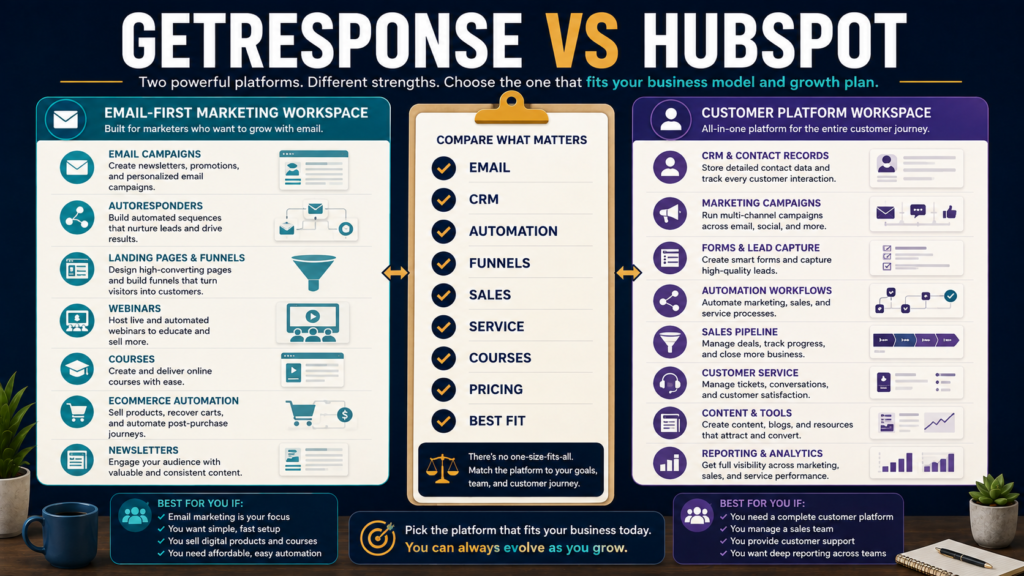
GetResponse and HubSpot can both help a business capture leads, communicate with prospects, automate marketing, and measure results.
But they are not simply two versions of the same email platform.
GetResponse is primarily an email-marketing and automation platform that has expanded into funnels, webinars, ecommerce marketing, courses, websites, and creator monetization.
HubSpot is a broader CRM-centered customer platform spanning marketing, sales, customer service, content, operations, and reporting.
That difference matters because the better choice depends less on which company has the longest feature list and more on how much business infrastructure you actually need.
Review Methodology: This comparison is based on official GetResponse and HubSpot product information, feature pages, and pricing information reviewed on August 25, 2026. No firsthand product testing or personal experience is claimed.
Affiliate Disclosure: This article contains affiliate links. If you purchase through one of these links, I may earn a commission at no additional cost to you. Affiliate compensation does not determine the conclusions or recommendations presented in this article.
Quick Verdict
GetResponse may be the better fit if you primarily need email marketing, lead generation, landing pages, autoresponders, automation, sales funnels, webinars, ecommerce marketing, or creator products without adopting a full CRM-centered business platform.
HubSpot may be the better fit if you want marketing tightly integrated with customer records, sales pipelines, service operations, CRM reporting, and multiple business teams.
For many solo creators and small online businesses, GetResponse is likely to be the simpler environment.
For businesses that need customer data shared across marketing, sales, and service, HubSpot may justify its greater scope and complexity.
What Is GetResponse?
GetResponse has evolved well beyond basic newsletters.
Its current platform includes combinations of:
- Email marketing.
- Newsletters.
- Autoresponders.
- Landing pages.
- Forms and popups.
- Marketing automation.
- Segmentation.
- Sales funnels.
- Ecommerce marketing.
- Webinars.
- Websites.
- Courses.
- Premium newsletters.
The exact capabilities depend on the selected plan. GetResponse currently lists Starter, Marketer, Creator, and Enterprise options.
If you want a broader introduction before comparing platforms, my GetResponse review for beginners covers the platform from a simpler email-marketing perspective.
You can also review GetResponse’s current options through my affiliate link.
What Is HubSpot?
HubSpot approaches marketing from the larger idea of managing the customer relationship.
Its customer platform includes hubs or product areas for:
- Marketing.
- Sales.
- Service.
- Content.
- CRM and customer data.
- Commerce-related functions.
- Automation.
- Reporting.
Marketing Hub integrates marketing activity with HubSpot’s CRM environment so leads and customers can be followed across more of the business relationship.
That can be powerful.
It can also be more than a solo business needs.
The Core Difference: Email Platform vs Customer Platform
A useful simplification is:
GetResponse
Email and marketing system first.
HubSpot
CRM and customer-platform system first.
Both overlap in:
- Forms.
- Email.
- Landing pages.
- Contact management.
- Automation.
- Reporting.
But their centers of gravity differ.
Email Marketing
GetResponse puts email near the center of the product.
Its current plans advertise email campaigns and autoresponders, with progressively deeper automation, segmentation, ecommerce, creator, and other features as tiers increase.
HubSpot also provides marketing email tools integrated with CRM records and broader Marketing Hub workflows.
The question is not whether HubSpot can send email.
It can.
The question is whether you want email to be one component of a much larger CRM-based operating environment.
Contact Management and CRM
This is where HubSpot’s broader strategy becomes much more important.
HubSpot is built around customer records that can connect marketing activity to sales and service workflows.
That can be useful for a business with:
- Sales representatives.
- Multiple deal stages.
- Lead ownership.
- Service teams.
- Detailed customer histories.
- Multiple departments.
- CRM-based reporting.
A solo ebook creator who needs:
lead magnet → welcome sequence → newsletter → offer
may not require that depth.
Automation
Both platforms provide automation, but the use cases can differ.
GetResponse Automation
GetResponse’s higher tiers support increasingly advanced marketing workflows, segmentation, ecommerce behavior, and funnel-oriented automation.
This is well suited to sequences such as:
Subscribe → tag → welcome → promote → follow up.
HubSpot Automation
HubSpot’s professional marketing environment can connect automation to broader CRM properties, lead management, lifecycle stages, and other customer-platform information.
This can matter when marketing automation must coordinate with sales or service processes.
Landing Pages and Lead Capture
Both platforms support lead capture and landing-page workflows.
GetResponse offers landing pages, forms, popups, and related list-building tools inside its marketing platform.
HubSpot offers forms, landing pages, lead-management capabilities, and CRM-connected marketing tools.
For a small business, ask:
Do I primarily need a page that collects subscribers?
or:
Do I need every lead captured into a broader CRM process?
That is a more useful distinction than simply counting templates.
Sales Funnels
GetResponse includes funnel-oriented features designed to connect acquisition, email, selling, and follow-up.
This can be attractive to a digital-product creator who does not want to assemble a large CRM system.
HubSpot can support sophisticated customer journeys, but its broader customer-platform architecture may involve more configuration.
Complexity is only valuable when you need what it enables.
Courses, Webinars, and Creator Monetization
This is an area where GetResponse has expanded substantially.
Its current feature set includes webinars and, on relevant plans, creator-oriented features such as courses and premium newsletters.
HubSpot is not primarily positioned as a course-creation platform.
If your business model revolves around:
- Courses.
- Newsletters.
- Email funnels.
- Webinars.
- Digital content.
GetResponse’s product direction may align more naturally.
Sales and Service
HubSpot has the stronger strategic advantage when the buyer needs more than marketing.
Its broader platform can connect marketing to:
- Sales pipeline.
- Deal management.
- Customer service.
- CRM records.
- Customer lifecycle reporting.
That matters more as a company develops formal sales and support processes.
If you do not need those areas, they should not decide the purchase.
Pricing: GetResponse
Pricing changes with list size and billing frequency.
At the time of review, GetResponse’s public pricing page listed its entry-level Starter plan beginning around $19 per month on monthly billing, with lower monthly-equivalent pricing for annual commitments. Marketer and Creator plans cost more and add broader capabilities.
Always verify the exact current checkout based on:
- Contact count.
- Plan.
- Billing cycle.
- Discounts.
- Required features.
Pricing: HubSpot
HubSpot’s pricing structure deserves careful review because it can involve:
- Product tier.
- Seats.
- Marketing contacts.
- Credits.
- Billing cycle.
- Onboarding requirements on higher tiers.
- Promotional pricing.
HubSpot currently provides free tools, while Marketing Hub Starter and higher tiers expand capabilities. Professional and Enterprise tiers become substantially more expensive and can include onboarding fees.
Do not compare only the lowest advertised number.
Calculate the configuration your business would actually require.
Why Pricing Can Become Misleading
Suppose Platform A costs more at the entry tier but replaces three other subscriptions.
That may be economical.
Suppose Platform B advertises many CRM and sales features that you never use.
Those capabilities have no practical value to your business.
Compare:
Total workflow cost
rather than:
Headline monthly price.
GetResponse May Be Better If You Want
- Email marketing as the core system.
- Autoresponders.
- Lead magnets.
- Landing pages.
- Marketing automation.
- Sales funnels.
- Webinars.
- Courses.
- Premium newsletters.
- Ecommerce marketing.
- A more focused online-marketing environment.
For creators and lean online businesses, this may reduce unnecessary CRM complexity.
My recent GetResponse vs Kit comparison provides another useful comparison if your decision is primarily between creator-focused email platforms rather than CRM systems.
HubSpot May Be Better If You Want
- CRM at the center of the business.
- Marketing and sales integration.
- Customer service integration.
- Formal pipelines.
- Lead ownership.
- Broader customer lifecycle data.
- Multiple business teams.
- More sophisticated cross-department reporting.
- A platform designed to grow into broader organizational processes.
HubSpot’s additional complexity can be worthwhile when those capabilities are actually required.
You May Not Need to Replace Your Current Stack
Before changing systems, list what already works.
For example:
| Function | Current Tool | Problem? |
|---|---|---|
| Website | WordPress | No |
| Existing platform | No | |
| Checkout | Existing checkout | No |
| Product delivery | Existing system | No |
| CRM | None | Maybe |
If email marketing already works and the only missing capability is a lightweight CRM, replacing the entire stack may be unnecessary.
Likewise, if you already use several disconnected marketing tools and want consolidation, the calculation changes.
Migration Cost Matters
Switching email or CRM systems involves more than exporting contacts.
You may need to rebuild:
- Tags.
- Lists.
- Segments.
- Forms.
- Landing pages.
- Automations.
- Email sequences.
- Integrations.
- Domains.
- Tracking.
- Lead stages.
- Permissions.
- Reports.
A platform must provide enough new value to justify that work.
Compare GetResponse With Other Email-First Alternatives
If HubSpot feels too broad, compare GetResponse with other email-focused platforms.
My GetResponse vs Mailchimp comparison looks more directly at email, automation, audience, and small-business marketing requirements.
You can also compare the newer creator-oriented alternatives before deciding that a full CRM platform is necessary.
Questions to Ask Before Choosing
Do I Need a True CRM?
If not, HubSpot’s broader ecosystem may be unnecessary.
Do Salespeople Need Access?
This strengthens the case for HubSpot.
Do I Primarily Build an Email Audience?
This strengthens the case for GetResponse.
Are Webinars or Courses Important?
GetResponse deserves closer consideration.
Do Marketing, Sales, and Service Need Shared Customer Records?
HubSpot may be the stronger fit.
What Will the System Cost at My Actual Contact and Seat Count?
Do not compare entry prices only.
How Much Setup Can I Realistically Maintain?
A powerful system that nobody maintains is not a better system.
Final Verdict
GetResponse vs HubSpot is not simply an email-software comparison.
GetResponse is generally the more focused choice for creators and small online businesses that want email marketing, automation, lead generation, funnels, webinars, ecommerce marketing, and creator-oriented features without adopting a full customer-platform environment.
HubSpot is the stronger candidate when CRM, sales, customer service, customer lifecycle management, and cross-team coordination are important requirements.
A larger platform should solve a larger problem.
If your business does not have that problem, extra complexity can become overhead rather than an advantage.
Conclusion
Choose GetResponse or HubSpot by mapping the platform to the business you actually operate.
If your customer journey is primarily:
subscriber → email sequence → offer → customer
GetResponse may provide a more manageable environment.
If your journey involves:
lead → CRM record → marketing qualification → salesperson → deal → service relationship
HubSpot may justify its broader scope.
Write down the workflow first.
Then price the exact plan needed to run it.
That produces a much better buying decision than selecting whichever platform advertises the most features.