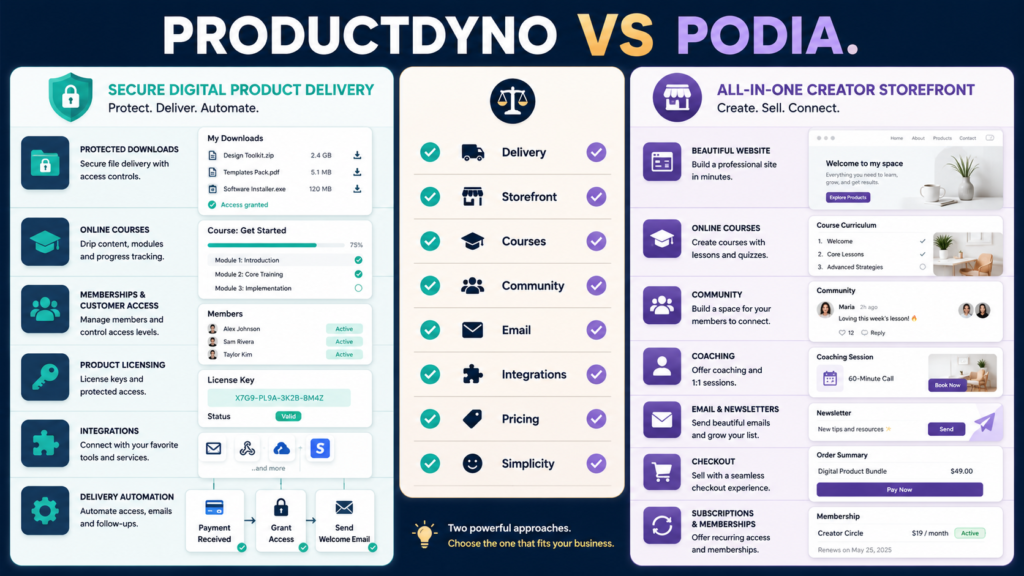
ProductDyno and Podia both support digital-product businesses, but they start from different places.
ProductDyno emphasizes product creation, secure delivery, customer access, courses, memberships, licensing, and connections with a wider marketing stack.
Podia emphasizes an all-in-one creator business environment that combines products with a website, store, courses, community, coaching, email, and built-in selling tools.
That creates a useful first question:
Do you want a dedicated digital-product delivery environment connected to other business tools, or do you want one platform to handle more of the complete creator business?
That distinction is more useful than counting features.
Review Methodology: This review is based on official product information, available documentation, and publicly available details reviewed on August 16, 2026. No firsthand product testing or personal experience is claimed.
Key Takeaways
- ProductDyno focuses strongly on digital-product delivery, customer access, courses, memberships, licensing, and integrations.
- Podia combines digital products with a website, online courses, coaching, community, email marketing, and checkout.
- Podia currently offers a 30-day free trial.
- Podia’s current plans differ partly by transaction fees and broader business features.
- ProductDyno’s official site currently presents more than one offer/pricing presentation, making checkout verification especially important.
- ProductDyno may fit better when you already have other marketing and checkout tools.
- Podia may fit better when you want to consolidate more of the business into one platform.
Affiliate Disclosure: This article contains affiliate links. If you purchase through one of these links, I may earn a commission at no additional cost to you. Affiliate compensation does not determine the conclusions or recommendations presented in this article.
What Is ProductDyno?
ProductDyno is designed around creating, protecting, delivering, and managing digital products.
Its current official website describes support for areas including:
- Digital downloads.
- Courses.
- Memberships.
- Product pages.
- Customer access.
- Licensing.
- Integrations.
- Email and marketing capabilities.
- Additional AI-assisted product tools.
ProductDyno’s current platform presentation positions it as more than a simple file-delivery service, while secure access and product management remain important parts of the offering.
You can review ProductDyno through Michael’s approved affiliate link if secure digital-product delivery and connected business infrastructure match your requirements.
What Is Podia?
Podia is an all-in-one creator platform.
Its current official feature pages support:
- Online courses.
- Digital downloads.
- Community.
- Coaching.
- Webinars or events.
- Website pages.
- Landing pages.
- Blogging.
- Email marketing.
- Built-in checkout.
- Coupons.
- Upsells.
- Subscriptions.
Podia’s current feature overview shows how much of the creator business can be managed from one environment.
That makes Podia particularly interesting for someone trying to reduce the number of separate systems involved in selling knowledge products.
The Central Difference: Infrastructure vs Consolidation
A practical way to think about the products is:
ProductDyno
I already have or expect to have a marketing stack, and I need a strong system for product creation, protection, access, delivery, courses, memberships, or licensing.
Podia
I want one creator-oriented platform to handle much of my website, selling, email, products, courses, and community.
There is overlap.
But your existing stack changes the answer.
Digital Downloads
Both platforms can support digital products such as downloadable resources.
For a simple PDF or ebook, ask:
- Where will the sales page live?
- Who processes checkout?
- How does the buyer receive access?
- Can access be protected?
- What customer emails are sent?
- What happens if the customer loses the original email?
- Can you easily update the product later?
Do not buy software solely because it can upload a PDF.
Nearly every digital-product platform can do that.
Evaluate the complete customer journey.
Online Courses
Both platforms support course-oriented use cases.
Podia’s current course features include lesson-based content, video, text, quizzes, and drip functionality, along with its broader website, checkout, and email environment.
ProductDyno similarly presents course and membership delivery as part of its product environment.
The question is not:
Which platform has courses?
Ask:
- How are lessons organized?
- How are students enrolled?
- Can you drip content?
- Do you need quizzes?
- Where do downloads appear?
- How do customers receive login instructions?
- What support process is available?
- Can multiple products share the same customer account?
Website and Storefront
This is one of Podia’s clearer distinctions.
Podia includes website and landing-page tools as part of the platform, allowing a creator to create public-facing pages and sell products without assembling a separate storefront from multiple systems.
That can simplify a new operation.
But if you already have a WordPress website you intend to keep, the built-in website may be less important.
Do not pay twice for the same job unless consolidation genuinely makes your workflow easier.
Email Marketing
Podia includes email capabilities within the broader creator platform.
This can reduce the need for a separate email provider for some businesses.
However, a business already using a dedicated email-marketing system may prefer to keep it.
Ask:
- Do I need advanced automations?
- How sophisticated is subscriber segmentation?
- Will my existing list need migration?
- Do I need specialized deliverability or reporting features?
- Does one system reduce complexity or remove functionality I use?
“Built in” does not automatically mean “better for my business.”
Community and Coaching
Podia supports community and coaching alongside products and courses.
That can be useful for creators whose business model includes:
- Paid community.
- Coaching.
- Cohort programs.
- Membership interaction.
- Ongoing customer engagement.
If your business sells evergreen ebooks and downloadable products with limited support, those features may not matter.
Product selection should follow your business model.
ProductDyno Licensing and Delivery Orientation
ProductDyno emphasizes more infrastructure-style digital-product functionality, including licensing and integrations alongside access and delivery.
That can be useful when products extend beyond a simple ebook.
Examples might include:
- Software.
- Protected files.
- Membership access.
- Multiple product bundles.
- More complex delivery rules.
Again, confirm the specific capability required by your product before choosing a plan.
Podia Pricing
As of August 16, 2026, Podia’s official pricing page lists a 30-day free trial and several paid plans.
Its current annual-billing presentation shows:
- Mover: $42 per month billed annually, with a 5% transaction fee.
- Shaker: $84 per month billed annually, with no Podia transaction fee.
- Earthquaker: $150 per month billed annually, with no Podia transaction fee and broader support/features.
Payment-processor fees can still apply separately. Because pricing can change, verify Podia’s current official pricing before purchase.
ProductDyno Pricing Requires Extra Verification
ProductDyno’s current official website presents multiple offer and pricing pages with differing structures.
One official presentation emphasizes a trial and a larger all-in-one monthly offer, while another official pricing presentation shows differently structured plans.
Because the official pages are not presenting one simple universal price in the material reviewed, the safest approach is:
- Open the exact ProductDyno offer you intend to use.
- Review the final checkout.
- Confirm monthly versus annual billing.
- Confirm renewal terms.
- Confirm which features belong to the selected plan.
- Save a copy of the terms that apply to your purchase.
Do not rely on an old review quoting one ProductDyno price as though it is necessarily the price you will receive today.
Existing ProductDyno Coverage
MichaelELeeReviews has a separate ProductDyno review focused on digital-product delivery if you want to examine ProductDyno without the Podia comparison.
There is also a verified ProductDyno vs. ThriveCart Academy comparison for businesses weighing a different checkout/course-delivery setup.
Which Platform Is Simpler?
That depends on what you already own.
New Creator With Almost Nothing
Podia may reduce setup by combining:
- Website.
- Store.
- Checkout.
- Product.
- Course.
- Email.
- Community.
Existing Business With WordPress, Email, and Checkout
ProductDyno may fit more naturally as the product-delivery component rather than forcing a migration into a new all-in-one platform.
The same software can be “simple” for one user and redundant for another.
Migration Costs Matter
Switching platforms can require:
- Moving files.
- Rebuilding courses.
- Recreating customer accounts.
- Moving email lists.
- Rebuilding sales pages.
- Reconnecting payment processors.
- Updating website links.
- Recreating automations.
- Testing customer access.
Do not migrate because another platform has one attractive feature.
Calculate the operational cost of switching.
Run a Real Test Before Buying
Use the same sample project on both platforms.
Example:
Product: 25-page digital guide with three bonus downloads.
Test:
- Create the product.
- Upload the files.
- Create the sales page.
- Configure the price.
- Test checkout.
- Test customer delivery.
- Test login or download.
- Replace one product file.
- Test an email.
- Review the buyer experience.
MichaelELeeReviews’ guide to evaluating a software free trial before you pay can help you score the experience systematically.
Who Should Consider ProductDyno?
ProductDyno may be the better fit when:
- Product delivery and protection are central.
- You already have a website.
- You already have email marketing.
- You use an external checkout or broader stack.
- Licensing matters.
- You sell multiple protected digital products.
- You want integrations with other business tools.
- You do not need your delivery platform to replace your entire website.
Who Should Consider Podia?
Podia may be the better fit when:
- You want an all-in-one creator business.
- You do not want to maintain many separate tools.
- You need a website and storefront.
- You sell courses or downloads.
- Community or coaching matters.
- Built-in email is attractive.
- You prefer transparent published plan pricing.
- You want a trial before committing.
Final Verdict
Choose ProductDyno when you want product delivery, protection, access, licensing, and integrations to sit inside a broader online-business stack you already operate.
Choose Podia when you want to consolidate more of the creator business—website, store, email, courses, community, coaching, and checkout—into one environment.
For an established WordPress-based business with existing marketing tools, ProductDyno may avoid unnecessary platform replacement.
For a new creator starting with very little infrastructure, Podia’s consolidated approach may reduce the number of systems that need to be assembled.
Conclusion
ProductDyno and Podia overlap in digital-product selling, but they represent two different approaches.
ProductDyno can function as a dedicated part of a larger technology stack.
Podia is designed to become more of the stack itself.
Before choosing, draw seven boxes on paper:
Website → Lead Capture → Email → Checkout → Product Delivery → Customer Access → Support
Write the software currently responsible for each box.
Then ask which platform removes genuine complexity rather than merely replacing tools that already work.