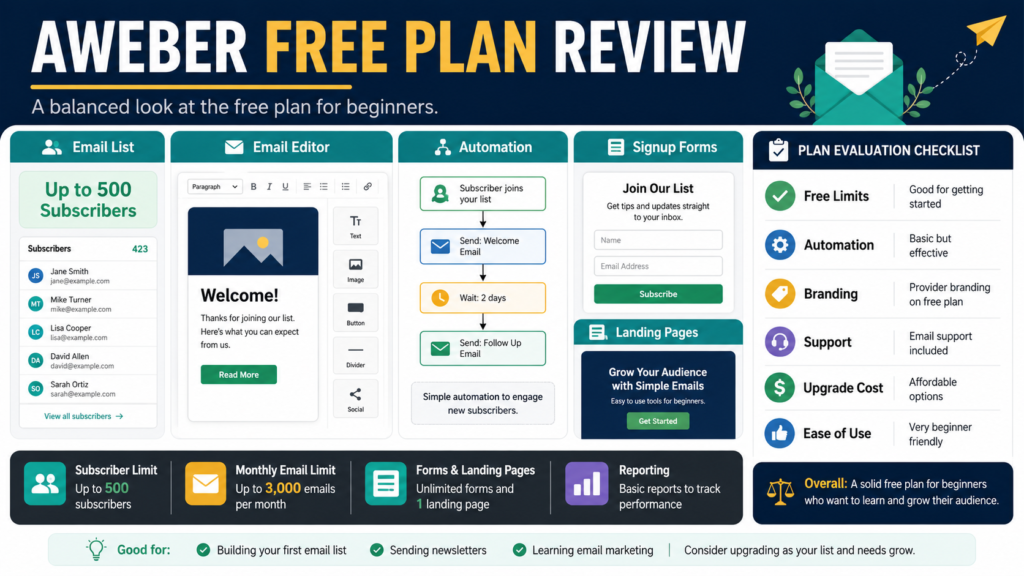
AWeber Free is designed to help beginners begin collecting subscribers and sending email without immediately paying for a monthly plan.
At the time of this review, the official AWeber documentation stated that the free plan supports:
- Up to 500 subscribers
- Up to 3,000 email sends per month
- One list profile
- One workflow automation or autoresponder campaign
- Signup forms
- Landing pages
- Email design tools
- Integrations
- Customer support
These limits may be enough for a beginner who needs one lead magnet, one welcome sequence, and occasional newsletters.
The plan may become restrictive when the list grows, the business needs several automated sequences, or more advanced features become important.
Review Methodology: This review is based on AWeber’s official pricing pages, product pages, and help documentation reviewed on August 2, 2026. No firsthand product testing or personal experience is claimed.
Affiliate Disclosure: This article contains affiliate links. If you purchase through one of these links, I may earn a commission at no additional cost to you. Affiliate compensation does not determine the conclusions or recommendations presented in this article.
Quick Verdict
AWeber Free may fit a beginner who wants to:
- Build a first email list
- Collect up to 500 subscribers
- Deliver one lead magnet
- Create one basic autoresponder
- Send occasional newsletters
- Build signup forms
- Create landing pages
- Learn email marketing before paying
It may not fit a business that needs:
- Several automated sequences
- Multiple lists or detailed segmentation
- More than 3,000 monthly sends
- More than 500 subscribers
- Advanced testing
- Expanded reporting
- Removal of every free-plan limitation
- Complex ecommerce workflows
What Is AWeber Free?
AWeber Free is a no-cost version of AWeber’s email-marketing platform.
AWeber’s current official documentation describes it as lifetime free access with optional upgrading, subject to limits involving subscribers, monthly sends, list profiles, and automation workflows.
Its current free-plan page lists:
- 500 subscribers
- 3,000 monthly emails
- Email design tools
- Campaign automation
- Signup forms
- Landing pages
- Integrations
- Customer support
AWeber states that no credit card is required to begin the free plan.
You can review the current AWeber Free and paid options.
The 500-Subscriber Limit
The free plan supports up to 500 subscribers.
This can be sufficient for:
- A new blog
- One lead magnet
- A small local business
- A first digital product
- A retiree testing an online-business idea
- A creator preparing for a future launch
The account must be upgraded after exceeding the free-plan contact limit.
Before beginning, review how AWeber counts:
- Active subscribers
- Unsubscribed contacts
- Imported contacts
- Duplicate contacts
- Suppressed addresses
Contact-count policies can affect when an upgrade becomes necessary.
The 3,000-Email Monthly Limit
AWeber’s official free-plan information currently lists 3,000 email sends per month.
This means the limit depends on both list size and message frequency.
Examples:
100 Subscribers
You could theoretically send several messages each month before reaching 3,000 sends.
500 Subscribers
Six messages to the entire list would use 3,000 sends.
Automated and broadcast messages may both contribute to usage, so confirm how the account records sends.
A weekly newsletter plus a welcome sequence may approach the limit as the list grows.
One List Profile
The current official documentation says the free account includes one list profile.
A single list can support a beginner business when subscribers share a similar interest.
Tags may help organize contacts inside that list, depending on the current free-plan features.
A business managing unrelated audiences may need a paid plan or a different structure.
One Automation Workflow
The free plan currently includes one workflow automation or autoresponder campaign.
A beginner could use that workflow for:
- Lead-magnet delivery
- Welcome email
- Educational follow-up
- Relevant next step
The limitation becomes important when you want separate sequences for:
- Different lead magnets
- Customers and prospects
- Several products
- Course onboarding
- Abandoned carts
- Reengagement
- Affiliate campaigns
Plan the first workflow carefully.
Landing Pages
AWeber provides landing-page tools that can be used without building a complete website.
Its current pages describe hosted landing pages for promoting an ebook, event, business, or subscriber offer and connecting the page to an AWeber list.
A beginner can use a landing page for:
- Checklist
- Guide
- Newsletter
- Waiting list
- Webinar
- Ebook announcement
Test:
- Mobile display
- Form submission
- Thank-you message
- Delivery email
- Privacy language
- Links
- Confirmation process
Signup Forms
Signup forms can be placed on an existing website or shared through a hosted option.
AWeber’s official form information says hosted forms can provide shareable links, which may help someone begin collecting subscribers before completing a full website.
This may be useful for a beginner testing one lead magnet.
The form should explain:
- What the subscriber receives
- What future email may include
- Who is sending the messages
- How to unsubscribe
Email Creation
The free plan includes email design tools.
AWeber also promotes AI-assisted writing and subject-line capabilities on its current main website.
A beginner should focus first on:
- Clear subject
- Useful message
- Readable formatting
- One primary link
- Correct disclosure
- Working unsubscribe option
The number of templates should not be the main reason to select a platform.
Customer Support
AWeber’s free-plan page currently lists phone, email, and chat access to customer solutions.
This may distinguish AWeber from free plans that provide only limited or automated support.
Support availability and channels can change, so confirm the current schedule and plan conditions.
Paid Plan Pricing
AWeber’s official pricing page currently promotes paid access beginning at $12.50 per month when billed annually. Other official AWeber materials describe paid plans beginning around $15 per month, depending on billing and plan conditions.
Before upgrading, verify:
- Contact count
- Monthly versus annual billing
- Automation access
- Landing-page features
- Branding
- Testing
- Reporting
- Support
- Ecommerce fees
Do not upgrade only because the free plan displays a notice.
Identify the specific limitation affecting the business.
A Practical Beginner Setup
Imagine a retiree launching a free AI-content checklist.
The AWeber Free setup might contain:
Landing Page
Explains the checklist.
Signup Form
Collects the email address.
Workflow
Email 1 delivers the checklist.
Email 2 explains one common mistake.
Email 3 provides a practical example.
Email 4 asks what the subscriber needs next.
Newsletter
One or two additional messages per month.
This may remain within the free-plan limits during the early stage.
The business should monitor the number of contacts and total sends.
Ecommerce and Product Selling
AWeber currently promotes tools for selling digital downloads, courses, subscriptions, and coaching through supported payment integrations. Its current ecommerce page describes one-time and recurring options and identifies platform and payment-processing fees.
A beginner interested in selling through AWeber should verify:
- Stripe connection
- Transaction fees
- Product-delivery process
- Refund handling
- Taxes
- Customer emails
- Subscription management
- Free-plan availability
Do not assume that all ecommerce functions are included without restrictions.
Advantages
No Immediate Subscription Cost
The free plan allows a beginner to begin before the list grows.
Landing Pages and Forms
A website is not always required for the first subscriber campaign.
Basic Automation
One welcome sequence may be sufficient at the beginning.
Customer Support
The official free-plan information currently lists multiple support channels.
Clear Growth Point
The 500-subscriber limit provides an obvious point for evaluating whether the business justifies a paid plan.
Limitations
500 Subscribers
The free plan is designed for a small list.
3,000 Monthly Sends
A growing list and frequent messages can reach the limit quickly.
One List Profile
Businesses with several unrelated audiences may need more flexibility.
One Workflow
Several lead magnets or products can outgrow the automation limit.
Upgrade Costs
The long-term price should be reviewed before building an important system.
Free-Plan Features Can Change
Confirm current terms before relying on a specific feature.
Who Should Consider AWeber Free?
It may fit:
- New bloggers
- Retirees starting an email list
- First-time digital-product creators
- Local businesses
- Coaches testing one lead magnet
- Affiliate marketers with a small audience
- Creators learning email marketing
Who May Need a Paid Plan Immediately?
A paid plan may be more appropriate when you:
- Import more than 500 subscribers
- Need several automation workflows
- Manage multiple audience segments
- Send frequent campaigns
- Require advanced testing
- Need expanded reporting
- Want broader ecommerce functionality
- Operate several products
Beginner Evaluation Checklist
- Define the lead magnet.
- Estimate the first-year subscriber count.
- Calculate expected monthly sends.
- Design one workflow.
- Create a free account.
- Build the landing page.
- Test the signup form.
- Complete the sequence as a subscriber.
- Review support.
- Compare paid pricing before the list approaches 500.
Final Verdict
AWeber Free provides a practical entry point for beginners who need one list, one automation, landing pages, signup forms, and a limited monthly email allowance.
It can support a first lead magnet and welcome sequence without an immediate subscription.
Its value decreases when the business requires several automated campaigns, frequent sending, or more than 500 subscribers.
Conclusion
AWeber Free may be enough for a beginner who wants to learn email marketing and build a small list before paying for advanced features.
The key limitations are subscriber count, monthly sends, one list profile, and one workflow.
Build and test one complete lead-magnet sequence, then monitor usage so you can compare paid options before the free limits interrupt the system.