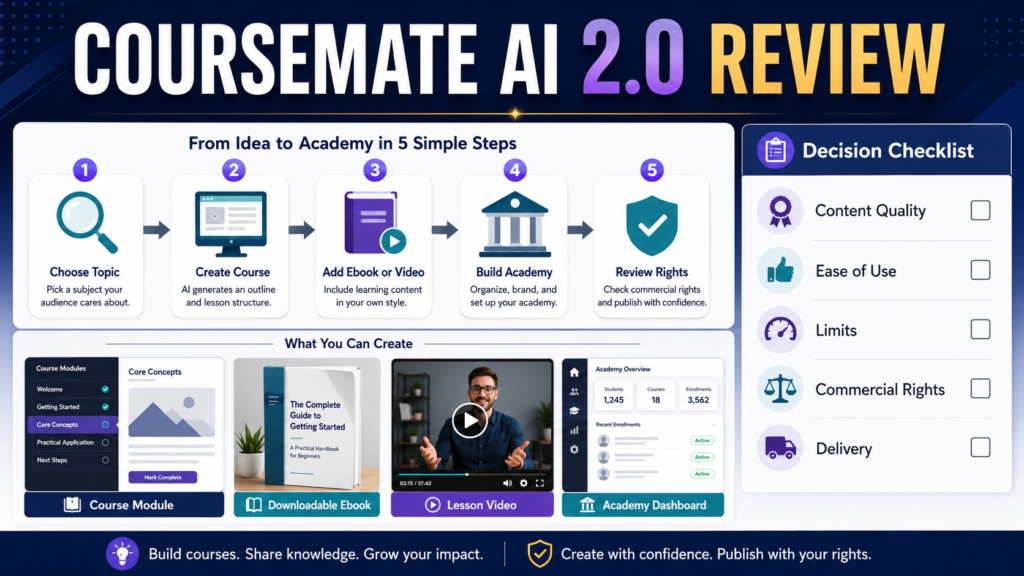
CourseMate AI 2.0 is designed for users who want to create AI-assisted courses, ebooks, training videos, PDFs, children’s ebooks, whiteboard videos, and online academies from one platform.
The broad feature set may appeal to marketers, educators, digital-product creators, and beginners who want several creation tools in one purchase.
The main concern is that a large number of automated features does not guarantee that the finished content will be accurate, original, educationally effective, or ready to sell.
CourseMate AI 2.0 may be useful as a production assistant. It should not be treated as a replacement for subject knowledge, course planning, editing, fact-checking, licensing review, or customer testing.
Review Methodology: This review is based on the official CourseMateAI 2.0 sales page and publicly available offer information reviewed on July 29, 2026. No firsthand testing or personal product experience is claimed.
Affiliate Disclosure: This article contains affiliate links. If you purchase through one of these links, I may earn a commission at no additional cost to you. Affiliate compensation does not determine the conclusions or recommendations presented in this article.
Quick Verdict
CourseMate AI 2.0 may be worth investigating when you want to:
- Create several types of digital educational content
- Build simple course or academy websites
- Generate first drafts of ebooks or lessons
- Create training-video content
- Develop whiteboard-style videos
- Produce products in more than one format
- Work from a one-time-purchase offer instead of another monthly subscription
It may not be the best fit when you:
- Need advanced learning-management features
- Require detailed student tracking
- Expect finished content without editing
- Need verified integrations with an existing business system
- Want a highly specialized professional course-authoring platform
- Do not need most of the included content types
What Is CourseMate AI 2.0?
CourseMate AI 2.0 is marketed as an AI-powered e-learning and digital-content creation platform.
The official sales page describes tools for:
- Online academies
- Training-video courses
- AI-generated ebooks
- Children’s ebooks
- PDFs
- Whiteboard videos
- Explainer videos
- Podcasts
- Multi-language content
The page also describes using the platform to create and publish educational products through academy-style websites.
You can review the current CourseMate AI 2.0 offer.
The exact features, limits, bonuses, upgrades, and commercial rights should be confirmed on the checkout page and inside the current license terms.
Course and Academy Creation
One of the primary selling points is the ability to create online academies and training courses.
The sales page states that users can create multiple academies and AI-generated training-video courses. It also lists specific generation limits for the front-end offer. These figures may vary by offer version or upgrade, so buyers should verify the current limits before purchasing.
A beginner should ask:
- Is the academy hosted by the provider?
- Can a custom domain be used?
- Can content be exported?
- How are students registered?
- Are payments processed inside the platform?
- Is student progress tracked?
- Can quizzes be created?
- Can certificates be issued?
- What happens if the service closes?
- Can the course be moved elsewhere?
A visually appealing academy does not automatically provide the full capabilities of a dedicated learning-management system.
Ebook and PDF Creation
CourseMate AI 2.0 is also promoted for generating ebooks, children’s ebooks, and PDFs.
This may be useful for creating:
- Lead magnets
- Short guides
- Workbooks
- Course companions
- Resource lists
- Lesson summaries
- Children’s learning materials
AI-generated ebook content should be reviewed for:
- Accuracy
- Originality
- Repetition
- Missing explanations
- Reading level
- Unclear examples
- Copyright concerns
- Licensing
- Formatting
- Final customer value
Do not assume that a generated ebook is ready to publish because it contains a cover and several pages.
Training-Video Creation
The sales page describes AI-assisted training videos and whiteboard-style videos.
A video tool may help create:
- Course lessons
- Explainer videos
- Product demonstrations
- Social-media education
- Sales presentations
- Tutorial content
Review the output for:
- Script accuracy
- Narration quality
- Visual timing
- Readable text
- Image licensing
- Export resolution
- Branding
- Commercial-use rights
- Watermarks
- Video-length limits
The effectiveness of a course depends on the quality of instruction, not only the number of videos.
Ease of Use
The vendor describes the system as suitable for users without advanced technical skills.
However, ease of use should be evaluated by completing the exact workflow you need.
A beginner test might include:
- Create one topic.
- Generate a short course outline.
- Create one lesson.
- Add one worksheet.
- Generate one short video.
- Create a basic academy.
- Preview the student experience.
- Export or publish the work.
- Check the license.
- Test access from another device.
A platform can be easy to open but still require time to produce good content.
Content Quality
AI can produce organized drafts quickly, but content quality depends on the information supplied and the review process.
Look for:
- Logical course structure
- Complete explanations
- Appropriate examples
- Accurate facts
- Useful activities
- Clear objectives
- Consistent terminology
- Natural language
- Meaningful progression
A weak course may contain attractive templates while teaching very little.
The buyer should plan to edit every generated asset.
Commercial Rights and Licensing
The sales page refers to selling courses, ebooks, videos, and other content and also mentions PLR-related use cases.
Before using any output commercially, confirm:
- Rights included in the front-end offer
- Rights included only in upgrades
- Whether client work is permitted
- Whether resale rights are included
- Whether PLR creation is permitted
- Whether templates can be resold
- Whether stock assets have restrictions
- Whether generated voices or images have separate terms
- Whether attribution is required
Do not rely only on promotional wording.
Save a copy of the license that applies when you purchase.
Current Pricing Considerations
At the time of this review, the official sales page displayed CourseMate AI 2.0 as a one-time purchase of $39.95 and compared that price with a stated monthly value. Promotions, coupon codes, front-end prices, and upgrade offers may change.
Before purchasing, review:
- Front-end price
- Taxes
- Optional upgrades
- Recurring memberships
- Usage limits
- Refund terms
- Payment processor
- Support period
- License level
A low front-end price can become more expensive when important features require additional upgrades.
Possible Upgrade Funnel
Products sold through launch marketplaces often include optional upgrades.
Although the exact current funnel should be verified during purchase, possible upgrades may involve:
- Higher usage limits
- Additional templates
- Commercial rights
- Agency rights
- Reseller rights
- Monthly content
- Extra automation
- Additional academies
Do not assume that an upgrade is necessary.
Start with the problem you need to solve and compare the front-end features with that requirement.
Advantages
Multiple Content Formats
The platform is promoted for courses, ebooks, PDFs, videos, podcasts, and academy sites.
One-Time-Purchase Positioning
The current front-end offer is presented as a one-time payment rather than a standard monthly software subscription.
Beginner-Oriented Workflow
The sales page emphasizes a point-and-click creation process.
Potential Time Savings
AI-assisted outlines and drafts may reduce initial setup time.
Useful for Product Experimentation
A creator may test several content formats before committing to a larger platform.
Limitations
Vendor Sales Page Is the Main Information Source
Detailed independent documentation and transparent feature specifications are limited compared with major software platforms.
Output Requires Human Review
Generated content may be inaccurate, repetitive, or too generic.
Broad Feature Set May Reduce Depth
A platform handling many content types may not provide the advanced features of specialized tools.
Upgrade Costs May Matter
Important rights or limits may be tied to additional offers.
Course Delivery Details Need Verification
Buyers should confirm student management, hosting, progress tracking, exports, and long-term access.
Promotional Claims Should Be Treated Carefully
The official page includes strong income and automation language. Those claims should not be treated as guaranteed or typical results.
Who May Benefit
CourseMate AI 2.0 may fit:
- Beginner digital-product creators
- Affiliate marketers
- Ebook creators
- Course creators testing an idea
- Retirees creating educational content
- Small online-business owners
- PLR publishers who confirm the license
- Marketers creating several types of media
Who May Not Need It
You may not need CourseMate AI 2.0 when:
- You already have a reliable course platform.
- You only need a writing tool.
- You only create one type of content.
- You require detailed corporate training features.
- You need advanced assessment and student reporting.
- You are unwilling to edit AI-generated material.
- You need extensive official documentation before purchasing.
A Beginner Evaluation Process
Step 1
Write down the one asset you want to create.
Step 2
Confirm that the front-end offer includes it.
Step 3
Review the usage limit.
Step 4
Confirm commercial rights.
Step 5
Check whether exporting is possible.
Step 6
Review support and tutorials.
Step 7
Create a small test project.
Step 8
Evaluate the customer or student experience.
Step 9
Decide whether an upgrade solves a real limitation.
Step 10
Do not create several products until the first one has been reviewed and tested.
Practical Use Case
Imagine a retired educator who wants to create a five-lesson beginner course.
The educator could use CourseMate AI 2.0 to help:
- Generate an initial outline
- Draft lesson scripts
- Create a short workbook
- Develop simple videos
- Build an academy page
The educator would still need to:
- Correct the information
- Improve the examples
- Confirm the sequence
- Add personal teaching judgment
- Review the license
- Test the course
- Provide customer support
The platform may accelerate production, but the educator remains responsible for quality.
Final Verdict
CourseMate AI 2.0 offers a broad set of AI-assisted tools for creating educational and digital content.
It may provide reasonable value for a beginner who wants to experiment with courses, ebooks, videos, and academy websites without beginning with several subscriptions.
It is less suitable for buyers who need advanced learning-management features, extensive independent documentation, or finished content requiring little review.
The product should be evaluated as a creation assistant rather than as an automated income system.
Conclusion
CourseMate AI 2.0 may help beginners create drafts of courses, ebooks, videos, PDFs, and academy content from one platform.
The most important buying questions concern output quality, front-end limits, upgrades, commercial rights, delivery features, and the amount of editing required.
Review the current license and complete feature list before deciding whether the front-end offer supports the one product you want to create first.