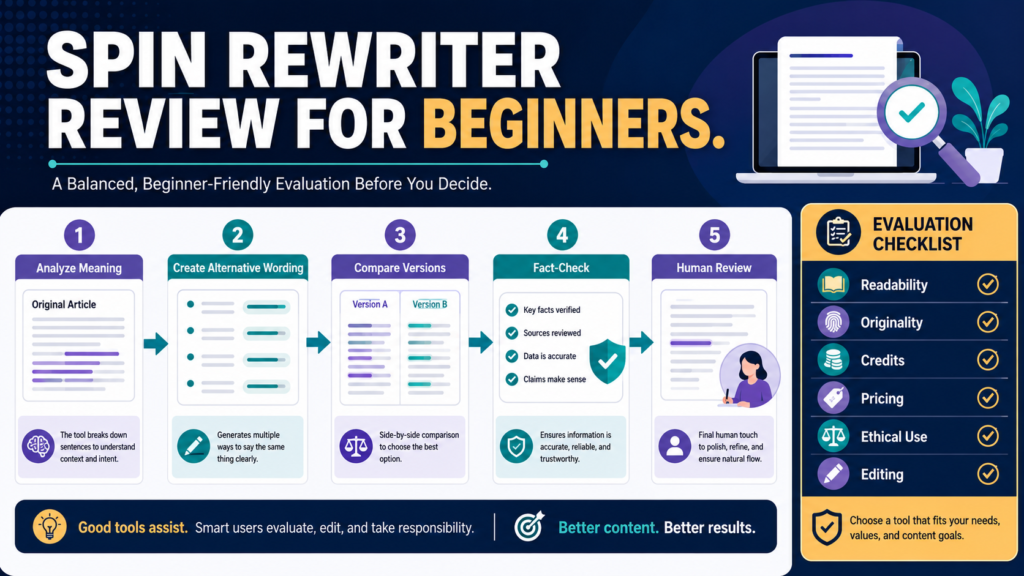
Spin Rewriter is a cloud-based article-rewriting platform designed to create alternative versions of existing written content.
Its most appropriate uses involve material you own or have permission to modify, such as:
- Updating an old article
- Creating a new version for another format
- Exploring alternative wording
- Repurposing licensed content
- Comparing possible rewrites
- Refreshing repetitive drafts
It should not be used to copy another publisher’s work, conceal plagiarism, or create hundreds of low-value pages from one article.
Spin Rewriter may save time during legitimate content repurposing, but its output still requires fact-checking, editing, and original value.
Review Methodology: This review is based on Spin Rewriter’s official website and pricing page as available on July 30, 2026, for publication on July 31, 2026. No firsthand testing or personal product experience is claimed.
Affiliate Disclosure: This article contains affiliate links. If you purchase through one of these links, I may earn a commission at no additional cost to you. Affiliate compensation does not determine the conclusions or recommendations presented in this article.
Quick Verdict
Spin Rewriter may be worth investigating when you:
- Own a library of articles that need refreshing
- Repurpose authorized PLR content
- Need several alternative drafts
- Want side-by-side version comparison
- Work with spintax formats
- Need bulk rewriting
- Are willing to review every output
It may not be the right tool when you:
- Need original research
- Want a complete content strategy
- Expect publication-ready articles without editing
- Plan to rewrite content you do not own
- Want only occasional sentence improvements
- Do not need mass export or bulk features
What Is Spin Rewriter?
Spin Rewriter describes itself as an AI article rewriter using its ENL semantic rewriting system and large-language-model technology to analyze meaning and create alternate text. Its current site shows a workflow where users paste an article, run a one-click rewrite, and export variations.
The platform is accessed through a browser rather than installed as desktop software. The official pricing page says current plans include unlimited article rewrites and a monthly allocation of one million AI credits for certain advanced features.
You can review the current Spin Rewriter offer.
How the Rewriting Process Works
The official site presents three basic stages:
- Paste the source article.
- Run the one-click rewrite.
- Export one or more versions.
The platform also describes:
- Side-by-side comparison
- Bulk rewriting
- Paragraph creation
- Spintax support
- Stock-photo integration
- Mass export
- Browser-based access
- Tutorial videos
Spin Rewriter says mass export can generate up to 1,000 versions, although creating that many files does not mean they should all be published.
Appropriate Uses
Refreshing Your Own Articles
An older article may need:
- Updated wording
- Improved structure
- New examples
- Current facts
- Shorter paragraphs
- A stronger conclusion
Spin Rewriter may help generate alternative language, but the update should add more than changed words.
Repurposing Authorized PLR
Private-label-rights content may permit editing and rebranding.
The exact license should be reviewed before using a rewriting tool.
You should still add:
- Audience-specific examples
- Your own organization
- Current information
- Better instructions
- Original commentary
- Your branding
Creating Draft Variations
You may want different versions of:
- Article summaries
- Product explanations
- Email introductions
- Educational sections
- Social captions
Use the variations as options rather than automatically publishing every output.
Reducing Repetition
A draft may overuse the same sentence structure or transition.
A rewriting tool can suggest alternatives, although individual editing may be faster for a short passage.
Uses to Avoid
Do not use Spin Rewriter to:
- Copy competitors’ articles
- Change wording while preserving stolen structure
- Conceal copyrighted material
- Create misleading customer reviews
- Generate fake personal experience
- Mass-publish thin pages
- Evade plagiarism checks
- Replace required professional research
The legal right to access online text is not the same as the right to republish it.
Semantic Rewriting
Spin Rewriter promotes its ENL technology as a system intended to evaluate words in context rather than replacing isolated terms.
This distinction matters because simple synonym replacement can produce awkward sentences.
Consider:
The customer can book a course.
A careless word replacement might treat “book” as a printed publication rather than a reservation action.
Context-aware rewriting aims to preserve the intended meaning.
However, no automated rewrite should be trusted without reading it.
Side-by-Side Comparison
The official pricing page lists side-by-side comparison as a feature for examining the source and rewritten versions.
This can help you check:
- Whether the meaning changed
- Whether facts remained accurate
- Whether examples were altered
- Whether important cautions disappeared
- Whether the language became unnatural
- Whether the version remains too similar
Comparison is more useful than evaluating the rewritten text alone.
Bulk Rewriting and Mass Export
Bulk rewriting may help businesses with a legitimate library of authorized material.
Possible uses include:
- Updating a collection of product descriptions
- Refreshing a licensed article archive
- Creating internal draft variations
- Repurposing training material
The danger is that speed can encourage publication without review.
If you generate 50 versions, you still have 50 files requiring quality control.
For most beginner websites, one excellent updated article is more valuable than dozens of weak variations.
AI Credits
Spin Rewriter’s official pricing page states that advanced AI functions use credits and that each user currently receives one million credits per month. The company gives examples involving paragraph rewrites, titles, descriptions, translations, localization, and keyword generation.
A large credit allowance does not determine content quality.
Evaluate:
- Which features consume credits
- Whether unused credits carry over
- What happens after the allocation is used
- Whether additional credits cost extra
- Which tasks actually require AI credits
Verify current rules inside the account before relying on the allowance.
Current Pricing
At the time of review, the official pricing page displayed:
- Monthly plan: $47 per month
- Yearly promotional offer: five-day trial followed by $77 per year, compared with a listed regular price of $197
- Lifetime option: $497 as a single payment
The page also displayed a five-day trial for the yearly offer and a 30-day money-back guarantee after payment. Promotional prices and terms can change, so review the current checkout carefully.
Monthly Plan
The monthly plan may fit someone who needs the tool for a short project.
At $47 per month, it is considerably more expensive over a full year than the displayed promotional yearly price.
Yearly Plan
The current $77 promotional annual offer appears to provide the lowest first-year cost among the displayed options.
Confirm:
- Renewal price
- Trial billing date
- Cancellation method
- Included bonuses
- Refund process
The pricing page states that subscribers keep the price locked at signup, but this should be confirmed during checkout and retained in your purchase records.
Lifetime Plan
The $497 lifetime option requires a larger upfront commitment.
Compare it with the current annual offer.
At a $77 annual rate, several years would pass before the lifetime price becomes less expensive. The calculation changes when the annual promotion ends or renewal terms differ.
Ease of Use
The three-step process appears straightforward:
- Paste
- Rewrite
- Export
The more difficult work happens after generation.
A responsible user must:
- Compare versions
- Verify meaning
- Correct facts
- Remove awkward language
- Add original value
- Check licensing
- Decide which version fits the audience
Ease of generation should not be confused with ease of producing publishable content.
A Responsible Rewriting Workflow
Step 1: Confirm Rights
Use only content you own or are licensed to modify.
Step 2: Save the Source
Keep the original document and license information.
Step 3: Define the New Purpose
Explain why the rewritten version needs to exist.
Step 4: Generate One Version
Do not begin with hundreds of exports.
Step 5: Compare
Review the rewrite beside the source.
Step 6: Verify
Check every fact, link, product detail, and claim.
Step 7: Add Original Value
Add examples, decisions, cautions, or instructions.
Step 8: Edit
Improve readability and natural language.
Step 9: Review Similarity
Confirm that the new work is more than superficial word substitution.
Step 10: Publish Only the Best Version
Archive or delete weak drafts.
Practical Example
Imagine a website owner has a two-year-old article about writing an email welcome sequence.
The article is original but contains repetitive language and outdated product references.
A responsible workflow would:
- Verify current email-platform information.
- Remove outdated recommendations.
- Use Spin Rewriter to create an alternative draft.
- Compare each section.
- Add a new three-email example.
- Improve the implementation checklist.
- Rewrite the conclusion manually.
- test every link.
- Publish one updated article.
The tool assists the rewrite, but the value comes from the updated information and improved teaching.
Advantages
Fast Draft Variations
The platform can create several alternate versions quickly.
Context-Focused Positioning
Its ENL system is marketed as understanding meaning rather than performing only synonym replacement.
Bulk and Mass Features
These may help users managing large authorized content libraries.
Browser Access
The platform works through a web interface.
Trial and Refund Window
The current yearly offer provides a trial and stated refund period.
Limitations
Rewriting Is Not Original Research
It cannot replace subject knowledge or source verification.
Output Requires Editing
Meaning, tone, facts, and readability may change.
Ethical Misuse Is Easy
The software could be used to disguise copied material.
Mass Export Can Encourage Thin Content
More files do not create more value automatically.
Pricing Varies Significantly
Monthly, annual, and lifetime options require careful comparison.
Vendor Claims Are Highly Promotional
Ranking, uniqueness, and quality statements should not be treated as guaranteed results.
Who Should Consider Spin Rewriter?
Spin Rewriter may fit:
- Publishers refreshing owned articles
- PLR users with valid editing rights
- Content teams needing draft variations
- Marketers working with authorized material
- Users who understand editing and verification
Who May Not Need It?
You may not need it when:
- You create original articles from the beginning.
- You have only a few paragraphs to revise.
- Your existing AI writing tool handles occasional rewrites.
- You are unwilling to review every output.
- You do not manage a reusable content library.
- You expect automatic search rankings.
Final Verdict
Spin Rewriter remains a specialized tool for rewriting and repurposing existing content.
Its features may save time when the source material is owned, licensed, and suitable for reuse. The strongest use case is creating working alternatives that a human editor improves.
It is not a substitute for original ideas, research, expertise, or responsible publishing.
Conclusion
Spin Rewriter may be useful for refreshing owned articles, adapting authorized PLR, and creating alternate drafts.
The decision depends on how often you rewrite content, whether you need bulk features, and whether the current annual or lifetime cost provides enough value.
Use the trial on one article you own, compare the result carefully, and calculate the real editing time before purchasing a long-term plan.