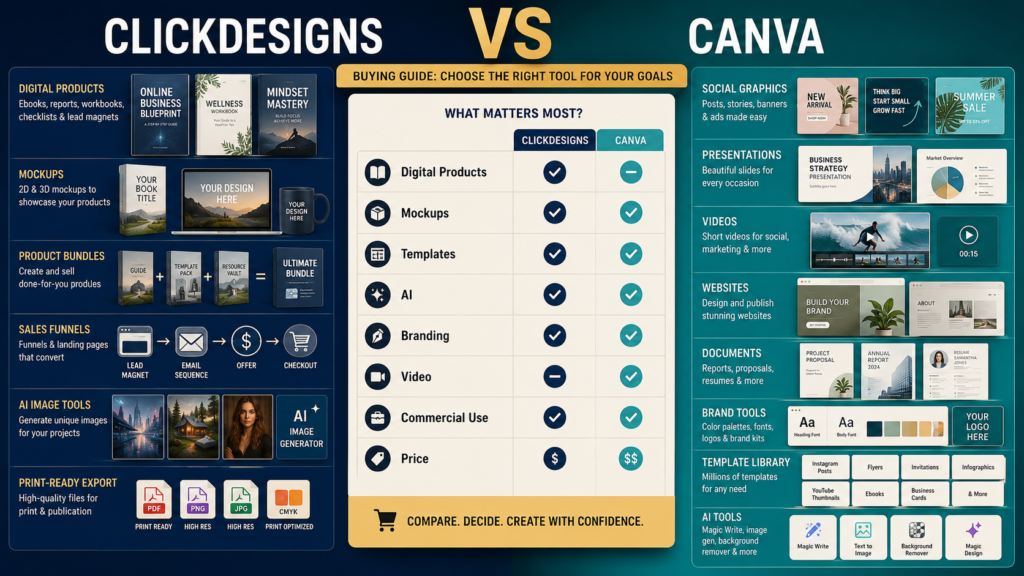
ClickDesigns and Canva overlap in several areas, but they are designed around different strengths.
ClickDesigns is the more specialized choice when your work centers heavily on ebook covers, product mockups, product bundles, funnel graphics, digital-product packaging, and related marketing visuals. Canva is the broader design platform when you want one environment for social graphics, presentations, videos, documents, websites, branding, AI-assisted creation, and many other everyday visual-content tasks.
For many creators, Canva can cover more general design needs.
For a digital-product seller who repeatedly creates boxshots, 3D covers, bundle images, and sales-funnel graphics, ClickDesigns may offer a more focused workflow.
Review Methodology: This comparison is based on current official ClickDesigns pricing, feature and support pages and current official Canva plan, licensing, AI, and product-creation information reviewed on August 11, 2026. No firsthand timed design test, customer-support test, export-quality comparison, AI-output quality test, or personal design result is claimed.
Affiliate Disclosure: This article contains affiliate links. If you purchase through one of these links, I may earn a commission at no additional cost to you. Affiliate compensation does not determine the conclusions or recommendations presented in this article.
Key Takeaways
- ClickDesigns focuses heavily on digital-marketing visuals, book covers, product packaging, sales-funnel graphics, 2D/3D mockups, and product bundles.
- Canva offers a broader general-purpose visual-design ecosystem with Free, Pro, Business, and Enterprise plans.
- ClickDesigns currently offers Standard, Pro, and Expert paid levels with a no-credit-card free trial.
- Canva Free remains available to individuals, while Canva Pro adds premium content, brand tools, AI tools, Background Remover, and other premium functionality.
- Both allow commercial use in various circumstances, but their licensing rules differ and should be read carefully.
- A creator may reasonably use both if each handles a different part of the workflow.
What Is ClickDesigns?
ClickDesigns is a cloud-based graphics platform with a strong emphasis on marketing and digital-product visuals.
Its current site highlights templates and tools for:
- Book covers.
- Boxshots.
- Device mockups.
- Product bundles.
- Product packaging.
- Sales-funnel graphics.
- Web graphics.
- Thumbnails.
- Social media.
Its current paid plans also include AI tools, stock assets, export options, mockup capabilities, cloud storage, and commercial use.
What Is Canva?
Canva is a broader visual-content platform.
Its current Pro documentation describes functionality spanning:
- Social media.
- Brand content.
- Photos.
- Video.
- Presentations.
- Premium templates.
- AI-powered tools.
- General design work.
Canva also supports creating certain digital and physical products for sale, subject to its licensing rules.
The Main Difference
Think of the products this way:
ClickDesigns
Specialist
Strong emphasis on:
- Product presentation.
- Mockups.
- Bundles.
- Covers.
- Funnel graphics.
- Marketing assets.
Canva
Generalist
Strong emphasis on:
- Many design formats.
- Social media.
- Presentations.
- Documents.
- Video.
- Websites.
- Branding.
- Collaboration.
- AI.
The correct choice depends on which work occupies more of your time.
Compare Ebook Covers
Both platforms can be used for book-related designs.
ClickDesigns specifically advertises book-cover templates and provides 2D and higher-plan 3D cover and mockup functionality.
Canva provides extensive general design templates and tools that can also be used for ebook creation and covers. Canva itself discusses ebooks as one type of digital product that creators can design.
Advantage
For standard flat ebook design:
Either may work.
For specialized product presentation:
ClickDesigns may require fewer extra steps.
Compare 3D Mockups
This is one of ClickDesigns’ clearest differentiators.
Current ClickDesigns plans provide:
- Standard: flat and 2D covers/mockups.
- Pro: 3D cover and mockup creator plus templates.
- Expert: expanded 3D features, including additional sharing and video capabilities.
For a creator repeatedly building:
- Ebook mockups.
- Software boxes.
- Tablet displays.
- Bundle stacks.
ClickDesigns is directly designed for this use.
Canva can create product-display graphics, but its core platform is not organized around the same dedicated 2D/3D digital-product mockup hierarchy.
Compare Product Bundles
ClickDesigns currently includes product-bundle tools.
Standard includes 2D bundle functionality, while Pro and Expert expand into 3D product bundles and sets.
This may be useful if you sell:
Main Ebook + Workbook + Checklist + Templates + Video Course
and want one product-stack image.
The visual bundle can be created inside the same ecosystem as the individual covers.
Compare General Templates
Canva’s advantage is breadth.
Canva Pro provides access to premium templates and content across a very large set of design types.
A creator may use Canva for:
- Pinterest.
- Instagram.
- Facebook.
- YouTube.
- Presentations.
- Documents.
- Video.
- Websites.
- Print.
If your design needs are broad rather than primarily product-focused, Canva may offer the more complete single-platform environment.
Compare Social Media
ClickDesigns currently includes social templates across major platforms and adds social planning and scheduling capabilities on higher plans.
Canva has a long-established social-media design environment and provides dedicated social design and content tools.
For ordinary social graphics, either can work.
The deciding factors may be:
- Template preference.
- Workflow.
- Brand system.
- Scheduling.
- Existing assets.
Compare AI Tools
ClickDesigns currently lists more than 35 AI tools.
Current examples include:
- Background Remover.
- Generative Fill.
- Background Replacement.
- AI Product Photography.
- AI Photo Editor.
- AI Virtual Try-On.
- AI Find & Replace.
- Image expansion.
- Image enhancement.
Current monthly allowances are listed as:
- Standard: 100 AI uses.
- Pro: 500.
- Expert: 1,000.
Canva currently offers AI access across its plan levels, with higher usage on paid subscriptions. Its current plan information shows Free and Pro receiving different AI-use allowances, and Canva Pro provides numerous premium AI and editing tools.
Do not choose solely by the number of AI tools.
Test the specific AI function you use repeatedly.
Compare Current ClickDesigns Pricing
As reviewed August 11, 2026, ClickDesigns is displaying a 50% promotional discount.
Monthly promotional prices are:
- Standard: $20 per month.
- Pro: $30 per month.
- Expert: $49 per month.
Annual billing is currently displayed at effective monthly amounts of:
- Standard: $15.
- Pro: $24.
- Expert: $42.
Because these are promotional prices, verify the current offer before subscribing.
Compare Canva Pricing Carefully
Canva’s official pricing page currently presents:
- Canva Free.
- Canva Pro.
- Canva Business.
- Enterprise.
Exact pricing can vary by market, billing information, and subscription circumstances, and Canva’s terms explicitly state that pricing may vary by location.
For this reason, verify the current price shown in your own region rather than relying on an older comparison article.
Compare Free Access
ClickDesigns currently offers the ability to try the platform free without a credit card from its pricing page.
Canva offers an ongoing Free level for individual users.
This makes testing easy.
Create the same three assets in both:
- Ebook cover.
- Social graphic.
- Product bundle or presentation image.
Then compare.
Compare Commercial Use
ClickDesigns lists commercial use across its current Standard, Pro, and Expert paid plans.
Canva allows commercial creation within its licensing framework, but designs that contain Canva-provided licensed content remain subject to Canva’s Content License Agreement. Canva distinguishes between your uploaded content and Canva-licensed elements.
Do not interpret “commercial use” as:
“You own every stock element and can redistribute it independently.”
Read the licensing rules for the exact product you are creating.
Important Canva Template Licensing Consideration
If you sell editable templates, licensing deserves particular attention.
Canva distinguishes between creating a finished design for sale and redistributing Canva-provided content in ways that may exceed the underlying license.
Before selling:
- Editable Canva templates.
- Stock-photo packs.
- Graphic-element packs.
read the current license.
Compare Branding
Canva Pro includes Brand Kit-style premium branding functionality.
This can help maintain:
- Fonts.
- Colors.
- Logos.
- Brand consistency.
ClickDesigns also includes design organization and brand-oriented functionality within its platform, with capabilities varying by plan.
If branding is central, test how quickly you can apply your real brand assets in each system.
Compare Print-Ready Export
ClickDesigns currently lists CMYK/300-DPI print-ready export functionality across paid plan levels.
This may matter for:
- Workbooks.
- Flyers.
- Printables.
- Book-related projects.
Canva also supports print-oriented design and Canva Print services for supported products and locations.
If professional printing is important, test actual exported files with your print provider.
Compare Video
Canva has broad video-creation functionality as part of its visual-content platform.
ClickDesigns Pro and Expert include additional export types and specific 3D mockup video functionality.
Canva may be stronger for general video creation.
ClickDesigns may be more convenient for animated product presentations and marketing visuals.
Compare Storage
Current ClickDesigns limits are:
- Standard: 10 GB.
- Pro: 100 GB.
- Expert: 1 TB.
Canva uses its own cloud-based design storage model with limits and features determined by plan.
Do not choose by storage alone unless you maintain a large media library.
Compare Integrations
ClickDesigns currently lists integrations or connections involving platforms such as WordPress, ProductDyno, GoHighLevel, Groove, and Convertri, with specific availability varying by feature.
Canva operates a broad app and integration ecosystem as part of its general visual platform.
If one integration is essential, verify it before paying.
A Practical Digital-Product Test
Imagine you are launching an ebook bundle.
You need:
- Flat ebook cover.
- 3D book image.
- Workbook image.
- Product stack.
- WordPress featured image.
- YouTube thumbnail.
- Facebook graphic.
- PDF worksheet.
ClickDesigns
Likely advantage:
Mockups, bundles, product covers.
Canva
Likely advantage:
General design breadth and easy production across many content formats.
You may decide:
Create product packaging in ClickDesigns.
Create general marketing content in Canva.
That is a reasonable workflow if the cost is justified.
Which Is Better for a Beginner?
Choose ClickDesigns first when your main problem is:
“I need professional-looking ebook covers, product boxes, mockups, bundles, and sales graphics.”
Choose Canva first when your problem is:
“I need one general design system for social posts, presentations, documents, video, websites, and everyday marketing.”
Affiliate Recommendation
You can review ClickDesigns’ current plans and digital-product design features if product mockups, covers, bundles, and funnel graphics are central to your workflow.
Use the free-access option to create a real sample asset before paying for a higher plan.
Who May Prefer ClickDesigns?
- Ebook creators.
- PLR marketers.
- Funnel builders.
- Digital-product sellers.
- Creators making product bundles.
- Marketers producing frequent mockups.
Who May Prefer Canva?
- Social-media creators.
- General small businesses.
- Presentation creators.
- Video creators.
- People creating many different visual formats.
- Solo creators wanting a broad all-purpose design platform.
Who May Use Both?
A creator may reasonably use:
ClickDesigns: Product packaging.
Canva: Everyday content creation.
The question is whether each saves enough work to justify overlapping subscriptions.
Final Verdict
ClickDesigns and Canva are not simply two versions of the same tool.
ClickDesigns currently provides a more specialized environment for digital-product presentation, including covers, 2D and 3D mockups, product bundles, funnel graphics, AI image tools, and print-ready exports.
Canva offers a much broader visual-design ecosystem covering general content creation, premium templates, brand management, AI-assisted tools, social content, presentations, video, and other business formats.
For a digital-product-heavy business, ClickDesigns may complement Canva rather than replace it.
Conclusion
Choose ClickDesigns when specialized product covers, mockups, bundles, and sales visuals make up a large portion of your workload.
Choose Canva when you want a broad visual-content platform for many different business tasks.
If you already own Canva, do not add ClickDesigns because it is simply “another design tool.”
Test whether its specialized mockup and product-packaging workflow solves a problem Canva does not solve efficiently enough for you.