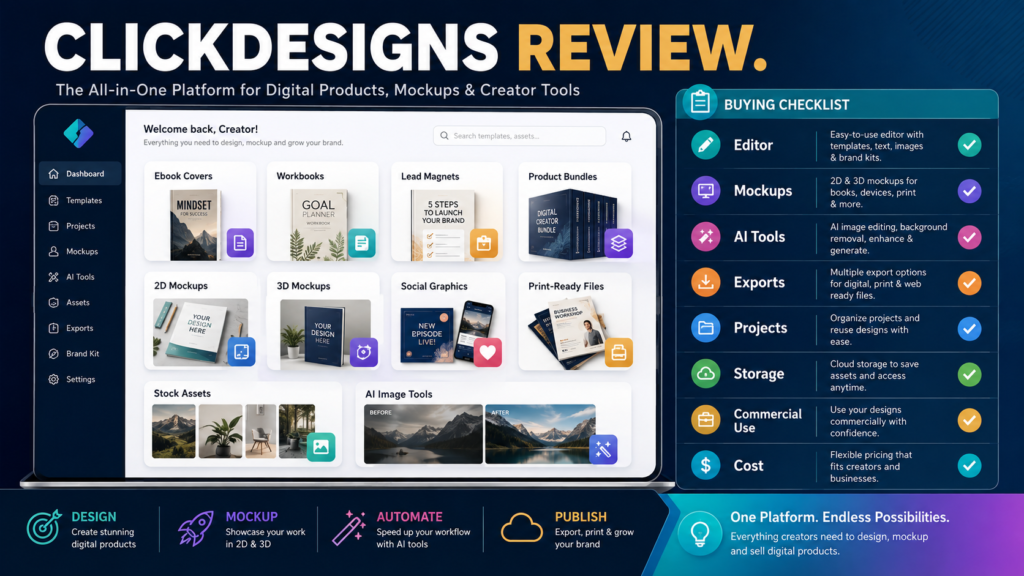
ClickDesigns may be worth considering for creators who regularly need ebook covers, lead-magnet graphics, digital-product mockups, product bundles, social-media graphics, and marketing visuals but do not want to build every design manually in advanced graphics software.
The current ClickDesigns platform combines a drag-and-drop editor with templates, stock assets, cover and mockup tools, AI-assisted image functions, print-ready exports, cloud storage, and commercial-use licensing on paid plans. The number of projects, stock assets, AI uses, 3D features, storage, and export options varies by plan.
That broad toolset can be useful for online-business owners creating many digital assets. It can also be unnecessary for someone who already has a design workflow that produces everything required.
Review Methodology: This review is based on current ClickDesigns pricing information, official feature descriptions, public FAQs, and available product information reviewed on August 6, 2026. No firsthand software testing, support interaction, performance measurements, or personal design results are claimed.
Key Takeaways
- ClickDesigns is a cloud-based graphics platform.
- Paid plans currently include unlimited design downloads.
- Plans differ in project limits, AI-tool usage, stock assets, storage, 3D tools, and advanced publishing functions.
- Commercial-use rights are listed for paid plans.
- A free option currently allows users to explore the platform before upgrading to download.
- The platform may be particularly relevant to digital-product sellers.
- Buyers should compare features against tools they already own before subscribing.
What Is ClickDesigns?
ClickDesigns is an online design platform positioned around marketing graphics, product packaging, covers, mockups, social content, print materials, and related visual assets.
The current pricing page describes:
- Drag-and-drop editing.
- Design templates.
- Ebook and product-cover templates.
- Mockups.
- Bundle creators.
- AI tools.
- Stock assets.
- Print-ready exports.
- Cloud storage.
- Social-content tools on higher plans.
- Commercial-use rights.
A digital-product creator might use it to create:
- Ebook covers.
- Lead-magnet covers.
- Workbook covers.
- Course images.
- Product mockups.
- Bonus graphics.
- Bundle images.
- Social-media posts.
- Sales-page graphics.
- Printable materials.
Who May Benefit From ClickDesigns?
ClickDesigns may suit:
- Ebook authors.
- Course creators.
- Affiliate marketers.
- PLR publishers.
- Lead-magnet creators.
- Bloggers.
- Coaches.
- Small-business owners.
- Digital-product sellers.
- Creators who need recurring promotional graphics.
It may be especially relevant to someone who repeatedly creates several visual assets for every product.
For example, one ebook launch might require:
- Ebook cover.
- Flat cover.
- 3D book mockup.
- Tablet mockup.
- Workbook image.
- Bundle image.
- Facebook graphic.
- Website featured image.
- Sales-page image.
A platform that keeps those assets in one project may reduce switching between tools.
Who May Not Need It?
ClickDesigns may be unnecessary when:
- You create very few graphics.
- Canva or another design tool already covers your needs.
- You employ a professional designer.
- You only need simple blog images.
- You require advanced professional illustration tools.
- You require sophisticated photo retouching.
- You need complex vector design.
- You do not create digital products.
- You would be paying for overlapping software.
The question is not whether ClickDesigns has useful features.
The question is whether those features replace enough work or other subscriptions to justify the cost.
Drag-and-Drop Editor
ClickDesigns currently promotes an online drag-and-drop editor across its plans.
For a beginner, evaluate:
- How quickly you can create a project.
- Whether templates are easy to change.
- How text boxes behave.
- Image upload.
- Resizing.
- Layer positioning.
- Alignment.
- Export quality.
- Brand consistency.
- Mobile usability of the final image.
A design tool should make routine tasks simpler, not create a second job learning the editor.
Ebook and Digital-Product Covers
One of the platform’s clearest use cases is cover creation.
A creator might need:
- Ebook cover.
- Workbook cover.
- Checklist cover.
- Report cover.
- Course thumbnail.
- Lead-magnet image.
- Product-module image.
ClickDesigns’ current Standard plan includes flat and 2D cover and mockup templates, while Pro and Expert add broader 3D cover and mockup capabilities.
This distinction matters.
If you only need flat images for WordPress and PDF covers, the entry-level capabilities may be enough.
If you routinely create product-stack visuals, 3D mockups may have more value.
Product Bundle Mockups
Digital products are often sold as bundles.
For example:
Main Product: Ebook.
Bonus 1: Workbook.
Bonus 2: Checklist.
Bonus 3: Prompt pack.
Bonus 4: Video training.
Rather than showing four unrelated images, a bundle mockup can present them as one coordinated offer.
Current ClickDesigns plan information includes 2D bundle functionality on Standard and additional 3D bundle and set tools on higher plans.
The value depends on how many offers you create.
AI Tools
ClickDesigns currently lists more than 35 AI-assisted tools, with usage allowances differing by plan.
Examples shown on the pricing page include:
- Background removal.
- Generative fill.
- Blur background.
- Photo colorization.
- Background replacement.
- Face cutout.
- AI product photography.
- AI photo editing.
- Virtual try-on.
- Find-and-replace functions.
The current stated monthly allowances are:
- Standard: 100 AI uses.
- Pro: 500 AI uses.
- Expert: 1,000 AI uses.
The company also says AI credits reset monthly and do not roll over.
Before upgrading for AI tools, determine how often you would actually use them.
Stock Assets
Stock assets can reduce the need for separate image subscriptions.
The current pricing page describes:
- Standard: access to approximately 1 million stock assets.
- Pro: approximately 10 million.
- Expert: 10 million or more, depending on the feature description.
Review:
- Search quality.
- Image relevance.
- Licensing.
- Style consistency.
- Availability of useful business images.
- Diversity of subjects.
- Suitability for commercial products.
Large asset counts sound impressive, but relevance matters more than the number.
Export Formats
The current plan comparison lists export differences.
Standard includes common still-image and document formats, while higher plans add formats such as GIF, WebM, WebP, MP4, and PDF. All paid levels list print-ready export capabilities.
Check the exact format you need for:
- WordPress.
- YouTube.
- Social media.
- PDF products.
- Print.
- Video.
- Sales pages.
Do not choose a higher plan solely because it supports formats you will never use.
Print-Ready Designs
Creators selling printable worksheets or physical companion materials may care about:
- High resolution.
- Print dimensions.
- Color handling.
- PDF export.
- Margins.
- Bleed.
ClickDesigns currently lists print-ready CMYK/300 DPI export support across its paid plans.
Always test a sample with your intended print service before building a large product line.
Social Content Features
The current Pro and Expert plans list a social-content planner, poster, and scheduler.
This may benefit creators who want to design and organize promotional content inside the same environment.
Before using it as a scheduling replacement, verify:
- Supported networks.
- Publishing permissions.
- Scheduling limits.
- Account connections.
- Image dimensions.
- Video support.
- Current platform API restrictions.
Social-platform integrations can change.
Project Limits
Current plan information lists:
- Standard: 50 projects.
- Pro: 100 projects.
- Expert: unlimited projects.
A project can potentially contain multiple designs, so a 50-project limit may be sufficient for a smaller business.
Estimate realistically.
If you create one organized project per product and launch 20–30 products, Standard may still provide room.
Cloud Storage
The current pricing comparison lists:
- Standard: 10 GB.
- Pro: 100 GB.
- Expert: 1 TB.
This matters more when projects include:
- High-resolution images.
- Video.
- Numerous product mockups.
- Uploaded brand assets.
- Large media libraries.
Do not pay for storage you do not need.
Commercial Use
The current paid-plan comparison lists commercial-use licensing across Standard, Pro, and Expert.
That is important for:
- Ebook covers.
- Product images.
- Client-facing materials.
- Lead magnets.
- Sales-page graphics.
- Promotional content.
Commercial-use rights do not automatically give you ownership of third-party trademarks, copyrighted images, celebrity likenesses, or assets you uploaded without permission.
Review current licensing terms for your specific use.
Free Access
ClickDesigns currently states that a free plan is available without requiring a credit card.
According to its FAQ, users can explore templates, features, models, mockups, AI tools, and automation, then upgrade when ready to download finished work.
This is useful because you can test:
- Editor.
- Template quality.
- Mockups.
- Workflow.
- AI tools.
- Asset search.
before purchasing.
Verify what can be downloaded or exported on the free plan because restrictions may apply.
Current Pricing
As reviewed August 6, 2026, ClickDesigns displays promotional monthly prices of approximately:
- Standard: $20 per month.
- Pro: $30 per month.
- Expert: $49 per month.
The pricing page also displays discounted annual billing equivalents and crossed-out “normal” prices, so promotions may change.
Do not rely on this article for a future checkout amount.
Review the current pricing page immediately before subscribing.
Support
ClickDesigns currently states that support is available by email and says the support team aims to respond within one business day.
This review does not verify actual response times or support quality.
Before purchasing, investigate:
- Knowledge base.
- Tutorial videos.
- Email support.
- Community access.
- Refund terms.
- Cancellation procedure.
- Billing support.
Cancellation
The current FAQ says subscriptions renew automatically according to the selected plan and that users may cancel, downgrade, or upgrade through the account subscription area. Access continues for the remainder of the current billing cycle after cancellation.
Verify current terms before purchasing.
Meaningful Advantages
Strong digital-product focus
The combination of covers, mockups, and bundles is directly relevant to digital sellers.
Multiple design functions
A creator may create marketing graphics and product visuals in the same environment.
AI image tools
Background and editing tools can reduce the need for separate utilities.
Commercial-use licensing
Paid plans support business use subject to current terms.
Stock assets
Integrated assets may simplify production.
Free exploration
A beginner can examine the editor before upgrading.
Meaningful Limitations
Overlap with existing design tools
Users already paying for another platform may duplicate functionality.
Advanced features require higher plans
3D mockups, larger AI limits, additional storage, and other capabilities differ by tier.
AI credits reset
Unused monthly AI allocations currently do not roll over.
Template dependence
Using popular templates without significant customization may make designs look similar to other users’ work.
Design judgment is still required
Software does not automatically create a strong visual hierarchy, readable mobile typography, or appropriate branding.
A Realistic Digital-Product Scenario
Imagine a creator preparing a $27 ebook package.
The assets required are:
- Ebook cover.
- Workbook cover.
- Checklist cover.
- 3D product image.
- Bundle graphic.
- WordPress featured image.
- Facebook graphic.
- Sales-page visual.
A tool focused on covers and mockups may save time.
The creator should test:
- Create the ebook cover.
- Export it.
- Build a 3D mockup.
- Create the bundle.
- Resize the graphic.
- Download the files.
- Confirm commercial-use terms.
- Test image quality on WordPress.
If that workflow is easier than the current process, the platform has practical value.
Buying Checklist
- How many products do I create each year?
- Do I need 3D mockups?
- Do I need product bundles?
- Do I need AI editing tools?
- How many AI uses will I realistically consume?
- Which export formats are essential?
- Do I need print-ready files?
- Do I need social scheduling?
- How many projects do I need?
- How much storage do I need?
- Do I already pay for similar features elsewhere?
- Are commercial rights suitable?
- Have I tested the free version?
- What is the current checkout price?
- What is the cancellation process?
Affiliate Recommendation
Affiliate Disclosure: This article contains affiliate links. If you purchase through one of these links, I may earn a commission at no additional cost to you. Affiliate compensation does not determine the conclusions or recommendations presented in this article.
You can review the current ClickDesigns offer if you want to evaluate its ebook covers, product mockups, bundle graphics, AI tools, stock assets, and commercial-use design features.
Compare the current Standard, Pro, and Expert limits before selecting a plan.
Is ClickDesigns Worth Considering?
ClickDesigns appears most useful for creators who repeatedly need visual assets for digital products.
It may be worth considering if you:
- Publish ebooks.
- Build lead magnets.
- Sell courses.
- Create product bundles.
- Need regular mockups.
- Want AI image tools.
- Need commercial-use graphics.
It may be less compelling if:
- You create only occasional images.
- Another tool already handles every required design.
- You need advanced professional graphics software.
- You rarely use mockups.
- You would not use enough features to justify another subscription.
Final Verdict
ClickDesigns appears to offer a practical combination of graphic design and digital-product presentation tools. Its cover, mockup, bundle, AI, stock-asset, and export capabilities make it particularly relevant to ebook and digital-product marketers rather than people who need only occasional social graphics.
The main buying decision is not whether the platform can create attractive images. It is whether it meaningfully simplifies enough of your existing workflow to replace manual work or another subscription.
Conclusion
ClickDesigns may be worth considering for digital-product creators who need a steady supply of covers, mockups, bundles, lead-magnet graphics, and promotional assets.
The free option provides an opportunity to inspect the workflow before paying, while the paid tiers vary substantially in project limits, AI uses, 3D features, assets, storage, and exports.
Create one complete sample product graphic set in the free environment and compare that workflow with your existing design process before choosing a paid plan.