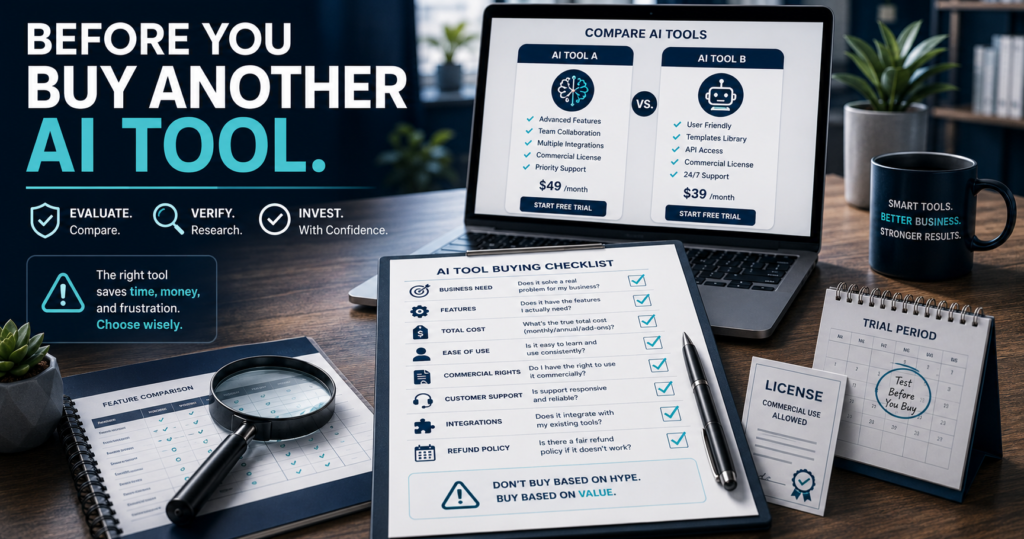
Artificial-intelligence software can make online-business tasks faster and easier.
A tool may promise to help you:
- Write content
- Produce videos
- Design graphics
- Build digital products
- Create email campaigns
- Research markets
- Automate repetitive work
- Develop websites
- Manage customers
The problem is no longer finding software.
The problem is deciding which software deserves your time and money.
New tools appear constantly, and each sales page seems to present its product as the missing piece of your business. The demonstration looks impressive. The feature list is long. The discount appears temporary.
Before long, you may own several products that perform similar tasks while still lacking a simple working process.
A better buying decision begins before you reach the checkout page.
It begins by identifying what your business actually needs.
TL;DR
Before buying another AI or online-business tool, confirm that:
- It solves a specific current problem.
- You will use it consistently.
- It does not unnecessarily duplicate something you already own.
- You understand the complete cost.
- You can evaluate it before making a long-term commitment.
- It fits your existing workflow.
- The commercial-use rights are clear.
- The support and refund terms are acceptable.
- Independent evidence supports the sales claims.
The best tool is not necessarily the most advanced one.
It is the tool that helps you complete useful work without adding unnecessary complexity.
Why Buying More Software Does Not Always Improve a Business
Software can increase capability, but it can also create complexity.
Every new tool may require:
- Account setup
- Training
- Prompt development
- Templates
- File organization
- Integrations
- Updates
- Subscription management
- Customer-support requests
- Changes to an existing workflow
The purchase price is only one part of the commitment.
A tool that costs very little but requires hours of setup, training, correction, and maintenance may be more expensive than it first appears.
That does not mean you should avoid buying software.
It means software should be purchased for a defined purpose.
Before clicking the order button, work through the following nine questions.
Question 1: What Exact Problem Will This Tool Solve?
Do not begin by studying the feature list.
Begin by defining the problem.
Weak reason:
This software looks powerful.
Better reason:
I need a faster way to turn approved scripts into captioned short videos without appearing on camera.
The second statement defines a specific business need.
Your answer should identify:
- The current task
- The difficulty you are experiencing
- The result you need
- The person responsible
- How frequently the task occurs
Complete this sentence:
I am considering this tool because I need to __________.
When that sentence is difficult to complete, the purchase may be based on curiosity rather than need.
Curiosity is not always a bad reason to explore software. It is usually a weak reason to purchase another long-term subscription.
Question 2: How Often Will I Actually Use It?
A useful tool should support recurring work.
Estimate how frequently you will use it:
- Daily
- Several times per week
- Weekly
- Monthly
- Occasionally
- Only for one project
Then compare that expected use with the price.
A tool used several times each week may justify a subscription more easily than one used twice per year.
Ask:
- Is this connected to a recurring business process?
- Do I already have content or projects ready for it?
- Will I use it after the initial excitement disappears?
- Does it save meaningful time?
- Does it improve the finished result?
Be realistic.
Do not base the decision on the business you hope to operate someday.
Base it on the work you are prepared to complete now.
Question 3: Does It Replace Something or Merely Duplicate It?
Many software collections become expensive because several products perform overlapping functions.
You may already own tools capable of:
- Writing articles
- Generating images
- Editing videos
- Creating voiceovers
- Building landing pages
- Delivering digital products
- Sending email
- Producing graphics
- Conducting research
Before buying, create a simple comparison.
| Needed capability | Current tool | New tool | Meaningful improvement? |
|---|---|---|---|
| Short-video creation | |||
| Image creation | |||
| Email automation | |||
| Product delivery | |||
| Content development |
The new tool should provide a meaningful improvement in at least one area.
Examples include:
- Better output quality
- Simpler workflow
- Faster production
- Lower total cost
- More appropriate commercial rights
- Stronger integration
- Easier customer delivery
- A capability your present tools genuinely lack
“Different” does not always mean “better.”
“More features” does not always mean “more useful.”
Question 4: What Is the Complete Cost?
The advertised price may not represent the complete cost of using the product.
Review:
- Initial purchase price
- Monthly or annual subscription
- Credit limits
- Usage limits
- Storage limits
- Export fees
- Upgrade requirements
- Additional templates
- Required integrations
- Transaction fees
- Training costs
- Commercial-license costs
- Future renewal price
A low entry price may lead to a higher long-term commitment.
A lifetime purchase may still include limits or optional upgrades.
A subscription may be economical when it replaces several other products.
The correct question is not:
Is this tool cheap?
Ask:
Is the total cost justified by the work it helps me complete?
Create a Simple Cost-per-Use Estimate
Suppose a tool costs $30 per month.
If you use it 20 times per month:
$30 divided by 20 uses equals $1.50 per use.
That may be reasonable when each use saves substantial time or produces a useful business asset.
If you use it twice:
$30 divided by 2 uses equals $15 per use.
That may still be worthwhile, but the decision should be deliberate.
Cost per use is not the only measurement.
It is a useful way to compare excitement with realistic usage.
Question 5: Can I Evaluate It Before Making a Long-Term Commitment?
A product demonstration shows what the seller wants you to see.
It may not show:
- The learning curve
- The limitations
- Slow processing
- Unsuccessful generations
- Export restrictions
- Credit consumption
- Missing integrations
- Support response times
- The amount of human editing required
Look for an appropriate way to evaluate the tool.
That may include:
- A free trial
- A limited plan
- A live demonstration
- An official tutorial
- A refund period
- A monthly option
- Independent walkthroughs
- Documentation
- Sample outputs
- User discussions
Do not test only the easiest demonstration.
Test the task you actually plan to complete.
For example, when evaluating a video-creation tool, use:
- Your normal script length
- Your preferred video format
- Your usual captions
- Your own branding
- Your required export quality
- Your realistic production schedule
The test should resemble your real workflow.
Question 6: Does It Fit the Tools and Workflow I Already Use?
A powerful product can still become a poor purchase when it does not fit your existing system.
Consider where the new tool will receive its inputs and where the finished work will go.
Example workflow:
- Develop the idea.
- Write and approve the script.
- Generate the video.
- Review captions.
- Export the file.
- Publish on Facebook and LinkedIn.
- Save the source files.
- Record performance.
The video software must fit somewhere inside that workflow.
Ask:
- Can I import the files I already use?
- Can I export the required format?
- Is the finished file easy to edit?
- Can I use my own branding?
- Does it connect with my other platforms?
- Can I download and preserve my work?
- Will I still have access if I cancel?
- Does it simplify or complicate the process?
The purpose of software is to support completion.
A tool that creates more disconnected steps may not improve the business.
Question 7: Are the Usage and Commercial Rights Clear?
This question is especially important for:
- AI-generated images
- AI voices
- Video content
- Templates
- Private-label-rights products
- Stock media
- Music
- Software accounts
- Client work
- Reseller programs
- Agency licenses
Do not assume that paying for software automatically gives you every possible right.
Review the current terms for:
- Personal use
- Commercial use
- Client use
- Resale rights
- Agency rights
- White-label rights
- Content ownership
- Voice rights
- Image rights
- Template restrictions
- Account sharing
- Number of users
- Number of customers
- Required attribution
Look for the exact language.
Do not rely only on:
- A sales-page headline
- A bonus description
- A social-media comment
- An unofficial review
- What another buyer believes
When the rights matter to your business model, save a copy of the applicable license or terms with your purchase records.
Terms can change.
Your documentation helps establish what you understood at the time of purchase.
Question 8: What Support, Training, and Refund Protection Are Included?
Software value depends partly on what happens when something goes wrong.
Review:
- Knowledge base
- Tutorial videos
- Onboarding
- Email support
- Live chat
- Community support
- Support hours
- Expected response time
- Update history
- Bug reporting
- Refund period
- Refund conditions
- Cancellation procedure
A product may be easy to use during the demonstration but difficult to troubleshoot independently.
Before purchasing, ask:
When I encounter a problem, what is my next step?
The answer should be clear.
Also read the refund policy before buying—not after discovering the product is unsuitable.
Pay particular attention to conditions such as:
- Refund requests must be made within a certain period.
- Usage above a specific level may affect eligibility.
- Refunds may apply only to the initial purchase.
- Add-ons may have different terms.
- Subscription renewals may be nonrefundable.
The purpose is not to expect failure.
It is to understand the agreement.
Question 9: What Evidence Supports the Product’s Claims?
A polished sales page is marketing material.
It is not independent proof that the software will produce the same result for every buyer.
Separate the available information into three categories.
Verified information
Examples:
- Features listed in current official documentation
- Published prices
- Written license terms
- Demonstrated export formats
- Confirmed integrations
- Documented usage limits
Personal or user experience
Examples:
- A reviewer’s documented use
- Actual screenshots
- A real workflow demonstration
- Specific strengths and weaknesses
- Customer feedback
Promotional claims
Examples:
- “Revolutionary”
- “Effortless”
- “Unlimited”
- “Game-changing”
- “The last tool you will ever need”
- “Create a full business in minutes”
- “Guaranteed to increase sales”
Promotional language is not automatically false.
It should not be treated as evidence without supporting information.
Ask:
- What was demonstrated?
- What remains unproven?
- Is the information current?
- Does the reviewer have firsthand experience?
- Is an affiliate relationship disclosed?
- Are disadvantages discussed?
- Is the review based mainly on the sales page?
The FTC advises that endorsements should be truthful and not misleading, that reviewers should not describe experiences they did not have, and that material connections should be disclosed.
A 15-Minute Software Evaluation
Use this quick process before a small or moderate software purchase.
Minute 1–3: Define the problem
Write:
- The task
- The desired result
- How often it occurs
- The current difficulty
Minute 4–6: Check what you already own
Identify existing tools with overlapping capabilities.
Minute 7–9: Review the complete cost
Check:
- Price
- Renewal
- Credits
- Limits
- Upgrades
- Commercial use
Minute 10–12: Review evidence
Examine:
- Official documentation
- Current demonstration
- Independent reviews
- User reports
Minute 13–15: Make the decision
Choose one:
- Buy now
- Test first
- Wait
- Use an existing tool
- Reject
This short review will not answer every question.
It can prevent many impulse purchases.
A Practical Example
Imagine that you are considering software that creates short videos from written scripts.
The sales page shows professional presenters, captions, transitions, and completed videos.
Before purchasing, work through the checklist.
The problem
You need to create regular faceless video posts for Facebook and LinkedIn.
Frequency
You plan to create five to ten videos per week.
Duplication
Your current editor can assemble videos, but it cannot automatically create the preferred presenter format.
Complete cost
The new tool requires a subscription and uses monthly generation credits.
Testing
A sample project confirms that a 550-character script can become a usable short video within your required production time.
Workflow fit
You can download the video, review the captions, and upload it to both platforms.
Commercial rights
The plan permits your intended business use.
Support
Tutorials and a clear support process are available.
Evidence
The tool completes the actual task—not merely a simplified demonstration.
That is a business-based reason to buy.
Now consider a different tool offering fifty AI features, most of which duplicate software you already own.
Even when it costs less, it may deliver less practical value.
Warning Signs to Notice Before Buying
Guaranteed income claims
Software can support business activity.
It cannot guarantee that customers will buy.
Artificial urgency
A countdown timer or limited-time message should not replace evaluation.
Vague commercial rights
“Commercial use included” should be supported by clear written terms.
Hidden limitations
Look for credits, word limits, export restrictions, watermarks, storage limits, and project caps.
Endless upgrades
Determine whether the main purchase solves the advertised problem or whether essential features require several upgrades.
No visible support process
A support email alone may not indicate how support actually operates, but there should be a clear method for requesting help.
Only positive reviews
A useful review should explain limitations, suitable users, and unsuitable users.
No current documentation
A product that cannot clearly explain how its major features work deserves additional caution.
The Difference Between a Good Tool and the Right Tool
A product may be well designed and still be wrong for your situation.
For example:
- A powerful automation platform may be excessive for a simple business.
- An advanced video editor may require more training than you want.
- An inexpensive tool may lack the commercial rights you need.
- An all-in-one platform may duplicate several products you already own.
- A specialized tool may solve one important problem exceptionally well.
A good review should not answer only:
Is this a good product?
It should also answer:
- Who is it for?
- Who is it not for?
- What problem does it solve?
- What must the buyer already have?
- What are its limitations?
- What does it cost over time?
- How difficult is it to use?
- Are there more suitable alternatives?
The correct decision depends on fit.
Create a Personal Tool-Purchase Rule
Use this rule before future purchases:
I will purchase a new tool only when it solves a current problem, supports a recurring workflow, offers a meaningful advantage over what I already own, and has a total cost and license I understand.
You can strengthen the rule by adding a waiting period.
For example:
Unless the purchase is required for an active project, I will wait 24 hours before buying.
The delay gives you time to:
- Review the terms
- Check your existing software
- Compare alternatives
- Read independent information
- Decide whether the need is genuine
Missing a temporary discount is usually less expensive than purchasing a product you never use.
Keep a Tool Inventory
Create a simple spreadsheet containing:
| Tool | Purpose | Cost | Renewal Date | Usage | Keep, Review, or Cancel |
|---|---|---|---|---|---|
Review it every three months.
For each tool, ask:
- Did I use it?
- What did it help me complete?
- Did it save time?
- Did it improve quality?
- Does another product duplicate it?
- Should I continue paying for it?
A tool inventory turns software management into a business decision rather than a collection habit.
How Reviews on This Website Should Help You
MichaelELeeReviews.com currently emphasizes practical strategies, real tools, and simple systems that readers can follow.
That means a useful product review should provide more than a list of features.
It should help answer:
- What does this product actually do?
- What problem is it intended to solve?
- Is it practical for a beginner?
- What does the buyer need before using it?
- What are the strengths?
- What are the limitations?
- What are the ongoing costs?
- Who should consider it?
- Who should probably avoid it?
The purpose of a review is not to make every product sound perfect.
The purpose is to help the reader make a more informed decision.
Final Buyer’s Checklist
Before buying an AI or online-business tool, confirm:
- ☐ I can name the specific problem it will solve.
- ☐ I know how often I will use it.
- ☐ I have compared it with tools I already own.
- ☐ I understand the complete cost.
- ☐ I have reviewed a realistic demonstration or test.
- ☐ It fits my existing workflow.
- ☐ The commercial-use rights are clear.
- ☐ I understand the support and refund terms.
- ☐ I have examined evidence beyond promotional claims.
- ☐ I know what success will look like after the purchase.
When several boxes remain unchecked, delay the purchase.
More information is needed.
Final Thoughts
AI and online-business software can provide tremendous value when it is connected to a real purpose.
The wrong tool creates another login, another learning curve, another expense, and another unfinished workflow.
The right tool helps you complete useful work more efficiently.
Before purchasing, slow the decision down long enough to ask:
- What problem does it solve?
- How often will I use it?
- What does it replace?
- What is the complete cost?
- Can I test it?
- Does it fit my workflow?
- Are the rights clear?
- Is the support acceptable?
- What evidence supports the claims?
A careful buying decision does not prevent progress.
It protects your money, time, attention, and business systems.
Reader Question
What is the most important factor when you buy software: price, ease of use, features, commercial rights, or customer support? Share your answer in the comments.
Keywords
how to choose AI tools, AI software buying guide, questions before buying AI software, best AI tools for online business, compare AI software, avoid wasting money on software, online business tools, AI tool review checklist, software subscription audit, digital marketing tools, AI tools for beginners, commercial use AI software