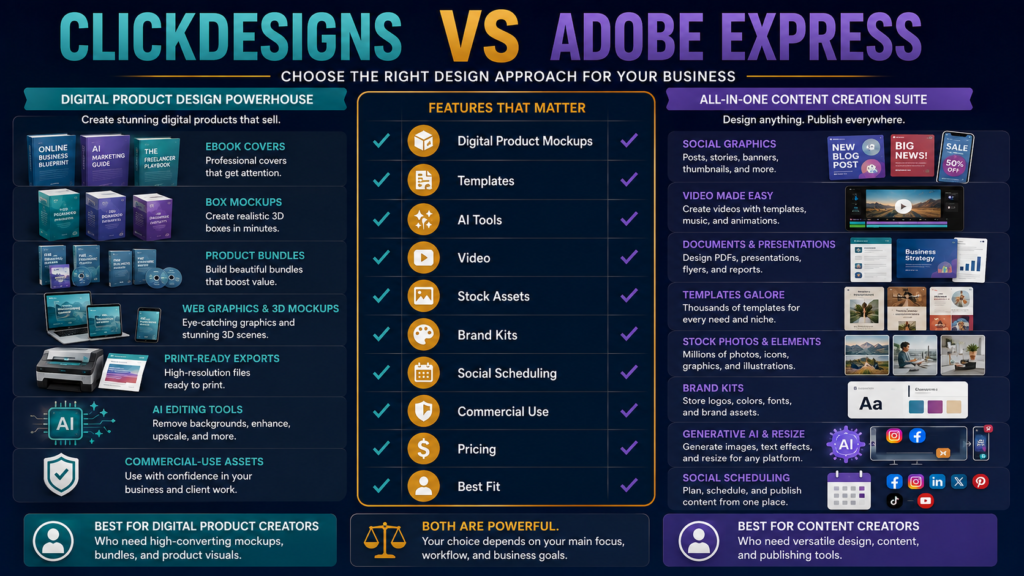
ClickDesigns and Adobe Express can both help non-designers create professional graphics.
But they are not identical products.
ClickDesigns is strongly oriented toward digital marketers and product creators who need:
- Ebook covers.
- Product mockups.
- Bundles.
- Boxshots.
- Web graphics.
- Social assets.
- AI-assisted editing.
- Commercial-use designs.
Its current pricing lineup includes Standard, Pro, and Expert plans with increasingly larger project limits, AI usage, stock libraries, 3D mockup features, scheduling, and storage.
Adobe Express is a broader creative platform covering:
- Social graphics.
- Video.
- Documents.
- Templates.
- Stock media.
- Brand tools.
- Generative AI.
- Content scheduling.
- Resizing.
- PDF-related workflows on some current packages.
The better choice depends on what you create repeatedly.
Review Methodology: This comparison is based on official ClickDesigns and Adobe pricing pages, product documentation, and publicly available information reviewed on August 20, 2026. No firsthand product testing or personal experience is claimed.
Key Takeaways
- ClickDesigns currently lists Standard at $20/month, Pro at $30/month, and Expert at $49/month under its displayed monthly promotional pricing.
- Its annual equivalents currently show $15/month Standard, $24/month Pro, and $42/month Expert when billed annually.
- ClickDesigns includes commercial-use rights on its paid plans and emphasizes product mockups, bundles, covers, AI editing, and digital-marketing graphics.
- Adobe Express Free currently includes 100,000+ templates, 1M+ stock assets, basic editing, 5GB storage, and limited social scheduling.
- Adobe’s official pricing pages currently show different individual-package presentations: one lists Adobe Express Premium at $9.99/month, while another newer surface lists an Acrobat Express package at $10.99/month that includes Express Premium and additional document/AI features. Verify the exact offer presented at checkout.
- Adobe Express Premium includes premium templates, 200M+ stock assets, 30,000+ fonts, more generative AI credits, one-click resizing, 100GB storage, and broader scheduling.
Affiliate Disclosure: This article contains affiliate links. If you purchase through one of these links, I may earn a commission at no additional cost to you. Affiliate compensation does not determine the conclusions or recommendations presented in this article.
What Is ClickDesigns?
ClickDesigns is a cloud-based design platform built with a strong emphasis on online marketing and digital products.
You can review ClickDesigns through Michael’s approved affiliate link.
Its current pricing page highlights:
- Drag-and-drop editing.
- Design templates.
- AI tools.
- Stock assets.
- Cover and mockup creation.
- Commercial-use licensing.
- Print-ready exports.
- Social scheduling on higher plans.
What Is Adobe Express?
Adobe Express is Adobe’s general-purpose, simplified content-creation platform.
It is designed for users who need to make:
- Social posts.
- Short videos.
- Flyers.
- Presentations.
- Documents.
- Promotional graphics.
- Brand content.
Its Premium feature set includes large Adobe Stock and font libraries plus Adobe Firefly-powered generative features.
The Core Difference
A simple way to think about the comparison:
ClickDesigns
Digital-product and marketing graphics specialist
Adobe Express
Broad general content-creation platform
That distinction matters more than asking which editor has more templates.
Digital-Product Mockups
This is one of ClickDesigns’ clearest strengths.
Its current paid plans emphasize:
- Flat covers.
- 2D product mockups.
- 3D covers.
- 3D mockups.
- Product bundles.
- Bundle sets.
- Custom product bundle creation.
For someone selling:
- Ebook.
- Course.
- Workbook.
- Software.
- Template pack.
- PLR package.
these mockup capabilities may be used constantly.
Adobe Express can certainly create promotional graphics, but its core product is not centered around marketer-style 3D digital-product packaging.
General Social Graphics
Adobe Express is extremely strong in broad general-purpose content.
Its current free and premium plans include large template libraries for:
- Social posts.
- Video.
- Marketing graphics.
- Documents.
- Other common design formats.
If most of your work is:
Instagram post → Reel → flyer → presentation → social ad
Adobe Express may fit naturally.
AI Tools
ClickDesigns currently lists more than 35 AI tools, with monthly usage varying by plan.
Examples include:
- Background removal.
- Generative fill.
- Background replacement.
- Image enhancement.
- AI product photography.
- Find-and-replace.
- Photo editing.
Current limits shown:
Standard
100 AI uses/month.
Pro
500 uses/month.
Expert
1,000 uses/month.
Adobe Express Premium currently includes 250 monthly generative credits on its listed individual Express plan.
The metering systems are different, so do not compare “500” against “250” as though they mean the same thing.
Templates
ClickDesigns emphasizes templates specifically for:
- Digital covers.
- Mockups.
- Web graphics.
- Packaging.
- Marketing assets.
Adobe Express provides a much broader template ecosystem across many consumer, business, social, and video categories.
If specialized product mockups are your daily work, the smaller specialized library may be more useful.
If you need many unrelated formats, Adobe’s breadth may win.
Stock Assets
ClickDesigns currently advertises:
Standard
1 million stock assets.
Pro
10 million.
Expert
10 million+.
Adobe Express Premium lists 200 million+ royalty-free Adobe Stock photos, videos, music tracks, and design elements.
This is a major breadth advantage for Adobe.
But quantity is not everything.
Ask whether the assets fit the work you actually make.
Fonts
Adobe Express Free currently includes access to more than 4,000 Adobe Fonts.
Premium lists access to more than 30,000 fonts.
ClickDesigns also supports fonts and font uploads at applicable tiers.
Designers with stronger typography requirements may appreciate Adobe’s broader font ecosystem.
Brand Kits
Both platforms can support branding.
ClickDesigns includes brand-kit functionality within its current feature table.
Adobe Express Premium includes brand-management tools for maintaining visual consistency.
For a solo creator, a basic kit containing:
- Colors.
- Logos.
- Fonts.
may be enough.
Social Scheduling
ClickDesigns Pro and Expert currently include a social content planner/poster/scheduler.
Adobe Express Free currently schedules to one account per social network, while Premium expands scheduling to three accounts per network.
This can reduce the need for another scheduling tool.
Export Formats
ClickDesigns Standard includes core image/document exports, while Pro and Expert expand exports to formats including:
- PNG.
- JPEG.
- GIF.
- WebM.
- WebP.
- MP4.
- PDF.
ClickDesigns also emphasizes print-ready CMYK/300 DPI export.
Adobe Express supports broad image, document, and video output suited to its general content-creation workflow.
Test the exact file format you need.
Commercial Use
ClickDesigns’ current paid-plan table explicitly lists commercial use.
Adobe Express provides commercially oriented creative assets and Firefly-generated features subject to Adobe’s current licensing and content terms.
For either platform, read current licensing when creating assets:
- For clients.
- For resale.
- For templates.
- For PLR.
- For merchandise.
Do not assume “commercial use” automatically means every possible resale model is allowed.
Pricing: ClickDesigns
Current monthly promotional presentation:
Standard
$20/month.
Pro
$30/month.
Expert
$49/month.
Annual pricing is currently shown as:
Standard
$15/month equivalent.
Pro
$24/month equivalent.
Expert
$42/month equivalent.
ClickDesigns also maintains other offer pages and legacy/standalone configurations, so verify the exact package you are purchasing.
Pricing: Adobe Express
Adobe’s official pricing pages currently show more than one presentation.
One lists:
Adobe Express Premium — $9.99/month.
Another current individual pricing surface lists:
Acrobat Express — $10.99/month, including Adobe Express Premium plus Acrobat-related functionality.
That makes it especially important to verify the checkout rather than relying on an old comparison.
Adobe Has a Free Plan
Adobe Express Free currently includes:
- 100,000+ templates.
- 1M+ stock assets.
- 4,000+ fonts.
- Basic photo/video/document editing.
- Social scheduling to one account per network.
- 5GB storage.
That makes it easy to test the editor before paying.
ClickDesigns Also Offers Free Exploration
ClickDesigns’ current pricing FAQ says users can start on its free plan without a credit card and explore the platform, with paid access required when they are ready to use the paid downloading features described by the offer.
Use the free environment to test:
- Editor.
- Templates.
- Product mockups.
- AI tools.
- Your own brand assets.
Existing ClickDesigns Coverage
MichaelELeeReviews has a verified ClickDesigns review for digital-product creators.
There is also a ClickDesigns vs. Canva comparison if Canva is also on your shortlist.
Who Should Consider ClickDesigns?
ClickDesigns may fit better when you regularly create:
- Ebook covers.
- Product boxes.
- Course mockups.
- Bundle graphics.
- Software mockups.
- Sales-page graphics.
- Product packaging.
- Digital-product promotional assets.
Its specialized templates can shorten repetitive production work.
Who Should Consider Adobe Express?
Adobe Express may fit better when you create a wider mix:
- Social media.
- Short videos.
- Presentations.
- Documents.
- Flyers.
- General promotional content.
- Brand assets.
Its large stock and font ecosystem is a major advantage.
Run One Real Design Test
Create the same product launch kit in both:
- Ebook cover.
- Product mockup.
- Social post.
- YouTube thumbnail.
- Promotional banner.
- Short video graphic.
Then score:
Template fit
Editing speed
Mockup quality
Brand consistency
Stock assets
Export options
AI usefulness
Total cost
Final Verdict
Choose ClickDesigns when digital-product packaging, covers, mockups, bundles, and direct-response marketing graphics make up a large percentage of your design work.
Choose Adobe Express when you need a broad everyday creative platform spanning social media, video, documents, stock assets, branding, and general marketing content.
ClickDesigns is the more specialized digital-product option.
Adobe Express is the broader general-purpose creative environment.
Conclusion
ClickDesigns vs. Adobe Express is not a simple question of which platform has more templates.
The better question is:
What do I create every week?
If your answer is:
covers, mockups, bundles, and digital-product graphics
ClickDesigns deserves close attention.
If your answer is:
social posts, video, documents, brand content, and a wide variety of marketing designs
Adobe Express may provide the broader toolkit.
Test your real workflow—not the demo page—and choose the platform that removes the most repetitive design work.