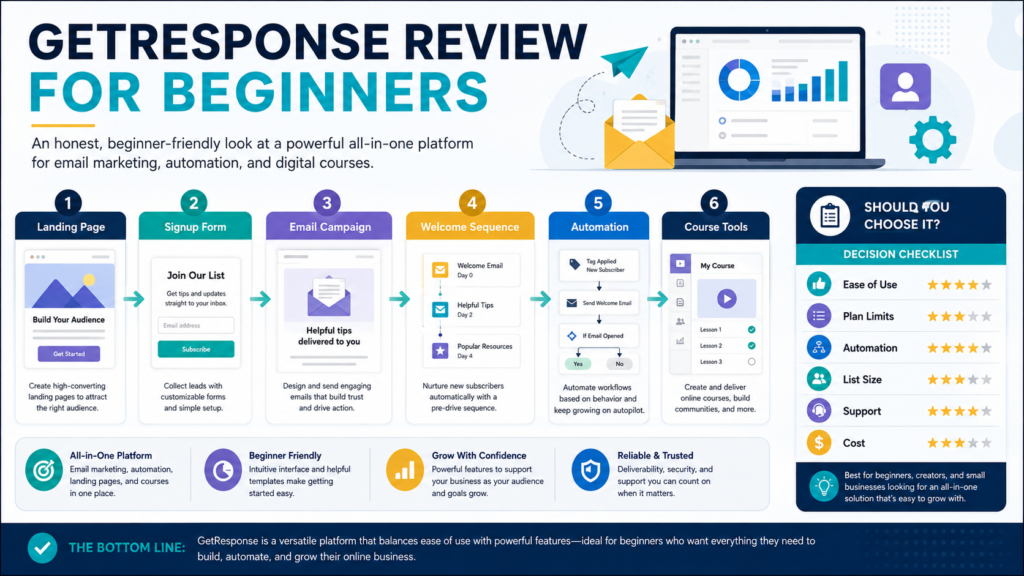
GetResponse is an email-marketing platform that combines newsletters, landing pages, signup forms, automated email sequences, marketing workflows, and additional creator or ecommerce tools.
It may be a practical choice for a beginner who wants to build an email list and prefers to keep several lead-generation functions inside one platform.
Its main limitation is that the broader capabilities can make plan selection and initial setup more complicated than a basic email-only service.
GetResponse is most valuable when you intend to use its connected workflow:
- Build a landing page or form.
- Collect subscribers.
- Deliver a welcome sequence.
- Send newsletters.
- Add automation when the business requires it.
- Track and improve the campaigns.
It may provide less value when you only need to send an occasional message to a small list.
Review Methodology: This review is based on GetResponse’s official pricing pages, help documentation, trial information, and publicly available product details reviewed on August 2, 2026. No firsthand product testing or personal experience is claimed.
Affiliate Disclosure: This article contains affiliate links. If you purchase through one of these links, I may earn a commission at no additional cost to you. Affiliate compensation does not determine the conclusions or recommendations presented in this article.
Quick Verdict
GetResponse may be worth considering when you need:
- Email newsletters
- Landing pages
- Signup forms and popups
- Automated welcome messages
- Marketing workflows
- Subscriber segmentation
- Ecommerce communication
- Course or creator features on appropriate plans
- Several connected marketing functions
It may not be the best fit when you:
- Need only a very basic email list
- Want the simplest possible free plan
- Do not plan to use landing pages or automation
- Already have several tools covering the same functions
- Require advanced features but have a limited budget
- Prefer a more specialized creator or ecommerce platform
What Is GetResponse?
GetResponse is positioned as an email and marketing-automation platform.
Its official pricing information currently organizes standard paid options into Starter, Marketer, and Creator plans, with Enterprise available through customized pricing. Available pricing also changes according to list size and billing period.
The platform’s tools may include:
- Email campaigns
- Landing pages
- Forms and popups
- Welcome sequences
- Automation workflows
- Segmentation
- Ecommerce features
- Course creation
- Premium newsletters
- Webinars or events on qualifying plans
- Reporting
The exact feature set depends on the plan.
You can explore GetResponse’s current email-marketing offer.
Starter Plan
At the time of this review, the Starter plan was listed at $19 per month for up to 1,000 contacts when billed monthly or $15.58 per month when billed annually.
The plan includes:
- Unlimited monthly email sends
- AI-assisted content tools
- Welcome email series
- One custom automation workflow
- Landing-page builder
- Signup forms and popups
- A custom domain benefit on an annual plan
Prices, discounts, and included features can change, so verify the checkout before subscribing.
Who the Starter Plan May Fit
The Starter plan may fit a beginner who needs:
- One lead magnet
- One welcome sequence
- Regular newsletters
- Landing pages
- Basic forms
- Limited automation
A beginner should not assume that Starter provides every automation, segmentation, or ecommerce function shown elsewhere on the website.
Marketer Plan
The Marketer plan is positioned for businesses needing broader multichannel and ecommerce marketing capabilities.
At the time of review, it was displayed at $59 per month when billed monthly or $48.38 per month when billed annually for the starting list size.
The plan may include more advanced access to:
- Marketing automation
- Segmentation
- Ecommerce workflows
- Promotional tools
- Contact scoring
- Behavior-based campaigns
GetResponse’s current documentation says access to workflow templates and automation capabilities differs by plan.
This plan may be unnecessary for a beginner who only needs one welcome sequence.
Creator Plan
The Creator plan is aimed at people selling knowledge, courses, or premium content.
GetResponse’s current trial information listed the Creator plan at an annual-billing equivalent of $56.58 per month and described features including:
- AI Course Creator
- Unlimited courses
- Up to 500 students
- Quizzes and certificates
- Marketing features from lower plans
These numbers and features should be verified because student limits, plan names, and prices may change.
A creator who already uses ProductDyno or another course platform should compare the cost of duplication before moving course delivery into GetResponse.
Free Account and Trial
GetResponse currently promotes a 14-day trial with premium feature access and no credit card required.
The company also maintains a free account option, although free-account limits apply to areas such as messages, landing pages, automation, chats, and webinars.
The trial gives a beginner an opportunity to test the complete workflow.
Do not use the trial only to explore the dashboard.
Create:
- One landing page
- One form
- One test list
- One welcome email
- One automation
- One newsletter
- One complete subscriber test
Landing Pages
The Starter plan currently includes a landing-page builder.
A landing page can be used for:
- Lead magnets
- Newsletter signup
- Webinar registration
- Product waiting lists
- Ebook announcements
- Course enrollment
A beginner should test:
- Mobile display
- Form connection
- Thank-you message
- Confirmation process
- Page speed
- Custom-domain setup
- Privacy language
- Tracking
A template may improve setup speed, but the offer and page copy still require careful planning.
Signup Forms and Popups
GetResponse supports forms and popups for collecting subscribers.
Possible placements include:
- Website sidebar
- Blog article
- Homepage
- Landing page
- Resource page
- Exit-intent popup
Avoid placing several competing forms on one page.
The visitor should understand:
- What is being offered
- Why an email address is requested
- What future communication will include
- How to unsubscribe
Email Campaigns
A beginner may use GetResponse to send:
- Welcome emails
- Newsletters
- Product announcements
- Educational sequences
- Customer follow-ups
- Event messages
The Starter plan’s unlimited monthly sends may be useful for businesses that communicate regularly, although contact limits and other plan conditions still apply.
Sending more messages does not automatically create better marketing.
The email should have:
- Clear subject
- Useful message
- One primary action
- Accurate links
- Responsible disclosure
- Unsubscribe option
Automation
Automation is one of GetResponse’s stronger differentiators.
A simple workflow may say:
When a person joins the AI Starter Kit list, send the delivery email and then send the first educational message two days later.
More advanced workflows may respond to:
- Link clicks
- Purchases
- Tags
- Page visits
- Abandoned carts
- Contact scores
- Completed sequences
The Starter plan currently includes one custom workflow, while broader automation access is associated with higher plans.
A beginner should build one useful automation before paying for unlimited workflows.
Ease of Use
GetResponse brings several tools together.
That can simplify integrations, but it can also create a larger dashboard.
A practical beginner test should include:
- Create a list.
- Build a landing page.
- Connect the form.
- Create a welcome email.
- Activate the sequence.
- Subscribe using another address.
- Confirm delivery.
- Send a newsletter.
- Review the report.
- Export a copy of the contacts.
Ease of use should be judged through the complete process rather than promotional demonstrations.
Support
The current trial and Starter information lists 24/7 support.
Before relying on that statement, confirm:
- Available channels
- Response times
- Plan differences
- Language availability
- Billing support
- Account-recovery process
Support quality is difficult to evaluate fully without firsthand experience.
Advantages
Connected Marketing Tools
Email, forms, landing pages, and automation work within the same platform.
Unlimited Sends on Paid Plans
The current paid-plan information promotes unlimited monthly email sends, subject to plan terms.
Growth Options
A business can move from a simple welcome sequence to more advanced automation.
Creator Features
The Creator plan may reduce the need for a separate course platform for some users.
Trial Without a Credit Card
The current 14-day trial provides a lower-risk testing opportunity.
Limitations
Pricing Increases With Needs
Higher contact counts and advanced features can raise the cost.
Starter Automation Is Limited
One workflow may not support a complex business.
Large Feature Set Requires Learning
Beginners may spend time exploring tools they do not need.
Plan Selection Can Be Confusing
Features differ among Starter, Marketer, Creator, and Enterprise.
Creator Tools May Duplicate Existing Platforms
Review the systems you already own.
Who Should Consider GetResponse?
GetResponse may fit:
- Bloggers
- Digital-product creators
- Affiliate marketers
- Small online businesses
- Course creators
- Businesses using lead magnets
- Users wanting landing pages and email together
- Marketers planning future automation
Who May Not Need It?
You may not need GetResponse when:
- Your current email platform works well.
- Your list is very small and another free option is sufficient.
- You do not need landing pages.
- You do not plan to use automation.
- You already pay for several overlapping tools.
- You want only a basic newsletter service.
Beginner Buying Checklist
- Estimate the initial contact count.
- List the emails you plan to send.
- Decide whether landing pages are needed.
- Define the first automation.
- Compare the current plans.
- Calculate the annual cost.
- Start the trial.
- Build one complete subscriber journey.
- Test support when a real question arises.
- Select the lowest plan that completes the workflow.
Final Verdict
GetResponse is a practical all-in-one email-marketing option for beginners who want landing pages, forms, newsletters, welcome sequences, and room for more advanced automation.
Its value becomes weaker when the user needs only basic email or already owns several tools with overlapping features.
The Starter plan may be sufficient for a simple lead-magnet and newsletter system. Marketer or Creator should be considered only when their additional capabilities solve a current need.
Conclusion
GetResponse can connect lead collection, email communication, landing pages, and automation inside one platform.
The best plan depends on your contact count, required workflows, creator needs, and the tools you already own.
Use the trial to build and test one complete subscriber journey before committing to a paid plan.